

Forum Replies Created
-
AuthorPosts
-
April 11, 2016 at 1:27 pm in reply to: [tribe_this_week] shortcode seems to be conflicting with my theme #1100951
George
ParticipantHey Justin,
Thanks for reaching out!
What you describe here makes it clear that the problem itself is arising from the Avada theme:
When I switch to the Twenty-Fourteen theme, the calendar displays.
So your best course action here is to reach out to the Avada support team—sounds like their JavaScript or CSS is preventing the display of the widget on your site.
I hope they can help that your site gets working again.
Sincerely,
GeorgeParticipantHey @Kelli,
Thanks for reaching out. The “FREE” button you mention sounds like it could be coming from your theme, unfortunately. I say “unfortunately” because if it is indeed coming from your theme, then there is little we can do here on our end of things. But to help me see this in action, can you link to a location on your site where the FREE button is visible? I’ll take a look and see what it is.
Next, you ask this:
Also, a few teachers only use donations as payments. How would I set that up?
If you are asking to set up donations, that’s unfortunately not something our plugins do. Our plugins are only providers of the basic Ticketing functionality; handling of payments and checkout processes is all taken care of by the eCommerce platform itself, i.e. WooCommerce in this case.
So, if you have an extension or something for WooCommerce that provides donation functionality, then if you are asking how to set that up in general your best bet is to go to the website and documentation for that specific extension….
If you are asking about how to setup the donation functionality of that extension on tickets specifically, so that folks can “pay what they want” for a ticket, then this feature/functionality is unfortunately not possible with our plugins at this time. 🙁
Thank you,
GeorgeParticipantHey @Kathy,
Thanks for reaching out. Most of your questions can fortunately be answered in our comprehensive Themer’s Guide, which can be found here → https://theeventscalendar.com/knowledgebase/themers-guide/
Check that out to learn about making templates that don’t get overridden on updates and such.
To find event details or any other file, the best thing to do here is simply to explore the plugin files directly to find the file you need. There are many files but you only need to look in the /src/views sub-directory.
The Events Calendar itself has a file used for generating event details that exists at src/views/modules/meta/details.php in the plugin files, for example—something like this file might be perfect for your needs.
Best of luck with your customizing!
GeorgeApril 11, 2016 at 9:52 am in reply to: How to get additional fields using Event Calendar api? #1100875ParticipantHey @DAVID,
You should be able to use the function tribe_get_custom_fields() to get the additional fields and their content for a post.
So, something like this:
$fields = tribe_get_custom_fields( get_the_ID() );foreach( $fields as $field ) {
// Your custom code....
}
We cannot help with custom coding much so to learn more about this function I would recommend reading the function’s code directly and tinkering a bit. You can find this function in this file inside Events Calendar Pro:
events-calendar-pro/src/functions/template-tags/general.php
Head to around line 157 and you’ll see the function defined there.
I hope that helps!
GeorgeApril 11, 2016 at 9:46 am in reply to: Additional Fields Add-on: "0" not getting saved as actual input #1100859ParticipantSorry to hear this, Zach!
I will investigate to see if this is indeed a bug in our code, which seems to be the case. The good news—relatively—is that bugs like this are usually rather quick to fix, so we’ll do that as soon as possible.
In the meantime, I’m wondering—would you be able to share a screenshot of your custom field’s configuration? I just mean the literal screen in your wp-admin where you have added/configured the Additional Field.
You can do so by uploading the screenshot to Imgur.com, Flickr.com, CloudUp.com, or any similar image-hosting site; then just share the links to those images here and I’ll take a look.
Thank you!
GeorgeParticipantHey @Birgit,
Thanks for reaching out.
We unfortunately cannot help with customizations or line-by-line assistance with locating code in our files—please see this page to learn more about the scope of support we can provide here → https://theeventscalendar.com/knowledgebase/what-support-is-provided-for-license-holders/
In regards to your questions, the function tribe_get_full_address() does not exist in /views/list/single-event.php. So you will have to use a different approach there.
You will notice a variable in this file called $venue_details—you can alter the address by modifying the $venue_details[‘address’] array element specifically.
Something similar to this might help—though you will need to tinker here.
Look for this:
// Setup an array of venue details for use later in the template

$venue_details = tribe_get_venue_details();
Then add code like the following right below it—literally the next line down:
ob_start();$_venueId = tribe_get_venue_id();
echo tribe_get_address( $_venueId );
echo '<br>' . tribe_get_city( $_venueId );$new_address = ob_get_clean();
$venue_details['address'] = $new_address;
You will likely need more tinkering from where, which you will have to take the reins on. If you find yourself not able to put together exactly what you want here, and aren’t able to find details like this from the code itself, then your best bet is to hire a professional developer since we cannot provide further assistance with your customizations.
We have a list of great developers here → http://m.tri.be/18k1 (and have no affiliation with any of these folks—they’re simply some well-respected names in the community that we’ve compiled to share in situations like this one).
Best of luck with your custom coding,
GeorgeApril 11, 2016 at 9:05 am in reply to: Event Organisers to create discount coupons/codes from front end? #1100829ParticipantHey @Tac,
Thanks for reaching out!
What you describe here is unfortunately not a feature of our plugins at this time. 🙁
Sorry to disappoint!
GeorgeParticipantHey Ben,
Sorry to hear about this! You say, “like others have reported”—if possible, can you share some of the links to the other threads you are referring to in this comment? I just want to check on those conversations and ensure that we’re on top of things.
1. As for your issues, do you only have this problem with the specific event you linked to here?
2. Your WordPress timezone is “Europe/London.” If you change your timezone to a numerical equivalent in your WordPress General Settings, does anything improve?
So, what I mean is that if the equivalent of “Europe/London” is GMT+1 right now, does anything change with your issues if you head into your WordPress admin to Settings → General and then change the timezone from “Europe/London” to just “UTC+1”?
Thanks!
GeorgeParticipantHey Stefan,
So sorry for the delayed reply here!
I’m happy to help with this.
1. Can you link to a specific event on your site, just so I can see the title live? (I’m having a hard time finding one on your site because I do not speak the language of the site—so sorry about this!)
2. Do you want JUST the title text itself to be removed, but leave the breadcrumbs in place? Or do you want the whole grey bar with that title AND the breadcrumbs to be removed?
Thank you,
GeorgeApril 8, 2016 at 10:09 am in reply to: Showing a List view on a page, as well as header text and a sidebar #1100147ParticipantHey Hugo,
Thanks for reaching out.
Creating a page with a sidebar in it is possible only if your theme has support for a sidebar. You can choose different page templates when making a page, so your theme might provide a page template with a sidebar. Page templates are listed when creating a page, as shown in this screenshot from the website WPBeginner.com:
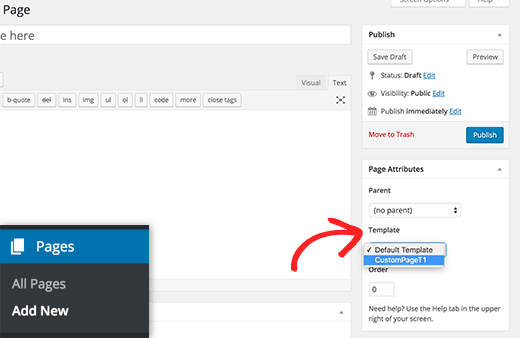
Don’t find a template there with a sidebar? Then unfortunately your theme does not provide one. This is not anything related to The Events Calendar itself; your theme simply doesn’t provide a template you want. So the best course of action in this case is to contact the theme developer for further assistance.
As for this:
And then below, I’d like to feature a List or Photo view of the events for that category.
That is unfortunately not possible at this time. 🙁
Cheers!
GeorgeParticipantThank you @Lindsay!
I wasn’t able to spot a specific culprit here, in the console or otherwise, so I would recommend pursuing support from your theme developer from here.
I’m sorry for the trouble!
Sincerely,
GeorgeParticipantThanks for this, @dswiese,
I’m really sorry about missing The Events Calendar in your list the first time! I don’t know how that happened—I searched for it to no avail, but it’s clearly there, so apologies for this mistake on my part.
1. Your system information shows that your events slug is /events. To help ensure no issues with this URL slug, can you head into the “Pages” section in your wp-admin and look for a page titled “Events”? If you find a page titled “Events”, or just using the /events slug period, delete this page or change its slug to something other than /events.
Do you find any such page? And does deleting or renaming it help at all?
2. If the answer to both questions there in #1 is “no”, then unfortunately—because I cannot recreate this issue yet—the only recommendation I can think of from here would be to run through the complete set of troubleshooting steps outlined here → https://theeventscalendar.com/knowledgebase/testing-for-conflicts/
Perform a test import after EACH STEP of that process—does the behavior change anywhere along the way?
I’m sorry that this test is the best one available right now, but I hope it yields some useful results as it tends to do that.
Thank you for your patience here!
Sincerely,
GeorgeParticipantThank you @Malcolm!
I don’t see this related to other threads yet, but am wondering about this:
Do you happen to have a “Page” in your site’s wp-admin that is titled “Events”? If so, then try deleting this page and see if that makes any impact here.
To be clear, I am not referring to another plugin related to events…I am talking about an actual Page in the section of the admin called “Pages”.
I just wanted to clarify this because I don’t think I was clear about it earlier—let me know what you find!
ParticipantHey Lindsay,
Thanks for reaching out. Can you share a link to where this issue is visible live on your site? I’ll take a look and see if I can identify the specific issue.
Other than this step though, there is unfortunately not much we can do for theme issues. 🙁 If changing themes resolves the problem, then your current theme is the source of the code, and so the best course of action is to contact the theme developer support team for further assistance.
Thank you,
GeorgeParticipantNice!
If you need to write more custom CSS on your site, definitely check out a [free!] tool like Firebug if you use FireFox, or the Developer Tools for either Safari or Chrome. They have “Inspector” tools that let you zoom right over the element whose styles you want to modify.
Best of luck with your site,
George -
AuthorPosts