

Forum Replies Created
-
AuthorPosts
-
George
ParticipantHey Charles,
Thanks for reaching out!
Each question is unfortunately a customization question. We are not able to help with customizations; check out this page to learn more → https://theeventscalendar.com/knowledgebase/what-support-is-provided-for-license-holders/
That being said, while the first two changes (for the “Previous” and “next” buttons) would require template modifications, you should be able to change the “Events for week…” title text by using a filter called tribe_events_title.
Something like this:
add_filter( 'tribe_events_title', 'tribe_modify_events_title' );function tribe_modify_events_title( $title ) {
$title = 'Something other than the default.';return $title;
}
You can see the filter in action to learn more—look for the function that is also called tribe_events_title(), which is located in this file in The Events Calendar plugin files:
the-events-calendar/src/functions/template-tags/loop.php
To learn about making the other sorts of template modifications, you can check out our themer’s guide here → https://theeventscalendar.com/knowledgebase/themers-guide/. If you still aren’t sure how to piece together the customizations you want to make, you might find it helpful to hire a professional developer to write the code for you. We have a list of great developers here → http://m.tri.be/18k1 (and have no affiliation with any of these folks—they’re simply some well-respected names in the community that we’ve compiled to share in situations like this one).
Cheers!
GeorgeParticipantHey @Janita,
Thanks for reaching out!
What you wrote here is interesting and could be a big part of the problem:
when we choose the page to use as events page
The /events feed is not an actual “page” and cannot be used as a “page”. So it probably cannot even be used for that Divi builder option you are describing.
This might be possible:
we are wondering if there is a way to edit the event calendar template used, to include both original page content and the calendar.
Unfortunately, though, it would require customizing templates and is a fairly involved customization that you would have to make. For assistance with that, I would recommend reaching out to the Divi support team for assistance in customizing the Divi templates to accommodate this.
Thanks,
GeorgeParticipantHey Markus,
A “personal” license would be fine here, but I just wanted to be clear that we unfortunately do not yet fully support any multilingual plugins, like WPML and such for example.
We don’t have coupons at this time—but let me know what you think about the fact above and if the lack of support for multilingual plugins alone is a deal-breaker.
Thank you!
GeorgeParticipantHey Jessica!
Is there currently a way to see all of the changes that have been made or a plug-in that can log changes?
There is unfortunately no way to do this with our plugins themselves—there is, however, a built-in feature of WordPress itself called “Post Revisions” that might work well for this. Events support post revisions. You can learn about this feature here → https://en.support.wordpress.com/posts/post-revisions/
I hope that helps! Other than this, there are unfortunately no plugins I know of that provide a true “Track Changes” experience.
Sincerely,
GeorgeApril 11, 2016 at 4:40 pm in reply to: Events Calendar / Events Calendar PRO is preventing media uploads #1101075ParticipantHey Matt,
Thanks for reaching out!
This is not an issue I have or can recreate.
1. Can you take a screenshot of what you see when you try to upload the media, and of the error you get? You can do so by uploading the screenshot to Imgur.com, Flickr.com, CloudUp.com, or any similar image-hosting site; then just share the links to those images here and I’ll take a look.
2. Also, when you mention “deactivating the plugins,” can you clarify what happens if you leave The Events Calendar active (just The Events Calendar, not any premium add-ons for it) and then deactivate ALL OTHER plugins on your site? Does the media uploader issue persist in this state?
Thank you!
GeorgeApril 11, 2016 at 4:36 pm in reply to: Events Calendar Pro working With Better Notification Emails #1101073ParticipantHey David,
Thanks for reaching out!
Such an action may indeed be possible. To be clear, though, we have no built-in support for that action or integration with that plugin at this time.
So, to get that plugin to fire its emails and such, your best bet is to reach out to those folks and see if they have any insight on wiring these things together.
I think a big help in that process will be an action that Community Events fires, called tribe_community_event_created. This action fires when a community event is submitted, and can be used to trigger other actions. It will take some custom coding though, unfortunately, so reaching out to those folks for further custom coding support is the best step I can recommend.
Thank you,
GeorgeParticipantHey Daniel!
This sort of issue is, unfortunately, mostly one that your theme has to handle. 🙁
I’m happy to take a quick look though! Can you share a link to an event on your site with a YouTube video that has this issue? I will take a look and try to at least identify the problem.
Thank you!
GeorgeApril 11, 2016 at 4:28 pm in reply to: Events Calendar Pro and the Enfold Theme by Kriesi.at #1101069ParticipantThanks for sharing Lance! I will share this with the team.
Cheers,
GeorgeParticipantHey @Kartik,
Thanks for reaching out!
I’m not quite certain which widget you are referring to. Can you check out our official list of widgets here and let me know which one you are not able to see on your site? → https://theeventscalendar.com/knowledgebase/events-calendar-widgets/
If you are looking for some widget that is not on that page, then it does not exist. 🙁
—
Next, can you also share your system information with us here? This page shows how to share that information → https://theeventscalendar.com/knowledgebase/sharing-sys-info/
Thank you!
GeorgeParticipantHey Eve,
Thanks for reaching out!
If you are just trying to get rid of the descriptions/excerpts on Photo View, then unfortunately there is no option that you can use to do that. 🙁 A Themer’s Guide-level customization is indeed required.
There is also an alternative approach that might be simpler—to test this, try adding CSS like the following to the bottom of your theme’s style.css file:
#tribe-events .tribe-events-list-photo-description {

    display: none !important;

}
Cheers!
GeorgeParticipantThank you! One last question—just to be absolutely clear, do you not have the “Stock” field at all? Here is a screenshot of that field for reference:
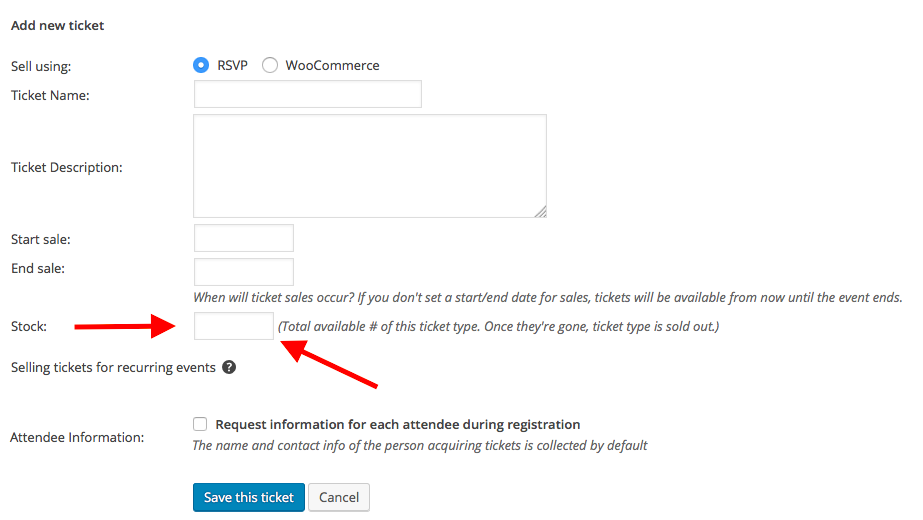
Or, do you have this field, but it just fails to work no matter what you try?
Thank you for your patience here! I just want to make sure I know the details of your issues to 100% accuracy because we’re working on a few different stock-related bugs; I want to be sure if this bug is similar to those or is a separate bug.
Sincerely,
GeorgeParticipantThis reply is private.
ParticipantHey @Kadi,
Yes. You can link to http://example.com/events/community/list, and if the user is logged in, then that will lead to the list. If they are not logged it, it will just be the submission form.
Cheers!
GeorgeApril 11, 2016 at 4:01 pm in reply to: [tribe_this_week] shortcode seems to be conflicting with my theme #1101058ParticipantHey Justin,
Sorry to hear this! So, to be clear, if you activate the Twenty Fourteen theme on your site, or Twenty Sixteen or another default theme, do the issues arise regardless?
If that’s the case, can you leave that default theme active on your site temporarily so I can take a look at the calendar views in that theme?
Thank you!
GeorgeApril 11, 2016 at 3:58 pm in reply to: Additional Fields Add-on: "0" not getting saved as actual input #1101057ParticipantThanks for this! I’ve confirmed the bug and made a bug ticket; we’ll hopefully be able to resolve this quickly. Stay tuned for the upcoming releases!
Thank you,
George -
AuthorPosts