
Home › Forums › Calendar Products › Community Events › Quantity/Stock Management Required
- This topic has 6 replies, 3 voices, and was last updated 10 years, 5 months ago by
Support Droid.
-
AuthorPosts
-
April 11, 2016 at 2:30 pm #1100999
Anthony
ParticipantI found a related thread here: https://theeventscalendar.com/support/forums/topic/inventory-required-for-some-tickets/, however, I’ve updated to the latest version and I’m still seeing that if I don’t have a quantity for my events, it won’t allow more than 0 to be added.
April 11, 2016 at 2:59 pm #1101005George
ParticipantHey Anthony,
Thanks for reaching out. I’m happy to investigate this with you.
1. Can you share your site’s System Information? (https://theeventscalendar.com/knowledgebase/sharing-sys-info/)
2. Can you clarify this sentence a bit? “if I don’t have a quantity for my events, it won’t allow more than 0 to be added.”
It sounds like your issue is just essentially that you cannot specify a quantity for tickets at all. Is this correct?
Thank you!
GeorgeApril 11, 2016 at 3:18 pm #1101015ParticipantThank you for your response:
1) HOME URL
http://cadssc.goliathcreative.com
SITE URL
http://cadssc.goliathcreative.com/wordpress
INSTALL KEYS
–
WORDPRESS VERSION
4.4.2
PHP VERSION
5.3.24
PLUGINS
Black Studio TinyMCE Widget version 2.2.8 by Black Studio(http://www.blackstudio.it)
Contact Form 7 version 4.3.1 by Takayuki Miyoshi(http://ideasilo.wordpress.com/)
Enable Media Replace version 3.0.4 by Måns Jonasson(http://www.mansjonasson.se)
Event Tickets Plus version 4.1 by Modern Tribe, Inc.(http://m.tri.be/28)
Event Tickets version 4.1 by Modern Tribe, Inc.(http://m.tri.be/28)
FB Photo Sync version 0.5.7 by Mike Auteri(http://www.mikeauteri.com/)
Import Users from CSV version 1.0.0 by Ulrich Sossou(http://ulrichsossou.com/)
Paid Memberships Pro version 1.8.7.3 by Stranger Studios(http://www.strangerstudios.com)
PMPro Customizations version .1 by Goliath Creative(http://www.strangerstudios.com)
Paid Memberships Pro – Import Users from CSV Add On version .3.2 by Stranger Studios(http://www.strangerstudios.com)
Paid Memberships Pro – Register Helper Add On version 1.2 by Stranger Studios(http://www.strangerstudios.com)
Paid Memberships Pro – WordPress Social Login Add On version .1 by Stranger Studios(http://www.strangerstudios.com)
Paid Memberships Pro – WooCommerce Add On version 1.2.10 by Stranger Studios(http://www.strangerstudios.com)
WPML Multilingual CMS version 3.3.6 by OnTheGoSystems(http://www.onthegosystems.com/)
Srizon Facebook Album Pro version 3.1.2 by Afzal(http://www.srizon.com/contact)
The Events Calendar version 4.1.1.1 by Modern Tribe, Inc.(http://m.tri.be/1x)
Widget Importer & Exporter version 1.2.2 by Steven Gliebe(http://stevengliebe.com)
WooCommerce Stripe Gateway version 2.6.10 by WooThemes(http://woothemes.com)
WooCommerce version 2.5.2 by WooThemes(http://woothemes.com)
WordPress Importer version 0.6.1 by wordpressdotorg(http://wordpress.org/)
WordPress Social Login version 2.3.0 by Miled(https://github.com/miled)
NETWORK PLUGINS
–
MU PLUGINS
–
THEME
Benevolence Child Theme
MULTISITE
–
SETTINGS
Array
4.1.1.1
hidden
Array
4.1.1.1
4.0.5
2016-02-01 00:00:00
2016-12-04 22:00:00
tribe
default
Array
month
3
F j, Y
F j
F Y
@
–
0
10
1
event
00:00
$
1
10
event
events
Array
Array
WORDPRESS TIMEZONE
–
SERVER TIMEZONE
UTC
COMMON LIBRARY DIR
/home/content/31/5002131/html/cadssc/wordpress/wp-content/plugins/event-tickets/common/src/Tribe
COMMON LIBRARY VERSION
4.12) That’s correct.
Thanks,
JonApril 11, 2016 at 4:14 pm #1101061ParticipantThank you! One last question—just to be absolutely clear, do you not have the “Stock” field at all? Here is a screenshot of that field for reference:
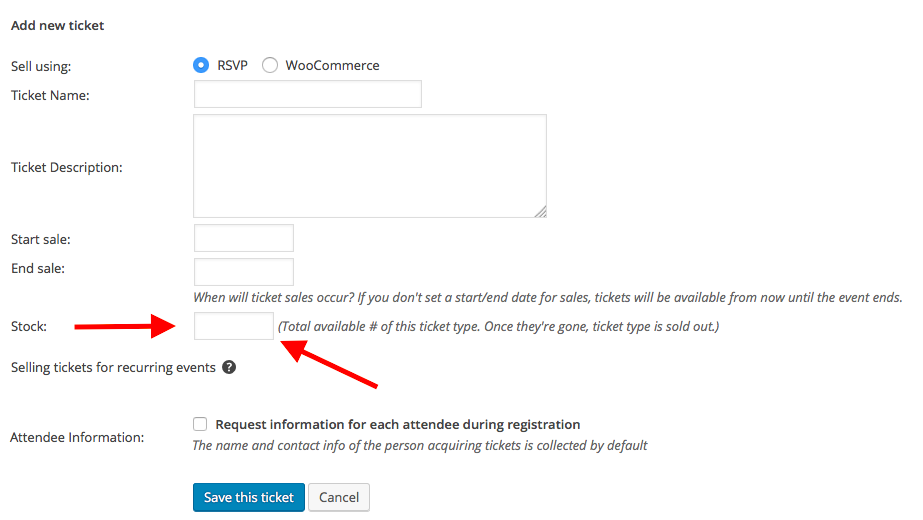
Or, do you have this field, but it just fails to work no matter what you try?
Thank you for your patience here! I just want to make sure I know the details of your issues to 100% accuracy because we’re working on a few different stock-related bugs; I want to be sure if this bug is similar to those or is a separate bug.
Sincerely,
GeorgeApril 11, 2016 at 4:22 pm #1101064ParticipantThe stock field is there. My issue is that it doesn’t work if the stock field is emptied. I’ve also tried going directly to the WooCommerce product and unchecking “manage inventory” to no avail.
April 11, 2016 at 5:34 pm #1101104ParticipantThank you, Anthony.
I do not have any of these issues when I try to recreate them, so I’m wondering if there’s perhaps a theme or plugin conflict on your site.
First, we just published a maintenance release this morning so I would recommend first getting up-to-date with that. The version is now 4.1.2 for these plugins:
• The Events Calendar
• Event Tickets
• Event Tickets Plus1. Once those are all at version 4.1.2, do your issues persist?
If that doesn’t help, then I would recommend testing for a theme or plugin conflict. To do this, deactivate all plugins on your site except for ONLY these four specific plugins:
• The Events Calendar
• Event Tickets
• Event Tickets Plus
• WooCommerceWhen your site is in this state, make a new test event with tickets.
2. For these tickets, when you add a quantity to them does it work?
Let me know what you find!
Thank you,
GeorgeApril 26, 2016 at 9:35 am #1107203KeymasterThis topic has not been active for quite some time and will now be closed.
If you still need assistance please simply open a new topic (linking to this one if necessary)
and one of the team will be only too happy to help. -
AuthorPosts
- The topic ‘Quantity/Stock Management Required’ is closed to new replies.