

Forum Replies Created
-
AuthorPosts
-
May 9, 2016 at 3:58 am in reply to: Event Tickets Plus & WooCommerce – Move attendee meta fieldset to checkout #1112165
George
ParticipantHey Richard,
Thanks for reaching out!
Unfortunately, the attendee meta feature is a complicated one, and moving it to any location other than where it shows up “out-of-the-box” would require extensive custom coding.
We cannot assist with custom coding projects, unfortunately, so if you want to make this happen but cannot make the code customizations yourself, your best course of action is to hire a professional developer to assist you. We have a list of great developers here, in case it’s helpful ? http://m.tri.be/18k1 (and we have no affiliation with any of these folks–they’re simply some well-respected names in the community that we’ve compiled).
Let me know if there is anything else I can try to help with!
Sincerely,
GeorgeParticipantHey Richard,
Thanks for reaching out!
I’m sorry to hear about these issues. I took at a look at your events page and notice a Cross-Origin Request error there. This is a fairly standard error that shows up in the JavaScript as follows:
Cross-Origin Request Blocked: The Same Origin Policy disallows reading the remote resource at http://prescottartstore.com/wp-admin/admin-ajax.php. (Reason: CORS header 'Access-Control-Allow-Origin' missing).This normally comes from a mixed set of protocols being used on the page, where some use https:// while others use http://.
To help resolve this, you may unfortunately have to work more closely with your webhost, but in the meantime, can you post your site’s complete, un-edited “System Information” to this thread? Here’s how to do that ? https://theeventscalendar.com/knowledgebase/sharing-sys-info/
That will help me look “under the hood” a bit and see if I can spot anything outright problematic in your site’s make-up.
Cheers,
GeorgeParticipantHey Virgil,
Thanks for reaching out! The features you are trying to implement are possible, but would unfortunately require many code customizations to implement 🙁
We cannot help with writing custom code, so to implement the features you describe, you would have to write that custom code or hire a professional developer to do it for you. We have a list of great developers here → http://m.tri.be/18k1 (and have no affiliation with any of these folks—they’re simply some well-respected names in the community that we’ve compiled to share in situations like this one).
Let me know if there is anything else I can try to help with!
Thanks,
GeorgeMay 9, 2016 at 3:42 am in reply to: events are being listed twice on calendar and date is off #1112158ParticipantHey @larafarwell,
Thanks for reaching out!
The first thing I noticed here is that you’re using version 3.9.2 of our Facebook Events plugin, which is quite outdated.
Please update to the most recent version, which at the time of my writing this is 4.1. You can get the most recent version for download here ? http://theeventscalendar.com/my-account/downloads
Once you’re up-to-date, do you have the same behavior?
Thank you,
GeorgeParticipantHey CDC,
Thanks for reaching out!
I was wondering if it is possible (I’m sure it would be..) to be able to sync events that are put up on our website to an external calendar application (e.g. iCal etc.)
Somewhat—this is “somewhat” possible because our plugin will indeed offer up an RSS feed of events; every time a new event is posted there, the feed is updated, just like an RSS feed for blog posts or something.
From here, though, the rest is up to the specific application in question that you want to use to “listen” to events. So, for any application, reach out to the makers of that application (or research online, etc.) and ask if the application can subscribe to an RSS feed.
The feed for your events can be found using this formula: domain name + events slug + /feed. So, if your site is example.com, and your events slug is the standard /events, then the feed is at example.com/events/feed
Was also wondering if it is possible to create sort of notifications to allow these ‘subscribers’ (to calendar categories – if that’s possible) to know when new events are added to the website.
Our plugins unfortunately do NOT offer per-category for feeds. 🙁 Aside from this, when it comes to whether a certain third-party app has notifications for when new content is available, my answer above is still relevant here—reach out to or research about that specific application to see if:
a) it can subscribe to RSS feeds (as elaborated upon above), and
b) if it can make notifications when new items on these RSS feeds are availableCheers!
GeorgeMay 9, 2016 at 3:31 am in reply to: I can't see the Settings area in the Event Calendar Plugin. #1112153ParticipantAwesome! Glad to hear it, @Maxime.
Please note one further wrinkle to all of this, which is that since the code from this thread is added in your theme’s functions.php file directly, every time you update the theme, the code will be lost. You will have to add the code back in.
So bookmark this thread for reference!
If they fix the CSS issue, though, then eventually an update might come that truly fixes this in the first place. 🙂 Until then, add this code back to functions.php any time the issue reappears on your site.
Best of luck with your site,
GeorgeMay 9, 2016 at 3:15 am in reply to: Event Tickets Plus & WooCommerce – Only allow a ticket to be purchased once ever #1112151ParticipantHey Richard,
Thanks for reaching out!
While we unfortunately cannot assist with plugins we don’t make or with writing/modifying custom code, if you are only trying to sell one single ticket for an event, why not just set the “Quantity” available of the ticket to 1?
This should work well and will only allow 1 ticket to be sold. Here is a screenshot of setting the ticket stock to 1, for reference:
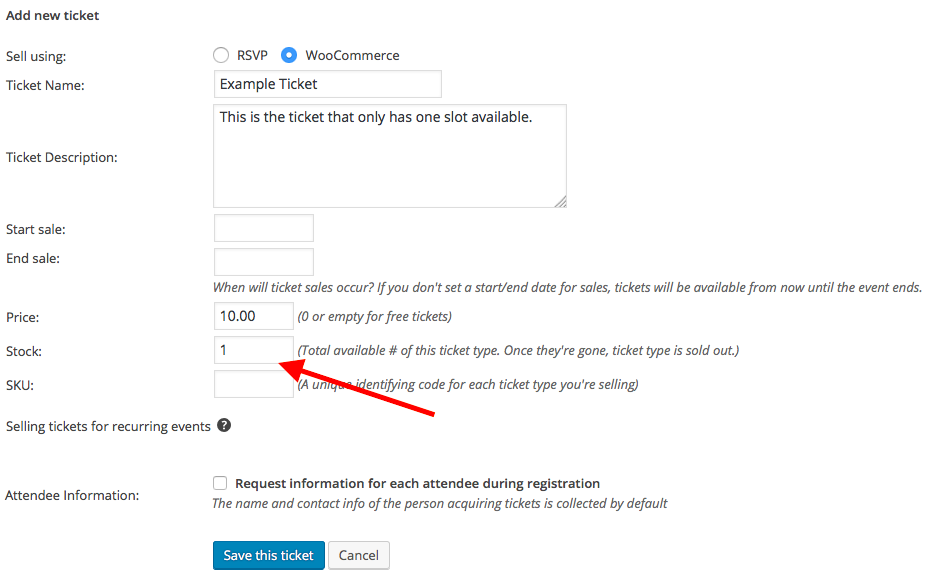
Cheers,
GeorgeParticipantHey Pau,
Thanks for reaching out!
What you describe is unfortunately not provided by our plugins out-of-the-box, and is not possible with any out-of-the-box options. So it is technically possible, but only with extensive custom coding.
We cannot help with custom coding, so to implement the features you describe, you would have to write that custom code or hire a professional developer to do it for you. We have a list of great developers here → http://m.tri.be/18k1 (and have no affiliation with any of these folks—they’re simply some well-respected names in the community that we’ve compiled to share in situations like this one).
I hope this information helps!
Best of luck with your customizing,
GeorgeParticipantHey Ryan,
Really sorry to hear about this issue—you are right that a few folks over the years have had similar instances of this happening.
It’s unfortunately a tricky issue that is notoriously hard, if not thus far impossible, for us to reproduce.
Your description of things seems to imply that even you, yourself, cannot reliably reproduce this problem. Is that true? Or are you able to reproduce this issue with other orders or tickets?
Thank you!
GeorgeParticipantHey Christina,
Thanks for reaching out!
To add a link—or other content—before the events content, you have two main options. The first option is to head into the plugin settings and use an option there that facilitates this. The option is located at Events → Settings → Display in your wp-admin, an is called “Add HTML before event content.” Here is a screenshot for reference:
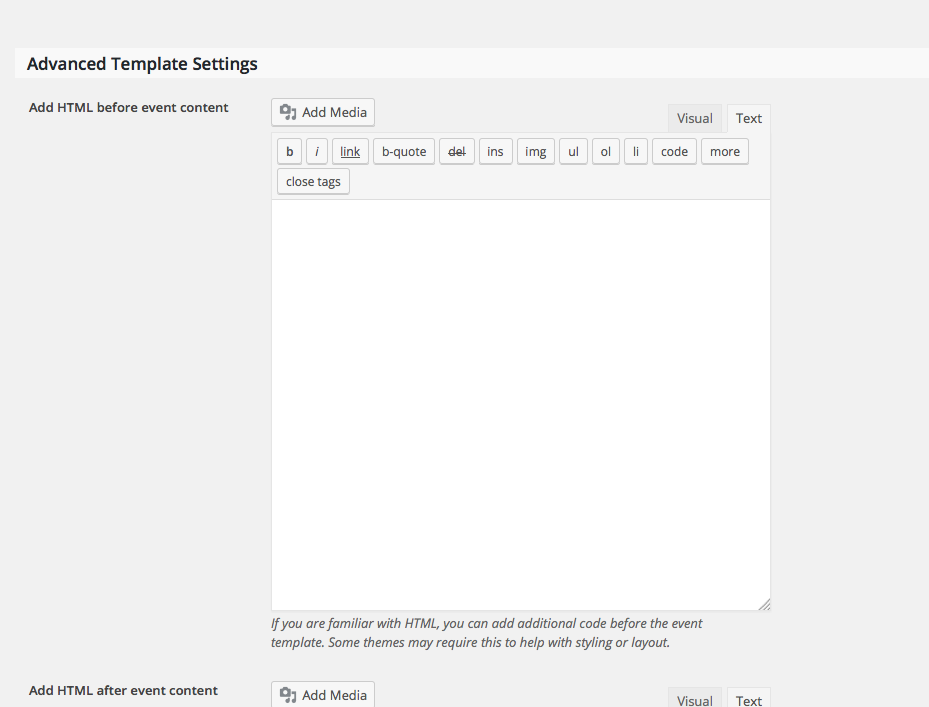
The only other method is to write custom code that adds content before the views. You can hook into the action tribe_events_before_template and then echo out basically any content you would like.
I hope this information helps!
GeorgeParticipantHey Abraao,
Thanks for reaching out!
This is unfortunately not provided by any of our plugins at this time:
Does Event Tickets Plus has a way to show a calendar with future events from where the visitor can click-through and buy a ticket to any given event (through woocommerce)?
Tickets can currently only be bought from the single-event views, not from something like the list view or month view.
Sorry to disappoint!
Cheers,
GeorgeMay 9, 2016 at 2:52 am in reply to: How to Move Filter Bar and Search Bar below all Calendar views? #1112139ParticipantHey @Phoebe,
Thanks for reaching out!
It is unfortunately a bit of an involved process to move the filter bar/calendar search bar below the events—but it is possible.
The process requires using custom The Events Calendar and Events Calendar Pro templates. If you’re not familiar with making custom templates, then the first step here is to familiarize yourself with this system. You can do that by reading this guide on the subject here ? https://theeventscalendar.com/knowledgebase/themers-guide/
Using the methods described in that guide, make custom templates for all of the main calendar views. The files for the “Core” views—Month, List, and Day Views—exist in the core plugin The Events Calendar. The files for the “Pro” views—Photo, Week, Map—exist in the Pro plugin, Events Calendar Pro.
In all of the views, the tribe bar is echoed with code like this:
// Tribe Bar

tribe_get_template_part( 'modules/bar' );
Simply move this below the code that renders the main view content and you’re good to go!
As an example:
• Here is the existing/default version of the “Month” view file, located in The Events Calendar at /src/views/month.php ? https://git.io/vreIz
• Now here is an example of a modified version of that same file, with the bar moved below the view content ? https://git.io/vreI1You will have to take the reins from here, as we cannot help with code customizations, but I hope the resources I have shared and the example files help you get started.
Cheers!
GeorgeParticipantHey Sean,
Thanks for reaching out!
Our plugins do provide much of the functionality necessary for what you describe, but our plugins are not optimized for “bookings” and so there are some key details that are not supported. This is the most pronounced of such details that are not supported:
They can only book 4 parties per day but can be a combination of the packages above with two of the types only bookable at 4pm to 6pm.
☝️ There’s not really any way to pull this off with our plugins out-of-the-box. You could concoct some custom solution here, but only by combining our plugins with extensive custom coding.
Sorry to disappoint! Please let me know if this helps or if there is anything else I can try to help with.
George
ParticipantHi,
Thanks for reaching out. The features you are trying to implement are possible, but would unfortunately require many code customizations to implement 🙁
To implement the features you describe, you would have to write that custom code or hire a professional developer to do it for you. We have a list of great developers here → http://m.tri.be/18k1 (and have no affiliation with any of these folks—they’re simply some well-respected names in the community that we’ve compiled to share in situations like this one).
We cannot help with code customizing, so I will close this thread for now.
Best of luck with your custom development.
Sincerely,
GeorgeParticipantHi Josh,
Thanks for reaching out.
First, if “Translations” and “Pre-Sales Questions” are the only forums you can access, then you are not logged into an account on this site that has a premium license.
If you do have a premium license that you paid for, please log into that account and post from there, as we are only able to assist premium members with technical support here on http://theeventscalendar.com
As for your issues, we are not able to offer technical support in the free forums here (“Pre-sales” and “Translations”), so if you reply on this thread please be sure to log into your license-holding account.
I’ve looked at your site regardless and was not able to spot an JavaScript errors or anything, despite noticing the behavior you describe.
To help investigate why these issues might be happening, can you do the following two things?
1. Post your site’s complete, un-edited “System Information” as described → https://theeventscalendar.com/knowledgebase/sharing-sys-info/
2. Perform the complete set of steps described here → https://theeventscalendar.com/knowledgebase/testing-for-conflicts/ After EACH STEP in this process, check out the various calendar views and see if the behavior is the same as it is presently. What do you find when you do this?
Thank you!
George -
AuthorPosts