

Forum Replies Created
-
AuthorPosts
-
July 11, 2016 at 9:00 am in reply to: Hiding unnamed/blank venues & organizers from filter bar #1138154
George
ParticipantLikewise! 😀
ParticipantHey @James,
Apologies for any lack of clarity on our part. “WooCommerce Tickets” is just a shorthand way of referring to the full plugin title, which is indeed “The Events Calendar: WooCommerce Tickets.”
Deleting this plugin WILL NOT delete any event data, though you may need to recreate tickets in some cases for upcoming events.
⚠️ Please note: While our plugins will not erase any data by design, it’s always recommended to back up your site and database before updating or installing any plugin or theme, though, regardless, so please do this before updating. You can search online for methods of making backups—there are many ways to do so, so use any option that you prefer.
I hope this information helps!
July 9, 2016 at 9:32 am in reply to: Hiding unnamed/blank venues & organizers from filter bar #1137771ParticipantOops! Sorry for forgetting that bit.
Yes, you should be able to exclude those values too by changing this line of code:
if ( empty( $value['name'] ) ) {To this:
if ( empty( $value['name'] ) || 'Unnamed Venue' == $value['name'] || 'Unnamed Organizer' == $value['name'] ) {— George
ParticipantHey Carlos,
Sorry my suggestion didn’t work! I think it’s because I am making the call to early, and so the action gets re-attached later anyways. I have reached out to our developers for some assistance on this.
— George
ParticipantHey Margie,
Thank you for your candid reply. I wanted to post an update here about this issue, but before doing so, would like to acknowledge how I am genuinely sorry about all of the grief caused by these issues.
We do take these issues seriously, and it’s with that in in mind that I was trying to elicit more details and information from you. I understand how frustrating that process can be, but when we cannot recreate an issue ourselves, but want to so that we can figure out what is breaking (and then fix it!), we must take the time to get as much information and detail as possible.
In dealing with your issue here, and being unable to reproduce the problems you described, I made a bug report anyways for our developers and published an alert to our entire support team about these issues.
Because of this, another of our support team members WAS able to recreate problems with recurring events; and so we have now confirmed a bug and are working on a fix.
This is a high-priority bug, so while I cannot confirm a specific release date for a fix at this time, we are hoping to publish a fix in the time frame of a week or two from now.
Sincerely,
GeorgeParticipantThanks for your posting that screenshot!
I cannot reproduce those results, but that information is helpful for confirming the behavior you describe.
In regards to the license key for your test site, you do NOT need to enter a license key on the test site (or any site) for the plugin to work. The plugin functionality is not affected in any way by the presence or absence of the license key.
The license key only signs up the domain name for updates and support. So, on your test site, you can just install the latest version of Facebook Events and any other premium add-ons (for which you can get files at any time here → http://theeventscalendar.com/my-account/downloads), and then just activate the plugins and use them normally. A notice may appear prompting for a license key, but you do not need to enter one at any time.
I hope this helps!
GeorgeJuly 9, 2016 at 8:55 am in reply to: Recurring Events are repeating the same day and not stopping at the date set. #1137761ParticipantHey Tyler,
Thank you for this!
1. Can you post your System Information as well? Here’s how to do that → https://theeventscalendar.com/knowledgebase/sharing-sys-info/
2. Can you confirm if this happens with ALL recurring events regardless of their configuration; or does it only seem to happen with a few specific events?
Thank you,
GeorgeJuly 8, 2016 at 2:19 pm in reply to: Hiding unnamed/blank venues & organizers from filter bar #1137565ParticipantHey @William,
I’m sorry for my mistake here, but there actually IS a filter we can use to keep empty values out of the filter lists!
Try replacing the other snippet with this one:
function tribe_remove_empty_values_from_organzier_venue_filters( $values, $slug ) {
if ( 'organizers' === $slug || 'venues' === $slug ) {
foreach ( $values as $key => $value ) {
if ( empty( $value['name'] ) ) {
unset( $values[ $key ] );
}
}
}return $values;
}add_filter( 'tribe_events_filter_values', 'tribe_remove_empty_values_from_organzier_venue_filters', 10, 2 );
The great thing about this is that it should ensure empty values are removed in ALL filter types—drop-down or otherwise! 😀
— George
ParticipantHey Carlos,
Thank you for clarifying. Using a remove_action should indeed be possible—I would recommend trying something like this in your theme’s functions.php file:
add_action( 'init', 'tribe_remove_tickets_email_bottom_action' );function tribe_remove_tickets_email_bottom_action() {
remove_action( 'tribe_tickets_ticket_email_ticket_bottom', array( 'Tribe__Tickets_Plus__Meta__Render', 'ticket_email_meta' ) );
}
You can then add your own actions. I hope this helps!
George
July 8, 2016 at 9:11 am in reply to: Customising the New Order E-mail to include ticket details #1137267ParticipantHey @James,
Thanks for reaching out!
You should indeed be able to make the sort of modifications you describe here. I should note early on that we are unfortunately not able to help with code customizing and such; please read here for more information ? https://theeventscalendar.com/knowledgebase/what-support-is-provided-for-license-holders/
I just wanted to set your expectations early by mentioning that, but am happy to try and help you get started here!
The WooCommerce action you shared should indeed be a great start. If you use this along with some The Events Calendar’s template tags, you should be able to add the information you want.
Those template tags are all found in The Events Calendar plugin files in this folder:
the-events-calendar/src/functions/template-tagsNow, despite the policies I mentioned earlier, I’ve gone ahead and just written you a full snippet implementing a basic version of this! 😀
You can find that here → https://git.io/vK3Yi
☝️ This snippet will make the Order Confirmation emails look like this:
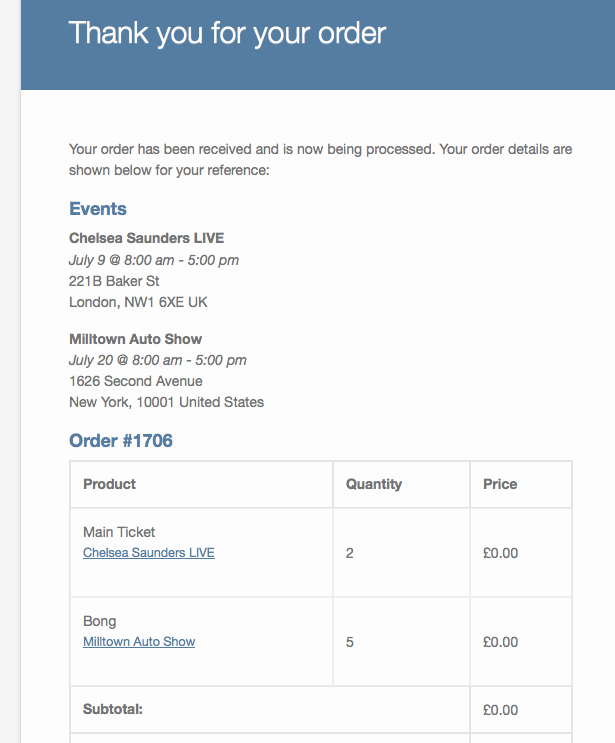
Tinker with it as needed if you want to further refine the display —I hope this helps!
— George
ParticipantHey @Haime,
I’m really sorry to hear about this! I cannot recreate issues with recurring events as you describe, but am happy to investigate this so that we can see what’s going on. We do have at least one other report of similar behavior, so there could be a bug in our code.
To help us investigate, can you do the following things?
1. Please share a screenshot of the complete “Time & Date” section of the problematic event on its edit screen. This is the section of the edit-event screen where the recurrence information is located. I know you describe the recurrence in your post above, but seeing the exact configuration is important just to confirm and so that we can recreate things exactly (for testing). As an example of the type of screenshot I am referring to, here is a screenshot of the “Time & Date” section of an event on my own site → https://cloudup.com/csUNd9JZAWY
If you share a screenshot like that, then it will be very helpful!
2. Can you confirm if this issue only seems to affect a certain recurring event, or certain recurring events? Or does it seemingly affect ALL recurring events? If only one event or a few, can you share links to these specific events on your site?
If you can provide these details, it will help us investigate this and work towards a fix. I will test in 4.2.2 and then in the 4.2.1 versions you have downgraded to, and see if I reproduce issues.
Thank you!
GeorgeJuly 8, 2016 at 7:11 am in reply to: Recurring Events are repeating the same day and not stopping at the date set. #1137205ParticipantHey @Tyler,
I’m really sorry to hear about this! I cannot recreate issues with recurring events as you describe, but am happy to investigate this so that we can see what’s going on.
To help us investigate, can you do the following things?
1. Please share a screenshot of the complete “Time & Date” section of the problematic event on its edit screen. This is the section of the edit-event screen where the recurrence information is located. I know you describe the recurrence in your post above, but seeing the exact configuration is important just to confirm and so that we can recreate things exactly (for testing). As an example of the type of screenshot I am referring to, here is a screenshot of the “Time & Date” section of an event on my own site → https://cloudup.com/csUNd9JZAWY
If you share a screenshot like that, then it will be very helpful!
2. Can you confirm if this issue only seems to affect a certain recurring event, or certain recurring events? Or does it seemingly affect ALL recurring events? If only one event or a few, can you share links to these specific events on your site?
3. Last, but certainly not least, can you post your complete, un-edited System Information to this thread? You can click “set as private reply” before submitting that reply if you would like to keep that information hidden from the public (so that only you and the support team here can see it). Here is how to post that information → https://theeventscalendar.com/knowledgebase/sharing-sys-info/
If you can provide these details, it will help us investigate this and work towards a fix.
Thank you!
GeorgeParticipantHey Carlos,
Thanks for following up. I’m sorry for my misunderstanding here, but can you clarify what you mean when you say the following?
can I remove the default action and create a new one with my tweaks
☝️ What do you mean here? Can you share the name of the specific “default action” you are referring to?
Thank you!
GeorgeParticipantHey @Fred,
I’m sorry to hear that this issue is persisting! Thanks for reaching out.
As Cliff mentioned in that last thread, excerpts by default will not process shortcodes. To modify this behavior, try adding the following line of code to your theme’s functions.php file:
add_filter( 'tribe_events_excerpt_allow_shortcode', '__return_true' );
☝️ Once you add this, have another look at your site—does anything improve with this issue?
If not, then how about if you add one more line of code so that you have this instead:
add_filter( 'tribe_events_excerpt_allow_shortcode', '__return_true' );

add_filter( 'tribe_events_excerpt_shortcode_removal', '__return_false' );
Thanks!
GeorgeParticipantHey Vic,
I’m sorry to hear that our implementation of the /events page isn’t quite ideal in your case, but do hope you find the plugins useful aside from that.
Installation of Events Calendar Pro should be easy and straightforward, and goes as follows:
• Ensure the free, core plugin The Events Calendar is installed and activated. This is not just a “free” version that gets replaced by Events Calendar Pro! The Events Calendar is the “Core” plugin, and any premium add-on like Events Calendar Pro is an add-on to this core plugin.
• Once The Events Calendar is activated, proceed with buying a license for Events Calendar Pro.
• Upon completing your purchase, your “confirmation” email will include a download link for the Events Calendar Pro plugin files—a .zip file, to be specific.
• Simply install and activate this .zip file on your site. You can use any method that you find if you search for “How to install a WordPress plugin” online.
• And you’re all set! 😀 Just activate the plugin, enter your license key on the Events → Settings → Licenses page in your site’s /wp-admin, and enjoy the plugin from there (hopefully).
Note that, once you complete your purchase, a copy of the .zip file of Events Calendar Pro will always be available at http://theeventscalendar.com/my-account/downloads. And the license key will always be available at http://theeventscalendar.com/license-keys
I hope this information helps!
George -
AuthorPosts