
Home › Forums › Ticket Products › Event Tickets Plus › Ateendee data in ticket e-mail
- This topic has 25 replies, 6 voices, and was last updated 9 years ago by
Support Droid.
-
AuthorPosts
-
July 1, 2016 at 7:40 am #1134437
Carlos Henrique
ParticipantHi!
I’m working with a client on a event website and we need to allow companies to buy multiple tickets for this event. In this scenario, the person who buys is the person who will attend to the event. We need to send each attendee data in the e-mail, not the byer data repeated several times.
How can I get these data and pass in the e-mail?
Thanks
July 1, 2016 at 8:30 am #1134468Geoff
MemberHey Carlos,
That’s a good question. I’m afraid that Event Tickets Plus only support sending an email to the person making the purchase. It is worth noting, though, that only one email will be sent containing all the tickets.
Sending to each attendee is an interesting idea and it would be great if you could add that to our feature request forum so we can get an idea of how many others would be interested in that as well.
Does this help answer your question? Please let me know.
Thanks!
GeoffJuly 1, 2016 at 8:44 am #1134473ParticipantActually I don’t need the e-mail to be sent to the attendees. It’s OK that the e-mail is sent only to the buyer. The problem is that I need each ticket with it’s attendee data. The system only gives me the purchaser name.
Looking throught the plugin files I found the table_meta_data function, wich builds the table of tickets and attendees meta in the back-end. Is there any way I can get this meta_data e pass it to the e-mail. That’s ok if I get all the meta data.
This data is stored somewhere in BD. I should be able to get it since it’s been displayed in the back-end for each ticket.
Thanks!
-
This reply was modified 10 years, 3 months ago by
July 1, 2016 at 8:46 am #1134475ParticipantAccidentally I hit the correct answer button! My bad!
July 1, 2016 at 9:57 am #1134563MemberHey Carlos,
Yeah, it’s possible to get the attendee information from the custom fields into the email. You can override the email template file in your theme (more on this in our Themer’s Guide) and then place something like this in the template to fetch the meta fields you need to display:
get_post_meta( $attendee_id, Tribe__Tickets_Plus__Meta::META_KEY, true );…where “META_KEY” is the ID of the field.
Cheers!
GeoffJuly 1, 2016 at 10:47 am #1134587ParticipantHi Geoff,
I’ve placed the code into the template file but I doing some wrong. I getting a Internal Error on checkout page and I insert the code.
Could you assist me a little more?
I have place the following code inside the for-each loop for de meta ID “tribe-tickets-meta_name”:
$ticket_meta_name = get_post_meta( $attendee_id, Tribe__Tickets_Plus__Meta::tribe-tickets-meta_name, true );Then I placed this inside the table:
<?php echo $ticket_meta_name; ?>Thanks!
-
This reply was modified 10 years, 3 months ago by
July 1, 2016 at 12:33 pm #1134632MemberHey Carlos!
I’m happy to help as best I can, or at least help point you in the right direction.
Is tribe-tickets-meta_name the ID of the field you’re working with?
If so, then you can echo that line itself:
<?php echo get_post_meta( $attendee_id, Tribe__Tickets_Plus__Meta::tribe-tickets-meta_name, true );Cheers!
GeoffJuly 1, 2016 at 12:42 pm #1134636ParticipantGeoff,
This is the code for this specific field:
<div class="tribe-tickets-meta tribe-tickets-meta-text tribe-tickets-meta-required">
<label for="tribe-tickets-meta_name">Name</label>
<input type="text" id="tribe-tickets-meta_name" class="ticket-meta" name="tribe-tickets-meta[][name]" value="" required>
</div>
I’ve tried to echo that code and also got Internal Error on the checkout page.
July 1, 2016 at 1:57 pm #1134654MemberHi Carlos,
I’ve been digging into this more and it actually is a lot more difficult than I had imagined. The reason being that there is no public function in the plugin to grab that data very easily.
You can see where we output the data on the front end in lines 17-48 of the meta.php template in the plugin.
In other words, I think this will require a bit more custom development than I had originally believed.
You can use that block of code as a blueprint for creating an array of the custom meta variables and then output the data from there. I realize this is not the most ideal way to grab data, but I’ve gone ahead and opened a ticket in our system to create a more accessible function for future use.
Sorry I don’t have more of a concrete solution for you here, but I do hope this at least gets the ball rolling and that we’ll have something more accessible in a future release to make this easier.
Thanks,
GeoffJuly 4, 2016 at 7:47 pm #1135289ParticipantHello Geoff!
I’m still trying to get the meta data into the e-mail.
Looking the Render.php file I found the function that builds the table in the back-end. Ins’t it possible to get the meta data using this code?
public function table_meta_data( $item ) { wp_enqueue_style( 'event-tickets-meta' ); wp_enqueue_script( 'event-tickets-meta-report' ); $meta_fields = Tribe__Tickets_Plus__Main::instance()->meta()->get_meta_fields_by_ticket( $item['product_id'] ); $meta_data = get_post_meta( $item['attendee_id'], Tribe__Tickets_Plus__Meta::META_KEY, true ); ?> <tr class="event-tickets-meta-row"> <td colspan="3"></td> <td colspan="4"> <dl> <?php foreach ( $meta_fields as $field ) { if ( 'checkbox' === $field->type && isset( $field->extra['options'] ) ) { $values = array(); foreach ( $field->extra['options'] as $option ) { $key = $field->slug . '_' . sanitize_title( $option ); if ( isset( $meta_data[ $key ] ) ) { $values[] = $meta_data[ $key ]; } } $value = implode( ', ', $values ); } elseif ( isset( $meta_data[ $field->slug ] ) ) { $value = $meta_data[ $field->slug ]; } else { continue; } if ( '' === trim( $value ) ) { $value = ' '; } ?> <dt class="event-tickets-meta-label_<?php echo esc_attr( $field->slug ); ?>"><?php echo esc_html( $field->label ); ?></dt> <dd class="event-tickets-meta-data_<?php echo esc_attr( $field->slug ); ?>"><?php echo $value ? esc_html( $value ) : ' '; ?></dd> <?php } ?> </dl> </td> </tr>July 5, 2016 at 8:50 pm #1135826George
ParticipantHey Carlos,
I wanted to chime in here and might be able to help point you in the right direction on this customization for now.
Just to be clear, here’s your original description of things:
The problem is that I need each ticket with it’s attendee data. The system only gives me the purchaser name.
1. ☝️ To help me help you, can you clarify if you are trying to display ALL attendee meta (AKA the “Additional Information” fields) on the ticket? Or just specific fields?
2. Next, can you share a screenshot of what specific “additional information” fields you have? I’m just curious so that I can get a sense of how best to display such information on the actual tickets themselves.
These questions may seem simple, but will help me in recommending some code from here.
⚠️ Please note that, while we will try to get you set up with a great starting block of code, you will have to take the reins on refining the code to be exactly how you want, to display how you like, etc.—and you are also responsible for maintaining the snippet over time.
I just wanted to mention these facts early so you know what to expect—but please do address the questions I ask above and I will use that information to try and recommend a solution.
Thanks,
GeorgeJuly 5, 2016 at 8:50 pm #1135827ParticipantHey Carlos,
I wanted to chime in here and might be able to help point you in the right direction on this customization for now.
Just to be clear, here’s your original description of things:
The problem is that I need each ticket with it’s attendee data. The system only gives me the purchaser name.
1. ☝️ To help me help you, can you clarify if you are trying to display ALL attendee meta (AKA the “Additional Information” fields) on the ticket? Or just specific fields?
2. Next, can you share a screenshot of what specific “additional information” fields you have? I’m just curious so that I can get a sense of how best to display such information on the actual tickets themselves.
These questions may seem simple, but will help me in recommending some code from here.
⚠️ Please note that, while we will try to get you set up with a great starting block of code, you will have to take the reins on refining the code to be exactly how you want, to display how you like, etc.—and you are also responsible for maintaining the snippet over time.
I just wanted to mention these facts early so you know what to expect—but please do address the questions I ask above and I will use that information to try and recommend a solution.
Thanks,
GeorgeJuly 6, 2016 at 6:25 am #1135924ParticipantHi George!
I don’t need all the meta data into the e-mail, but I need at least the name of the attendee and not the name of the buyer. In this case, the attendee is the person how buys the tickets.
As my website will allow companies to by multiple tickets, each ticket has to have the attendee data and not the buyer data. As the buyer, oftenly is a secretary.
I’ve attached a screenshot of the attendees meta data.
Thanks for your help.
July 7, 2016 at 11:31 am #1136748ParticipantThanks for clarifying, Carlos!
If you update to the most recent version of The Events Calendar, Event Tickets, and Event Tickets Plus, this information should automatically be included on tickets! 😀
The version for all three plugins is 4.2.2
Here is an example of this in action; check out the following screenshot:
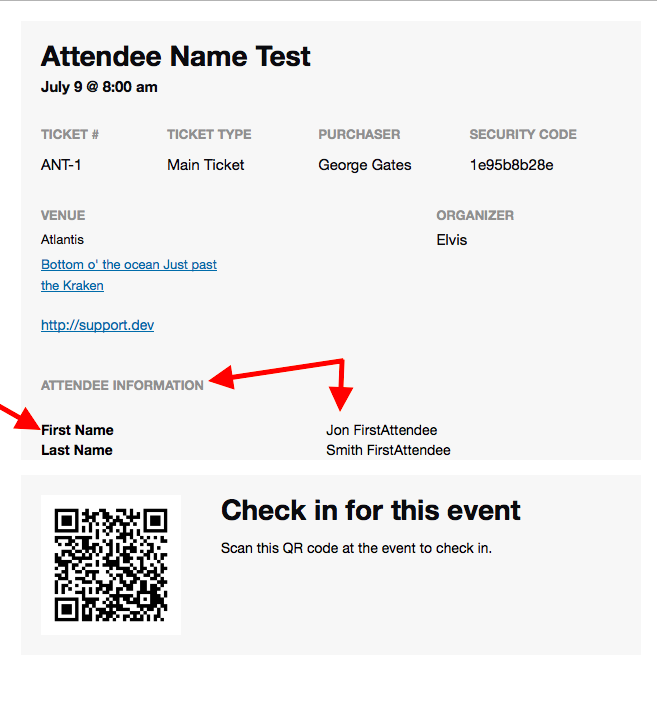
I hope this helps.
Cheers,
GeorgeJuly 7, 2016 at 2:22 pm #1136935ParticipantHi George!
Thanks exactly what I needed! Now I just need to hide some of the data. I only need to show first and last name and the company name. Can I customize this overriding email.php template file or I is it in another file?
Thanks
-
This reply was modified 10 years, 3 months ago by
-
AuthorPosts
- The topic ‘Ateendee data in ticket e-mail’ is closed to new replies.