

Forum Replies Created
-
AuthorPosts
-
George
ParticipantHey Dan,
Thanks for reaching out. At this time, our plugins do not support any sort of “bundling” of tickets into a single product. Each ticket is its own instance of a WooCommerce “product” post type.
Now, bundling may technically be possible, but only through unofficial / unsupported means. So, for example, there may be a WooCommerce Extension out there that enables bundling multiple Woo products into one product. I don’t know of one, but if one exists, then it might work with our tickets products.
But aside from this sort of possibility, our plugins do not support this sort of bundling. I am sorry to disappoint!
Please let me know if there’s anything else I can try to help with.
Sincerely,
GeorgeParticipantHey Carlos,
Thanks for following up.
Modifying the output of those fields is unfortunately not possible at this time unless you were to modify a core plugin method called ticket_email_meta().
This method can be found at this location within Event Tickets Plus:
event-tickets-plus/src/Tribe/Meta/Render.phpYou would have to modify that core plugin file, which we generally do not recommend because the code will be erased upon the next update of Event Tickets Plus.
I am sorry to bear this news, Carlos! One thing I have done in the meantime is make a ticket for our developers to add a new filter there, so that you could manipulate which fields show up and which are hidden just by writing code safely from within your theme or a custom plugin. We could help with that once the filter exists—but for now, manual file modification is required. 🙁
Sorry to disappoint, Carlos—let me know what you think and if there is anything else I can try to help with here!
— George
ParticipantHey @Margie,
Thanks for the follow-up.
The findings you report here are very odd, and I cannot reproduce them. 🙁 If the recurrence settings on the event showed “None” (i.e., it was showing as being NOT a recurring event), but it was actually a recurring event, then somewhere along the way maybe its settings were changed? Maybe it was originally a recurring event; then re-set to a NON-recurring event, but with all of the recurring instances already generated, weird issues arose….
I admit that I am not sure about the cause of the problem.
As for bulk-deleting the old entries, unfortunately the best things I could think of would be one of the following:
1. Search for other “Bulk Delete” plugins online; there are many options, most of them free. You may be able to find alternative plugins with high ratings that work a bit better. http://wordpress.org/plugins
2. Contact your web host and explain the issue, and your goal in trying to remove all of these events. Depending on your host, they may be able to write a Database query that deletes all of those events.
Sorry for the trouble, and for this odd issue!
George
Participant😀
July 7, 2016 at 2:41 pm in reply to: Tons of Warning messages in error Log upon upgrading to version 4.2 #1136956Participant😀
July 7, 2016 at 2:06 pm in reply to: Hiding unnamed/blank venues & organizers from filter bar #1136915ParticipantHey @William,
Thanks for reporting this. I took a look through our code and, unfortunately, there is not much by way of filters or actions to “properly” filter out these empty-titled venues and organizers.
I am going to propose the introduction of such filters for some future release, but in the meantime, I wrote a bit of JavaScript for you that should help pull this off. It’s not ideal to do stuff like this in this way, but it should help for the time being.
To use my snippet, simply copy and paste the contents of this Gist into your theme’s functions.php file ? https://git.io/vKYEP
I hope this helps!
GeorgeParticipantI’m sorry to hear this, @adriennefawcett!
There are a few things that can be done here.
First, let’s take care of all those nearly 7,000 spam entries: you can make the process of deleting a bunch of these entries much easier by using a “bulk deletion” plugin. There are many out there—head over to wordpress.org/plugins to search for free plugins. Search for “bulk delete” or something similar, and find a high-rated plugin. These should help with bulk-deleting all of those entries.
Next, when it comes to preventing this from happening again, there are a few things that can be done. First is setting up the ReCAPTCHA provided by the Community Events itself—you can find the configuration options for this in Events → Settings → Community in your wp-admin. Next, to help me investigate why this might have happened to begin with, can you post your site’s complete, un-edited system information to this thread? Here’s how to do that ? https://theeventscalendar.com/knowledgebase/sharing-sys-info/
I hope this information helps get the ball rolling here; with your system information, I can take a closer look and hopefully offer some more insight from there.
Thank you!
GeorgePS
Oh! One more thing—can you clarify how you are hosting your website? Are you hosting it on your own server, for example? Are you hosting it on a managed webhost, something you pay monthly or yearly for, for example? If so, can you share the link to the site of your webhost?Thanks!
ParticipantHey Jeff,
Thanks for reaching out! (And thinks for chiming in, @Michael.)
When you buy Event Tickets Plus, you should ensure the following:
• DEACTIVATE any existing versions of “WooCommerce Tickets” on your site.
• INSTALL and ACTIVATE the new “core” tickets plugin, “Event Tickets.” This is free and available here → https://wordpress.org/plugins/event-tickets/
• INSTALL and ACTIVATE “Event Tickets Plus.”
• Ensure that WooCommerce is updated to its most recent version, which is currently 2.6.2 (http://woocommerce.com)☝️ Once you do all of this, you should be good to go!
Let me know if this helps,
GeorgeParticipantThanks for clarifying, Carlos!
If you update to the most recent version of The Events Calendar, Event Tickets, and Event Tickets Plus, this information should automatically be included on tickets! 😀
The version for all three plugins is 4.2.2
Here is an example of this in action; check out the following screenshot:
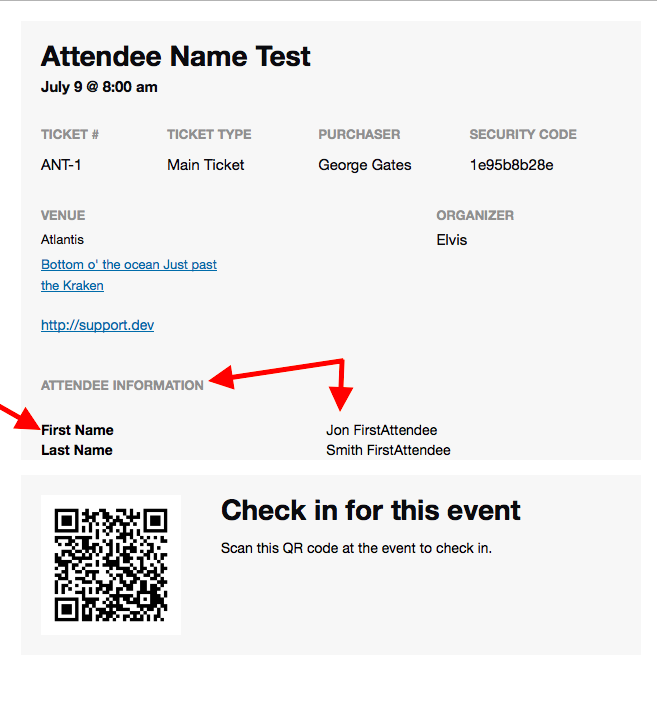
I hope this helps.
Cheers,
GeorgeParticipantHey Margie,
Thank you for this feedback. There are a lot of data points and specific details here, so just to track things accurately and ensure we are on the same page, here are some more specific questions about this one Event, the “AA” event.
Question #1
You say:
So I went to take this screenshot and noticed that the event I opened (June 15, 2017), showed it was actually May 19, 2016 with recurrences None
1. To be clear, do you mean that this “AA” event literally had its “Recurrence” option set to “None”? I.e., it was NOT showing as a recurring event in its own edit screen?
Question #2
Next, you say this:
Just as a fyi: it appears that at one time there were 2 sequences for AA – one that went through 2016 and into 2017 (the 12 month limit I set?), a
2. As noted in Question #1 above, you report that the edit screen for the event shows no recurrence options. So, if those options aren’t visible in the edit screen, how did you determine that “there were 2 sequences” for the AA event? Did you just look at the events on the front end of your site, and see what appeared to be 2 sequences?
Question/Comment #3
You say:
It seems like the easiest thing would be to completely REMOVE this event and all it recurrences
3. This is indeed a good recommendation, and if these issues are only happening with one event, then the issues could have arisen from some weird edge-case issue that won’t crop up again.
I see in your “System Information”‘s Plugins section that you have a Bulk Delete plugin…this should help with the process of deleting instances of that recurring event.
Thank you for your patience here!
GeorgeParticipantHey Jane,
You do NOT need Events Calendar Pro to use Community Events! 😀
You only need The Events Calendar to be installed.
The Events Calendar is the “Core” plugin, so it is required for all premium add-ons: Community Events, Events Calendar Pro, Filter Bar, our “Importer” plugins like Facebook Importer, and so on.
But aside from this “core” requirement, all of the other pro add-ons are totally independent of each other.
So you can just use Community Events alongside The Events Calendar, and not need any other pro add-ons.
I hope this helps!
GeorgeParticipantThis reply is private.
ParticipantHey Carlos,
I wanted to chime in here and might be able to help point you in the right direction on this customization for now.
Just to be clear, here’s your original description of things:
The problem is that I need each ticket with it’s attendee data. The system only gives me the purchaser name.
1. ☝️ To help me help you, can you clarify if you are trying to display ALL attendee meta (AKA the “Additional Information” fields) on the ticket? Or just specific fields?
2. Next, can you share a screenshot of what specific “additional information” fields you have? I’m just curious so that I can get a sense of how best to display such information on the actual tickets themselves.
These questions may seem simple, but will help me in recommending some code from here.
⚠️ Please note that, while we will try to get you set up with a great starting block of code, you will have to take the reins on refining the code to be exactly how you want, to display how you like, etc.—and you are also responsible for maintaining the snippet over time.
I just wanted to mention these facts early so you know what to expect—but please do address the questions I ask above and I will use that information to try and recommend a solution.
Thanks,
GeorgeParticipantHey Carlos,
I wanted to chime in here and might be able to help point you in the right direction on this customization for now.
Just to be clear, here’s your original description of things:
The problem is that I need each ticket with it’s attendee data. The system only gives me the purchaser name.
1. ☝️ To help me help you, can you clarify if you are trying to display ALL attendee meta (AKA the “Additional Information” fields) on the ticket? Or just specific fields?
2. Next, can you share a screenshot of what specific “additional information” fields you have? I’m just curious so that I can get a sense of how best to display such information on the actual tickets themselves.
These questions may seem simple, but will help me in recommending some code from here.
⚠️ Please note that, while we will try to get you set up with a great starting block of code, you will have to take the reins on refining the code to be exactly how you want, to display how you like, etc.—and you are also responsible for maintaining the snippet over time.
I just wanted to mention these facts early so you know what to expect—but please do address the questions I ask above and I will use that information to try and recommend a solution.
Thanks,
GeorgeParticipantThis reply is private.
-
AuthorPosts