

Forum Replies Created
-
AuthorPosts
-
George
ParticipantHi folks,
Another Maintenance Release is coming tomorrow (if all goes to plan — this is subject to change if the release fails final QA, for example).
We are hopeful it will address a number of issues, including some of the Event Aggregator import/scheduled-import issues reported here and in other threads.
I can’t think of anything about your disappointments that is invalid; I agree about the prevalence of these bugs being quite frustrating. From my perspective, I can see just how hard our developers are working on fixing these problems. Next, Event Aggregator integrates with third-party platforms: Google, Facebook, Meetup, etc. And so any changes on these third-party platforms might cause breakages in our plugin. That’s not necessarily the culprit with some of the current import issues, but is indeed often a factor.
Finally, in closing I would strongly encourage you both to being using staging or development sites if you’re not already doing so—these provide safe places where you can test new plugins and updates to screen for issues/bugs.
Stay tuned for Release news,
GeorgeMarch 7, 2017 at 11:14 am in reply to: “The URL provided did not have events in the proper format.” error #1250690ParticipantHey @Colin,
Thanks for confirming this.
One thing that might factor into these issues is the fact that each calendar in the bottom-left corner is a separate calendar completely (click for a larger-sized image):
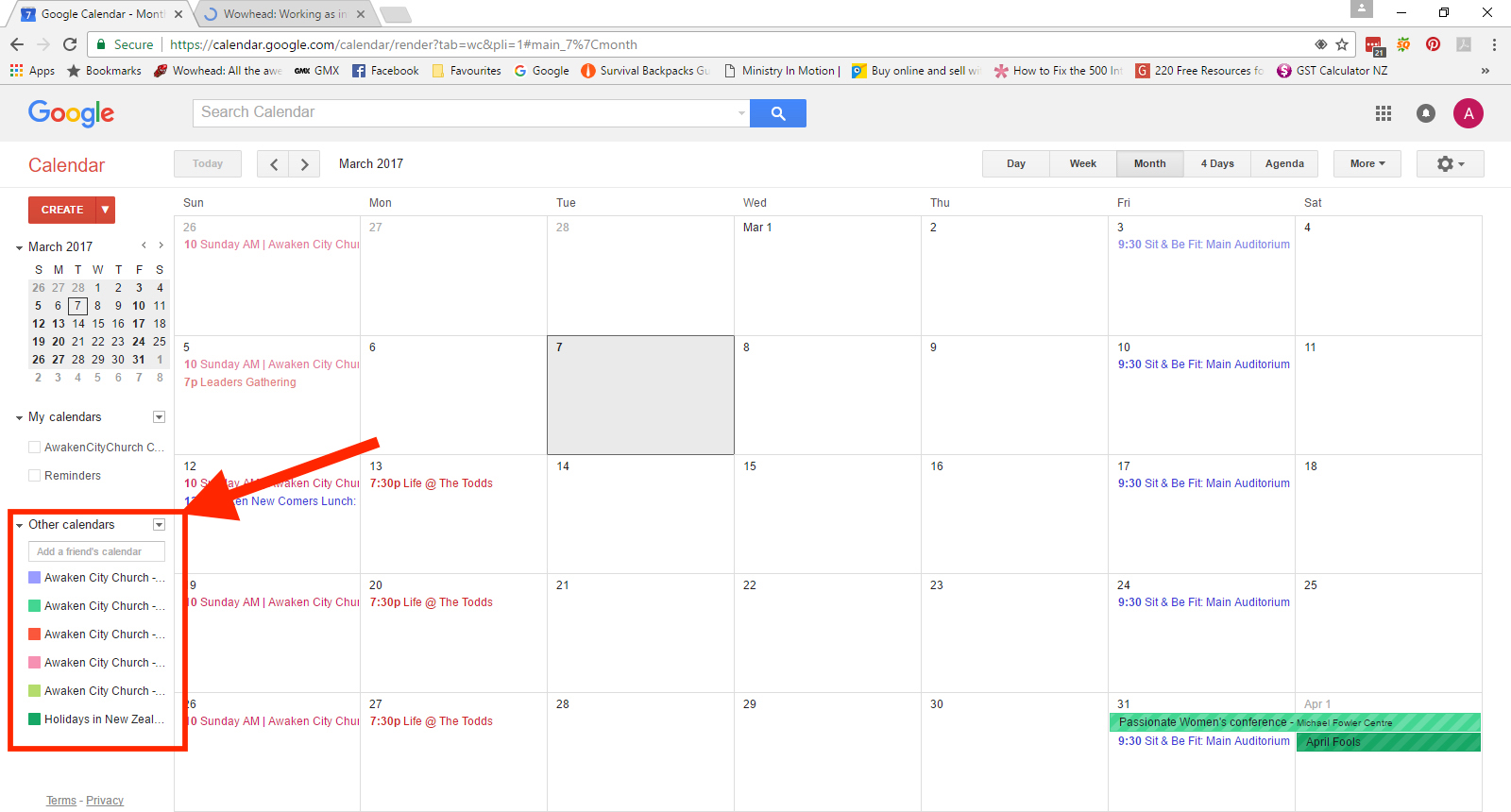
Your screenshot seems to show that the events for the month are spread across a few of these different calendars. So is it possible that you’ve exported files from one of the calendars that might be empty, when you in meant to export a file from one of the calendars that has events like shown in your screenshot?
— George
ParticipantThank you for the video.
The loop you’re using is made by the “Tool set” plugin you’re using, not our own plugins, so you may need to contact the “Toolset” plugin developers for assistance with modifying their loop.
Getting past events is tricky — you would need to add a meta query to the loop that looks for the _EventStartDate or _EventEndDate meta keys on events, and then filters the query results by these meta keys.
So, I would recommend contacting the Toolset plugin developers with this question:
- How can I set up my loop with your plugin so that it queries for custom post types based on a meta field’s key and value?
- Once they provide this information, try to add a meta query that looks for events within a certain range of dates. This seems to be the best way to ensure your loop pulls in past events and upcoming events.
Does this information help you move forward with this project?
— George
March 7, 2017 at 9:54 am in reply to: Single Page Event Not Rendering Properly On Optimizepress 2.0 Page #1250638ParticipantSure thing David, thanks for your patience here. While I will close this thread for now, if issues arise related to our plugins specifically please come back and open a new thread any time — link to this thread for context if need be, etc…
Best of luck with your project,
GeorgeParticipantThis reply is private.
ParticipantHey Jennifer,
It sounds like these features are an important part of your site. With that in mind, last month Cliff gave you some specific steps that would help reveal the cause of your problems: https://theeventscalendar.com/support/forums/topic/users-cant-post-events-using-community-events/
You never responded to those queries. Can you respond to those queries here in this thread and let us know what you find?
Thanks,
GeorgeParticipantHey James,
Thanks for reaching out. This is a great feature idea — and one totally worth submitting to our UserVoice page — but it is not possible at this time with our plugins. 🙁 There is no Extensions that do this, either.
Sorry to bear that news!
Please let me know if there are any other issues or questions I can try to help with.
— George
ParticipantHey Aaron,
Thanks for reaching out.
We are unfortunately not able to help with modifying the look or behavior of our plugins, as described here: lhttps://theeventscalendar.com/knowledgebase/what-support-is-provided-for-license-holders/
To get the custom code you posted here working as you desire, you will have to continue to debug and troubleshoot your code on your own. You could also hire a professional developer to do it for you. We have a list of great developers here → http://m.tri.be/18k1 (and have no affiliation with any of these folks—they’re simply some well-respected names in the community that we’ve compiled to share in situations like this one).
Best of luck with your custom coding. Open a new thread any time if other issues or questions that fall within the scope of customer support arise.
— George
ParticipantHey Alexander,
Thanks for reaching out.
There is unfortunately not a more portable method for handling these fields at this. The only thing I could think of would be getting into the core plugin code which is not recommended because that itself is not very “portable”…a bit of a paradox unfortunately. 🙁
Please let me know if this helps and if there are any other issues or questions I can try to help with!
— George
ParticipantYou can check people in before the date of an event and should not have issues with that — please let us know if you do find issues with that!
— George
ParticipantThanks for sharing your solution! REST API support is not something we’ve fully rolled out—support should be arriving in version 4.5, if all goes to plan (though this is subject to change).
Best of luck with your current solution in the meantime!
Open a new thread any time if other issues or questions arise.
— George
March 6, 2017 at 10:02 pm in reply to: Batching Adult and Child tickets to automatically make family ticket #1250262ParticipantThanks for reaching out, Steven!
It’s unfortunately not possible for our plugins to do what you describe, and automatically calculate a Family ticket if a user enters 2 children, 2 adults, or some other combination of tickets.
Sorry to disappoint. 🙁 Please let me know if there are any other issues or questions I can try to help with!
— George
ParticipantAh! Nevermind, I noticed the widget on the home page — not sure why I missed that at first…
Changing the size of the widget title text is possible in a few ways. You could use the methods in our Themer’s Guide to modify the HTML directly and literally make the h2 tags be h3 tags instead.
Or you could just decrease their font size manually via CSS, using this selector:
.tribe-mini-calendar-event h2.tribe-events-title a
So, something like this:
.tribe-mini-calendar-event h2.tribe-events-title a {

    font-size: 1.3em !important;

}
As for the next issue, try CSS like this to remove that padding:
.tribe-mini-calendar-event .list-date {

    padding: 0 !important;

}
You will have to take the reins from here. As noted on this page, we cannot help with modifying the appearance or behavior of our plugins.
I hope this CSS helps nonetheless!
Best of luck with your site,
GeorgeParticipantThanks for reaching out Jason.
We unfortunately cannot help with modifying the look or behavior of our plugins, as elaborated upon here ? https://theeventscalendar.com/knowledgebase/what-support-is-provided-for-license-holders/
So please read over that guide to set your expectations about this support exchange.
With all of that being said, can you share a link to where I can look at the list widget directly? Despite some of our policies around not being able to help with this sort of thing, I’m happy to at least try and take a look at the widget firsthand and recommend some CSS to get things looking like you describe.
— George
March 6, 2017 at 9:53 pm in reply to: Expired events don't automatically unpublish? Seriously? #1250258ParticipantIt is true that our plugins do not provide that feature at this time. I am sorry to disappoint.
Please let me know if there are any other issues or questions I can try to help with.
Sincerely,
George -
AuthorPosts