

Forum Replies Created
-
AuthorPosts
-
George
ParticipantExcellent! Glad to hear it.
Cheers,
GeorgeParticipantHey Jennifer,
Events Calendar Pro does offer some basic color customization options in the WordPress Customizer. Anything that is not related to the calendar, however—or any complex layout modifications, for example—would require custom CSS coding. (Just as a note before you consider proceeding with buying a license, we are not able to assist with writing custom code.)
Also, yes, Events Calendar Pro does provide more widgets that you cannot get in the core plugin The Events Calendar. Those widgets include:
• Mini Calendar Widget
• Advanced List Widget (the core List Widget with some extra options)
• Event Countdown Widget
• “This Week” Widget (events happening this week)I hope this helps! Let me know any further questions you might have or if there’s anything else I might be able to help with.
Sincerely,
GeorgeParticipantHello!
You can learn more about the widgets provided by The Events Calendar and Events Calendar Pro on this page, which does include screenshots of real-life widgets for examples ? https://theeventscalendar.com/knowledgebase/events-calendar-widgets/
You can see some more screenshots here, as well ? http://wpshindig.com/event-widgets/
I want a widget at the sidebar of a page, to show my future events. Can it do that?
☝️ Yes! You could place the List Widget in any sidebar and it will show a list of the upcoming events.
Cheers!
GeorgeParticipantHey Jeremy,
Thanks for reaching out.
At this time, there is no way to embed the Photo View via shortcode. That will be possible in the next major release of Events Calendar Pro, version 4.3, which is coming sometime this fall. (I do not have a specific ETA or date, unfortunately.)
Next, you ask:
Also can you limit the amount of content that appears on each event in photo view? For example I would like to only show certain fields, like Venue, and price. And can I limit the excerpt length in this way?
☝️ Yes, you can limit things as you describe but unfortunately only by way of custom coding. So you would have to write custom CSS and/or some custom PHP coding to modify the Photo View output.
I hope this information helps!
GeorgeParticipantHey Jennifer!
Thanks for reaching out, and for your interest in our plugins.
Events Calendar Pro and Community Events are sold separately, and their features do not overlap. So buying Events Calendar Pro does not mean you get Community Events, nor any of the features of Community Events. And vice versa.
Next, you ask this:
If so, does community offer admin approval of posts?
YES — You can set the default status of submitted events to “Draft” or “Pending Review.” This means they will not be published unless and admin actually goes to the individual event and clicks “Publish”.
I hope this information helps—let me know if there’s anything else I can try to help with!
Cheers,
GeorgeParticipantHey Pedro,
Thanks for reaching out!
Our plugins unfortunately do not provide the sort of feature you describe here. 🙁
I’m sorry to disappoint, but please let me know if there is anything else I can try to help with.
Sincerely,
GeorgeParticipantHey @Jonathan,
Thanks for reaching out!
This may be happening because you have not entered your Facebook API keys. Have you entered them in the Events → Settings → APIs tab in your site’s wp-admin? Here is a screenshot of the Facebook API options, for example:
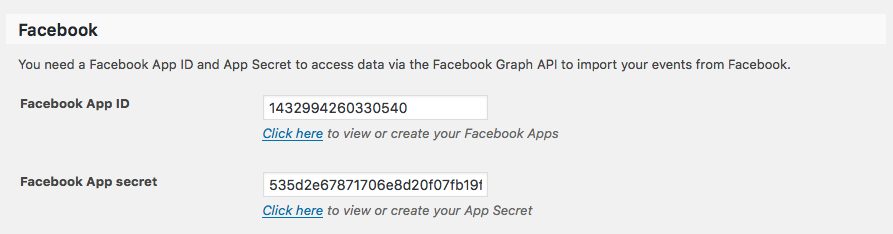
1. Have you entered these API details?
2. If so, then in your reply can you share your site’s complete System Information? Here is how to do that → https://theeventscalendar.com/knowledgebase/sharing-sys-info/
Thank you!
GeorgeParticipantHey John!
Thanks for reaching out.
You can indeed move ticket forms, but only with a bit of custom coding.
While we cannot help with implementing custom code, we have covered the process of moving the ticket forms in detail here. → https://theeventscalendar.com/knowledgebase/moving-rsvp-ticket-forms/
Check out that article and let us know if it helps!
Cheers,
GeorgeAugust 18, 2016 at 8:11 am in reply to: WP Related Posts plugin only shows events on non-events posts (e.g. blog) #1153119ParticipantThanks Bark!
I don’t see an email with that attached theme in our inbox—you might not have sent it yet, of course. But I just had issues with email delivery with another customer who was sending in their theme, so even if you did send that theme over email, it might not have reached our inbox. 🙁
Can you upload your theme and any child themes to CloudUp.com, then share a link to the CloudUp uploads here? I will download them and take a look.
Thanks for your patience here! I am happy to take a look so that, even if I cannot fix things, you can proceed with hiring someone or other means with the confidence that it’s worth the money because a quick fix or simple tweak isn’t possible…in other words, that something more complicated is required.
Cheers!
GeorgeAugust 18, 2016 at 8:07 am in reply to: Calendar not appearing when using Organic Shop theme #1153117ParticipantHey Alice,
Thanks for this information. I’m still taking a look through your themes, but wanted to note that just yesterday we published a series of maintenance releases.
You can learn about those releases here in detail → https://theeventscalendar.com/release-events-calendar-4-2-5-event-tickets-4-2-5-premium-add-ons/
One of the main reasons I mention this, though, is that there is a tweak to how our plugins pull in the single-events template.
So that might help here.
Update The Events Calendar and any other premium add-ons on your site, and let me know if the issues persist where the search template is pulled in instead of the single-events template.
Let us know what you find!
Thank you,
GeorgeParticipantThis reply is private.
ParticipantHey Rocio,
We’re hoping to release that in September. You can check out more details and sign up to be notified when it launches on this page → https://theeventscalendar.com/wordpress-event-aggregator/
Cheers!
GeorgeAugust 17, 2016 at 9:36 am in reply to: Events on WordPress No Longer Sync with Eventbrite & Vice Versa #1152682ParticipantWe agree, Mel—it’s very frustrating and our developers have been working hard on figuring out what the issues are.
As noted above, we’re zeroing in on a fix and are hoping to publish a fix soon. Stay tuned to this thread!
And thank you all for your patience!
Sincerely,
GeorgeParticipantHey Rocio,
Using other plugins may indeed be possible. I do not know of any specific ones that work well, so discovering and testing out the right plugins for your project is something you’ll have to do on your own, but yes, other plugins may indeed work well.
In terms of other plugins that specifically work with our plugins, the only ones we can guarantee will work with The Events Calendar are our own add-ons. If you find another importer plugin out there and are curious if it will work with The Events Calendar, your best course of action is to ask the developer of that plugin via their own support channels.
I apologize if my answers here are not very specific—I am not trying to make things harder for you, there’s just not really much we can say about other pieces of software that we do not make. There are many many WordPress plugins out there so definitely explore, tinker, ask their support teams, etc. — I am sure you will find a good fit.
Please let me know if there’s anything else I can try to help with!
GeorgeAugust 17, 2016 at 9:22 am in reply to: Can I use Additional Fields with Tribe Create Event function #1152610ParticipantCheers! 😀
— George
-
AuthorPosts