

Forum Replies Created
-
AuthorPosts
-
George
ParticipantI’m sorry to hear that troubles are persisting here, Richard!
Here is what I would recommend doing:
1. Go to the Products list in your site’s wp-admin. Here’s a screenshot of my own site’s Products list for reference (click for a larger-sized image):
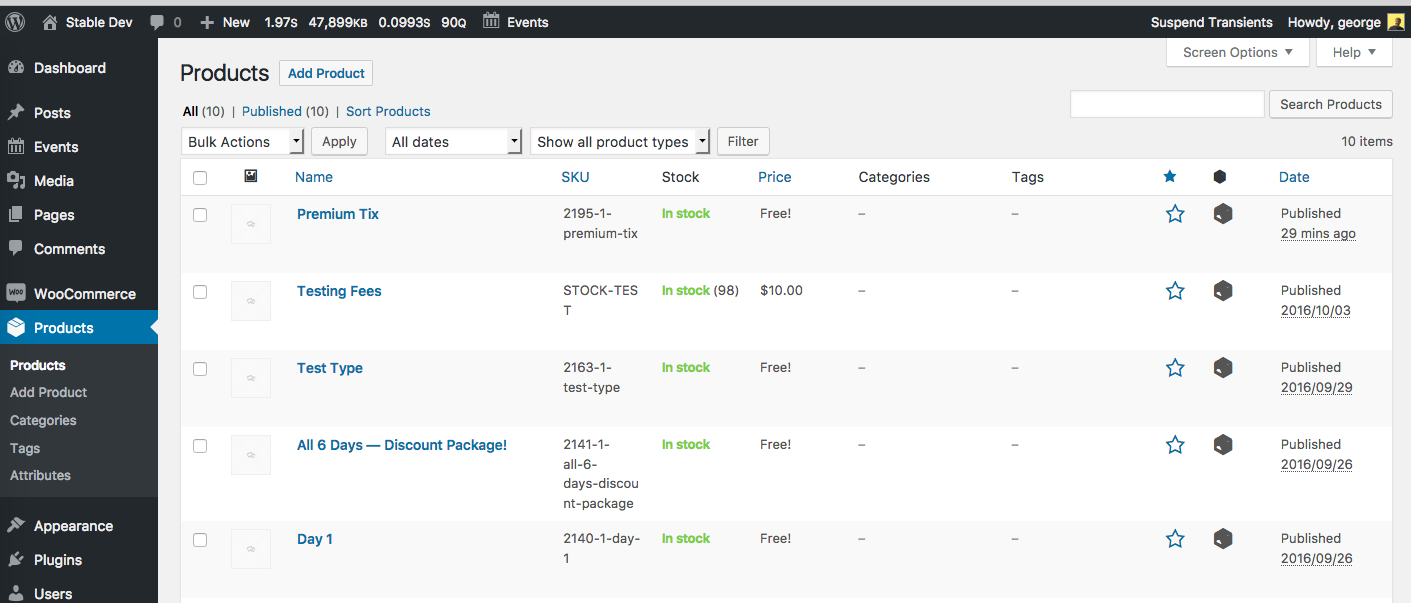
2. Look at specific product names. For example, in my Products list above, we can see that one of the tickets is a Product called “Premium Tix”.
3. Next, go back to the Orders → Add New screen.
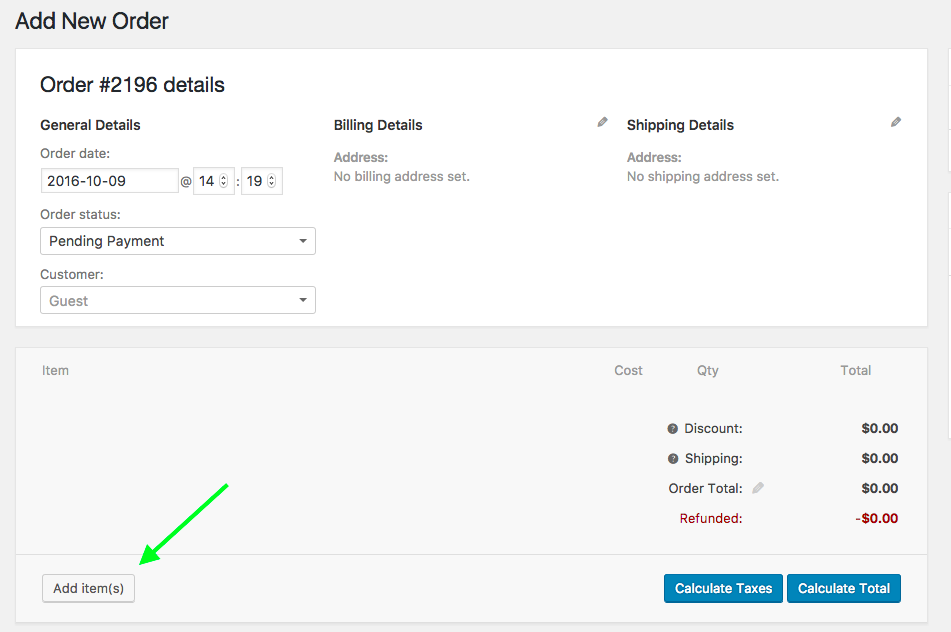
4. Click “Add Items” as shown in this screenshot (click for a larger-sized image):
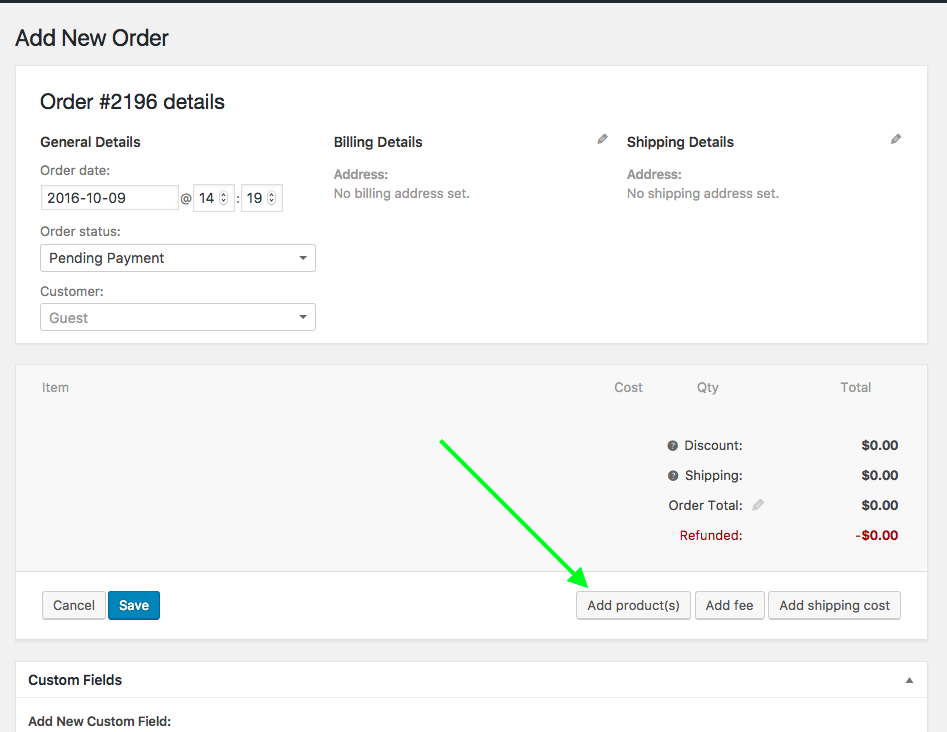
4. That will make some other buttons show up. Of these buttons, click “Add Product(s)” as shown in this screenshot (click for a larger-sized image):
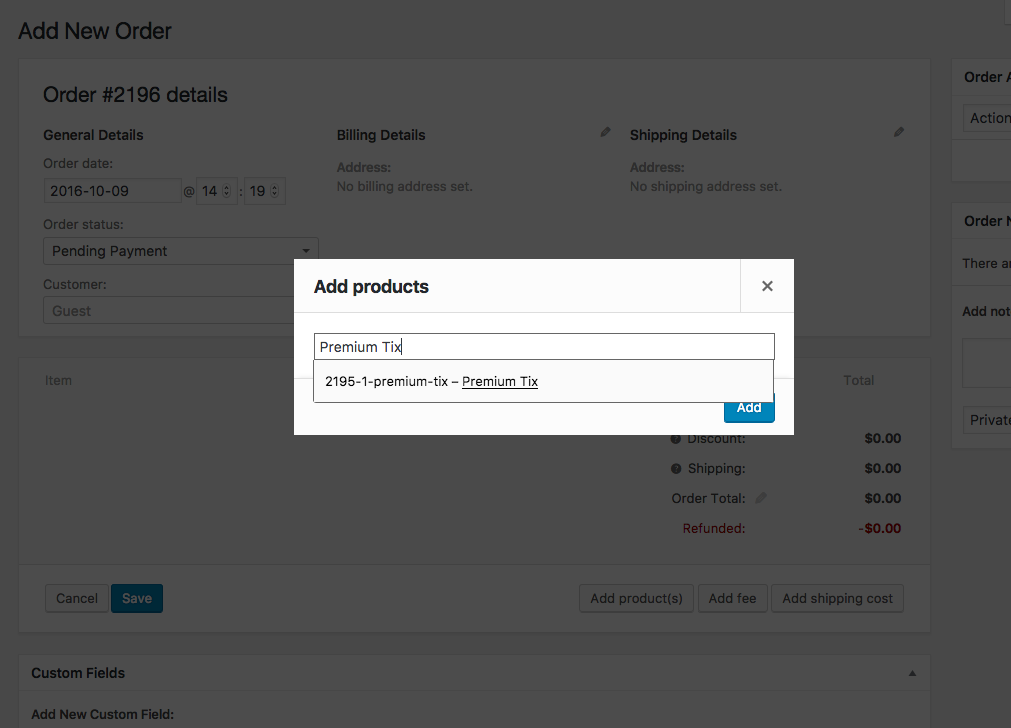
5. Search for the exact product name of the ticket you are trying to add orders for. As shown in the following screenshot, I am searching specifically for that “Premium Tix” ticket product we found earlier back in Steps #1 and #2 (click for a larger-sized image):
If the steps above are not working for you, where exactly and specifically along the way are things failing? For example, do you not see any ticket products in the “Products” list to begin with in Step #1 above? Or do you see them there, but they just don’t turn up when you search in Step #5 above?
Thanks for your patience,
GeorgeParticipantThanks for reaching out Brian, and sorry to hear about these issues.
1. Just to be clear, are you saying that the ICS data you posted is for that one event there; and that the first screenshot, which shows a start/end time of 5am/10am respectively, gets its start/end times erroneously set to 10am/3pm respectively once imported into another site?
2. Are you exporting events from one WordPress site into another WordPress site?
3. Please paste the URL of the iCAL feed from your site that you are plugging into iCal Importer on the other site.
I cannot reproduce this behavior Brian, so this issue will require some investigation and back-and-forth. I apologize in advance for that, and there’s not a quick answer here; but I’m happy to help and will be investigating this issue thoroughly for you.
Sincerely,
GeorgeParticipantHey Darren,
Thanks for reaching out. Your comments about the login flow here and other aspects of the workflow are interesting, and are worth considering for sure. Our ticketing plugins don’t just support WooCommerce, so any feature change we make needs to be nimble enough to provide same or similar support for all four eCommerce plugins we support.
This doesn’t mean that changes to better support the sort of flow you mention here won’t ever make their way into our plugins, or that your feedback isn’t good feedback — I just wanted to set the expectation early that it can take a while for changes like this to arrive in a proper plugin update, given the balancing-act of feature parity I touched on above….
In the meantime, you can certainly make it so that folks are redirected to their WooCommerce login page instead of the wp-login.php screen. You’d need to use the filter tribe_tickets_ticket_login_url to change the login URL.
I wrote a snippet for you here that does just that:
function tribe_make_login_to_purchase_go_to_woo_my_account_login( $original_login_url ) {$new_url = esc_url( get_permalink( get_option( 'woocommerce_myaccount_page_id' ) ) );
if ( empty( $new_url ) ) {
return $original_login_url;
}return $new_url;
}add_filter( 'tribe_tickets_ticket_login_url', 'tribe_make_login_to_purchase_go_to_woo_my_account_login' );
☝️ Try adding that to your site and let us know if it helps!
Cheers,
GeorgeParticipantThis reply is private.
October 9, 2016 at 10:40 am in reply to: Want to buy pro but free not working properly Events on Calendar partial popup #1174280ParticipantHey Janet,
Thanks for sharing this information and elaborating on the issues.
So, to be absolutely clear, it seems like these are the following issues:
1. The font size in the month view tooltips is too large, as shown in this screenshot → https://cldup.com/Nuh2hOILiD.png
2. Tooltips for events in the first two weeks of the month view are cut off, as shown in this screenshot → https://cldup.com/AqAY4R8exv.png
☝️ Are there any other issues here? Please specify them and share screenshots if so. (You can do so by uploading the screenshots to this thread. If you have issues with that, you can upload to Imgur.com, Flickr.com, CloudUp.com, or any similar image-hosting site; then just share the links to those images here and I’ll take a look.)
The reason I’m asking for clarification is because the 2 issues I described above are unfortunately ones stemming directly from your theme. I say, “unfortunately”, because these issue can therefore only be resolved with some custom CSS code. We cannot help with writing custom code, even for folks who hold premium licenses, as described in our support policy here (please read).
However, I’m happy to at least try and write some basic CSS to help you move forward with the main issues here.
So, let me know if the two issues I described above are the only ones persisting. You mentioned something with the words “Archive” for example, but I do not see “Archive” anywhere on the links you provided.
We can proceed from there and I will try to write some custom CSS for you! 🙂
— George
ParticipantThis reply is private.
October 9, 2016 at 10:24 am in reply to: Syntax errors when inserting snippets into functions.php #1174278ParticipantHey Toby,
Thanks for reaching out.
I was not able to produce any syntax errors with those snippets, so something in your process of copying and pasting the code might be the cause of the issues.
We cannot help with custom code, as per our support policy here. With that in mind, we cannot help troubleshoot custom code either.
However, I’m still glad to at least try and help here before closing this thread outright.
1. Using the code in your child theme’s functions.php file should not be a problem.
2. Please add both snippets to your functions.php file such that the syntax errors you report arise.
3. Then, go to http://gist.github.com and paste the ENTIRE, UN-EDITED functions.php file in to a Gist there. Publish the Gist, and share a link to it here.
4. Then, go to the front-end of your site where the syntax errors show up. Copy and paste the COMPLETE, UN-EDITED errors that pop up. Then go back to http://gist.github.com and make a second Gist with the full text of those errors in it.
☝️ With this information, I’ll be able to take a closer look here and try to spot the error. 😀
Thanks!
GeorgeOctober 9, 2016 at 10:19 am in reply to: Followed "Make links to an event go to website" but only works on FIRST month #1174277ParticipantHey Omer,
Thanks for reaching out.
I tested this snippet on my own testing site and did not the issue you describe, where once you paginate into future or past months the snippet no longer works.
Upgrading to Pro is not relevant to that issue at all.
However, these forums here are our “Pre-sales Questions” forums, so we unfortunately cannot field technical support questions here.
It doesn’t currently appear that you have a premium license with us. If this is wrong, and you do have a premium license with us, then apologies for my misunderstanding!
However, in that case please log into the account on this site that has your premium license, and then post this question in a premium support forum.
If you indeed do not have a premium license, then please post your question in our free support forums here → http://wordpress.org/plugins/the-events-calendar
We check those forums a bit more than once per week, so hopefully we will be able to get to your question there.
Thank you,
GeorgeParticipantHey Ying,
This normally only happens if an organizer with the same has already been created. Do you find that to be the case here? Or do you find that, even for organizers whose names have not already existed on your site, this issue happens?
If so, can you please post your site’s system information? Here’s how to do that → https://theeventscalendar.com/knowledgebase/sharing-sys-info/
Thanks!
GeorgeParticipantHey Jens,
Thanks for reaching out!
This is currently possible, from a technical point of view. But only with some extensive custom coding far beyond the scope of our support forums, unfortunately. 🙁
So, to make this a reality, you would have to write that custom code yourself or hire a professional to assist you in doing so.
We have a collection of customization resources here that might be helpful on this front → http://theeventscalendar.com/customizations
Please let me know if there’s anything else I can try to help with!
— George
October 9, 2016 at 9:52 am in reply to: Is it possible to send a reminder email to ticket purchasers? #1174268ParticipantHi Rolf,
At this time there is no way to send these sorts of reminders automatically with our plugins. 🙁
Sorry to disappoint!
Is there anything else I can try to help with here?
— George
ParticipantHey Joani,
Sorry to see this!
1. Do you see duplicates only on the front-end of your site, or do you see duplicates in the wp-admin of your site, too?
2. Please post your site’s system information; here is how to do that → https://theeventscalendar.com/knowledgebase/sharing-sys-info/
Thank you!
GeorgeParticipantHey Tamara,
Thanks for reaching out.
I am not producing this “Buy Now” button on event embeds on my own local site, so I’m wondering if you can please share a link to a page on your site where there is an embedded event with this button? I will take a closer look at it and try to recommend a solution from there.
It would also be helpful if you posted your site’s complete System Information; this is very easy to do, and may be quite helpful. Here’s how to post that information → https://theeventscalendar.com/knowledgebase/sharing-sys-info/
Thanks!
GeorgeParticipantThanks for your interest in our plugins! They are separate, and so if you wanted both plugins on one site, for example, you would buy one Personal License for Events Calendar Pro, and one Personal License for Filter Bar.
I hope this helps!
Let me know if there’s anything else I can try to help with. 😀
— George
October 8, 2016 at 10:01 pm in reply to: Feasible to display live current date instead of start date for date range? #1174196ParticipantHey @pixelcrane,
Thanks for stopping by.
Doing this is possible, though a little tricky. Per our support policy we unfortunately cannot help with writing custom snippets and such, but I’ve gone ahead and made a proof-of-concept snippet here for you that should at least help you get started!
Here is that snippet:
function tribe_add_dynamic_start_date_to_selected_events( $inner, $event_id ) {// If the current event is *not* in the "Dynamic Start Date" category, return normal details.
if ( is_object_in_term( $event_id, 'tribe_events_cat', 'dynamic-start-date' ) ) {
return $inner;
}// Get timestamp of the event start time.
$end_timestamp = tribe_get_end_date( $event_id, true, 'U' );// If the event is being viewed after its end time, just return the normal details.
if ( strtotime( 'now' ) > $end_timestamp ) {
return $inner;
}return date( tribe_get_date_format(), strtotime( 'now' ) ) . ' - ' . tribe_get_end_date( $event_id );
}add_filter( 'tribe_events_event_schedule_details_inner', 'tribe_add_dynamic_start_date_to_selected_events', 10, 2 );
☝️ Try adding this snippet to your theme’s functions.php file and let me know if it helps.
Once the snippet is added to your theme’s functions.php file, head to an event whose start times you want to be “dynamic” in this way. Then, make an event category called “Dynamic Start Date” and give that event that category. Here is a screenshot showing this in effect:
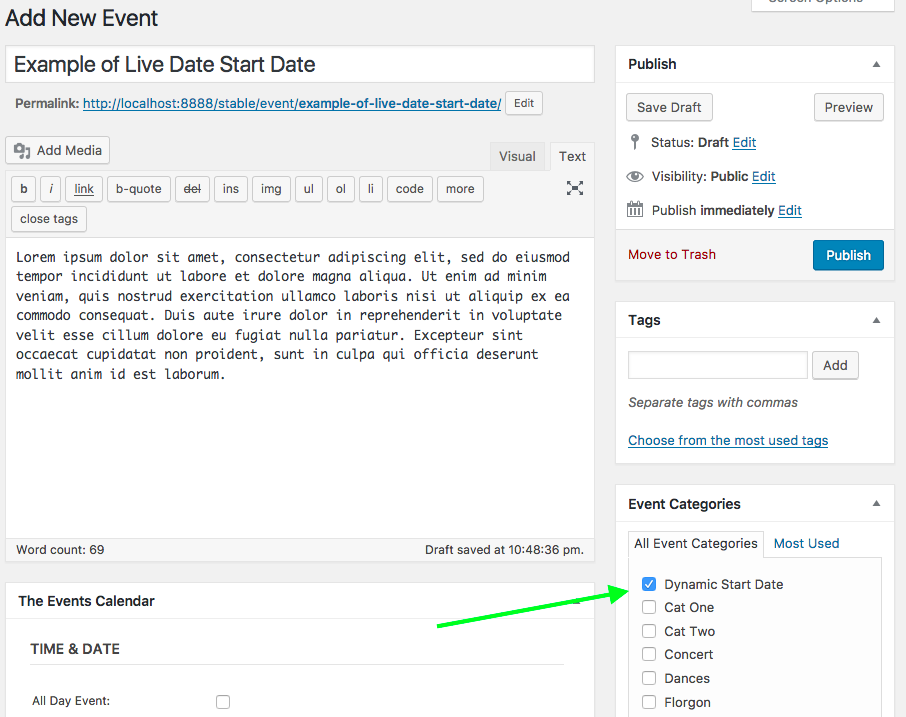
For any event that has that category, the start time of the event will be altered as you describe: it will show the set end date, but for the start date will show the current date.
Now, if you’re looking at a passed event, then it will just show the set start date. You didn’t specify this feature, but I added because it seems to make sense to me.
For example, let’s say today is October 10th.
For one “Dynamic Start Date” event, its start date is October 1 and its end date is October 15th. When you view it, it’s schedule details will say, “October 10 – October 15”.
Now let’s say there’s another event that started October 1, and ended October 5. Even though it has the “Dynamic Start Date” category, when you view it its schedule details will say, “October 1 – October 5”, because it wouldn’t make sense if it said it started October 10 and ended October 5!
The snippet I shared here is just a starting place; take it, tinker with it, etc. I hope it helps! 😀
— George
-
AuthorPosts