
Home › Forums › Ticket Products › Event Tickets Plus › How do we add free delegates?
- This topic has 15 replies, 5 voices, and was last updated 9 years, 11 months ago by
Richard.
-
AuthorPosts
-
September 30, 2016 at 7:52 am #1170998
Richard
ParticipantHow do we add in free delegates to the attendee list? Some sales are done offline for example but we still need tickets etc generating for them.
Thanks
September 30, 2016 at 8:00 am #1171004Geoff
MemberHey Richard, happy Friday!
Great question. You will need to create am manual order for offline registrations directly through WooCommerce by heading to WooCommerce > Orders > New. That will allow you to create a new order for someone who registered offline and, once it’s been created, the regular process of a ticket being created and sent to the attendee will take place.
Does this help answer your question? Please let me know. 🙂
Cheers,
GeoffSeptember 30, 2016 at 8:07 am #1171007ParticipantThanks, will that reduce the ticket count too?
September 30, 2016 at 11:34 am #1171173MemberIt absolutely will. 🙂
October 1, 2016 at 4:12 am #1171415ParticipantSorry on this page I can’t work out how to select the right type of ticket or how to select a ticket at all?
October 3, 2016 at 7:25 am #1171772MemberHi Richard, hope you had a great weekend!
Which page are you referring to? Do you perhaps have a link or screenshot where I can see what you’re referring to?
Thanks!
GeoffOctober 3, 2016 at 1:01 pm #1171926ParticipantSure, here. Where do I say what ticket? Under add product there’s no tickets to select.
October 3, 2016 at 2:57 pm #1171973MemberSorry, Richard, I am still not seeing a link or screenshot in your last reply. Will you please try again?
If you’re referring to the WooCommerce new order screen (screenshot), then you will want to first click the “Add product(s)” button and then search for the ticket you want to add to the order.
Thanks!
GeoffOctober 4, 2016 at 5:26 am #1172206ParticipantYes but then when I search for a product there are none there!
October 4, 2016 at 8:16 am #1172279MemberHi Richard,
The search depends on whether you have created tickets for events. Have you created tickets for any of your events so far? If not, you can do that by clicking “Edit” on the event, then scrolling down to the “Tickets” section (screenshot) which will allow you to create tickets for the event.
If you’re not seeing the “Tickets” section in the event editor, please head to Events > Settings > Tickets and make sure that “Event” is a selected option for using tickets (screenshot).
Once those tickets have been published to the event, they will also be searchable in the WooCommerce order screen.
Cheers!
GeoffOctober 7, 2016 at 4:03 am #1173666ParticipantYes, we have sold tons of tickets!
October 9, 2016 at 11:34 am #1174291George
ParticipantI’m sorry to hear that troubles are persisting here, Richard!
Here is what I would recommend doing:
1. Go to the Products list in your site’s wp-admin. Here’s a screenshot of my own site’s Products list for reference (click for a larger-sized image):
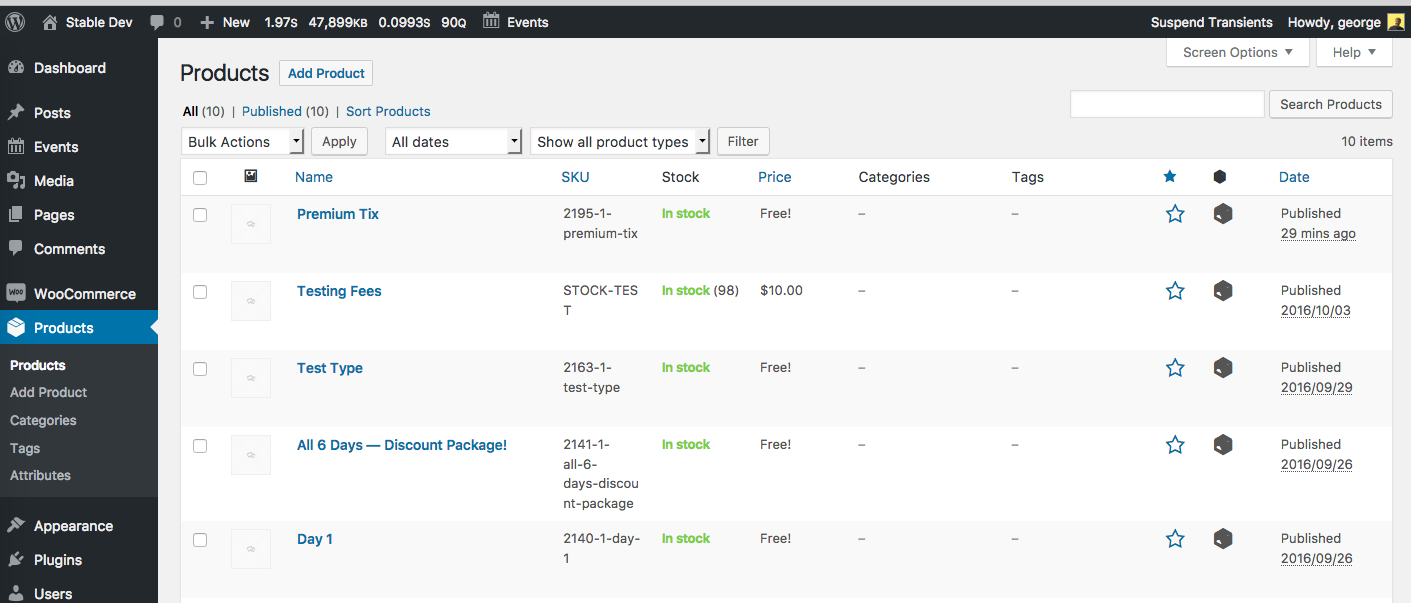
2. Look at specific product names. For example, in my Products list above, we can see that one of the tickets is a Product called “Premium Tix”.
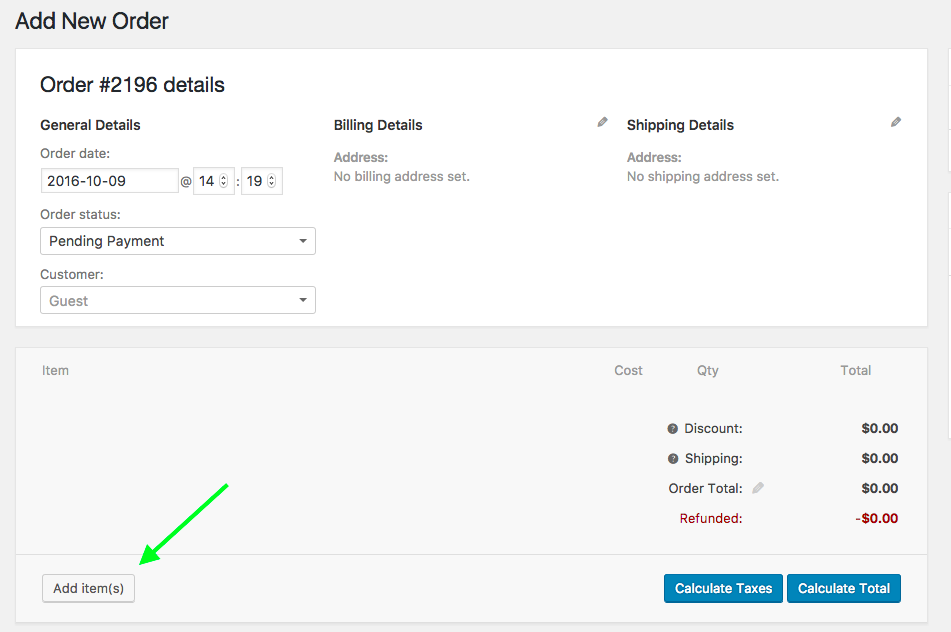
3. Next, go back to the Orders → Add New screen.
4. Click “Add Items” as shown in this screenshot (click for a larger-sized image):
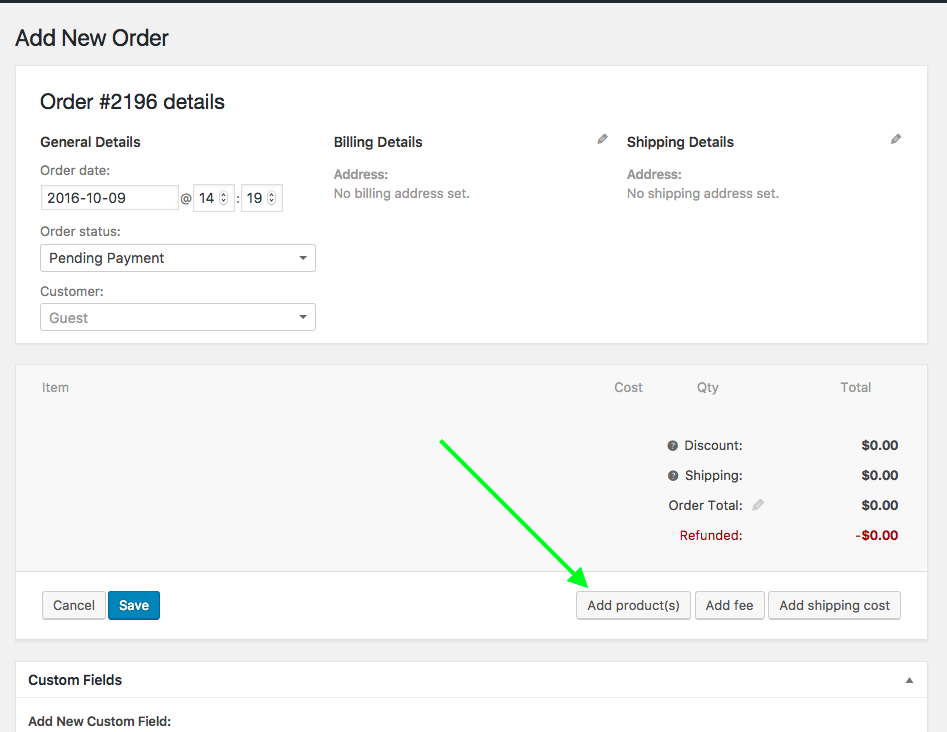
4. That will make some other buttons show up. Of these buttons, click “Add Product(s)” as shown in this screenshot (click for a larger-sized image):
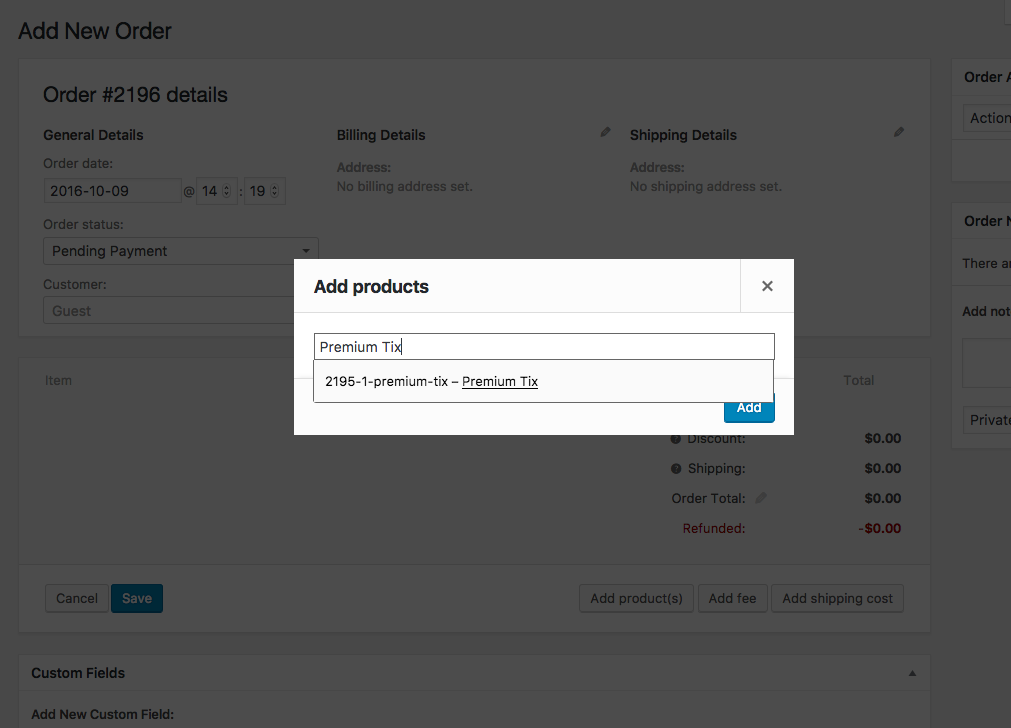
5. Search for the exact product name of the ticket you are trying to add orders for. As shown in the following screenshot, I am searching specifically for that “Premium Tix” ticket product we found earlier back in Steps #1 and #2 (click for a larger-sized image):
If the steps above are not working for you, where exactly and specifically along the way are things failing? For example, do you not see any ticket products in the “Products” list to begin with in Step #1 above? Or do you see them there, but they just don’t turn up when you search in Step #5 above?
Thanks for your patience,
GeorgeOctober 14, 2016 at 10:51 am #1176717ParticipantOK I have this working, but there’s no way to add in the attendee names?
How do I do that? For example a company buys ten tickets – we need to enter that order and the names of the attendees.
Thanks
October 17, 2016 at 5:04 pm #1178029ParticipantHey Richard,
You can adjust the singular Customer of the order, and you can modify the Billing Address and Shipping Address.
If you are hoping to manually add “Additional Information” using the “Additional Information” features for tickets provided by Event Tickets Plus, this is unfortunately not possible from inside WooCommerce.
Let me know if this information helps!
Sincerely,
GeorgeNovember 8, 2016 at 8:35 am #1189203Support Droid
KeymasterHey there! This thread has been pretty quiet for the last three weeks, so we’re going to go ahead and close it to avoid confusion with other topics. If you’re still looking for help with this, please do open a new thread, reference this one and we’d be more than happy to continue the conversation over there.
Thanks so much!
The Events Calendar Support Team -
AuthorPosts
- The topic ‘How do we add free delegates?’ is closed to new replies.