
Home › Forums › Calendar Products › Events Calendar PRO › Feasible to display live current date instead of start date for date range?
- This topic has 3 replies, 4 voices, and was last updated 9 years, 11 months ago by
pixelcrane.
-
AuthorPosts
-
October 7, 2016 at 2:53 pm #1173910
pixelcrane
ParticipantHi there people who make the world go round!
Here is the scenario… let’s say we have an event that goes from August 15, 2016 – October 31, 2016. Is it feasible to have the front end display:
Event Name
<dynamicCurrentDate> – October 31, 2016-instead of-
Event Name
August 15, 2106 – October 31, 2016Logically this would have to auto-update and display the actual date at midnight every day from August 15, 2016 – October 31, 2016. Then, on October 31, 2016 the event would display as…
Event Name
October 31, 2016You can see how the reasoning would apply to the site we have at http://www.jhparkcity.com/events/
Specifically, my questions would be applicable for events like ‘Endangered Landscape Exhibits’ and ‘Dealer’s Choice Exhibit’
Gracias!
October 8, 2016 at 10:01 pm #1174196George
ParticipantHey @pixelcrane,
Thanks for stopping by.
Doing this is possible, though a little tricky. Per our support policy we unfortunately cannot help with writing custom snippets and such, but I’ve gone ahead and made a proof-of-concept snippet here for you that should at least help you get started!
Here is that snippet:
function tribe_add_dynamic_start_date_to_selected_events( $inner, $event_id ) {// If the current event is *not* in the "Dynamic Start Date" category, return normal details.
if ( is_object_in_term( $event_id, 'tribe_events_cat', 'dynamic-start-date' ) ) {
return $inner;
}// Get timestamp of the event start time.
$end_timestamp = tribe_get_end_date( $event_id, true, 'U' );// If the event is being viewed after its end time, just return the normal details.
if ( strtotime( 'now' ) > $end_timestamp ) {
return $inner;
}return date( tribe_get_date_format(), strtotime( 'now' ) ) . ' - ' . tribe_get_end_date( $event_id );
}add_filter( 'tribe_events_event_schedule_details_inner', 'tribe_add_dynamic_start_date_to_selected_events', 10, 2 );
☝️ Try adding this snippet to your theme’s functions.php file and let me know if it helps.
Once the snippet is added to your theme’s functions.php file, head to an event whose start times you want to be “dynamic” in this way. Then, make an event category called “Dynamic Start Date” and give that event that category. Here is a screenshot showing this in effect:
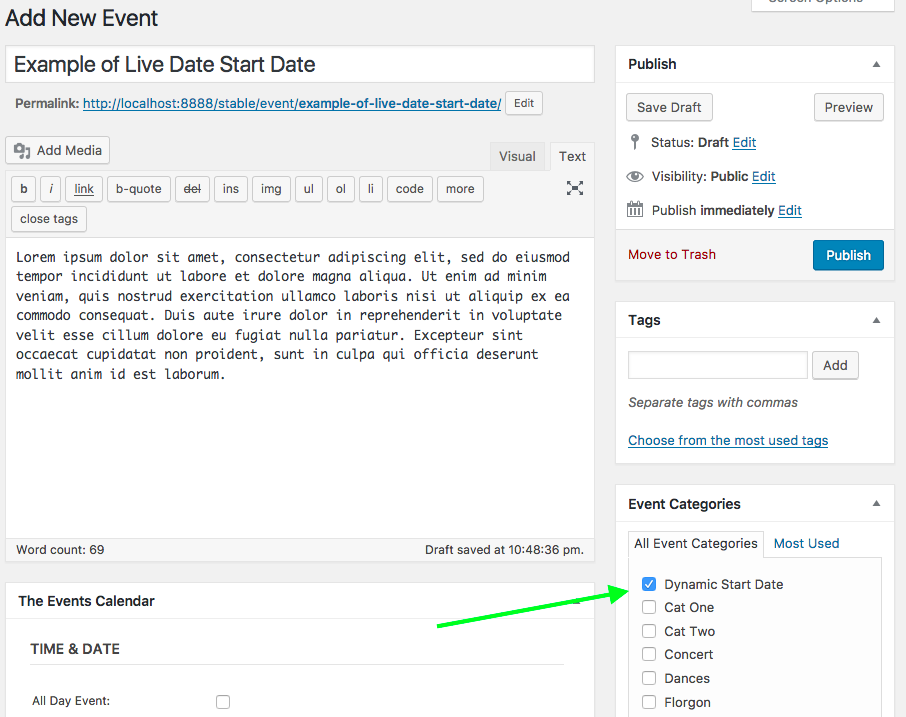
For any event that has that category, the start time of the event will be altered as you describe: it will show the set end date, but for the start date will show the current date.
Now, if you’re looking at a passed event, then it will just show the set start date. You didn’t specify this feature, but I added because it seems to make sense to me.
For example, let’s say today is October 10th.
For one “Dynamic Start Date” event, its start date is October 1 and its end date is October 15th. When you view it, it’s schedule details will say, “October 10 – October 15”.
Now let’s say there’s another event that started October 1, and ended October 5. Even though it has the “Dynamic Start Date” category, when you view it its schedule details will say, “October 1 – October 5”, because it wouldn’t make sense if it said it started October 10 and ended October 5!
The snippet I shared here is just a starting place; take it, tinker with it, etc. I hope it helps! 😀
— George
October 30, 2016 at 9:35 am #1185055Support Droid
KeymasterHey there! This thread has been pretty quiet for the last three weeks, so we’re going to go ahead and close it to avoid confusion with other topics. If you’re still looking for help with this, please do open a new thread, reference this one and we’d be more than happy to continue the conversation over there.
Thanks so much!
The Events Calendar Support Team -
AuthorPosts
- The topic ‘Feasible to display live current date instead of start date for date range?’ is closed to new replies.