

Forum Replies Created
-
AuthorPosts
-
October 20, 2016 at 7:02 pm in reply to: Update caused Fatal error: Can't use function return value in write context in / #1180270
George
ParticipantHey there,
We ran into an issue with the packaging of the 4.3.1 update of The Events Calendar and Event Tickets.
There are two main solutions to proceed and work around these issues.
First: Replace the Files of The Events Calendar 4.3.1.1
- If you are able to access your site files via FTP, head to the /wp-content/plugins directory and delete the /the-events-calendar folder there. This will not delete event content.
- Once that is deleted, download a fresh copy of The Events Calendar 4.3.1.1 from WordPress.org ? http://wordpress.org/plugins/the-events-calendar
- Install this new fresh copy of The Events Calendar 4.3.1.1 on your site.
⚠️ Please Note: If you have Event Tickets on your site, you may also want to do this process for Event Tickets 4.3.1.1, available on WordPress.org here.
Next: PHP 5.2 Fix
If you do the above steps and still see fatal error when you try to access your site, then this is the result of your site’s server running an old version of PHP.
To proceed, first please contact your web host and ask them to upgrade the version of PHP they are running. While we do try to support old versions of PHP 5.2, because WordPress itself does, using out-of-date versions of software like this is bad for security and site performance.
You can contact your web host and request they update their servers by sending a message like this:
I'm interested in running the open-source WordPress (https://wordpress.org/) web software and I was wondering if my account supported the following:• PHP 5.6 or greater
• MySQL 5.6 or greater
• The mod_rewrite Apache moduleThanks!
Then, you have two options for a temporary fix:
- You can head to line 97 of events-calendar-pro/src/functions/template-tags/venue.php from this:
return ! empty( tribe_get_events( $args ) );to this:
$tribe_events = tribe_get_events( $args );

return ! empty( $tribe_events ); - Or you can delete The Events Calendar 4.3.1.1 and Events Calendar Pro 4.3.1 from your site and temporarily re-install versions 4.3 of both plugins until we release a fix for this issue—which we will do promptly and are working on as I type this response.
Thank you so much for your patience! Please let us know if you have further questions on this matter or anything else we can try to help with.
Sincerely,
GeorgeParticipantHey there,
We ran into an issue with the packaging of the 4.3.1 update of The Events Calendar and Event Tickets.
There are two main solutions to proceed and work around these issues.
First: Replace the Files of The Events Calendar 4.3.1.1
- If you are able to access your site files via FTP, head to the /wp-content/plugins directory and delete the /the-events-calendar folder there. This will not delete event content.
- Once that is deleted, download a fresh copy of The Events Calendar 4.3.1.1 from WordPress.org ? http://wordpress.org/plugins/the-events-calendar
- Install this new fresh copy of The Events Calendar 4.3.1.1 on your site.
⚠️ Please Note: If you have Event Tickets on your site, you may also want to do this process for Event Tickets 4.3.1.1, available on WordPress.org here.
Next: PHP 5.2 Fix
If you do the above steps and still see fatal error when you try to access your site, then this is the result of your site’s server running an old version of PHP.
To proceed, first please contact your web host and ask them to upgrade the version of PHP they are running. While we do try to support old versions of PHP 5.2, because WordPress itself does, using out-of-date versions of software like this is bad for security and site performance.
You can contact your web host and request they update their servers by sending a message like this:
I'm interested in running the open-source WordPress (https://wordpress.org/) web software and I was wondering if my account supported the following:• PHP 5.6 or greater
• MySQL 5.6 or greater
• The mod_rewrite Apache moduleThanks!
Then, you have two options for a temporary fix:
- You can head to line 97 of events-calendar-pro/src/functions/template-tags/venue.php from this:
return ! empty( tribe_get_events( $args ) );to this:
$tribe_events = tribe_get_events( $args );

return ! empty( $tribe_events ); - Or you can delete The Events Calendar 4.3.1.1 and Events Calendar Pro 4.3.1 from your site and temporarily re-install versions 4.3 of both plugins until we release a fix for this issue—which we will do promptly and are working on as I type this response.
Thank you so much for your patience! Please let us know if you have further questions on this matter or anything else we can try to help with.
Sincerely,
GeorgeParticipantHey there,
We ran into an issue with the packaging of the 4.3.1 update of The Events Calendar and Event Tickets.
There are two main solutions to proceed and work around these issues.
First: Replace the Files of The Events Calendar 4.3.1.1
- If you are able to access your site files via FTP, head to the /wp-content/plugins directory and delete the /the-events-calendar folder there. This will not delete event content.
- Once that is deleted, download a fresh copy of The Events Calendar 4.3.1.1 from WordPress.org ? http://wordpress.org/plugins/the-events-calendar
- Install this new fresh copy of The Events Calendar 4.3.1.1 on your site.
⚠️ Please Note: If you have Event Tickets on your site, you may also want to do this process for Event Tickets 4.3.1.1, available on WordPress.org here.
Next: PHP 5.2 Fix
If you do the above steps and still see fatal error when you try to access your site, then this is the result of your site’s server running an old version of PHP.
To proceed, first please contact your web host and ask them to upgrade the version of PHP they are running. While we do try to support old versions of PHP 5.2, because WordPress itself does, using out-of-date versions of software like this is bad for security and site performance.
You can contact your web host and request they update their servers by sending a message like this:
I'm interested in running the open-source WordPress (https://wordpress.org/) web software and I was wondering if my account supported the following:• PHP 5.6 or greater
• MySQL 5.6 or greater
• The mod_rewrite Apache moduleThanks!
Then, you have two options for a temporary fix:
- You can head to line 97 of events-calendar-pro/src/functions/template-tags/venue.php from this:
return ! empty( tribe_get_events( $args ) );to this:
$tribe_events = tribe_get_events( $args );

return ! empty( $tribe_events ); - Or you can delete The Events Calendar 4.3.1.1 and Events Calendar Pro 4.3.1 from your site and temporarily re-install versions 4.3 of both plugins until we release a fix for this issue—which we will do promptly and are working on as I type this response.
Thank you so much for your patience! Please let us know if you have further questions on this matter or anything else we can try to help with.
Sincerely,
GeorgeOctober 20, 2016 at 6:44 pm in reply to: Permalink Not Editable for Recurring Events After Most Recent Update #1180260ParticipantHey Kevin,
I have confirmed that there is a bug here and I have reported this to our development team.
I’m sorry for the trouble here; I will update this thread with news about when this is fixed. It could unfortunately take several weeks before a bug fix truly arrives.
If I have not posted here, then there is no news since my last post here — but I assure you I will update this thread with updates about the status of the bug fix.
Thank you for reporting this!
Please let me know if there’s anything else I can try to help with in the meantime.
Sincerely,
GeorgeOctober 20, 2016 at 6:44 pm in reply to: Permalink Not Editable for Recurring Events After Most Recent Update #1180259ParticipantHey Brian,
I have confirmed that there is a bug here and I have reported this to our development team.
I’m sorry for the trouble here; I will update this thread with news about when this is fixed. It could unfortunately take several weeks before a bug fix truly arrives.
If I have not posted here, then there is no news since my last post here — but I assure you I will update this thread with updates about the status of the bug fix.
Thank you for reporting this!
Please let me know if there’s anything else I can try to help with in the meantime.
Sincerely,
GeorgeOctober 20, 2016 at 2:03 pm in reply to: Pro or Add-On(s) to Achieve RSVP with Purchase Option? #1180118ParticipantHey Josef,
Thanks for reaching out.
Our plugins unfortunately don’t have any support for this sort of RSVP configuration. 🙁 You would have to specifically mention costs in your event post, or get clever with custom coding to modify the display of that “FREE” text to something else on an event-by-event basis.
Sorry to disappoint! Please let me know if there’s anything else I can try to help with.
Sincerely,
GeorgeOctober 20, 2016 at 1:59 pm in reply to: Issue with FB Events after Aggregator showed up in WP #1180116ParticipantHey Christos,
I’m sorry to hear about these troubles.
You do NOT have to use Event Aggregator. To completely disengage Event Aggregator from your site, simply remove the Event Aggregator license key from your Events settings page in your wp-admin.
1. Once you have removed this license key, do issues persist for you?
2. Can you confirm if you are accessing the “Facebook” tab you are referring to by going to the “Legacy Imports” menu item in your wp-admin? Here is a screenshot of what I am referring to:
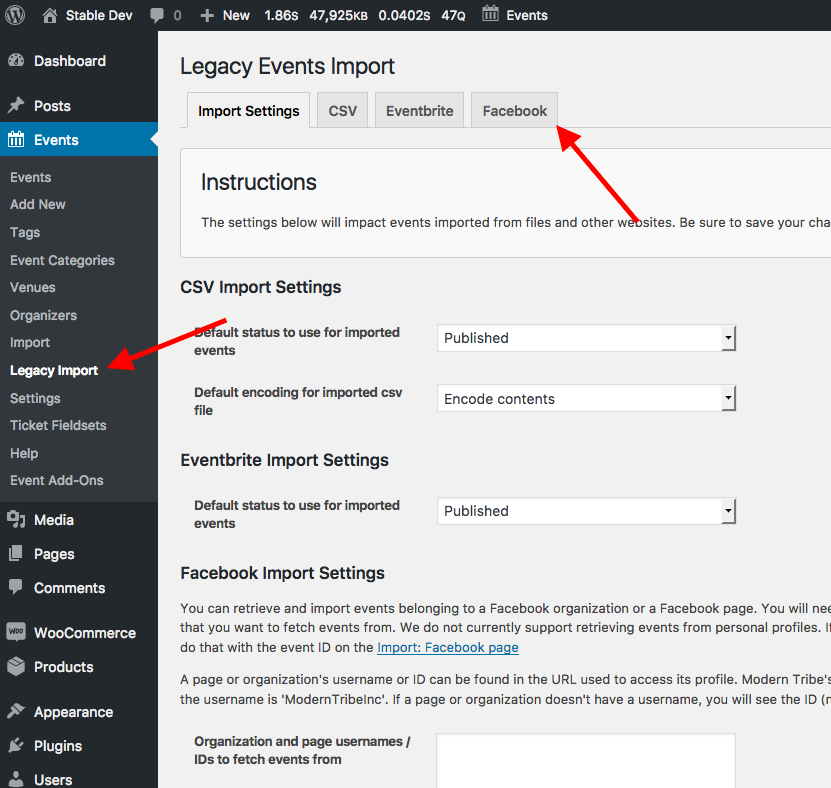
☝️ Is this the Facebook page you’re using in your admin?
Please address EACH of my questions above in your response — I appreciate your patience, @Christos, and if you can respond to each item in our posts here we can ensure a faster support exchange to try and resolve these problems for you.
Thank you,
GeorgeParticipantHey Jason,
I’m sorry for the trouble here.
I took a look at your site and there is a CORS header issue (Cross-Origin Resource Sharing).
Basically, some resources are being served up over HTTPS on your site, (https://), while others are over HTTP (http://). This inconsistency in protocols is not allowed by browsers and will cause issues like you face.
We have noticed this issue arising from some other customers — it seems like there is a bug in our code, that we have not confirmed this.
Your case here only elevates the concern and I am reporting this to our developers; we will try to confirm a bug here and I will keep you posted with news about these issues.
Stay tuned!
GeorgeOctober 20, 2016 at 12:48 pm in reply to: Permalink Not Editable for Recurring Events After Most Recent Update #1180070ParticipantSorry to hear about this Brian!
I don’t notice any issues — to help me investigate, let’s start with what you wrote here:
De-selecting the event and re-saving a draft allows the EDIT box to the right of the permalink to return. However, once the event has been toggled to recurring then saved, the EDIT box disappears from view.
☝️ Can you share a screenshot of this specific “EDIT” box you are referring to? You can do so by uploading the screenshots to this thread. If you have issues with that, you can upload to Imgur.com, Flickr.com, CloudUp.com, or any similar image-hosting site; then just share the links to those images here and I’ll take a look.
Thank you!
GeorgeParticipantThis thread is a duplicate, so I am closing it and continuing the discussion here ? https://theeventscalendar.com/support/forums/topic/facebook-events-tab-not-showing-up-2/
ParticipantHey @soul322,
Once you enter the Facebook license key and App details, you should be able to head to Events → Legacy Imports in your wp-admin and there you should find the “Facebook” tab you’re looking for.
Here is a screenshot of this:
☝️ Let me know if you see this and if this information helps!
— George
ParticipantThanks for reaching out, Waseem!
Our plugins have no specific integration with that plugin, so I would recommend contacting the makers of that plugin directly for insight on what it is compatible with.
As noted, though, our plugins have no specific integration with that plugin.
Sincerely,
GeorgeOctober 20, 2016 at 12:18 pm in reply to: Why in comments: During scheduled import, the limit of HTTP requests was reached #1180050ParticipantThis reply is private.
ParticipantThanks for sharing your findings here, folks. I will now close this thread to facilitate the posting in premium forums that I mentioned in my reply above. Please do upgrade your version of WordPress if needed, Martin — the current version is 4.6.1.
Best of luck with your projects!
GeorgeOctober 20, 2016 at 12:10 pm in reply to: Events Tickets Plus required data from tickets fieldsets missing #1180042ParticipantThanks Sabine — for your information here, and for your patience as we continue to investigate this.
One thing I’m curious about is if you could please make a test event, with test tickets? This way, you can test in one setting if newly-created events suffer the same issues, instead of waiting until the future “real” event.
I would recommend making two test events, actually:
• One with just as many “Additional Fields” as the first event, which had the issues.
• Another with only one or two “Additional Fields”.See if issues arise once you make these test events and do some test ticket purchase/registrations (make yourself a 100%-off coupon code so you don’t have to actually spend money in the transactions).
If issues do persist in these test events, then deactivate ALL plugins on your site except for only these ones:
• The Events Calendar 4.3
• Event Tickets 4.3
• Event Tickets Plus 4.3
• WooCommerce 2.6.6Then, activate a default theme like Twenty Sixteen or Twenty Twelve.
Then, repeat the process above of creating two test events, with test tickets of different amount of “Additional Fields”, and try testing again.
What do you find by doing these tests?
Thank you for your patience here,
George -
AuthorPosts