

Forum Replies Created
-
AuthorPosts
-
November 4, 2016 at 9:36 am in reply to: Can i have Custom Fields, custom alterations and custom pin #1187810
Geoff
MemberHi Aamir,
There is a Month View that comes standard with The Events Calendar — that is what we typically refer to as a grid view (screenshot).
If you’re looking for something a little different, Events Calendar PRO includes a Photo View that is also in the form of a grid layout (screenshot).
Cheers!
GeoffMemberHi @ico33,
Good question. The Events Calendar does not include an option to auto-delete events, but there are a number of WordPress plugins that might be able to help.
I have used the Post Expirator plugin before with The Events Calendar and it seems to do the trick.
Will that work for you as well? Please let me know. 🙂
Cheers!
GeoffNovember 4, 2016 at 9:23 am in reply to: Community Events: edit possible without access to backend #1187748MemberHi Torsten,
Yes, absolutely! Community Events allows a person to edit their events after they have been submitted without having access to the WordPress dashboard of your site. 🙂
Does this help answer your question? Please let me know.
Cheers and happy Friday!
Geoff
MemberHi Felix,
Thanks for getting in touch!
I’m sorry to say that we do not have any promotions running for custom bundles at the moment, though we do post our latest deals here for future reference.
However, please send us an email through our contact form and reference this thread because I think we might be able to find another way to help you out.
Cheers,
GeoffMemberHi Darlene,
Oh no, so sorry for the trouble! Events being out of order is definitely not a good thing.
I’m actually surprised that I have not seen any other reports of this because I was able to replicate the same issue on my test site and it would seem to be something that might affect a lot of people.
I have opened a ticket for this in our system. At this point, I do not have a timeframe for when it will be assigned to an upcoming release, but I will mark this thread as Pending Fix so that we can follow-up with you when we have more news to share.
Thanks for the heads up and for your patience while we work on this!
Geoff
MemberHi Ross,
Oh man, the idea to allow customers to re-send the ticket email to themselves is awesome!
I am afraid that isn’t supported by the plugins at the moment, but I can see how extremely useful that would be. In fact, would you be willing to post this to our feature request forum? That will ensure it gets seen and prioritized, as well as, allow other people to vote on it. That would be super helpful and much appreciated!
Sorry I don’t have a workaround for you in the meantime, but does this at least help answer your question? Please let me know.
Thanks,
GeoffNovember 4, 2016 at 8:32 am in reply to: Woo Event Ticket Cart – Separate Tickets / Show Attendee Meta #1187716MemberHey Steven,
That’s excellent feedback.
I am afraid that we do not have a workaround, though I believe that would be possible to accomplish with custom development — most likely with an override of WooCommerce’s cart template. The trick (and admittedly a tough one) would be to alter the WooCommerce query for products in the cart so that it displays all instances of a product rather than grouping them together in batches with quantity.
Ultimately, the change will have to come on the WooCommerce side of things since Event Tickets Plus is merely using the default WooCommerce functionality rather than it’s own thing.
Sorry I don’t have a concrete solution here, but does this at least help answer your question? Please let me know.
Thanks,
GeoffMemberHi Mandy and happy Friday!
Yes, the ticket fieldset data can be found in the attendee report for an event.
You can access that information by clicking on the Attendees list for an event (screenshot) and then on the “View Details” link of an attendee (screenshot). That will reveal the fieldset data for a specific attendee (yet another screenshot).
Is this what you’re looking for? Please let me know. 🙂
Cheers!
GeoffMemberHi @digitaliway and happy Friday. 🙂
You can create a dropdown field asking customers where they would like to be picked up by using a custom ticket field in the ticket settings for the event.
Here is a detailed guide that provides step-by-step instructions for creating custom ticket fields:
https://theeventscalendar.com/knowledgebase/collecting-attendee-information/
Will this help you get started? Please let me know.
Cheers!
GeoffMemberHello Rob and happy Friday!
I have seen this sort of thing pop up before. Both the mapping and geolocation features of the plugin are powered by the Google Maps API and the issue has been related to that in the past. More specifically, one venue is properly validated by the API using the venue address but the other is not recognized by the API for some reason or another.
One thing we ought to try right off the bat is to specify the exact latitude/longitude coordinates for the Melbourne venue in the venue settings.
You can add the coordinates by heading to Events > Venues from the WordPress dashboard and clicking “Edit” on the venue. Once in there, there is an option to use the venue’s coordinates:
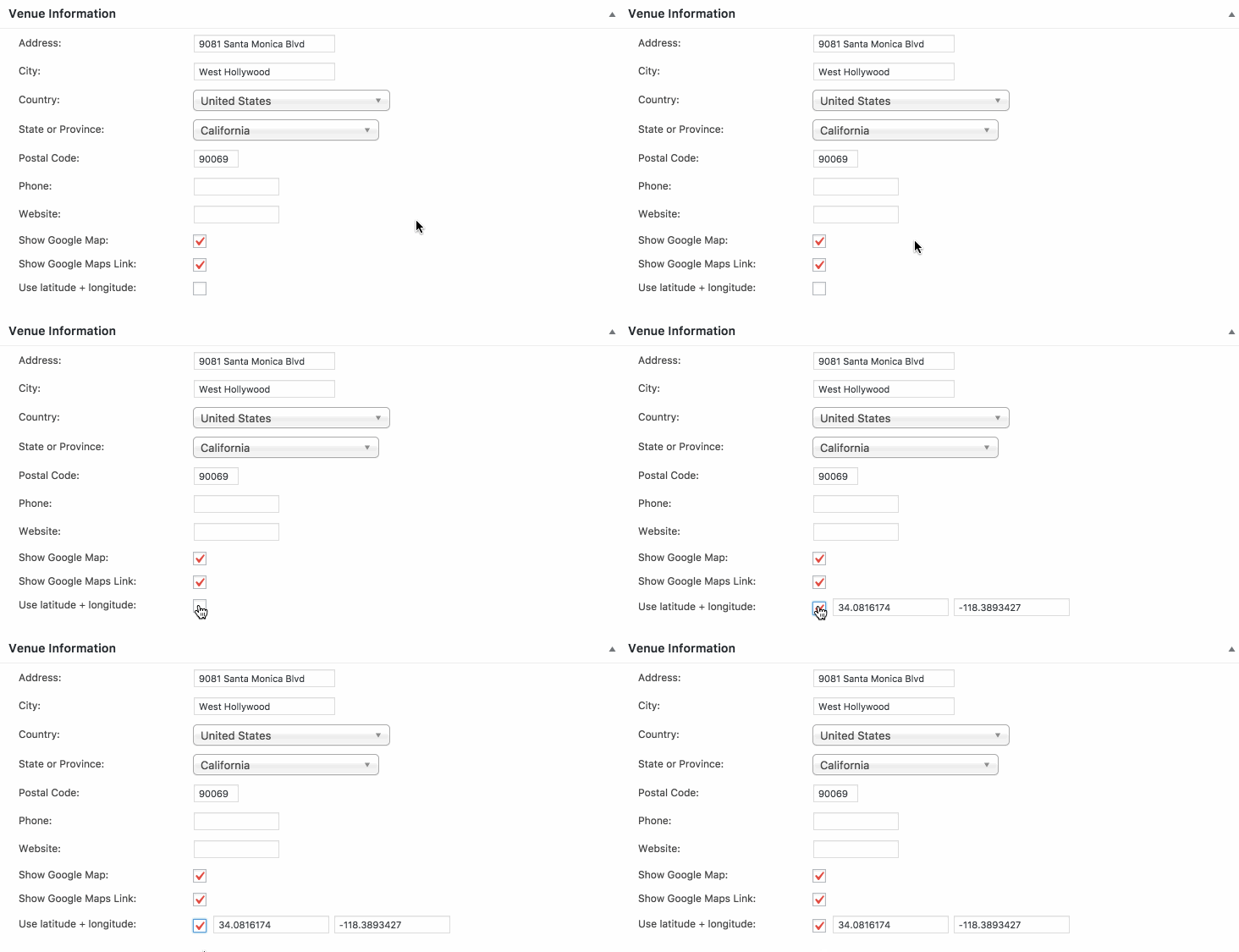
The coordinates should populate automatically but, if they do not, you can enter them manually using the information in the Google Maps URL for the venue.In this case, it looks like that would be: -37.971237 and 144.4926947.
Enter those coordinates, save the venue and hopefully that should do the trick. I will warn that the change may not be immediate and, if there is a caching plugin on your site, you will want to clear the website cache to help speed the process up a bit. You can also head to Settings > Pernalinks from the WordPress dashboard, click the Save button on the screen without making any changes and that will further flush the site’s cache.
Let’s start there and see what we find.
Thanks!
GeoffMemberHi Olli,
Thanks for purchasing Events Calendar PRO! That’s awesome.
I think you just found a limitation in how custom recurring events work because you’re absolutely right: you can set a custom start time but not a custom start date if you use the Custom recurrence option, and you can set a custom start but not a custom start time if you use the Date recurrence option.
I’m so sorry I misled you on that. I totally understand if that’s a deal-breaker and would be happy to refund your purchase if you would prefer to not use the plugin because if that. Let me know and I can process that for you.
Thanis,
GeoffMemberHi Nauman,
I have actually not seen any other plugins that offer that functionality. They may very well be out there, but nothing has been shared here on the forums and the quick search I did on WordPress.org did not seem to return any helpful results either.
Cheers,
GeoffNovember 4, 2016 at 7:50 am in reply to: "Reset filters" feature somewhat counterintuitive when using search field #1187687MemberPerfect! Man, I’m really sorry I didn’t have that direct link for you. I must have looked right past it, but I’m super glad you found it and that’s an excellent place to contribute additional thoughts, feedback and sketches. 🙂
Geoff
November 4, 2016 at 7:47 am in reply to: Making users pay to load events and other questions #1187685MemberHa! I love that your fictional example just happened to be in my backyard. 🙂
Thanks so much for the clarification — that makes a lot of sense.
Community Events is unfortunately unable to prevent visitors from using saved Organizers when submitting events. You can set a default Organizer to be displayed (which requires Events Calendar PRO to also be installed), but all of the saved Organizers from previous submissions would still be available to use in those submissions.
So sorry for the bad news there, but does that at least shed some light on how the Community Events submissions work with organizers? Let me know if you have additional questions and I’d be happy to help as best I can!
Cheers,
GeoffNovember 4, 2016 at 7:41 am in reply to: The ticket prices showing are not correct whenever ticket end date is reached #1187681MemberThis reply is private.
-
AuthorPosts

