
Home › Forums › Welcome! › Pre-Sales Questions › Community Events: edit possible without access to backend
- This topic has 11 replies, 2 voices, and was last updated 9 years, 11 months ago by
Geoff.
-
AuthorPosts
-
November 4, 2016 at 5:24 am #1187648
Torsten Voll
GuestHey there,
Can an event be edited after submission by an event planner without having access to the backend of my website?
Cheers & kind regards,
TorstenNovember 4, 2016 at 9:23 am #1187748MemberHi Torsten,
Yes, absolutely! Community Events allows a person to edit their events after they have been submitted without having access to the WordPress dashboard of your site. 🙂
Does this help answer your question? Please let me know.
Cheers and happy Friday!
Geoff
November 10, 2016 at 9:44 am #1190458Torsten
ParticipantHi Geoff,
Sounds good, thx, but how?
What would be the settings and how does it work after an event has been submitted. How to get it back or access to it?
Thanks for your help!
Kind regards,
TorstenNovember 10, 2016 at 10:00 am #1190469MemberHi Torsten,
The attendee can visit the event page and there text above the ticket form that tells them how many tickets they have reserved for the event with a link to view their tickets (screenshot).
Clicking that link will allow them to edit their registration details (screenshot).
Cheers!
GeoffNovember 10, 2016 at 10:16 am #1190478ParticipantHey Geoff,
Thanks for your quick response!
I am not sure I can follow you. There are no tickets involved. Our website offers event organisers to submit their own event. I want them to be able to edit the event details afterwards in case something went wrong but without them logging into the wordpress backend.
So how is it possible?
Cheers,
TorstenNovember 10, 2016 at 2:03 pm #1190640MemberOh, I’m sorry — I totally misread your question!
An organizer can see and edit the events they have submitted to the Community Events form by visiting:
[your-site]/events/community/list
Note that your URL will be different if you use a different slug that /events for your calendar. 🙂
Is that what you were looking for? Sorry again for the mixup!
Geoff
November 10, 2016 at 2:29 pm #1190651ParticipantNo problem Geoff!
I tried this now but it looks that the organiser needs to sign into the backend and this is want I don’t want or am I wrong?
Cheers,
TorstenNovember 11, 2016 at 7:21 am #1190874MemberHi Torsten,
Please head to Events > Settings > Community and make sure the following setting is active:
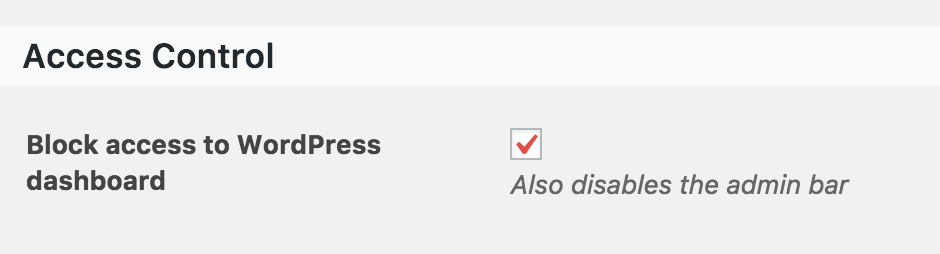
That will ensure the organizer does not have access to the WordPress dashboard when editing their events.
Thanks!
GeoffNovember 11, 2016 at 7:46 am #1190889GuestThanks Geoff,
But still there is a sign-in necessary. My organisers do not have an account.
I do not want them to so how can they see their event they have just submitted?Cheers,
TorstenNovember 11, 2016 at 9:09 am #1191027MemberHi Torsten,
I’m afraid that logging in is necessary one way or another — otherwise, there would be no way for to associate which events belong to the people who submitted them.
The Community Events setting I shared above asks the person to log into, but does not provide them access to the WordPress backend. In other words, the only content they will have access to is a front-end list of their own events, which they can use to edit their events.
I hope this clears this up a bit!
Cheers,
GeoffNovember 16, 2016 at 9:52 am #1193317ParticipantThanks for your help Geoff. This makes total sense!
November 17, 2016 at 6:17 am #1193804MemberRight on, happy that helps!
I hope you enjoy using Community Events with The Events Calendar! I’ll close his thread but please do let us know if any questions come up as you get started (we have a ton of great guides as well) and we’d be happy to help. 🙂
Cheers,
Geoff -
AuthorPosts
- The topic ‘Community Events: edit possible without access to backend’ is closed to new replies.