

Forum Replies Created
-
AuthorPosts
-
Geoff
MemberHi Pim,
Thanks for getting in touch!
I’d be happy to help you here but do you have a link where I can see your calendar? That will help me see the layout issue and recommend some code to fix it up. I tried visiting the URL associated with your account, but it redirected me elsewhere and I was unable to access the calendar.
Thanks so much!
GeoffMemberThis reply is private.
MemberHello Christoph,
Yes, you are absolutely fine using one license for both your development and live sites. You will only be able to activate the license on one site at a time, but entering the license only enables automatic plugin updates and has no impact on the functionality of the plugin.
Here’s more details on using one license for both sites:
https://theeventscalendar.com/knowledgebase/using-one-license-live-dev-sites/Does this help answer your question? Please let me know. 🙂
Cheers!
GeoffFebruary 28, 2017 at 7:24 am in reply to: I want to purchase a second license for events calendar pro #1246878MemberHey there,
Great question!
There is no need to purchase a second license. You can simply install the plugin on both sites and it will function the same. The only difference is that you can only input the license key on one of the sites since your license is for a single site — however, entering the license only enables automatic updates, so there will be no functional impact to the site and you will be able to test the plugin as needed.
Does that make sense and will it work for you? Please let me know. 🙂
Cheers!
GeoffMemberHey there and thanks for getting in touch!
There are indeed updates available for both The Events Calendar and Events Calendar PRO:
- The Events Calendar 4.4.3
- Events Calendar PRO 4.4.3
You can download the latest versions by logging into our site and navigating to My Account > Downloads. We have detailed instructions for how to install plugin updates for you as well:
Does this help answer your question? Please let me know. 🙂
Cheers!
GeoffMemberHi Erik,
Oh shoot, sorry about that! I made a small tweak to the snippet and it seemed to do the trick:
function tribe_events_alter_tickets_default_quantity() {
wp_enqueue_script( 'jquery' );
?>
<style>
tr.tribe-tickets-meta-row {
display: table-row !important;
}
</style>
<script>
jQuery(document).ready( function () {
jQuery( '.single-tribe_events input.text' ).val( 1 );
});
</script>
<?php
}
add_action( 'wp_head', 'tribe_events_alter_tickets_default_quantity' );
Hopefully that works for you (and James as well). I’m happy to help you in this thread as well since it is so closely related to the original question but please do feel free to open a new thread if you have additional questions about any thing else besides the snippet.
Thanks so much!
GeoffMemberHeck yeah, that is so awesome to hear! I’m really glad the update did the trick and I appreciate you following up to let me know.
I’ll go ahead and close this thread but let us know if that notice or any other questions come up and we’d be happy to help. 🙂
Cheers!
GeoffMemberRight on! I’m so glad to hear everything is working smoothly and I appreciate you following up to let us know. Definitely keep us posted if any other questions come up and we’d be happy to help. 🙂
Cheers!
GeoffFebruary 28, 2017 at 7:00 am in reply to: How to subscribe to Events to get notified by email when new event is posted? #1246858MemberHey Rishi and thanks for following up!
Glad to hear my last reply helped answer your question and I hope that MailPoet winds up being a nice solution as well once it is fully integrated with your site.
I’ll go ahead and close this thread but let us know if any other questions come up and we’d be happy to help. 🙂
Cheers!
GeoffFebruary 27, 2017 at 4:23 pm in reply to: How to subscribe to Events to get notified by email when new event is posted? #1246567MemberHi Rishi,
Thanks for getting in touch!
The Events Calendar does include an RSS feed that users can subscribe to in any RSS reader app. That said, I’m afraid that our plugins do not include email notifications right out of the box.
One idea you might consider is using the Mail Poet plugin. It allows you to send automated email newsletters based on published posts and I believe works with custom post types, like Events.
Does this help answer your question? Please let me know. 🙂
Cheers!
GeoffMemberHeck yeah, glad to hear it Erik! Thanks for letting us know. 🙂
James, hoping this works for you as well but let me know if you hit a snag along the way.
Cheers!
GeoffMemberHi Adrain,
Awesome, so glad that helped!
I think the best way to change the RSVP title and add an icon is to override the template file altogether.
We have a Themer’s Guide that provides instructions for template overrides, but it basically boils down to this:
- Make a copy of the rsvp.php template. It is located at wp-content/plugins/event-tickets/src/views/tickets/rsvp.php
- Make a new folder in your theme directory called tribe-events
- Make a new folder in that one called tickets
- Drop your copied rsvp.php file in that last folder
Now that the template is in your theme, you can modify it to suit your needs. In this case, change the RSVP header (Line 24) to anything you would like and add your markup for an icon next to it.
Does this help answer your question? Please let me know. 🙂
Cheers!
GeoffMemberHi James,
You can add that to your functions.php file. 🙂
Cheers!
GeoffMemberThis reply is private.
MemberHey Alexander,
Quick question: will you please navigate to Events > Settings > Display and let me know if you have the Photo View option enabled?
Here’s how that should look:
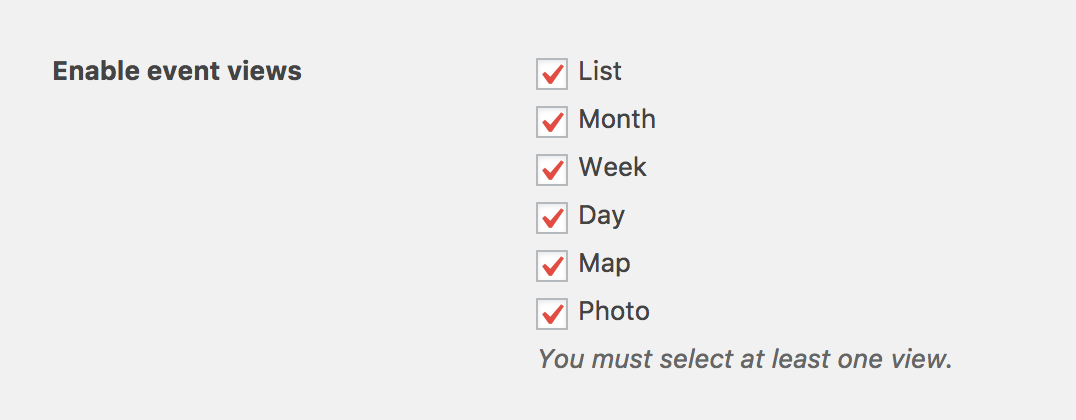
The reason I ask is because Photo does not appear as an option in your calendar menu at the moment (screenshot), which suggests it is disabled.
If the option is disabled, enable it, save your settings, then re-check both your calendar and the homepage.
Thanks so much!
Geoff -
AuthorPosts