

Forum Replies Created
-
AuthorPosts
-
May 2, 2016 at 2:14 pm in reply to: How do I change the url for my Events Calendar Pro License? #1109732
Geoff
MemberExcellent! So glad and thanks for following up. 🙂
For anyone else wondering the same, this article provides all the details:
https://theeventscalendar.com/knowledgebase/moving-your-license-keys/Cheers!
GeoffMemberMy pleasure! Sorry again for striking out hte first time but so glad to hear all is well now — cheers, dude!
Geoff
MemberHey Cesar and welcome back!
The related events are a setting you can find in Events > Settings > Display (screenshot).
Do you see that setting and is it unchecked?
Thanks!
GeoffMemberHey there and thanks for getting in touch!
Yes, recurring events are included in Events Calendar PRO and are likely the best way to show an event like the one you’re describing.
A recurring event can either look like one event or many events in the List View. There is a setting in Events Calendar PRO that allows you to show either the next instance of a recurring event, or all of them. If you have them all showing, then List View will look like this:
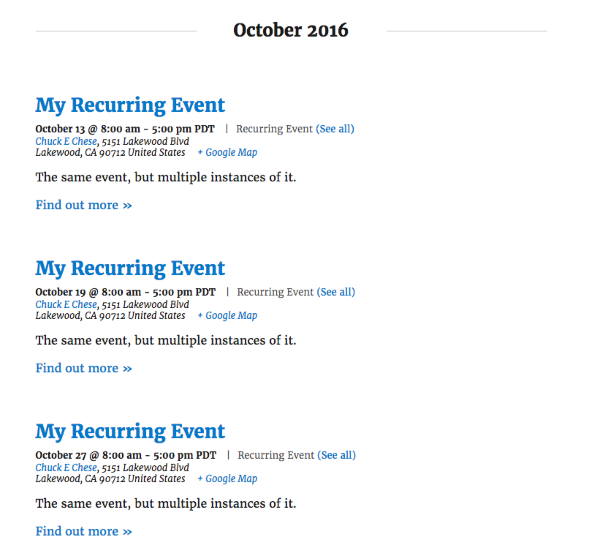
Does that look like what you’re looking for? We definitely offer a full refund on all our products within 30 days of purchase, so I would highly encourage you to check it out to see if it works for you.
Cheers!
GeoffMemberHi Valery,
So sorry for this trouble! Your system information looks pretty clean and I’m still unsure why the tickets would not appear on your WordPress pages.
Just to confirm: will you please run through the steps outlined here to test for conflicts? This will help us determine if there is possibly an integration issue with Event Tickets Plus and another installed plugin, or perhaps the theme itself.
Let me know if the issue is still there when the site is running in those default conditions and we can go from there. 🙂
Thanks!
GeoffMemberAh, gotcha — thanks for clarifying!
Still the same result on my end: I delete the ticket from the event editor and it also is deleted from Products.
I’d be happy to look over your system information if you want to share here in a private reply.
Thanks!
GeoffMemberHi Jean-Philippe!
Nope, not yet. That’s what we’re working on and hope to have in 4.3. 🙂
Cheers,
GeoffMemberHey Michael,
Oh sorry, totally misunderstood!
Moving the link is the same process as removing it. You can take that block of code and move it where you would like it to appear in the template.
Is that what you’re looking for, or is it something else?
Thanks!
GeoffMemberHey Kevin and welcome to the forums!
Javascript will certainly work and you can add that to your theme’s footer template, if you’d like.
Another way to go about it is to do a template override for the widget. You can find out more about template overrides in our Themer’s Guide, but it breaks down to this:
- Make a copy of the single-event.php template. It’s located at /wp-content/plugins/events-calendar-pro/src/views/pro/widgets/modules/single-event.php.
- Make a new folder in your theme directory called tribe-events
- Make a new folder in that one called pro
- Make a new folder in that one called widgets
- Make a new folder in that one called modules
- Drop the copied single-event.php template in that last folder
Now that the template is in your theme, you can modify it to suit your needs. In this case, change this:
<h2 class="tribe-events-title">
<a href="<?php echo esc_url( tribe_get_event_link() ); ?>" rel="bookmark"><?php the_title(); ?></a>
</h2>
…to this:
<h2 class="tribe-events-title">
<a href="<?php echo esc_url( tribe_get_event_link() ); ?>" rel="bookmark" target="_blank"><?php the_title(); ?></a>
</h2>
Does this make sense and will it work for you? Please let me know. 🙂
Cheers!
GeoffMemberHello Michael!
Good question. You can override the list-widget.php template and remove the link from the template. There’s more information on template overrides in our Themer’s Guide, but it basically boils down to this:
- Make a copy of the template. It’s located in /wp-content/plugins/events-calendar-pro/src/views/pro/widgets/list-widget.php.
- Make a new folder in your theme directory called tribe-events
- Make a new folder in that one called pro
- Make an folder in that one called widgets
- Drop the copied list-widget.php file in that last folder
Once the template is in your theme folder, you can modify it to suit your needs. In this case, remove this from the template:
<p class="tribe-events-widget-link"> <a href="<?php esc_attr_e( esc_url( $link_to_all ) ) ?>" rel="bookmark"> <?php esc_html_e( 'View More…', 'tribe-events-calendar-pro' ) ?> </a> </p>Hello, I need to move the “View More” link to the right of the “Upcoming Events” title above the list.
The “View More” link should actually be at the bottom of the widget (screenshot). If it’s somewhere else, then it might be possible that there is already a template override in place. If that’s the case, you should be able to do the same thing, but work with the template that’s already in the theme directory.
Will this work for you? Please let me know. 🙂
Cheers!
GeoffMemberHey Peter and welcome to the forums!
Event registration is actually in our Event Tickets Plus plugin:
https://theeventscalendar.com/product/wordpress-event-tickets-plus/Events Calendar PRO includes a lot of great features (like recurring events and extra calendar views), but you will need Event Tickets (free) and Event Tickets Plus to create tickets for events and take registration information during checkout.
Did you mean to purchase Event Tickets Plus instead of Events Calendar PRO? If so, just let me know and I’d be happy to refund your purchase so you can snag the other plugin.
Thanks!
GeoffMemberAwesome, right on! Cheers man, and have a great day. 🙂
Geoff
MemberHey again, Valery! Hope all is well. 🙂
Yes, that is absolutely possible. You can use the get_posts() function in WordPress to request events and then put the tribe_get_start_date() function to use like this:
<?php echo tribe_get_start_date() ?>Will this help you get started? Please let me know.
Cheers!
GeoffMemberHey John and welcome back!
That’s super strange! I just tried deleting a ticket in the Products area of WooCommerce and it also deleted from the event that the ticket was attached to.
Is it possible that the ticket you deleted was for a different event? One way to make sure is to add a SKU to the ticket when creating it so you can match it up in the Products area when deleting just to be sure.
And, if that’s not the case, then do you maybe have any caching turned out?Seems like something is holding onto that data and not releasing it as it should.
Worst case, is someone still able to purchase that ticket on the front end once you’ve deleted it from WooCommerce? If so, I would suggest deleting it from the event instead.
Thanks!
GeoffMemberHey and happy Monday!
Absolutely. You only need one license and can move it between sites as you test. A lot of us do the same thing around here on our setups, so you’re well covered. Here’s more information on how that works, in case you’re wondering.
Does that help answer your question? Please let me know. 🙂
Cheers,
Geoff -
AuthorPosts