

Forum Replies Created
-
AuthorPosts
-
Geoff
MemberHey July, thanks for getting in touch and welcome to the forums. 🙂
I tried this out on my test site and the CSS seemed to do the trick:
.tribe-grid-header .column span {
color: red; /* or whatever color you want. :) */
}
Does this work for you as well? Please let me know.
Cheers!
GeoffMemberHey Matthias,
You bet! You can head to the editing screen for a venue, and there you will find an option to use the lat/long coordinates. Here’s a little screencast that shows how that works.
Will that work for you? Please let me know. 🙂
Cheers!
GeoffMemberHi Ines, thanks so much for writing in!
Yeah, linking to the calendar in the main menu can be a little tricky and I totally know how confusing that can be.
The calendar should have a URL associated with it that follows this format:
[your-site]/events
Or, if you have used something different than /events in the calendar settings, then that would be it instead.
To add the calendar to the menu, you’ll head over to Appearance > Settings from the WordPress dashboard, select the custom link option, then place the calendar URL right in there. 🙂
As far as making the calendar your front page, that’s something that isn’t supported just yet but is something we’ve been interested in exploring!
Does this help answer your questions? Please let me know.
Cheers!
GeoffMemberHi Hilda,
Great question! i’m afraid the calendar’s layout is sent tot the printer as-is rather than with a customized CSS file. I do see that we have an open feature request for this and I do know that we’ve discussed it internally on the team before, but haven’t landed on the best way to approach it. If you could add your vote and perhaps thoughts on how that might work, it would be greatly appreciated! I’ve also made a note for us to discuss this again on the team, because I see more votes have been added and yet the request hasn’t moved in a few months.
Sorry for the bad news, but does this help answer your question? Please let me know.
Thanks,
GeoffMemberHi Kamram,
Sorry for the trouble here with the public attendee list option!
Juts to confirm, do you have the following option selected when creating tickets:
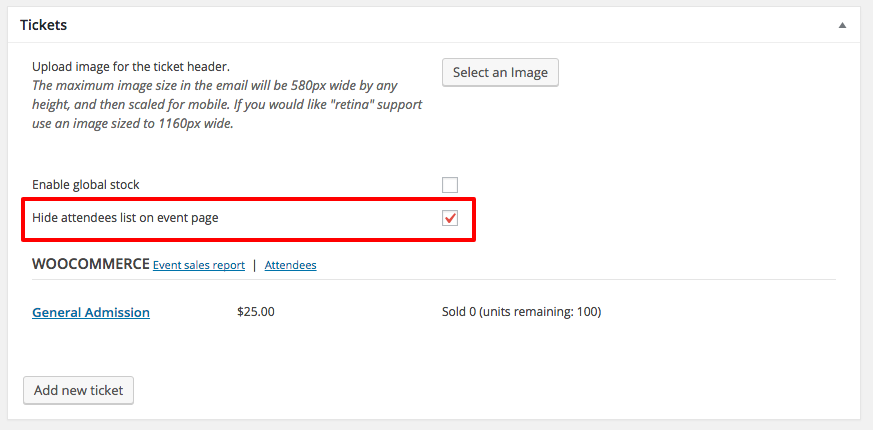
I have that option selected on my test site and that hides the option on the front end of the website (screenshot).
If you do have the option selected and the checkbox is still showing up on the front end of your site, then can you confirm whether it happens when switching to the default WordPress Twenty Sixteen theme? That’s the theme I’m using and it would be interesting to see if that’s the difference.
Thanks!
GeoffMemberMy pleasure! Thanks again for reaching out and I hope you enjoy the plugins. 🙂
Cheers and have s great day.
Geoff
MemberHey Joshua,
Great question! I’ve had a lot of luck working with the User Role Editor plugin in the past. It allows you to set the editing and publishing capabilities for registered site members, including for custom post types like events.
Will this work for you as well? Please let me know. 🙂
Cheers!
GeoffMemberHey Michelle,
Absolutely! The calendar has a RSS feed set up right out of the box that you can get to by adding /feed to the URL. For example:
[your-site]/events/feed
The same goes for category-specific feeds:
[your-site]/events/category/[category-slug]/feed
Cheers!
GeoffJuly 12, 2016 at 7:26 am in reply to: Confirmation by the administration before confirmation for the client #1138626MemberExcellent! Thanks so much for following up to let me know. 🙂
Cheers and have a great day!
GeoffMemberHi James,
Oh yeah, the price field is a good point. If tickets are enabled, then the cost field of the tickets will override the WooCommerce cost field. However, it’s totally possible to override the ticket template of the plugin altogether (more on template overrides in our Themer’s Guide) to replace the plugin’s cost field with the dynamic one.
Cheers!
GeoffMemberMy pleasure! Thanks for following up and I hope you enjoy using Events Calendar PRO — do note that your PRO license will provide you access to these support forums and you can reach out to us anytime you need any help at all. 🙂
Cheers!
GeoffMemberHi Tommy and thanks for getting in touch!
Will you please send me a screenshot of the start and end sale dates for the event where the tickets are not showing up? It should look something like this.
This will help me check your settings to see if something is awry.
Thanks!
GeoffMemberHi Jason,
Great question! One thing Event Tickets Plus does offer is the ability to add registration fields to a ticket to be completed prior to order. So, for example, you could add a checkbox for “Is this a fist?” for someone to check prior to making a purchase.
However, that in itself will do nothing as far as providing the functionality for making the transaction a gift. You would likely need to configure your ecommerce plugin to use that data triggering some other sort of behavior based on the selection.
The automated follow-ups you mentioned could very well work, though I did not see anything in the documentation there that says it can use those registration fields in the emails. That might be worth checking out with the plugin author in advance just to make sure.
Cheers!
GeoffMemberHi Michelle,
Thanks for reaching out!
While we do not have a demo that allows you to log in and try the plugin, all our plugins come with a great refund policy that allows you to return anything for any reason within 30 days of purchase. That should give you plenty of time to try the plugin out and see if it works for you.
Does this help answer your question? Please let me know. 🙂
Thanks!
GeoffMemberHey Martin and thanks for reaching out!
These are great questions and I’m happy to answer them with you.
First off, I’m afraid Facebook Events is a one-way only sort of thing and that it only imports events from Facebook rather than exporting them from WordPress. That said, we are looking into that feature. It’s something we’d love to do and have to do some more digging with the Facebook API to figure out. up until recently, the API wouldn’t allow us to it, so we certainly need to look back into it and revisit the request.
3.) What would be the right mix of plugins to use: I want to leave even-calendar as a free version but wanted to purchase the full version of event tickets. Will this mix work with the “facebook events plugin”?
The Events Calendar does indeed work with both Event Tickets and Event Tickets Plus. And those will also work with Facebook Events in the sense that Facebook Events will import the event into The Events Calendar, and then allow you to add tickets with Event Tickets and Event Tickets Plus.
Your mix will look like this:
- The Events Calendar (free)
- Event Tickets (free)
- Event Tickets Plus
- Facebook Events
I’ll also add that all our premium plugins come with a nice refund policy that allows you to return them within 30 days of purchase, should they not work the way you had hoped.
Does this help answer your questions? Please let me know. 🙂
Cheers!
Geoff -
AuthorPosts