

Forum Replies Created
-
AuthorPosts
-
Geoff
MemberHey Aaron,
That’s certainly odd!
Do you happen to know if you are using a custom template for the single event view? The reason I ask is that the layout looks quite different from what comes right of the box with The Events Calendar, so perhaps there is a customization in that template that would help pinpoint the issue.
You can check for custom templates by opening up your theme folder and looking for a subfolder called tribe-events. Let me know if there is anything in there.
Worst case, we’ll suggest checking in with the theme author for clues.
Let’s start here and see what we find!
Geoff
MemberHey Jonathan, thanks for getting in touch!
This is an interesting use case and one that I honestly have not seen come up before.
iCal Importer is currently set up to fetch events from as many sources as it is provided. So, in this case, where there are two instances of the same source, iCal Importer recognizes that as two sources, which it them imports. iCal Importer is smart enough to know when an event is being imported twice, so that is why it is attempting to combine the two requests into one and merge the categories together rather than importing the same event twice.
Unfortunately, what iCal Importer is unable to do is fetch from a source and distinguish between different categories. If it pulls up the same event in multiple queries, then it will do its best to merge those requests together rather than perform duplicative imports. In other words, I’m afraid that the plugin isn’t well suited to fetch events in this particular way.
I’m sorry for the bad news, but does this at least help clarify things a bit? Please let me know.
Thanks,
GeoffMemberHi Katherine, and thanks for getting in touch!
So sorry for the confusion — I realize it can be tough finding the right configuration of plugins so I’m happy to help you out here.
First things first: recurring events do not currently support tickets. In other words, if you have created a recurring event using Events Calendar PRO, then any tickets you create for that recurring series will be attached to the parent event in the series, rather than the individual events. So, in other words, the tickets you sell for the series will not be associated with all the other events in the series making them unusable for any event but the parent.
That said, the process for creating recurring events is completely flexible and can accommodate custom patterns. We have a lot more information on how to create custom recurrence patterns for events in this post but, in short, you can create events that happen on a daily, weekly, monthly or annual basis, add exclusions to those conditions and set that recurring events have either the same or different start and end times.
I’m on a very, very tight deadline on this project. How steep is the learning curve for someone with extensive experience of WP and Woo as well as good PHP etc skills?
I think it would be a low learning curve in that case. The plugins should work right out of the box, but all our code is documented and we have lots of other customizing examples available in our Knowledgebase.
So, Events Calendar Pro supports recurring events but does not actually allow selling tickets? For that I’ll need both it and the Events Tickets Plus addon? Or do I just need Event Tickets Plus (which however it appears does not handle recurring events)?
If you need recurring events, then you will certainly need Events Calendar PRO. If you need the ability to sell tickets, then you will need Event Tickets Plus, with the understanding that Events Calendar PRO and Event Tickets Plus do not currently support each other when it comes to selling tickets for recurring events. That is a feature we are working on for our next major release, though.
This would be the plugin combo for you:
- The Events Calendar (free)
- Events Calendar PRO (adds recurring events functionality)
- Event Tickets (free)
- Event Tickets Plus (adds integration for creating selling tickets)
- WooCommerce (free, the cart and checkout engine for payments)
I sure hope this helps clarify things! Please let me know and I’d be happy to answer any other questions you might have about purchasing the plugins. 🙂
Cheers!
GeoffMemberThat’s so awesome to hear! Nice work and thanks for following up to let me know that everything turned out well.
I’ll go ahead and close this thread but please feel free to open a new one if any other questions pop up and we’d be more than happy to help. 🙂
Cheers and have a great day!
GeoffJuly 26, 2016 at 7:55 am in reply to: Bookings for courses that stretch over a few days, etc. #1144185MemberHey Marileen, thanks for following up!
One last thing, does booking a ticket and having to pay for it then work with the woocommerce cart and check-out system?
It sure does! In fact, that is exactly how selling tickets works in Event Tickets Plus. Once a ticket is created, it gets registered as a Product in WooCommerce and then WooCommerce handles the full payment process once the ticket has been added to the cart. Event Tickets Plus is merely the bridge between The Events Calendar and WooCommerce so that you can use tickets just like you would any other WooCommerce product. 🙂
It’s also worth noting that we offer a pretty nice refund policy — you can return any of the plugins within 30 days of purchase should they not meet your needs for any reason at all. That should give you a good chance to test drive the plugins and see if they work well with your site.
Cheers!
GeoffMemberHey Alessandro, so glad that information was helpful!
And, I’m so sorry — I totally missed the part about the demo.
We actually do not have a full demo available. Instead, we offer a full refund on all our products within 30 days of purchase. We find that it’s best to test the plugins on a real site and this should give you plenty of time to check out the plugins and return them should they not fit your needs for any reason at all.
Cheers!
GeoffJuly 26, 2016 at 7:46 am in reply to: Events Calendar PRO license "refunded" and not active, NEED HELP #1144176MemberMy pleasure — sorry again for the mixup but I’m glad all is working. 🙂
Have a great day!
GeoffMemberHi Al, I see my last reply was marked as the correct answer — I’ll go ahead and close this thread but please feel free to open a new one if any other questions come up and we’d be happy to help. 🙂
Cheers!
GeoffMemberThanks Sonia!
Looking at the screenshot, it appears that the you did change the end date of the event, but it is still set for May 12, 2017. Will you please change that to 2016?
Thanks!
GeoffMemberThis is super helpful, thanks Sonia!
I tried recreating the issue using similar settings but still was unable to.
Before we dig too much deeper, will you please try changing the recurring settings of that event for me? I saw in your screenshot that the start and end date date for the event are:
- Start: 08/02/2016
- End: 06/02/2017
In other words the event is starting on August 2, 2016 at 2pm and ends on June 2, 2017 at 3pm. If you change the end date to 08/02/2016, that should prevent the plugin from thinking that one single event last for 10 months.
Here’s a screenshot of how the event’s date settings should appear when you’re done:
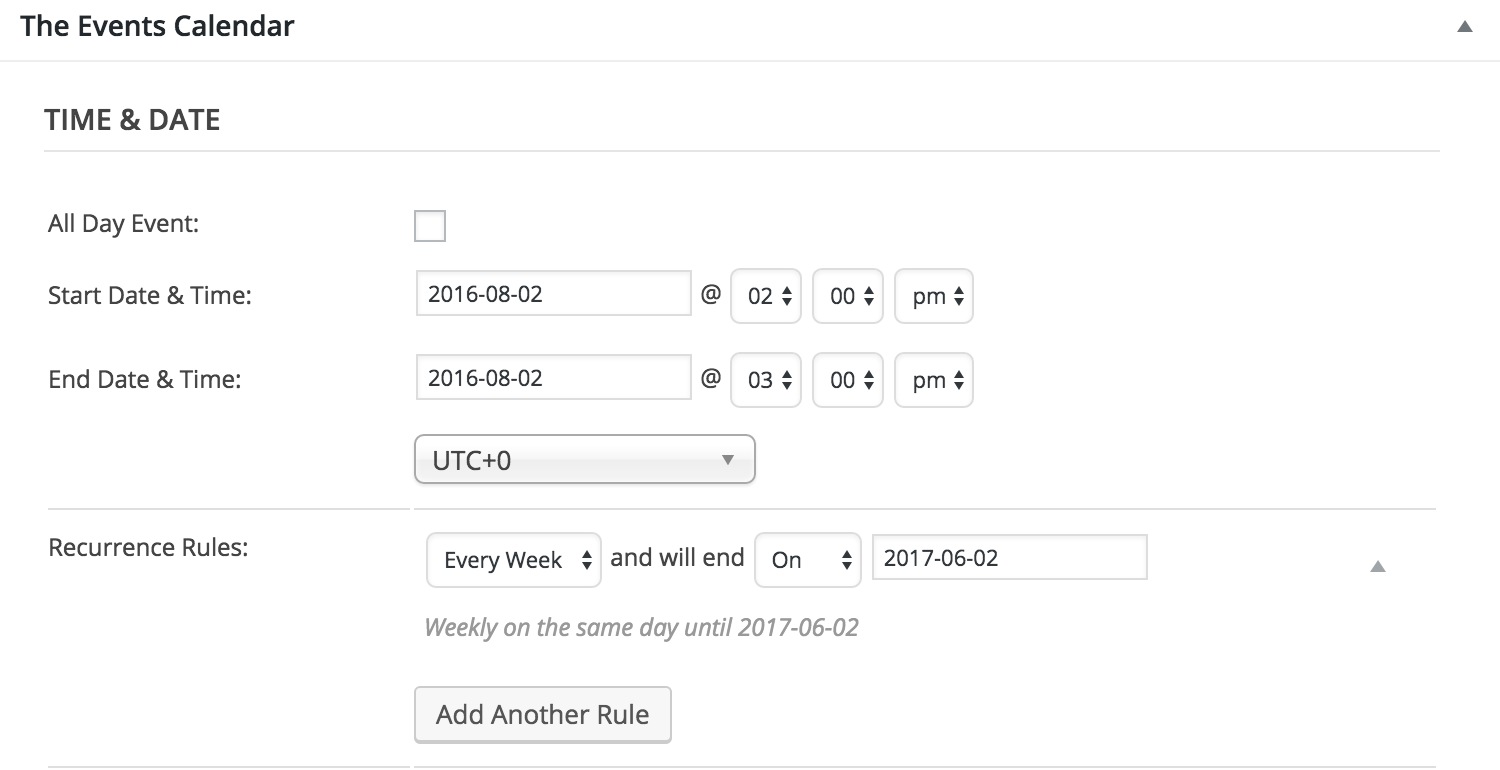
Please give that a shot and send me a screenshot of the settings once you’re done — I’m hoping this will help clean things up quite a bit!
Thanks,
GeoffJuly 25, 2016 at 2:46 pm in reply to: Can I Add a Start and End Time to the Event Title in Month View? #1143840MemberMatthew, you did it again! Thanks so much for jumping in and helping.
David, I’ll go ahead and close this thread but do feel free to open a new one if any other questions pop up and we’d be happy to help — or maybe Matthew will. 🙂
Thanks!
GeoffJuly 25, 2016 at 2:35 pm in reply to: Events Calendar PRO license "refunded" and not active, NEED HELP #1143837MemberHey Noah,
So sorry for the trouble! I believe was the one who helped you with that refund, so let’s take a look at it together.
I just made a change to your account — try validating the license again and let me know if the license is still deactivated. I’m hoping it’s not!
Thanks so much,
GeoffMemberHowdy Sara,
Interesting question! The Events Calendar automatically includes both an .ics file and an RSS feed that can be used to migrate content to other calendar, such as Google Calendar, iCalendar, etc.
This is part of the free plugin rather than premium feature. So, for example, you can find the .ics file for your events at:
[your-site/events/ical]
…and the RSS feed at:
[your-site]/events/feed
In addition, it’s possible to use the WordPress Exporter to download the XML data from your calendar and use that wherever XML is supported.
I will say that most calendar applications do indeed accept the .ics file format, so you will more than likely be covered. However, I’ll note that the way applications render that data can vary, so the same behavior in one application may not do exactly the same thing in another.
Does this help answer your question? Please let me know. 🙂
Geoff
MemberThis reply is private.
MemberHeck yeah, that’s awesome to hear! Definitely let us know if any other questions come up between know and kickoff and we’d be happy to help. 🙂
Cheers and have a great day!
Geoff -
AuthorPosts