

Forum Replies Created
-
AuthorPosts
-
Courtney
MemberHey Fran
Can help me narrow this down.
Are you using a child theme as a derivative of Beaver Themer?
Can you share a screenshot of how you have added the widget to the home page?
I am wanting to narrow down if this is a Themer or Builder issue.
Does the widget insert and display well on another page either in the sidebar or within the post/page content? https://theeventscalendar.com/knowledgebase/pro-widget-shortcodes/#event-list-shortcode
Can you revert first to disabling all plugins except ours and Beaver Builder and see if that still displays the widget? And if that still doesn’t work, please also deactivate Builder and use a default theme, such as Twenty Seventeen https://wordpress.org/themes/twentyseventeen/.
I’m familiar with both plugins you mentioned using. Looking forward to getting this resolved with you.
Thanks
Courtney 🙂September 28, 2018 at 7:54 am in reply to: display pending events on front end "My Events" page? #1633139MemberHey Brandon
I dug a little further and found that you should already have this functionality.
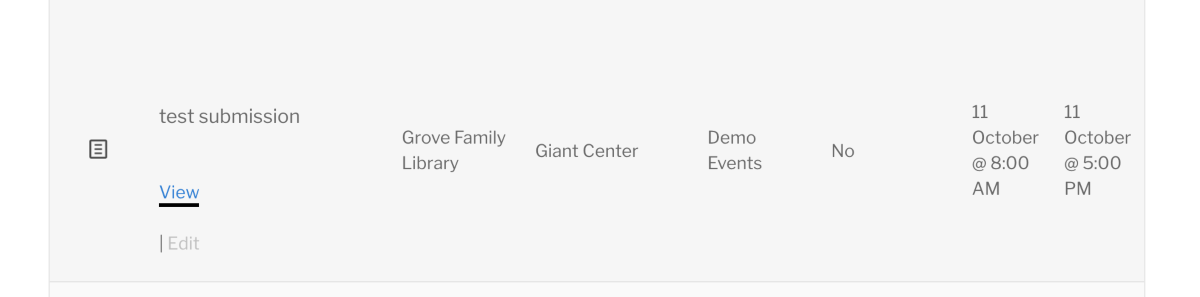
Notice on the far left that it shows an icon for draft mode vs a checkmark for published.
If you are not seeing the same thing, please head through our testing for conflicts. https://theeventscalendar.com/knowledgebase/testing-for-conflicts/
Let me know what you find.
Thanks
Courtney 🙂September 28, 2018 at 7:37 am in reply to: API Key does not work in Events Ticket Plus App for Android #1633131MemberHey Chris
Unfortunately, this looks like a bug and I’ve submitted it for our developers to address.
We apologize for the inconvenience caused by this glitch and we are actively working on a solution for this. I cannot guarantee when it will be fixed, as it’s in the development team’s hands now. They need to assign it, code it, test it, and schedule it for release. The good news is that you will be contacted as soon as a fix is available.
Thank you for your patience as we see this through. Please let me know if you have any other questions in the meantime!
Thanks
CourtneyMemberHey there Kate
Unfortunately, this is related to a known bug that we are currently working on.
You might have some success using https://wordpress.org/plugins/transients-manager/ to clear transients, but that hasn’t always worked. It is worth a shot.
We apologize for the inconvenience caused by this glitch and we are actively working on a solution for this. I cannot guarantee when it will be fixed, as it’s in the development team’s hands now. They need to assign it, code it, test it, and schedule it for release. The good news is that you will be contacted as soon as a fix is available.
Thank you for your patience as we see this through. Please let me know if you have any other questions in the meantime!
Thanks
CourtneyMemberHey there
So sorry for that mix-up. I do see 2 licenses for Event Tickets Plus, activated on different sites. Verifying this is what you wanted as you mentioned you had uploaded one previously.
When you uploaded your plugin to your site, did you start by uploading the plugin with the license activated on that site? Or did you possibly upload the version already activated on another domain?
Could you share a screenshot where you are seeing this message?
Could you go through our Testing for Conflicts guide: https://theeventscalendar.com/knowledgebase/testing-for-conflicts/
When you are checking for Event Tickets Plus, please remove it from your site, then download it for the crrect domain from My Account » Downloads https://theeventscalendar.com/my-account/downloads/ and upload it again to your site.
Please let me know if the issue persists after this.
Thanks
Courtney 🙂September 28, 2018 at 4:44 am in reply to: display pending events on front end "My Events" page? #1633033MemberHi Brandon
Oh, I could see how submitters might want that feature. I’ll check to see if we have a way to make that possible with any customizations.
If you think that is something you would like as a feature I encourage you to visit our User Voice Page and either upvote an existing request or make a new request there.
You can suggest it at http://tribe.uservoice.com.
Thanks
Courtney 🙂September 28, 2018 at 4:34 am in reply to: How to hide availability figure from event page? #1633021MemberHi Indi
I’m glad that worked for you. Can you open a new ticket with us regarding the quantity changes? One of our team members will help sort that out.
Thanks
Courtney 🙂MemberHi Philipp
So sorry that is happening. Like the other thread, I’d like to test this out further.
Can you share the address and lat/long of one place that isn’t displaying?
If you enter the information into http://maps.google.com, do you see results?
Thanks
Courtney 🙂September 28, 2018 at 4:13 am in reply to: API Key does not work in Events Ticket Plus App for Android #1633014MemberHey there Chris
I’m sorry for the somewhat longer waiting time. We are experiencing a higher than normal load in our help desk. We are working to make sure that everyone gets an answer as soon as possible.
Sorry to hear about the QR code app issue.
I am going to check in with our developers about this issue. It does look like you’ve tried our previous suggestions.
Thanks
Courtney 🙂September 27, 2018 at 4:20 pm in reply to: Tickets Pro and WooCommerce – I don\’t see WooCommerce option when creating event #1632737MemberHi Mark!
So glad you got that sorted out. The radio button method is outdated and we’ve since moved it to an auto-detected option. I’ll be sure to update that article soon.
I’ll close out this thread for now but let us know if you have any other questions.
Thanks
Courtney 🙂MemberHi Coenraad
Event Tickets Plus uses another e-commerce plugin to handle payment processing. We currently support WooCommerce or Easy Digital Downloads.Read more about each option’s features and payment gateways.
You can check to see if either of those work with Sage.
Thanks
Courtney 🙂MemberHi Jason
It is definitely possible to customize that message. First start at the Themer’s Guide to learn how to do this without risking issues with plugin updates.
Then, check out the thread another user started with the same request. https://theeventscalendar.com/support/forums/topic/customize-ticket-email/#post-1492561.
Let me know how it goes.
Thanks
Courtney 🙂MemberHi there Nirmana
https://theeventscalendar.com/support/forums/topic/events-in-multiple-time-zones-2/ is the thread where you and Sky were interacting. Can you head over there to continue the conversation? He will be sure to help you there.
Thanks
Courtney 🙂September 27, 2018 at 4:02 pm in reply to: Why am I bothering with EC Pro? Recurring events is a nightmare #1632720MemberHi Benjamin
I’m sorry you are having so much extra work. Is there a way that our plugin could simplify this for you?
https://wordpress.org/plugins/duplicate-tec-event/ may help you. We have never truly included a way to duplicate events outside of what recurring events can do. However, Duplicate Events is an independent 3rd party plugin that will use one event as a master template. I’ve used it before on a few projects. Please note that we do not support or maintain this plugin. You’ll need to reach out to their support forum for help with it.
We do offer 30 day refunds if you find the plugin does not meet your needs. It’s just a matter of submitting a refund request form at https://theeventscalendar.com/knowledgebase/refund-policy/.
Thanks
Courtney 🙂MemberHey Mike
Events Calendar Pro is a separate plugin from Filter Bar. Each would be an annual subscription.
You can see both in action, along with almost all of our plugins at WP Shindig Demo Site https://wpshindig.com/events/.
Is there anything else I can help you with?
Thanks
Courtney 🙂 -
AuthorPosts