

Forum Replies Created
-
AuthorPosts
-
Courtney
MemberHi Jeremy
When you export Event Tickets Plus data as a .csv file, the attendee information fields will be included. https://theeventscalendar.com/knowledgebase/collecting-attendee-information/ has a good overview on this.
Do note – that is different than Events Calendar Pro https://theeventscalendar.com/knowledgebase/pro-additional-fields/.
Which plugin specifically were you wanting? Do these 2 articles help to clarify which product will best fit your needs?
Thanks
Courtney 🙂MemberSorry to hear that Edward. I am glad that you did get a solution working. We definitely want to improve your experience. We will continue to do our best to integrate with default themes and popular plugins.
Thanks
Courtney 🙂January 22, 2018 at 4:35 am in reply to: Can I edit the language file on wordpress.com site? #1432187MemberGreat to hear. Thanks Maria. I will pass that on to our translation team too. We don’t often encounter clients using WordPress.com and do appreciate knowing what has helped and worked there.
Thanks
Courtney 🙂January 22, 2018 at 4:34 am in reply to: Month view using shortcode doesn’t display properly #1432185MemberHi Storm
If the code I shared doesn’t work, please reach out to your theme developer to isolate the padding to just https://hopehumanesociety.com/get-involved/events/. We haven’t encountered this issue with others, so I believe this is a theme issue. Please let me know how they respond. Do share the code I provided previously with them. They may have a better way to isolate the fix so that it doesn’t impact other tables on your site.
We do offer 30 day refunds if you find the plugin does not meet your needs. It’s just a matter of submitting a refund request form at https://theeventscalendar.com/knowledgebase/refund-policy/.
Thanks
Courtney 🙂January 19, 2018 at 12:31 pm in reply to: Need some help with the Event Calendar Integration with Beaver Builder #1430981MemberYou are right on that Sheri. Our photo view layout uses jQuery Isotope to output the items in a Pinterest-type grid but not in a rigid row-column type grid. Since this is a jQuery library, it isn’t something we really can modify much. We do have a bit of it inside Customizer. But again, it’ll be interesting to see what BB’s team does here. I have pinged a support member there as well with your question.
Keep me posted on your progress.
Thanks
Courtney 🙂January 19, 2018 at 11:57 am in reply to: WordPress Update occures new Colours in the Calender #1430918MemberHi Nina
Unfortunately, I am out of other suggestions. It appears as if your theme is setting much of this. Can you test this with Twenty Seventeen https://wordpress.org/themes/twentyseventeen/ and the CSS I provided? I’m curious to see if it works with a default theme. If that works, then it’s worth reaching out to your theme developer.
Thanks
Courtney 🙂MemberHi Jeremy
This actually means the ability for you to create your own fields. Here’s a quick overview of it all:
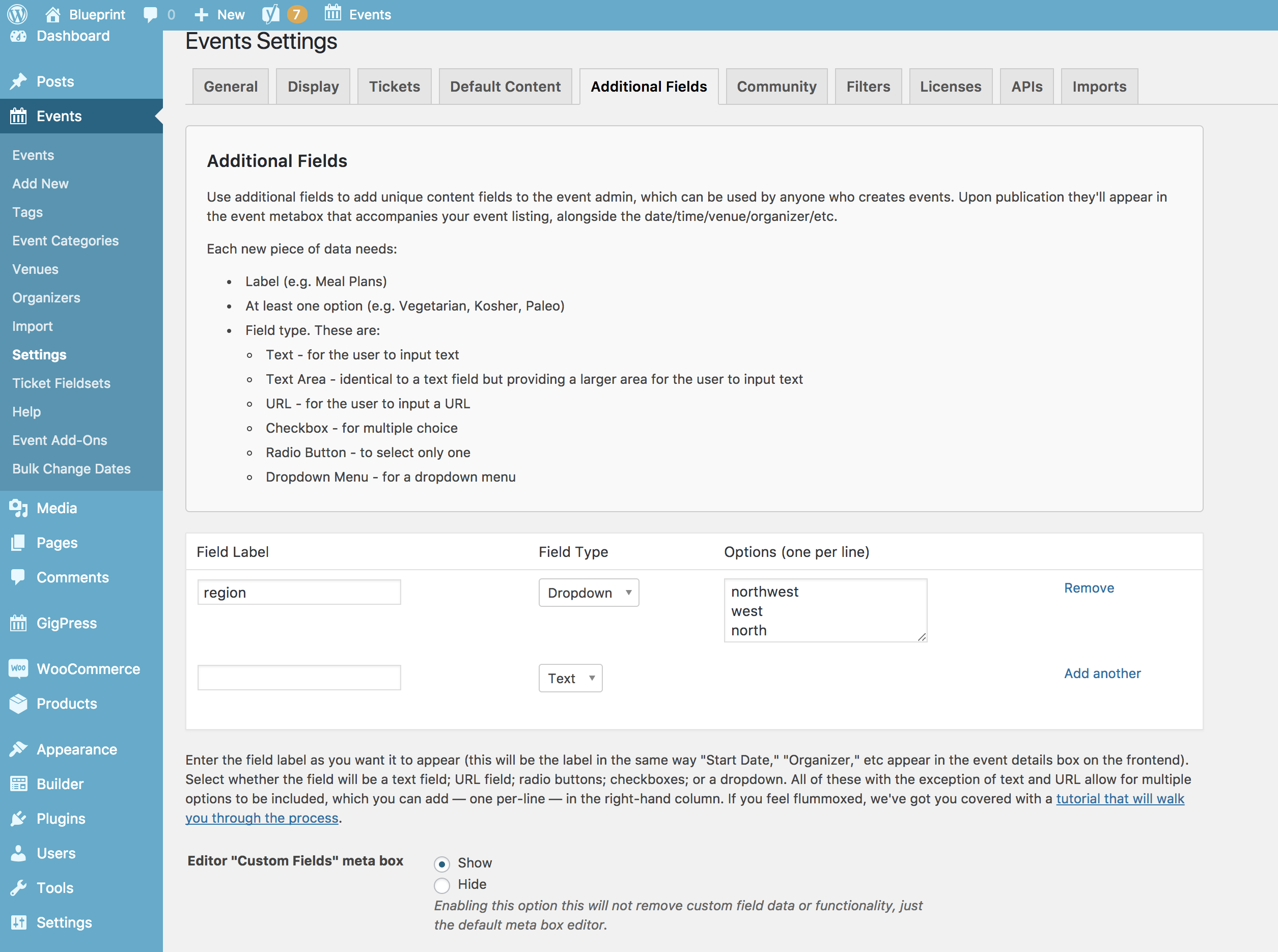
https://theeventscalendar.com/knowledgebase/pro-additional-fields/ Is a complete guide to implementing this.
Is there anything else I can help you with?
Thanks
Courtney 🙂MemberHi Ashley
We’d be happy to help sort that out for you.
Please send an email to support [at] theeventscalendar [.] com.
Thanks
Courtney 🙂January 18, 2018 at 5:10 pm in reply to: Support tickets removed from my support tickets without an answer #1430084MemberHi Andre
https://theeventscalendar.com/support/forums/users/andre-klevensensio-no/support/topics/ indicates your threads are still open and that Patricia has replied to you. Did you get the notification via email to check on your threads again?
Thanks
Courtney 🙂January 18, 2018 at 4:50 pm in reply to: Need some help with the Event Calendar Integration with Beaver Builder #1430072MemberHey Sheri
I did some more digging.
Builder » Themer Layouts » Page Builder (of the layout already created) » Preview As » Archive » Events Archive
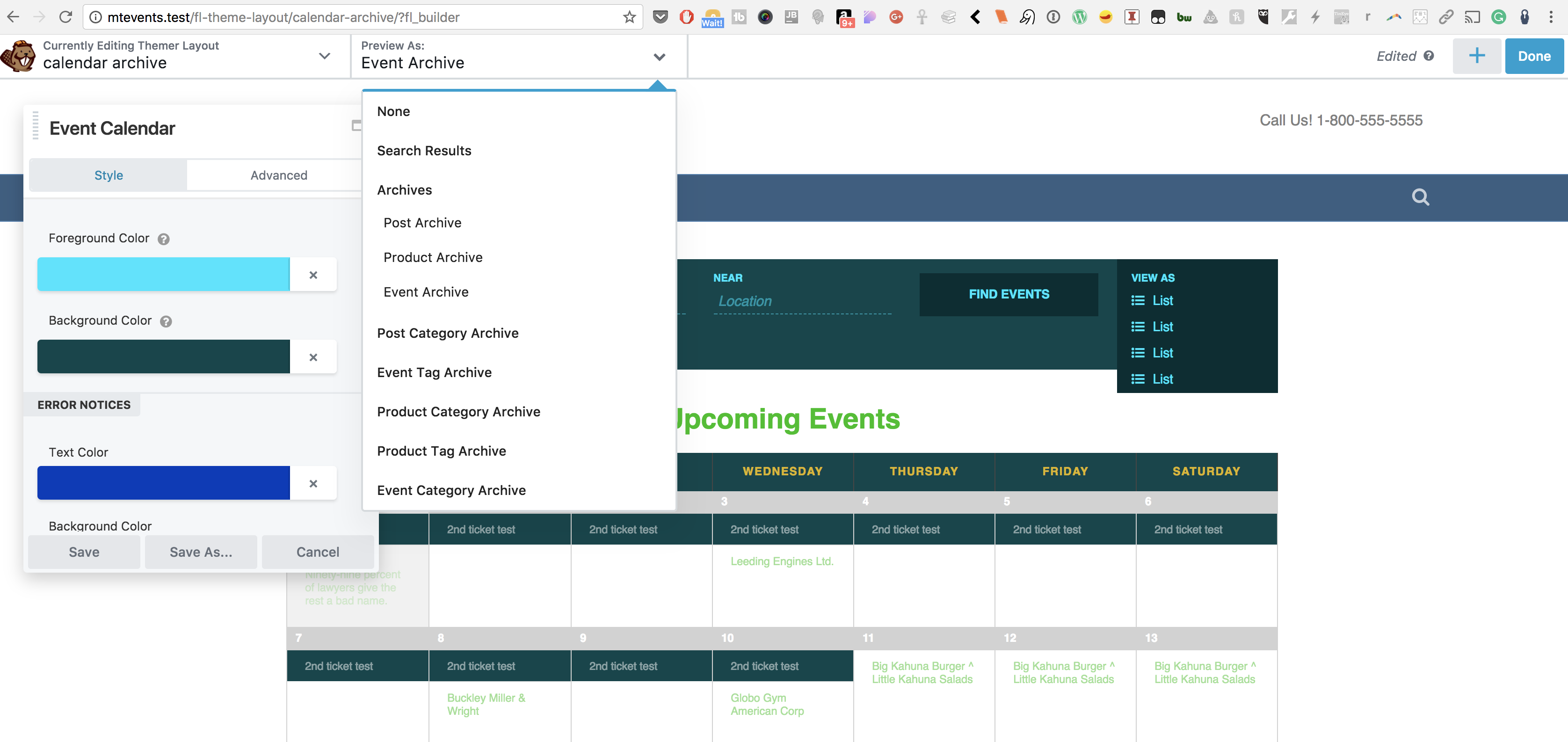
This will style how the calendar appears as a shortcode or widget added to another post/page. It doesn’t seem to impact what I see on the default /events page on my local site. I’ll be curious to see if Beaver Builder’s Page Builder finds a way to tackle that.
Thanks
Courtney 🙂January 18, 2018 at 12:27 pm in reply to: Need some help with the Event Calendar Integration with Beaver Builder #1429842MemberHi Sheri
I’m actually in touch with some of their support team for now to address this issue. While I keep testing, I will say a quick way to get at the elements you want might be to go through Appearance » Customizer.
Beaver Builder and Themer are great at getting to a lot of areas, but the way our /events page is an archive and not a true “page” as in a file you can get to make this a bit more tricky. I’ll keep you posted on what I find.
Thanks
Courtney 🙂MemberThanks Gavin
Again, we’d love to have your System Info https://theeventscalendar.com/knowledgebase/sharing-sys-info/ to review some settings.
Thanks
Courtney 🙂MemberShows the same error – is that with all other plugins disabled? I am unable to reproduce that.
Thanks
Courtney 🙂January 18, 2018 at 11:07 am in reply to: WordPress Update occures new Colours in the Calender #1429719MemberHi Ninia
We are tested up to 4.9.2, but we always advise testing this with staging or at least a local backup of your site.
It looks like you added
tribe-grid-body .tribe-events-week-hourly-single {
   border: none !important;
}
to your site, missing the initial “.”
.tribe-grid-body .tribe-events-week-hourly-single {
   border: none !important;
}
Can you double check that?
Thanks
Courtney 🙂MemberThanks Josep. Happy to help.
Courtney -
AuthorPosts