
Home › Forums › Calendar Products › Events Calendar PRO › Need some help with the Event Calendar Integration with Beaver Builder
- This topic has 15 replies, 2 voices, and was last updated 8 years, 7 months ago by
Sheri Miller.
-
AuthorPosts
-
January 12, 2018 at 1:01 pm #1425153
Sheri Miller
ParticipantNeed some help with the integration with Beaver Builder. Questions are….
Any way to add the Filter bar to the Event Calendar Module or to the Events Grid?
Any way to customize the Event Calendar Module? All I see is basic drop it in – I can’t find any customization.
Basically I want the custom grid calendar with the filter bar above. There doesn’t seem to be a way to do that. I need to be able to filter out categories for pages (Kids – Entertainment – etc). Want to be able to have posts and events on the same page.
Is there a way to get Events to show up in the post loop on a custom Grid? You can choose either posts or events but there is no option to add more than one post type and events don’t show up if you are set on just posts.
Any way to add Venue to Custom Grid? It has address but that doesn’t really help. We need Venue there.
January 12, 2018 at 2:50 pm #1425257Courtney
MemberHey Sheri! Let’s see what I can do to help 🙂
Any way to add the Filter bar to the Event Calendar Module or to the Events Grid?
Are you referring specifically to the Beaver Themer integration with The Events Calendar? I believe the integration you are looking for relates specifically to the Themer alpha/beta plugin. The functionality of the Events Grid with that resides entirely in the hands of the Beaver Builder team. They did just begin work on integrating our other plugins, beyond The Events Calendar and Event Tickets. I know it is not in the latest update of Themer, but hear that they are actively working on it and may send me a version to test out soon.
That said, I love to see how they are modifying the layout options. We will be releasing a blog post soon to show some of these integrations.
Any way to customize the Event Calendar Module? All I see is basic drop it in – I can’t find any customization.
Can you send me a screenshot of what you are seeing?
Thanks!
Courtney 🙂January 17, 2018 at 5:55 am #1428402ParticipantYes, I am referring to the integration with alpha Themer. I submitted these to them as well a few minutes ago. Tried on their Facebook page before and I didn’t get any help. No one seems to know how to use this yet.
Attached is what it looks like when you drop in the Events Calendar module. There is nothing there to customize so you get the standard calendar that is all. Based off the settings in the dashboard. All you can change is some coloring and spacing. I am having to use this for now and it looks horrible.
There is an option to drop in Event Posts and those can be customized (also attached says “Posts”). They look great and match the site perfectly. I wish the calendar has these options. That is what I am trying to do. The problem is, these aren’t actually a calendar only the post types so you can’t get the filter bar and no more events show up. Very odd.
Would love any help you can offer. I am stumped on how to get this stupid thing to look good. I can’t believe there is no way to get rid of the text on the calendar page. I can’t find a single setting to remove excerpt – http://tallahasseetimes.com/calendar
January 17, 2018 at 11:58 am #1428814MemberHi Sheri
I am excited about the way Beaver Builder is integrating with The Events Calendar and our other plugins. At this time, they are entirely handling the way that our plugin works within their system. I can provide some support and test out exactly the same features that you see. But – this is their project, and as such, beyond our Scope of Support / Terms.
I do know that they’ve begun work on integrating our Filter Bar into their system. However, that isn’t in the alpha or beta release yet. I’ll be very curious to see this rolled out. At this time, we don’t even offer Filter Bar as a shortcode option.
I see that you are using a Photo view, which is the closest to a masonry layout that we offer. What type of view are you wanting?
When I use Themer, I have edited single and category/tag archives.

Where are you editing? I’m guessing you are in a post/page using Builder?
At this time, I don’t see a way for Themer to interact with the default /events page. Is that what you were aiming for?
Sorry this is full of more questions. This integration is new, and I’m thrilled to have a client I can work with to explore possibilities.
Thanks
Courtney 🙂January 17, 2018 at 12:48 pm #1428861ParticipantGlad to help! I have spent over a year trying to build this stupid site and I think I am finally finding the technology to get it to do what I want. Since I am not a coder I have had to rely on plugins – this hasn’t been easy. I have tried everything and I am closer than ever.
I am using the Themer to create the calendar page. That is the only place I can see the Event modules available. I wish it was options on the page builders. I want the events to look like the posts on the main page. I would like it to all be seamless and the events flow into the posts on the main page as content eventually. Still figuring this out.
For now is there anyway to reduce the amount of text in the description and make the boxes the same size?
January 18, 2018 at 12:27 pm #1429842MemberHi Sheri
I’m actually in touch with some of their support team for now to address this issue. While I keep testing, I will say a quick way to get at the elements you want might be to go through Appearance » Customizer.
Beaver Builder and Themer are great at getting to a lot of areas, but the way our /events page is an archive and not a true “page” as in a file you can get to make this a bit more tricky. I’ll keep you posted on what I find.
Thanks
Courtney 🙂January 18, 2018 at 4:50 pm #1430072MemberHey Sheri
I did some more digging.
Builder » Themer Layouts » Page Builder (of the layout already created) » Preview As » Archive » Events Archive
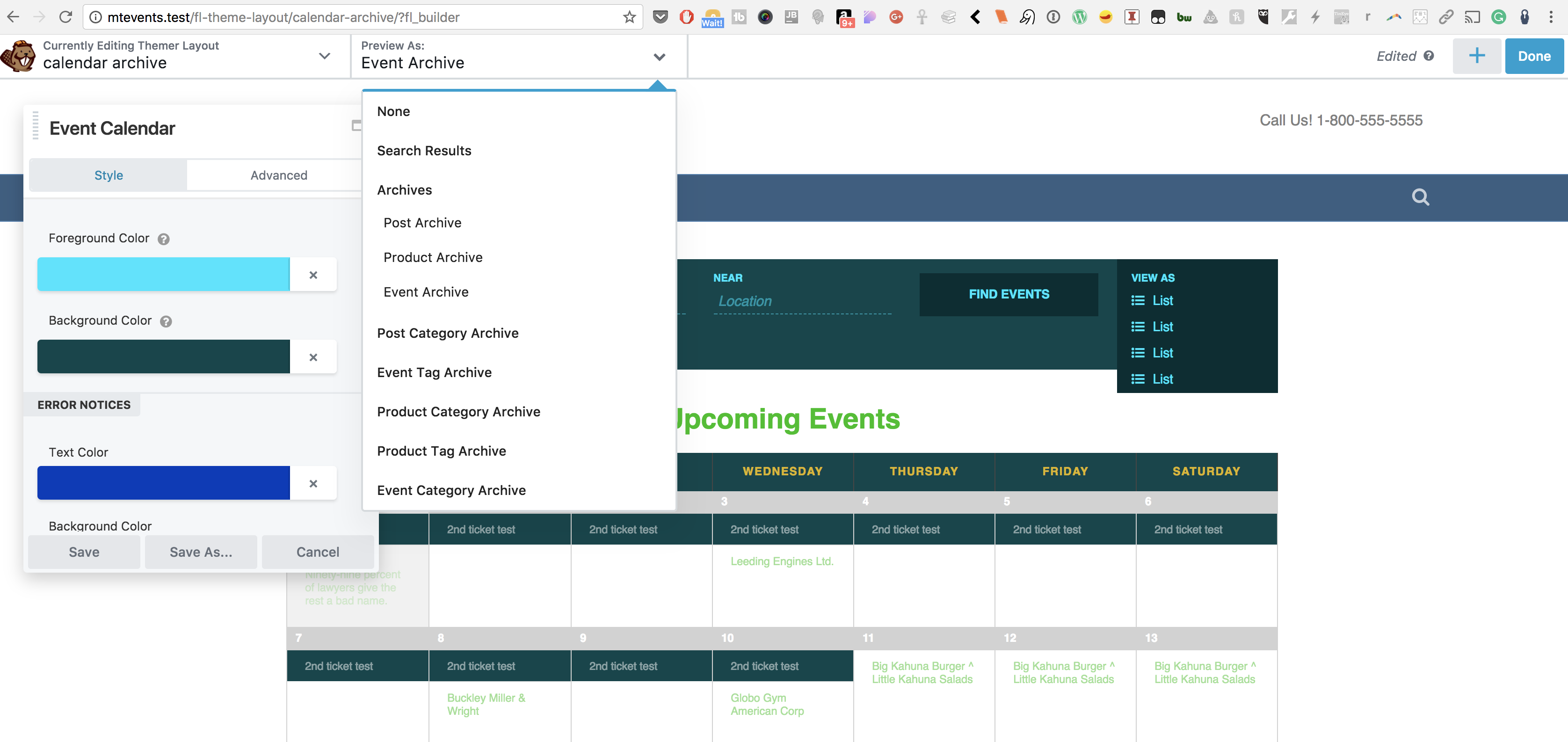
This will style how the calendar appears as a shortcode or widget added to another post/page. It doesn’t seem to impact what I see on the default /events page on my local site. I’ll be curious to see if Beaver Builder’s Page Builder finds a way to tackle that.
Thanks
Courtney 🙂January 19, 2018 at 10:50 am #1430843ParticipantI found that but you can’t alter the photo layout at all with it. Well the basic coloring but that is it. There doesn’t seem to be much help right now. I think I am finding some other ways to make things work.
Yea when you open the calendar page you can see the calendar but you can’t change it at all.
January 19, 2018 at 12:31 pm #1430981MemberYou are right on that Sheri. Our photo view layout uses jQuery Isotope to output the items in a Pinterest-type grid but not in a rigid row-column type grid. Since this is a jQuery library, it isn’t something we really can modify much. We do have a bit of it inside Customizer. But again, it’ll be interesting to see what BB’s team does here. I have pinged a support member there as well with your question.
Keep me posted on your progress.
Thanks
Courtney 🙂January 19, 2018 at 12:52 pm #1430995ParticipantActually I figured out how to get the photos to show up. Use a Custom Grid – Column – Show Picture. Problem is the filtering and getting the calendar to show up in order.
January 22, 2018 at 8:56 am #1432444MemberHey Sheri
I just followed those steps.
Layout: Masonry & Default
Content: Custom Query, Post Type Events, Order DescendingAre you still seeing events out of order?
Thanks
Courtney 🙂January 27, 2018 at 9:20 am #1437976ParticipantLooks like I need a custom shortcode to get the Venue to show up on the
grid. Is that possible?Here’s what they said….
[wpbb post:custom_field key=”_EventVenueID”] correctly picks the Venue ID
for the event. The reason why it works while this shortcode doesn’t work[wpbb post:custom_field key=”_VenueVenue”]
is that the meta key “_EventVenueID” exists in the Events Post Type while
the key “_VenueVenue” doesn’t exist there. Their documentation also states
that it is coming from the Venue Custom Post Type.Remember that the Custom Layout is set to fetch data from the Events Post
Type.So to really get those meta keys from the Venue CPT and display them within
the loop of the Events CPT would require a custom shortcode. Something like
the shortcode below, for example.
[event-venue key=”_VenueVenue”]January 29, 2018 at 11:31 am #1439086MemberHey Sheri
https://theeventscalendar.com/knowledgebase/listing-venues-and-organizers/ shows an extension we created a while ago to list venues. You can see that it includes filtering out venues. It could work to narrow it down to just the venue that you are wanting to display.
Ultimately though, I think this is something you may want to wait on Beaver Themer to put together. It seems like that would better suit your needs, as you are pretty far along in building your site with Themer.
Thank you for continuing to test this. It really is fun to work on this, despite it not being officially released or supported yet.
Thanks
Courtney 🙂February 1, 2018 at 7:55 am #1441674ParticipantI was so excited for this integration. Once again this program is not doing
what I was hoping it would do. So disappointed.February 23, 2018 at 8:35 am #1462070Support Droid
KeymasterHey there! This thread has been pretty quiet for the last three weeks, so we’re going to go ahead and close it to avoid confusion with other topics. If you’re still looking for help with this, please do open a new thread, reference this one and we’d be more than happy to continue the conversation over there.
Thanks so much!
The Events Calendar Support Team -
AuthorPosts
- The topic ‘Need some help with the Event Calendar Integration with Beaver Builder’ is closed to new replies.