

Forum Replies Created
-
AuthorPosts
-
September 21, 2018 at 8:18 am in reply to: I’m in the process of creating a community events website #1627425
Courtney
MemberHey Zaba
I think to achieve most of this, we can help. The Events Calendar (free) is our starting plugin that others are built on top of. Events Calendar Pro includes additional features like shortcodes to display the calendar on multiple pages within your site in unique ways, create recurring events, or to display a map view of the events on your site. You may not need this.
Event Tickets is the base for ticket sales. You may want additional features included with Event Tickets Plus.
Community Events would be needed to allow organizers to submit events to your site and Community Tickets to allow the organizers to also create tickets for their events.
We do not have a way to show venues on the map (hotels) that are not the location of your events.
Is there anything else I can help you with?
Thanks
Courtney 🙂MemberHey Lara
We’d be happy to help sort that out for you.
Please send an email to support [at] theeventscalendar [.] com with this request.
Thanks
Courtney 🙂MemberHey Dominic
While you are creating the ticket, expand the “Advanced” area. You can schedule when the tickets are available.
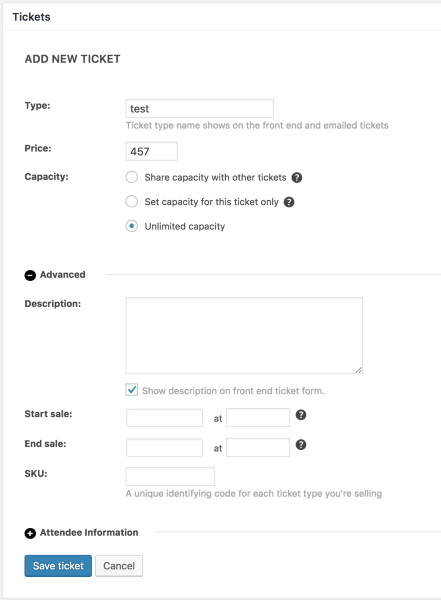
Let me know if that helps.
Thanks
Courtney 🙂September 21, 2018 at 7:48 am in reply to: Can I have different events linked to different stripe accounts? #1627368MemberHi KC
Event Tickets Plus relies upon an e-commerce plugin for all payment purposes. We currently support WooCommerce or Easy Digital Downloads. Read more about each option’s features and payment gateways.
If either of these is able to handle multiple accounts, that could work. You’ll need to check in further with them about this.
However, I haven’t heard of others doing this before with Stripe.
Thanks
Courtney 🙂September 21, 2018 at 7:38 am in reply to: Multiple date options display a drop down menu in the events page (archive) #1627351MemberHi Miguel
Hi there!
Thanks so much for getting in touch! I’m afraid that we’re not equipped to provide technical support for current plugin users here in our pre-sales forum. We’d be more than happy to assist you at one of the following locations:
• If you’re using one or more of our free plugins such as The Events Calendar and Event Tickets, you can request assistance on the WordPress.org support forum for the affected product.
• If you’re a current license holder for one of our premium offerings, please log in to your account and submit a post to the appropriate forum for the affected product. Please include your System Info https://theeventscalendar.com/knowledgebase/sharing-sys-info/ so we can better help you.If you can, please take the time to confirm in your post that you’ve run through our Testing for Conflicts steps prior to contacting us–this will save us a step and help us to get your issue resolved that much quicker! 🙂
Thanks again, and we’ll see you in the forums!
CourtneyMemberHi Barbara
Can you tell me where that message displays? I’d love to see a screenshot of it.
You can set the default page slug at Events » Settings » General » Events URL slug.
If the site is working as you want, there’s no need to change this.
Thanks
Courtney 🙂MemberHey there. I’ve swapped these for you. Head to My Account » Downloads https://theeventscalendar.com/my-account/downloads/ to get your plugin.
Let me know if you need any more help.
Thanks
Courtney 🙂MemberHey Mitchell
Unfortunately, Filter Bar only works on the /events page at this time. If you think that is something you would like as a feature I encourage you to visit our User Voice Page and either upvote an existing request or make a new request there.
You can suggest it at http://tribe.uservoice.com.
Workarounds others have found is to set their /events page as the home page.
So sorry about this.
Thanks
Courtney 🙂MemberHi Amila
Take a look at WP Shindig Demo Site https://wpshindig.com/events/. This is a setup of most of our plugins.
You can schedule multiple events per day with The Events Calendar (free).
You can click on the event title of each event to access more information.
Event Tickets (free) handles tickets. You are able to schedule when tickets are available for purchase, as well as inventory.
You set the price and location with each ticket you create.
If you’d like more advanced features, check out Events Calendar Pro and Event Tickets Plus. These will come with things like shortcodes to display your calendar in various ways beyond the /events link, integration wtih more payment options than Paypal, QR code check ins, etc.
In addition, if you want to use our plugins and then rename some settings, check out https://theeventscalendar.com/extensions/change-labels-events-venues-organizers/. You’d first need to install TEC & ET, then add this, and change terms to things like “courses” “classes” “instructors” etc.
Is there anything else I can help you with?
Thanks
Courtney 🙂MemberHey Ruth
We do not have that functionality out of the box. However, if you use WooCommerce ( Event Tickets Plus requires that you use it or Easy Digital Downloads for the payment gateways), you might be able to still achieve this.
I found https://docs.woocommerce.com/document/woocommerce-zapier/. Zapier is a 3rd party that helps connect all sorts of things that otherwise wouldn’t have that ability. It does have a setting for pending orders. https://theeventscalendar.com/automating-event-promotion-zapier/ can give you an overview.
Do let us know if you use these to achieve your goals.
Thanks
Courtney 🙂MemberHey Angela
Did you by chance change the domain name? I see http://www.ausfencing.org as the active site, but am not sure if that’s still the same.
Can you walk through the steps on Moving Your License Key https://theeventscalendar.com/knowledgebase/moving-your-license-keys/? You can pick up at step 2 if needed.
See also: Why am I being told my license key is out of installs?.
Let me know if that works for you.
Thanks
Courtney 🙂MemberHey Thomas
Glad that helped resolve it. Often if you are using Yoast’s WordPress SEO plugin, the columns in the dashboard may look off. Other plugins do this as well. There are a lot more features in APM that can help you manage events.
I’ll close out this thread for now but let us know if you have any other questions.
Thanks
Courtney 🙂September 20, 2018 at 7:19 am in reply to: Your Event Aggregator Facebook token expired about 2 months ago. #1626353MemberHi Justin
Thanks so much for reaching out! I think you’re still seeing the notice because your version of The Events Calendar may need some updates.
Facebook recently declined our efforts to work with them. https://theeventscalendar.com/important-facebook-api-changes/ We are terribly sorry about this.
You can still import events using either of these 2 options outlined in How to Import Facebook Events into Event Aggregator https://theeventscalendar.com/knowledgebase/how-to-import-facebook-events-into-event-aggregator/, though it is a less ideal method than we previously had available.
Needless to say, we are just as stuck and frustrated as our clients on this issue. If anything changes, we will continue to keep you updated through our social channels, blog posts, newsletters, and on https://theeventscalendar.com/knowledgebase/ea-fb-privacy-policy and https://theeventscalendar.com/event-aggregator-status/.
Please let me know if you have any other questions!
Thanks
Courtney 🙂September 20, 2018 at 7:04 am in reply to: Out of Installs? Also, Can’t read your suggested topics #1626338MemberHey Matthew
We’re just about to move the knowledgebase, so I can request the colors be a bit more accessible on the new home.
I see your site has an active license on keystolifeak.wpengine.com but you’ve since moved it live.
Can you walk through the steps on Moving Your License Key https://theeventscalendar.com/knowledgebase/moving-your-license-keys/? You can pick up at step 2 if needed.
See also: Why am I being told my license key is out of installs?.
Thanks
Courtney 🙂MemberHi Dan
That would be a feature of Events Calendar Pro.
We offer Calendar View Shortcodes https://theeventscalendar.com/knowledgebase/embedding-calendar-views-tribe_events-shortcode/ and Widget Shortcodes https://theeventscalendar.com/knowledgebase/pro-widget-shortcodes/ for Events Calendar Pro https://theeventscalendar.com/product/wordpress-events-calendar-pro/
We have a few other shortcodes for things such as single events https://theeventscalendar.com/knowledgebase/embedding-single-events-tribe_event_inline-shortcode/
Is there anything else I can help you with?
Thanks
Courtney 🙂 -
AuthorPosts