Forum Replies Created
-
AuthorPosts
-
October 26, 2015 at 9:10 am in reply to: bug masonry feature and some blog post features with enfold theme #1017949
Cliff
MemberHi Valérie. Thanks for the detailed information.
The Events Calendar core plugin is required for the PRO extension to work, but not vice-versa; PRO is an add-on to the core plugin.
Adding events will work without PRO activated.
However, I want to help you get the PRO add-on working, of course!
Your screenshot showed things working correctly, but the link to http://libredetre.com/agenda/ didn’t have any content on it. I did find http://libredetre.com/events/ from your website’s navigation menu.
That events link seems to be working fine.
Is the issue still happening on your site? If yes, is it when the Photo view is enabled? Please explain how to re-create the issue you’re experiencing.
Thanks.
MemberHi Annette. Thanks for the info to help diagnose your issue.
You can view this gif to see how Find Events works by default: http://cl.ly/image/0M080h3M282f
Does it not work like that for you?
Notice selecting February 2015 from the month selector results in the “2015-02” text (in YYYY-MM format) and the URL changes to http://example.com/events/2015-02/
If I manually enter “10/2015”, this is what I experience: http://cl.ly/image/3R223S1n472v
That’s not the same as what you reported (FYI: your screenshot didn’t come through and the link was a 404 error).
NOTE: There is a “Datepicker Date Format” option at Events -> Settings -> Display –> “Date Format Settings” section
Mine is set to 2015-01-15. What is yours set to?
I hope my reply can help you resolve your issue or help you more thoroughly explain it to me so I can further assist you.
October 7, 2015 at 10:01 pm in reply to: Default status for submitted events "published" not working #1012579MemberHey Jeff. Sorry you’re having these troubles.
I agree the first priority is to make sure you’re on the current release version of our plugins. On this site, you can visit My Account > Downloads to get the latest version of Community Events, and you can get the latest version of The Events Calendar core at https://wordpress.org/plugins/the-events-calendar/
Once you’ve updated to the current version of Core and Community Events, please give it another try. If it’s still not working, would you mind grabbing your system information and pasting it here?
Make sure to use the “Set as private reply” checkbox to protect your private information from the public.
You can find the system info by going to WP Admin > Events > Settings, clicking on the “Help” tab, and scrolling down to the “System Information” box. (Or by going to [yoursite]/wp-admin/edit.php?post_type=tribe_events&page=tribe-events-calendar&tab=help)
That will give me a lot of extra information to help diagnose the problem.
Thank you, sir!
October 7, 2015 at 9:54 pm in reply to: WP_Router in Breadcrumb (Community Events + Yoast WP SEO Breadcrumbs) #1012576MemberThis reply is private.
October 7, 2015 at 4:20 pm in reply to: 'Events List' widget not showing the month, just day-name and day-number #1012537MemberPeter, thanks for the additional info.
There are 2 ways to go about this:
- filter the dayname to output the Month Name instead (e.g. “October” instead of “Saturday”)
- One potential downside is that the HTML code will be .list-dayname but it’ll really be displaying “Oct” (the month) — but that should be ok
- Additionally, you’ll lose the day name, since it’s being replaced by the month name — but that’s probably just fine since you’re trying to avoid the confusion of visitors thinking an event is “this Saturday” or “next Wednesday”
- Here’s a sample snippet to make this change: https://gist.github.com/cliffordp/5c6fae0071a07b2e2e73
- use our Themer’s Guide to override the /wp-content/plugins/events-calendar-pro/src/views/pro/widgets/modules/single-event.php file (e.g. add span class=”list-monthname” to display the month name in addition to the day name)
I hope this information helps you get the customizations you’re wanting! 🙂
Please let me know how it goes for you.
MemberThanks again for the info.
We’ve had quite a few threads on this topic lately. Apparently, a common issue is that you ENTER the key, it gets the green-colored “success” message, and then you DON’T click the “Save Changes” button at the bottom of that screen.
Could you please try these steps:
- Visit License Tab.
- Enter License Key.
- You get a Green License Valid Message.
- After you get the message you are then clicking “Save Changes”.
- Then you get a “License key(s) updated.” message near the top of the page.
And then let me know if that turned out to be the solution for you as well.
Sorry again for the trouble of dealing with license keys. I know it’s never fun.
Thanks.
MemberYou’re welcome. I’m glad it worked for you!
Yup, installing it like a regular plugin would work — because it is a regular plugin. 🙂
I appreciate your suggestions for how we handle support; I’ve passed them along. Our scope of support is that we do not provide customizations so when we do go above and beyond anyway (especially when we know it can benefit multiple users), providing a code snippet is often sufficient. Sometimes it’s not though, and that’s understandable.
Again, I’m very glad it’s working well for you.
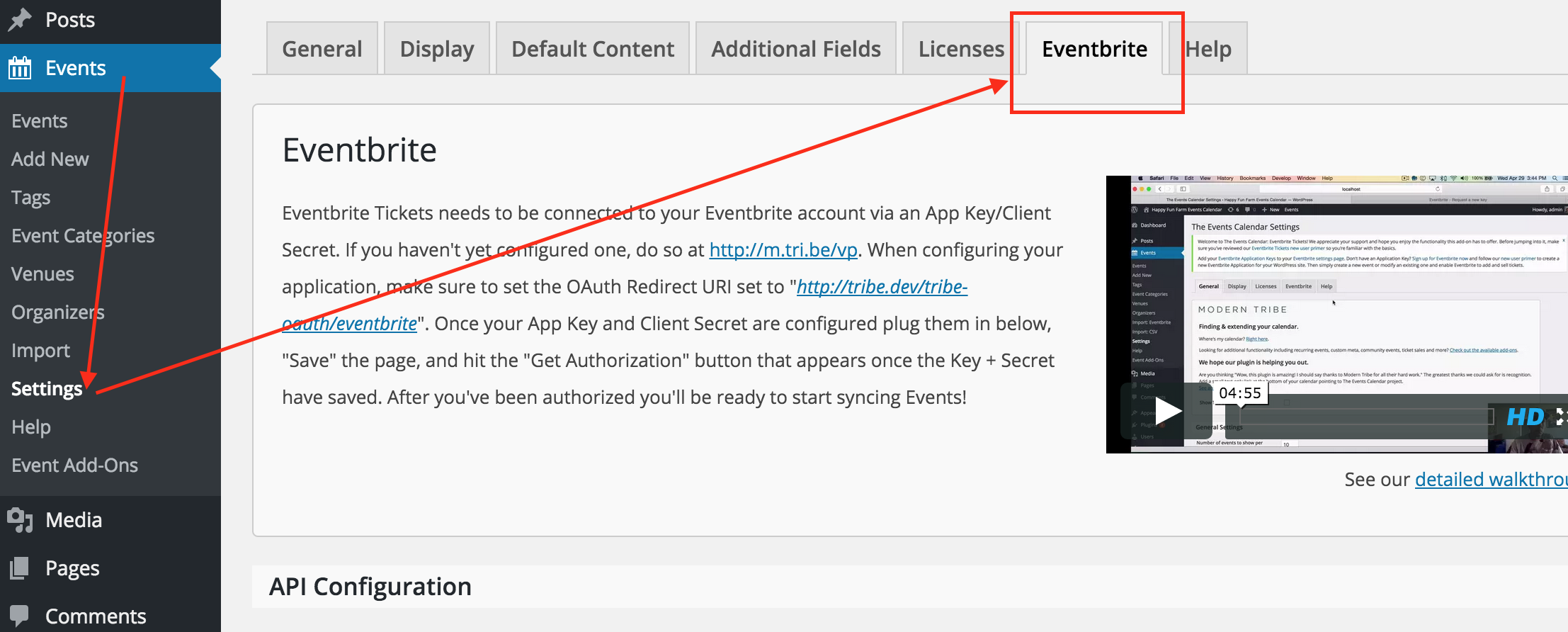
MemberWhat happens when you go to Events > Settings > Eventbrite?
Do you see this?
 October 6, 2015 at 9:12 pm in reply to: Event page is only showing one ticket for purchase. #1012119Member
No worries. Hope your event is a success!
MemberHi Keith.
I understand you have the Eventbrite Tickets add-on installed and activated, but you’re not seeing it as an option in wp-admin > Events > Import.
Well, sure enough that’s a logical place to look for it, but it’s actually at wp-admin > Events > Settings > Eventbrite — /wp-admin/edit.php?post_type=tribe_events&page=tribe-events-calendar&tab=eventbrite
I think the developers went this route since it’s more of a continual connection to Eventbrite instead of a one-time import or a file-based import.
Please let me know if you find the settings and move forward just fine — or that you need additional assistance.
October 6, 2015 at 11:42 am in reply to: Event page is only showing one ticket for purchase. #1012006MemberThanks for the screenshots. Your screenshots show “don’t sell the $20 or $22 tickets until 8 AM today, October 6.”
I visited http://westchesterputnampottery.com/calendar/halloween-mania/ and all 3 ticket options appear now.
🙂
October 6, 2015 at 11:40 am in reply to: 'Events List' widget not showing the month, just day-name and day-number #1012004MemberThis reply is private.
MemberYeah! Thanks for letting me know.
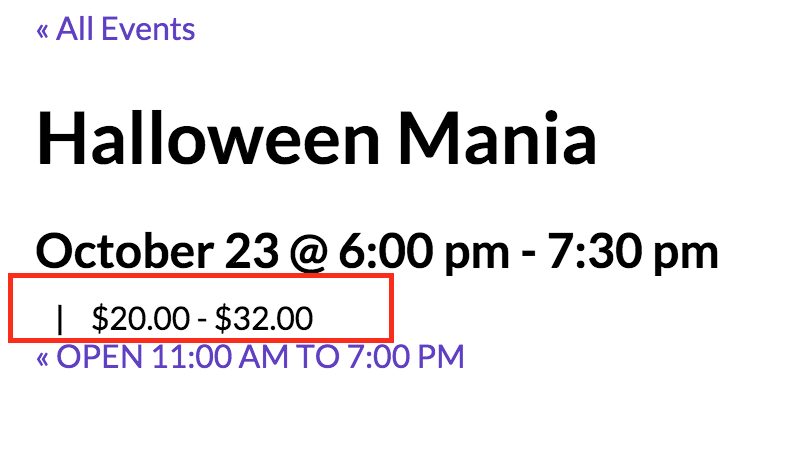
October 5, 2015 at 11:35 pm in reply to: Event page is only showing one ticket for purchase. #1011762MemberHi Debora. Sorry you’re experiencing this issue. Thanks for the link to view it myself!
At that page, I see the event’s price is a RANGE from $20 to $32. If you had only entered 1 ticket, it would just say 1 price.

I understand the issue is at the bottom of that page, where only the $32 ticket is available for purchase.

Would be able to send me a screenshot of this event’s WooTickets settings in wp-admin, especially of the $20 ticket’s settings?
Also, did you add these 2 tickets via the Event wp-admin editing screen or via WooCommerce directly? If added via the Event wp-admin editing screen, did you then edit anything about this WooCommerce Product in the WooCommerce Product editing screen?
Thanks for the info!
MemberHey Corey. Thanks for the details. Hopefully I can help you resolve your issue quickly.
You can access all of the latest versions of our plugins at My Account > Downloads.
At this time, The Events Calendar (core) is at v3.12.13 and the PRO add-on is at v3.12.2.
Please make sure you DO have the current versions of all our plugins.
Once you have the latest, greatest versions on your site, please test again. If you’re still having the issue, please copy your system information and paste it here. Make sure to use the “Set as private reply” checkbox to protect your private information from the public.
You can find the system info by going to WP Admin > Events > Settings, clicking on the “Help” tab, and scrolling down to the “System Information” box. (Or by going to [yoursite]/wp-admin/edit.php?post_type=tribe_events&page=tribe-events-calendar&tab=help)
That will give me a lot of extra information to help diagnose the problem.
I hope updating to the latest versions solves it for you, but, if not, having your system information will help a lot in finding a solution.
Thanks!
- filter the dayname to output the Month Name instead (e.g. “October” instead of “Saturday”)
-
AuthorPosts