Forum Replies Created
-
AuthorPosts
-
Cliff
MemberGlad to help and thanks for the details.
So this means you have a theme conflict.
- Either your parent theme is conflicting
- Or your child theme’s “tribe-events” folder is conflicting
Please test this scenario for me:
- If you activate the Parent theme (without any “tribe-events” folder in it), is the link fixed?
- If yes, then enable the Child theme (the one with the “tribe-events” folder in it). Is the link broken now?
Once we figure out the source of the problem, we can address the issue.
MemberThis CSS might do the trick for you:
div#tribe-community-events.form {
color: black;
}
You can add custom CSS code via your child theme’s style.css file or via a plugin like Simple Custom CSS or, my favorite, Jetpack. Jetpack supports regular CSS and the LESS and Sass pre-processors.
Let me know how it goes.
MemberIf I understand you correctly:
1)
You activated the Twenty Fifteen default WordPress theme.
2)
You deactivated all WordPress plugins other than The Events Calendar and The Events Calendar Eventbrite Tickets
3)
And when you go to wp-admin > Events > Settings > Eventbrite tab, the tab works but when you enter your Eventbrite API credentials and click Get Authorization, it goes to a blank white screen.
Is all of this correct? If not, please provide a video screencast of what you’re doing or provide thorough written information about what exactly is happening.
===
I’ll also suggest you enable WP_DEBUG and share any PHP errors you see while navigating your site’s wp-admin pages, home page, events page, single-event pages, and any other of your site’s pages relevant to this ticket.
Once you share your WP_DEBUG findings, we may be able to get an idea of any plugin or theme conflicts.
Please enable WP_DEBUG on your site. You’ll need to edit to your site’s wp-config.php file and change this line of code:
define('WP_DEBUG', false);to this:define('WP_DEBUG', true);
(or add this line of code if you can’t find mention of ‘WP_DEBUG’ in your wp-config.php file)If any errors do appear while navigating your site’s pages, please copy and paste them in their entirety into a new ticket reply — along with the URL of where you saw the error(s) — and make sure you set it as a Private reply.
Let us know what you find. 🙂
MemberPlease provide the link that accompanies that screenshot so I can take a look.
MemberMarcel, I was mistaken. The __() means it is translatable. The error in the code is that it has the incorrect text domain.
Our developers have already fixed this in the version 4.0 major update coming in a month or so (there’s already a beta available for it).
If you really need it fixed now (don’t want to wait), you could just edit that plugin file directly (normally not the recommended way to do things, but this is a special case) by adding”-pro” to “<span class=”s1″>tribe-events-calendar” so that it reads like this:</span>
'View all ...', 'tribe-events-calendar-pro' ), $events_label_plural...Your plugin file edit would be overwritten by any future update… which is what you want anyway.
Another solution would be to add this snippet to your child theme’s functions.php:
Here: https://gist.github.com/cliffordp/ea48db01dfb96a9aebb0
But then you should remove that snippet from functions.php after the fix is added in the next release.
I’m looking forward to hearing back from you. Thanks.
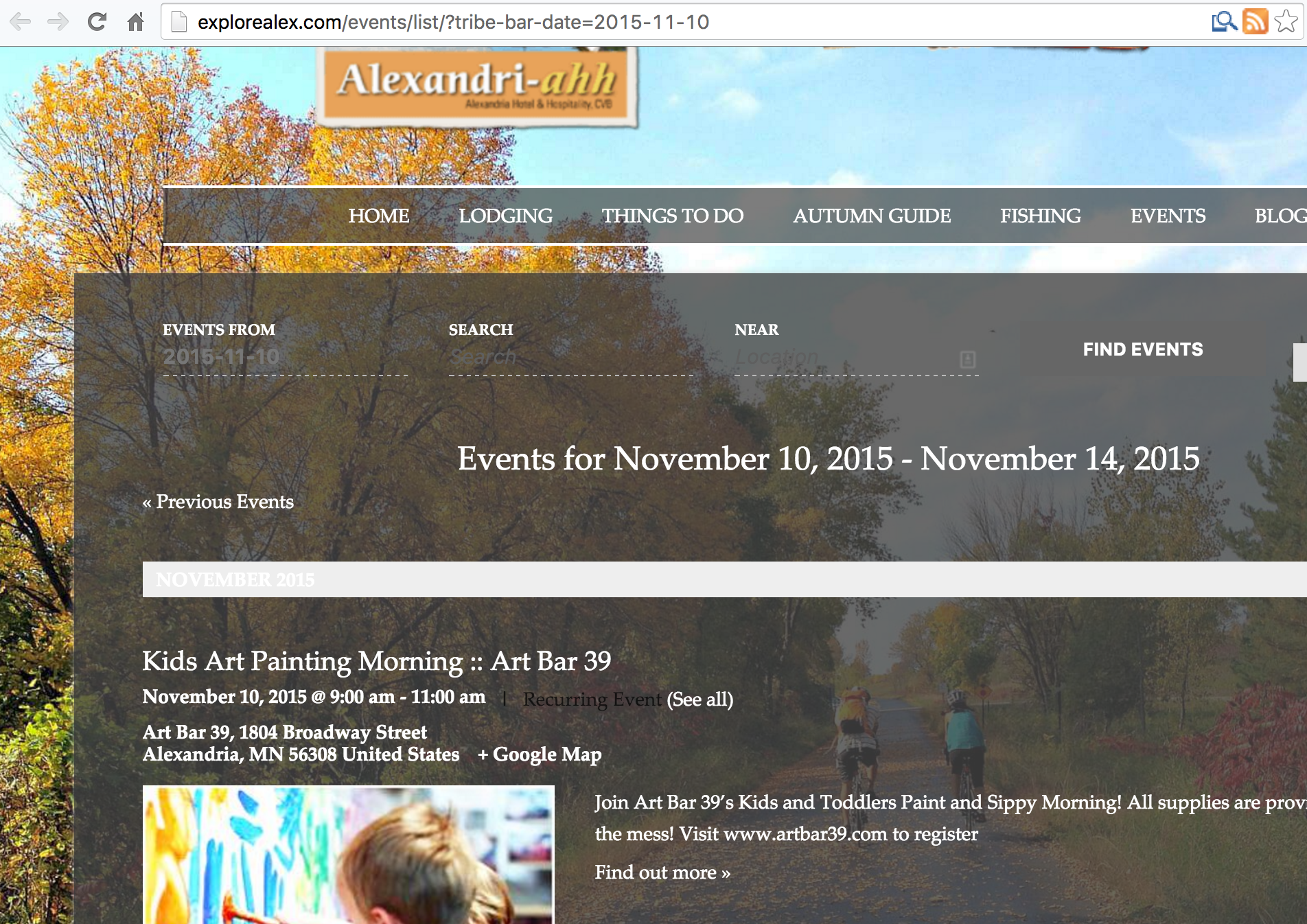
MemberThanks for the detailed request. This is what I see now:

Is this NOT what you want? You want the semi-transparent black to be 100% transparent (i.e. no background at all)???
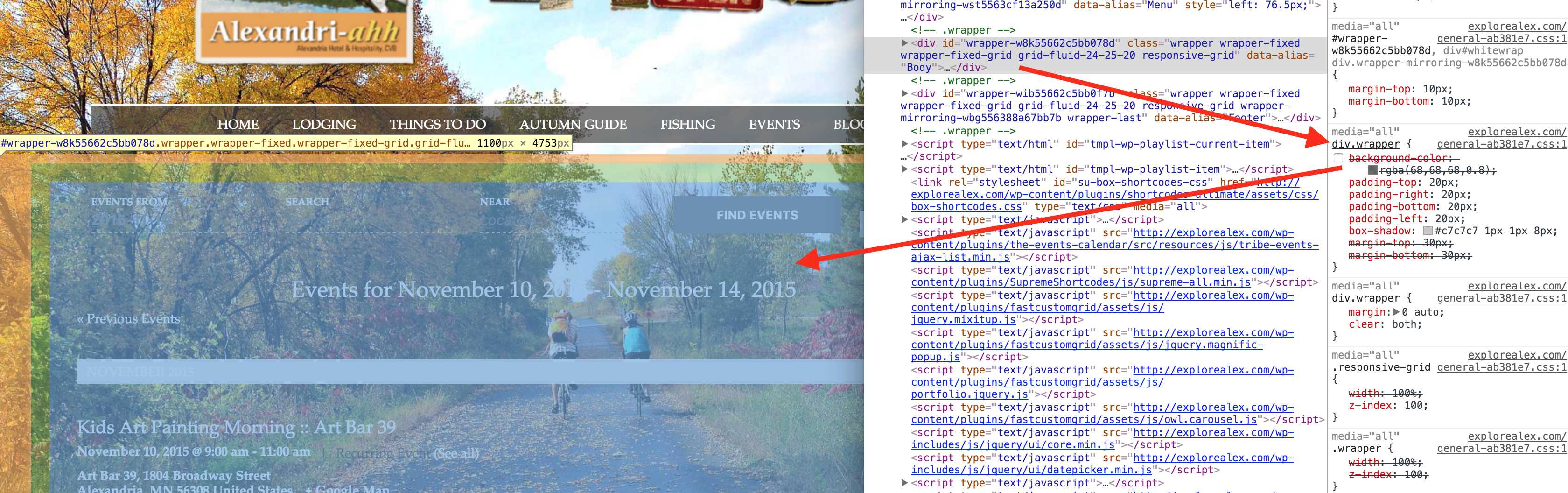
If yes, div.wrapper seemed to be the one adding the background:

If you need more help, please confirm exactly what you DO want the design to be.
P.S. You had two periods in one of your bits of code: ‘div..tribe-‘
Let me know how it goes for you!
MemberHi Emina.
I visited one of your events that had a price: http://djecjigrad.hr/raspored/blago-je-moje/
I did not see a way to purchase tickets so let’s get working on this issue…
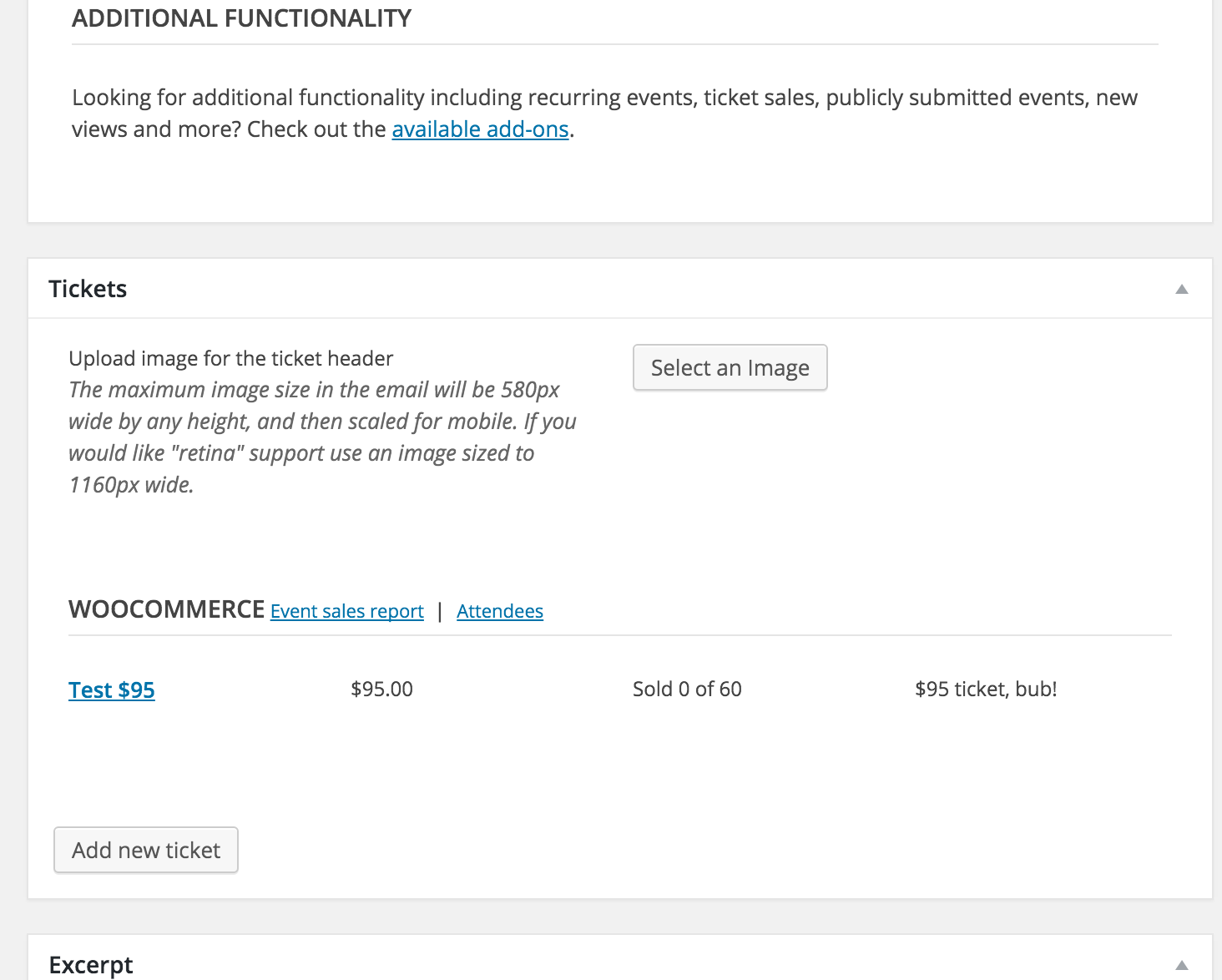
I’m guessing you don’t have one or more tickets assigned to that event (even though there’s a Cost appearing on the event). It should look similar to this when editing that single event in wp-admin:

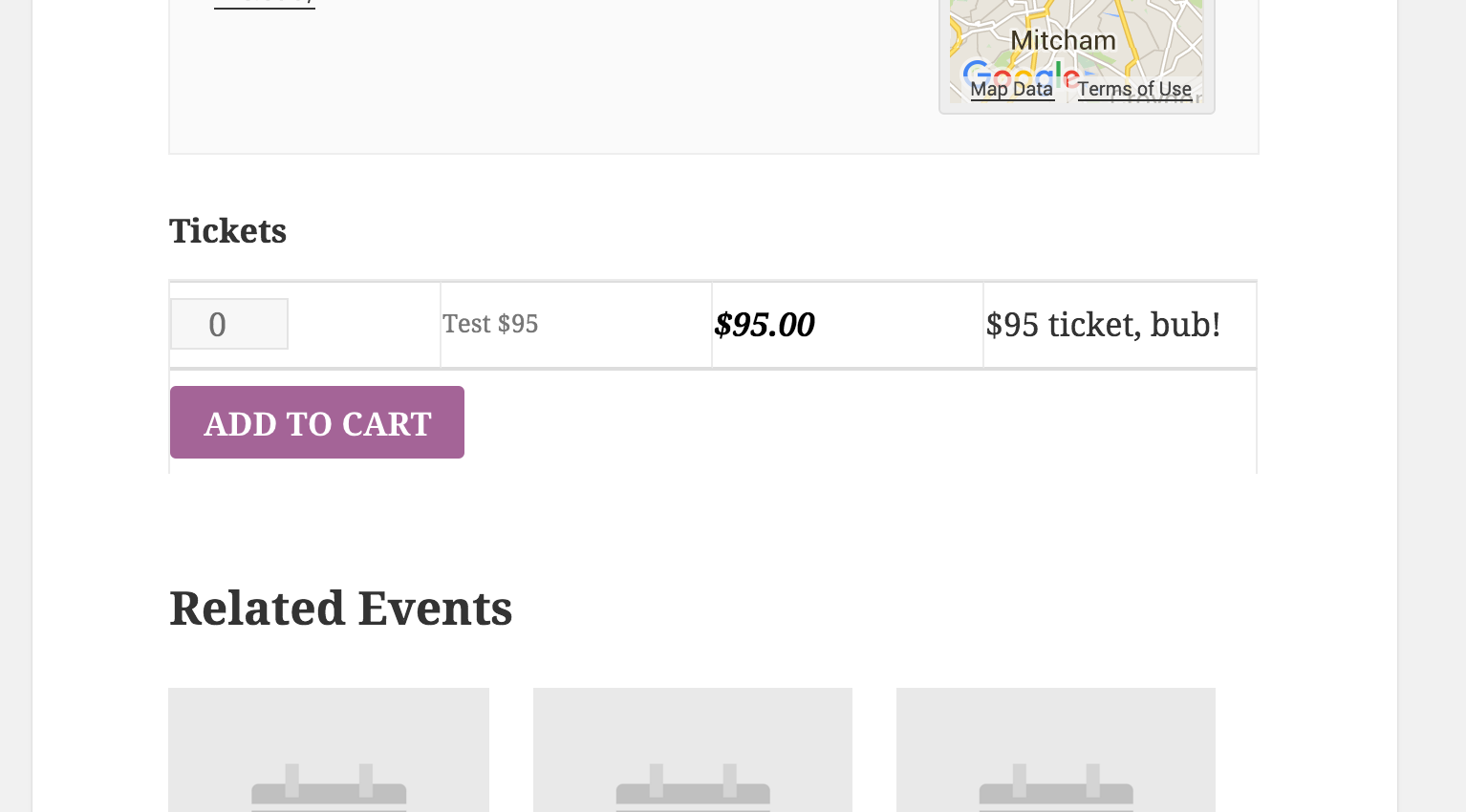
And then it’ll display on the front-end like this:

Please let me know what you find out.
MemberHi Jessica. Could you please provide me a link to view this issue?
Also, what browser are you using for that screenshot?
I look forward to hearing back from you.
Thanks.
MemberWhat’s up, Joel…
Guess what, we provide many non-profits with a free copy. Check out https://theeventscalendar.com/knowledgebase/do-you-offer-discounts-for-non-profit-organizations/ for more information. Note that support isn’t provided if you do get a free license.
As for exporting, we just output to iCal format, which all the calendaring applications can read/interpret. So I’d say “yes.”
Last but not least — if you do decide to purchase — we have a pretty great Refund Policy so you can buy one or many of our add-ons and thoroughly test them.
Let me know if you have any follow-up questions.
MemberHi Alexa.
Here are our widgets and shortcodes.
I think you’ll find what you’re looking for.
Please let me know if you have any follow-up questions.
MemberHi Andre.
You posted in our Pre-Sales forum from a user account that doesn’t have any purchases associated with it.
We don’t answer support questions for Events core/free or PRO add-on in the Pre-Sales forum.
If you made your purchase(s) through a different user account, please login to that account and then post in one of the paid forums.
You may also choose to post in the free core plugin‘s forum.
However, the plugin fits into your theme. It does not control whether or not your sidebar or full-width page or archive template will appear. You’d need to ask your theme author, if applicable.
For your reference: our plugin’s existing widgets and shortcodes.
Thank you for your understanding and thank you for using our plugins.
Last but not least, we have a pretty great Refund Policy so you can buy one or many of our add-ons and thoroughly test them.
Let me know if you have any follow-up questions.
MemberHi Steve. Thanks for inquiring about our paid add-ons.
The Community Events add-on makes it easy for site visitors to add new events via the front-end.
It also integrates with our PRO add-on to make things like custom/additional fields easy to manage (these fields show up on the front-end Community Events form). Plus, it adds quite a few other benefits outside of integrating with Community Events.
Last but not least, we have a pretty great Refund Policy so you can buy one or many of our add-ons and thoroughly test them.
Please give all this information a look-over and let me know if you have any other pre-sales questions.
MemberHi Nahar.
Sorry to hear about your troubles setting up our Eventbrite Tickets add-on.
Do you have the free/core The Events Calendar plugin still active? You should.
Have you followed the Eventbrite setup process? https://theeventscalendar.com/knowledgebase/configuring-eb-tickets/
===
If yes, could you try temporarily activating the default Twenty Fifteen theme, and seeing if the issue persists.
If disabling the theme fixes it, we have narrowed the issue down to a theme conflict. Do you have any theme overrides for the Events Calendar? If so could you try disabling them by renaming your [themename]/tribe-events/ folder to ‘tribe-events-bak’. Did that fix it?
If the issue persists in the default Twenty Fifteen theme, then we have a different set of debugging steps. Please keep the Twenty Fifteen theme enabled, and also disable any plugins other than the ones from Modern Tribe to see if that fixes it. If it does, please try re-enabling the plugins one at a time until the issue resurfaces. When it does resurface, can you let me know which plugin caused that to happen?
MemberHi again, Paul.
I replied to your actual “issue” ticket at https://theeventscalendar.com/support/forums/topic/community-events-browser-conflicts/
In the future, please do not duplicate post or bump existing posts. We work the support forum queue in order (oldest first).
I’d also like to draw your attention to https://theeventscalendar.com/knowledgebase/what-support-is-provided-for-license-holders/, where it says we should reply within 24-48 hours (on US business days), to help understand the expected reply time.
Thank you very much for your understanding. You are a valued customer, and we’ll work your other ticket as needed.
MemberHi Drew.
I know from personal/private experience that Event Organiser is a solid plugin so I’m glad you think ours is even better!
“Subscribing to” — instead of a one-time export/import of — events is an existing feature request: https://tribe.uservoice.com/forums/195723-feature-ideas/suggestions/3777092-subscribe-to-calendar-via-ical
Feel free to add your vote to it.
===
But here’s a code snippet that probably accomplishes this for you!
Snippet: https://gist.github.com/cliffordp/ab1f7c4d95723ee6f892
If you really wanted to, you could customize the calendar’s button text and/or where they link to in order to pull off a true “subscribe” link.
Let me know what you think!
-
AuthorPosts