

Forum Replies Created
-
AuthorPosts
-
Cliff
MemberYour staging/development site should usually start as being a copy of your production site (i.e. same plugins active).
Please reference https://theeventscalendar.com/knowledgebase/license-key-out-of-installs/ (likely the last link in that article) and let me know if this answers your question.
June 6, 2017 at 9:28 pm in reply to: database error Unknown column ‘EventStartDate’ in ‘order clause’ for query #1294207MemberReplying to let you know I received your update; thanks for it.
No rush on my end but please note that threads get Closed automatically after a couple weeks of inactivity. If it does get Closed, please open a new thread, adding your current problem description and also linking back to this thread.
Thank you!
MemberI didn’t see mention of it being included in today’s Release Notes, but internally I saw mention that today’s release should have fixed this problem for most use cases.
Please try it and report back your findings.
June 6, 2017 at 9:16 pm in reply to: reCAPTCHA ISSUE – CANNOT RETAIN API KEYS AND ALLOW ANONYMOUS SUBMISSIONS #1294204MemberYeah, sorry about this…
I’ll mark this ticket as Pending Fix, which means this thread should receive a reply once the applicable fix has been released. I cannot guarantee when it will be fixed as it’s in the development team’s hands now. They need to assign it, code it, test it, and schedule it for release.
I apologize for this issue and appreciate your understanding and patience.
June 6, 2017 at 9:13 pm in reply to: Recurring event + custom event link behind Events Calendar #1294202MemberPlease try this code snippet:
https://gist.github.com/cliffordp/2e5c53412171363b66864087b6a75bad
Since it’s redirecting from the Single Event view/page, it should always work correctly, no matter from which view someone clicks to view it.
Please let me know how this goes for you.
MemberI’m glad you’re all sorted now. Thanks for the update.
June 6, 2017 at 8:01 pm in reply to: Calendar Tool Tip – Formatting Text So It Does Not Break Words By Wrapping #1294168MemberThis should help with that request:
body.post-type-archive-tribe_events .tribe-events-tooltip .tribe-events-event-thumb {
float: none;
}
Please know that styling is not part of our Scope of Support / Terms, but we do go a bit over-and-above from time-to-time.
Please let me know how this goes for you.
MemberGotcha. Thanks for clarifying. I now understand you’re on the “advanced” level of our users 🙂
Well, since this isn’t currently a known issue, I’d suggest following our typically-recommended troubleshooting steps:
There might be some new updates available. Could you please make sure all your Modern Tribe plugins (and WordPress core) are at their latest versions?
- Downloads / Version Numbers
- License Keys
- TEC Automatic Updates
- or TEC Manual Updates
- WordPress core updates
Once you verify you’re on the latest versions, please test to see if the issue is still happening for you.
If it is, please follow our Testing for Conflicts Guide (basically switch to Twenty Seventeen theme and deactivate all plugins and custom code other than Modern Tribe plugins) and see if that helps narrow down the cause of this.
Of course, we always recommend restorable database and file backups before modifying anything on your site.
If it doesn’t, please enable WP_DEBUG and WP_DEBUG_LOG (which will create a file on your server at /wp-content/debug.log if there are any WP_DEBUG messages) and share any debug messages you see while trying to replicate this issue and doing other things on your site relevant to this ticket (such as visiting your site’s home page, events page, single-event pages, and anything else you can think to do).
Then, please share your System Information (while in Testing for Conflicts Mode) in a Private Reply. That will give me a lot of extra information to help troubleshoot this.
You might also see if you can spot any console errors at your site. (If needed, you may reference our KB article Using Google Chrome Developer Tools.)
Let us know what you find out.
Thanks.
June 5, 2017 at 9:56 pm in reply to: Recurring event + custom event link behind Events Calendar #1293593MemberHi, Thierry.
Yes, this is possible.
Please provide a link to your existing site and an annotated screenshot of what button(s) or link(s) from it you’d like customized. Then, please explain how you’ll enter the custom link for each event (possibly using the Event Website URL, the Venue Website URL, or maybe a URL type field from PRO’s Additional Fields functionality).
Then I’ll be able to better assist you.
June 5, 2017 at 9:53 pm in reply to: new install now will not let me install update so I can start using in wordpress #1293590MemberHi, Debbie. Sorry you’re experiencing this.
Here is our information about installing and updating:
Please let me know how this goes for you.
June 5, 2017 at 9:52 pm in reply to: Customization of Filtering the Attendee List: Adding Filter by Attendee Name #1293589MemberHi, Paula.
Thanks for your question.
The link you provided includes this screenshot:
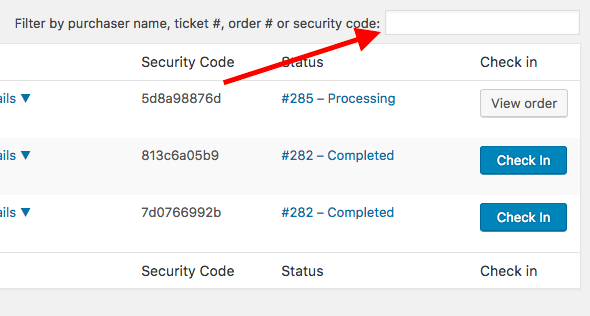
The text before the search box that’s being pointed to states, “Filter by purchaser name…”
Please clarify exactly what your question is if I’m not understanding you correctly.
Thank you.
MemberHi, Christopher.
I’ll assume you’re using our Event Tickets Plus (ET+) plugin with WooCommerce; correct me if I’m wrong.
Our ET+ plugin creates new WooCommerce products. And when someone “buys” one, we just programmatically add it to the WooCommerce cart. Then WooCommerce handles it from there.
Therefore, you could implement some WooCommerce coupon, some custom code snippet to accomplish this, or even use a WooCommerce extension. Ones I’m aware of include https://woocommerce.com/products/dynamic-pricing/ and https://wordpress.org/plugins/woocommerce-bulk-discount/, but I don’t know if either can do this exact setup. Please understand that these are third-party, not guaranteed or supported by us.
Please let me know how this project goes for you.
MemberThis reply is private.
MemberHi again, Mark.
I’ll continue helping you at your other forum thread.
Please know that, in our forums, bumping threads or posting duplicate threads does not get your questions answered more quickly.
MemberHi, Susan.
This often happens with Yoast SEO. You can go to Screen Options in the upper right corner and uncheck the boxes of the columns you don’t want to see.
Please let me know how this goes for you.
-
AuthorPosts