

Forum Replies Created
-
AuthorPosts
-
Brian
MemberHi sorry for the issues.
I am here to help though!
Thanks for the information on the theme and moving to staging to for testing.
I went to the Event and did not see any errors so lets start with this.
I have a bunch of questions that to help get to the bottom of this .
Please check in Products and see if the ticket you created in the Event is there.
Also, Please go to the Event you created the ticket and confirm it is listed there and let me know the times you setup for the ticket’s to be on sale (if not date please let me know that).
Have you looked at New User Primer for WooCommerce Tickets? (it could help you see all the features if you have not)
https://theeventscalendar.com/support/documentation/wootickets-new-user-primer/
Let me know what you find out from those two questions and we can take the next step from there.
Thanks
MemberHello,
Sorry for the issues, I can help out to get them back on track.
Events List
I took a look at the site and saw the list view is not working.
It is just going to a white screen so it looks like it is getting an error causing the template to stop.
Can you view the error log in either the wp-admin/ directory or the root directory of the site and see if there are an errors releated to your custom template.
Category Month View
I also went to the category page and it looks like it is adding javascript variables.
Do you have any customizations for the Month Tooltips?
Also, are you running debug from wp-config and from the Events Calendar? If you are can you try turning it off and seeing if that resolves either problem.
Please let me know what you find out and we can go from there to resolve this.
Thanks
September 3, 2014 at 8:06 am in reply to: Default Month View will not Display with the Default Page Template #719451MemberHi,
Sorry for the issues with the Month Calendar not showing as default. Thanks for all the information about testing for conflicts too.
I visited your site @ http://ddotsites.com/ddotuniversity/events/
This is what I see:
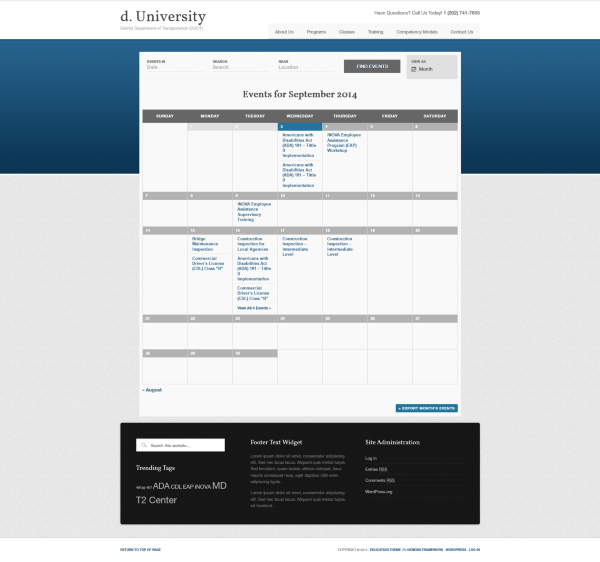
Are you saying the month view is not displaying for you when you first visit the page even though it is set to default.
Can you try clearing the cache in your browser and try in another browser and see if it works in any of them.
Also, files are not attached to the ticket so I could not see the pdf. If you would like me to take a look please include a link to it in your next reply.
Let me know what you find out and we can go from there to fix it.
Thanks
September 3, 2014 at 7:48 am in reply to: Problem with breadcrumbs – undefined index notices #719386MemberHi,
Sorry for the troubles, not sure if there is a simple fix, but it is possible.
If you can find the function, which is calling the breadcrumbs and can remove it using an action. You could use the coding below to target the Community Pages to disable it on just those pages.
/*

* Run on Community Events Pages Only

* @3.7

*/

add_action( 'wp_head', 'evensts_run_on_community_pages' );

function evensts_run_on_community_pages( $query ) {

	if ( tribe_is_community_my_events_page() || tribe_is_community_edit_event_page() ) {

		/*add coding here */

	}

}
Another option is to bring it to the attention of the developer to run isset checks to prevent the errors from showing.
Let me know if that helps.
Thanks
September 3, 2014 at 7:35 am in reply to: Events not showing up in main blog, Outspoken Theme #719366MemberHi,
It is hard to say which file it is, as there are a couple options and every theme is different.
It could be the index.php file or the home.php.
I can help a little with this, but I will be unable to provide all the coding. The theme developer may have a better idea on how to do this.
However, if you can post a private reply with the coding I will take a look.
Thanks
MemberThanks for the link.
I was able to load the theme and get visual composer(4.2.3) running with Events Calendar Pro 3.7.
Unfortunately, I got zero errors in the process, not even a hint of trouble from my error logs, console, or query checker.
Although it appears to be an issue with The Events Calendar Pro and Visual Composer. To me it is starting to look like another plugin, some custom coding, or the hosting causing an issue.
Can you please copy the System Information from Events->Help into a reply and I can try adding some of the other plugins and see if that finds an issue.
Also, please contact your host and see if they they might have some insight into this. You could even share the url with this thread for them to have something to look at.
Let me know what you find out.
Thanks
MemberHello,
I have some coding that you can add to your theme’s function.php file that may help fix this conflict with Series Engine.
add_action( 'admin_init', 'event_editor_force_utc' );

function event_editor_force_utc() {

	global $pagenow, $post;

	if ( 'post-new.php' !== $pagenow && 'post.php' !== $pagenow ) return;

	if ( TribeEvents::POSTTYPE !== get_post_type( $post ) ) return;

	date_default_timezone_set( 'UTC' );

}
Also, we have found if you disable Timely integration from the Series Engine Settings it alleviates the worst of the conflicts with The Events Calendar Pro.
Let me know if that works for you.
Thanks
MemberI took a look at the files you sent and put them into a theme and ordered some tickets.
I do not have the coding active to mark orders completed, but when I did try to complete an order it went to a blank white screen.
I looked at my error log and saw this:
[03-Sep-2014 13:30:57 UTC] PHP Parse error: syntax error, unexpected '}', expecting ',' or ';' in /wp-content/themes/twentytwelve/woocommerce/emails/customer-completed-order.php on line 52Please try fixing that error and see if it solves the issue.
Thanks!
MemberI am sorry you feel the product does not do what you would like it to do. I think it is pretty clear on the product page what its features are and it is designed to sell tickets on The Events Calendar Events Pages something that WooCommerce does not do out of the box. If you would like a refund as you feel another solutions fits what you would like better please email us at pro(at)tri.be
Thanks
MemberBrian
I feel like we are not getting anywhere with this sorry about that.
Is it possible you can zip up your theme and provide a link for me to download it and see if I can reproduce it the errors on my end? You can do it in a private reply.
And.. Yes, turn off debug in the config and there is a setting in the general tab of the Event Calendar too.
Thanks, we will get this fixed yet, sorry again for the delay.
MemberRussell,
I can help you out with this.
Here is the css for the tooptip:
#tribe-events-content-wrapper #tribe-events-content .tribe-events-tooltip h4, .single-tribe_events a.tribe-events-ical, .single-tribe_events a.tribe-events-gcal {

 color: #21759b;

}
And for the Export:
.tribe-events-ical.tribe-events-button {

 color: #21759b;

}
Change the color hexcode on each to what you would like and it should take over.
Let me know if you have issues.
Thanks
September 2, 2014 at 3:00 pm in reply to: One Venue has several different websites – how do I change original? #717784MemberHello,
I can help you with this.
If you are looking to delete a venue go to:
Events->Venue then find the one in the list and delete it.
However, if you delete it there it will delete it for any events you have on your site assigned to it.
Also, if you add venues with the same name it is going to have a very similar url, the best thing to do is change the venue name somehow.
Let me know if that helps.
Thanks
September 2, 2014 at 11:22 am in reply to: Finding the page-id for auto-generated 'events' slug #717535MemberHi, I can help you out.
If you would like to add different titles whether SEO or for visitors beyond our template the only way to do that is by customizing the template using our themer’s guide:
https://theeventscalendar.com/support/documentation/events-calendar-themers-guide/
For the breadcrumbs you may have to add the theme functions to the custom Event Templates you add to the theme.
And this topic has some filters that are useful if you are working with WordPress SEO Plugin to modify the SEO title:
I am going to close this ticket as the original question has been answered, but if you have issues with this or need more help on your second question please create a new ticket and reference this one. I am doing this also because it helps to have one question in a ticket for both us and our customers to search for solutions or see trends.
Thanks
September 2, 2014 at 11:07 am in reply to: Events Calendar pro conflict with Visual Composer #717516MemberOk how strange.
Do you have Debug mode by chance? If so I think we can turn that off in the plugin and in wp-config to try to get this working.
These messages:
The Events Calendar Log: Initializing Tribe Events on Sep, 2nd at 05:09:26 pm
Our messages in debug are saying it is working. But not much help beyond that.
I saw this error:
PHP Warning: fopen(/var/www/vhosts/16/300445/webspace/httpdocs/wp-content/plugins/events-calendar-pro/events-calendar-pro.php): failed to open stream: No such file or directory in /var/www/vhosts/16/300445/webspace/httpdocs/wp-includes/functions.php on line 3879
Are you using the latest version of Visual Composer released on 8/20/2014?
Since you have not gotten the site working have you deleted Visual Composer and The Events Calendar Pro from the plugin directory to at least get it working. If all else please do this to get the site backup and turn off debugging in the wp-config and then in Events->Settings General Tab at the bottom.
Are you using the latest version of Visual Composer released on 8/20/2014?
Let me know what you find out.
Thanks
MemberHi, I can help you out with your questions and issues.
Ticket List
To get a list of tickets purchased for an Event you can go to the Event List and then hover over the title and click Attendees, you can then, click, print, or email that list.
Please note, it creates the list by orders so if one person purchases 5 tickets, they will be listed for all 5 tickets. (Each ticket will still be unique)
The tickets will only show in the attendees list if the orders for tickets are completed in WooCommerce.
Go to WooCommerce->Orders to complete them.
Guest Register
I went to the site and went through the checkout process and by default I could have ordered without creating an account.
Please try the process in a browser you are not logged in and see if you can order without creating an account.
Either way it should still ask for billing information.
Let me know what you find out and if you need any help on these issues.
Thanks
-
AuthorPosts