
Home › Forums › Calendar Products › Events Calendar PRO › Default Month View will not Display with the Default Page Template
- This topic has 8 replies, 2 voices, and was last updated 12 years, 1 month ago by
Brian.
-
AuthorPosts
-
September 2, 2014 at 10:46 am #717465
DDOT Webmaster
ParticipantI am using the following child them from StudioPress:
http://my.studiopress.com/setup/more-themes/previous-versions/education-theme/This is the development site URL address:
http://ddotsites.com/ddotuniversity/This is the URL for the problem page:
http://ddotsites.com/ddotuniversity/events/If I select the Default Page Template as the Event Template, then the main page body will not display month calendar even though the Default View has been selected to show the Month inside the Default Page Template (i.e., the template that controls the appearance of the calendar content).
Attach is a PDF of the Event Calendar Setting configured to view the Month as the default view. See attachment The Event Calendar Settings.pdf.
Yet, the Month view does not display. See Default Page Template with the Month as the Default View.pdf. Why?
I have deactivated all the Plugins except the two Event Calendar Plugins, the Free and the Pro versions. I have also reverted the WordPress Theme to 2011. Implementing these steps has indeed restored the calendar for the 2011 WordPress theme.
I need the Default View to be the Month using the Default Page Template of my chosen WordPress them from StudioPress.
As an alternative, if I select the Default Events Template then a transparent monthly calendar displays. How do I put a white layer (wrapper) behind the calendar so that the blue background is not revealed through the calendar? What is the file name to be altered and what is the code?
September 3, 2014 at 8:06 am #719451MemberHi,
Sorry for the issues with the Month Calendar not showing as default. Thanks for all the information about testing for conflicts too.
I visited your site @ http://ddotsites.com/ddotuniversity/events/
This is what I see:
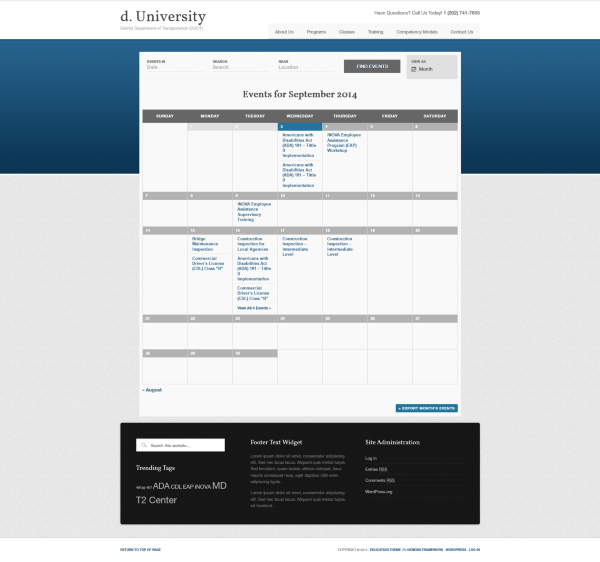
Are you saying the month view is not displaying for you when you first visit the page even though it is set to default.
Can you try clearing the cache in your browser and try in another browser and see if it works in any of them.
Also, files are not attached to the ticket so I could not see the pdf. If you would like me to take a look please include a link to it in your next reply.
Let me know what you find out and we can go from there to fix it.
Thanks
September 3, 2014 at 11:54 am #719931ParticipantI’ve made some changes to the following problem pages since my initial correspondence:
http://ddotsites.com/ddotuniversity/events/As an alternative, I’ve selected the Default *Events* Template which displayed a transparent calendar. I took some time to identify the CSS class and file names. I found them! I added a background: #f9f9f9 layer behind the calendar. The transparency is gone at the top of the page. The blue band no longer is visible through the calendar table cells. Consequently, I answered my second question. I figured out how to put a white layer (wrapper) behind the calendar so that the blue background does not show through? That is what you are currently seeing.
However, If I select the Default *Page* Template (i.e., the template that controls the appearance of the calendar content) as the Event Template, then the main page body will not display month calendar inside the page.
September 3, 2014 at 5:52 pm #720553ParticipantYes, I am saying that the month view is not displaying when anyone visits the page even though it is set to default. This occurs across all browsers, from my home and work. I clear the local browser cache and I clear the WordPress cache with the plugin WP Super Cache.
Can you try clearing the cache in your browser and try in another browser and see if it works in any of them.
September 3, 2014 at 6:44 pm #720620ParticipantCurrently the Event Template is set to the Default (Modern Tribe) Events Template to view the month. This works!
What does not work is setting the Default (WP Theme) Page Template to view the month.
September 4, 2014 at 6:51 am #721828MemberOk so it works when it is the “Default (Modern Tribe) Events Template”, but not with the “Default (WP Theme) Page Template”.
I did a test with Genesis Parent Theme and did not see any issues, but then I did a test with the latest version of the Education Theme and see it is not working there.
I checked my Genesis settings and saw it does not work if the “Content Archives” Section is set to “Display post excerpts.”
Let me know if changing that fixes the issue.
As it works in at least one template is what we strive for and why we provide different options.
If you cannot get it to work with the “Default (WP Theme) Page Template”, then let me know if you need help making customizations to the “Default (Modern Tribe) Events Template” as I think it would be better to focus on changing that.
Thanks
September 5, 2014 at 8:01 am #724653ParticipantThank you!!!!
September 5, 2014 at 8:14 am #724667ParticipantIt turns out that I prefer the Event Template set to target the Default (Modern Tribe) Events Template to view the month. The Default (WP Theme) Page Template on my site includes a primary and secondary right sidebar so it’s too crowded to fit the month in the page body. Very tight!
Next question I will post in the forum is “How do I set the single event URL to use the Default (WP Theme) Page Template while the while the multiple events URL use the Default (Modern Tribe) Events Template?”
September 5, 2014 at 11:15 am #725032MemberGreat, glad it is working now. Since this issue is resolved I am going to close this topic.
And thanks for posting you other question in another topic that is really helpful for us!
If you need anything else related to this topic or another please post a new topic on the forum and we can help you out.
Thanks
-
AuthorPosts
- The topic ‘Default Month View will not Display with the Default Page Template’ is closed to new replies.