

Forum Replies Created
-
AuthorPosts
-
January 21, 2015 at 8:07 am in reply to: How Can I add Time zone while adding Event to the Event Calender Pro #935674
Brian
MemberSince there is has not been any activity on this thread for over 2 weeks so I am now closing it. Feel free to start a new thread if you have further issues. Thanks! 🙂
MemberSince there is has not been any activity on this thread for over 2 weeks so I am now closing it. Feel free to start a new thread if you have further issues. Thanks! 🙂
MemberOk sounds good.
I am going to close this ticket as you marked it resolved, but if you need anything else related to this topic or another please post a new topic on the forum and we can help you out.
Thanks
MemberI am glad to see you were able to figure it out.
I am going to go ahead and close this ticket as you marked it resolved. If you have a similar issue or another in the future, please do not hesitate to create a new ticket.
Thanks!
MemberThanks for providing the screenshots, I see the issue now.
Since you are using the 24 hour clock not sure what the AM or PM is showing that could be the issue.
What is your time settings in WordPress?
They are found on this page or your admin:
Settings > General > Time Format
Let me know what you find out and we can go from there.
Thanks
January 21, 2015 at 7:39 am in reply to: Next / Prev Events showing twice in the single event view #935654MemberNo worries. Glad it helps.
I am going to go ahead and close this ticket, but if you need help on this or something else please post a new ticket.
Thanks!
MemberHi,
Sorry for the issues you are having. I can help troubleshoot this with you.
I took a look at your site and see what you mean.
The top links work for Previous and Next Month, but not the bottom.
I am not getting any javascript errors so can you please follow our testing for conflicts guide:
And see if that helps narrow down the issue.
Let me know and we can go from there.
Thanks
MemberHi Scott,
Sorry for the issues you are having. I can help troubleshoot them with you.
I visited your site and see what you mean.
On the single events I get this javascript error, which maybe is causing the map and countdown to break:
Error: No images were supplied for Backstretch
http://whub44.webhostinghub.com/~moore25/wp-includes/js/jquery/jquery.js?ver=1.11.1
Line 2On the List Events I get this message:
Cross-Origin Request Blocked: The Same Origin Policy disallows reading the remote resource at http://whub44.webhostinghub.com/~moore25/wp-admin/admin-ajax.php. This can be fixed by moving the resource to the same domain or enabling CORS.
The event url in your nav is this: http://192.145.238.199/~moore25/?post_type=tribe_events
So the ajax is not running as it sees a different url.
See if you can fix those and let us know if that fixes the issue or we can go to the next steps.
Thanks
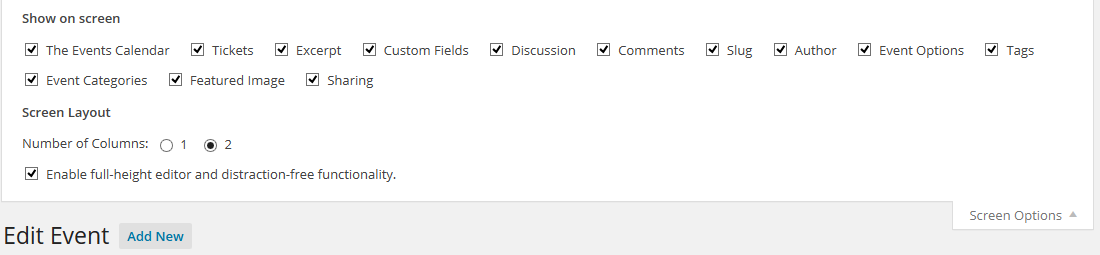
MemberThat is the Event Listing Page, what about when editing a single event?
This is what should show on that page:
 Member
Only files in these two directories are able to be moved and changed in your theme:
\events-calendar-pro\views\pro\
\the-events-calendar\views\
MemberWe do not modify the payment process and all tickets purchased go through WooCommerce’s order system. That is where it would show paid. The tickets are a product per WooCommerce and can be found in the Product listing. (they are hidden by default from the shop page)
And the Autocomplete all paid orders should work, I have used a snippet provided by WooCommerce to complete all orders and that has worked in the past as well.
You also can manually create orders and add tickets to them.
January 21, 2015 at 7:10 am in reply to: Event start date not showing up for all-day and multi-day events #935637MemberI did some testing on the List Widget and by default it does show the end date.
So there is either a conflict or a customization that could be causing the issue.
Do you have any custom templates in your theme for the events calendar?
Also, can you run through our testing for conflicts guide and see if that narrows down the issue:
Let me know what you find out.
Thanks
January 21, 2015 at 7:00 am in reply to: I can't see the "View as" menu in the calendar page #935631MemberI am glad to see you were able to figure it out.
I am going to go ahead and close this ticket. If you have a similar issue or another in the future, please do not hesitate to create a new ticket.
Thanks!
MemberI am glad to see you were able to figure it out.
I am going to go ahead and close this ticket. If you have a similar issue or another in the future, please do not hesitate to create a new ticket.
Thanks!
MemberHi Leland, you could activate the comment system and use that on the events. That is about as close to a feature to what you looking for that is available without customization from you.
-
AuthorPosts