

Forum Replies Created
-
AuthorPosts
-
February 11, 2015 at 1:18 pm in reply to: Remove scroll bar from expanded vertical category filter #941743
Brian
MemberDo you have a think to let me see. Hard to know what it disappeared since there is a customization.
Let me know and I will take a quick look.
Thanks
MemberThis reply is private.
February 11, 2015 at 1:10 pm in reply to: Ticket stock increasing as people purchase tickets #941737MemberSo this is happening on a local environment and not on a live server?
Does it help if you reduce PHP to 5.3 to 5.5 range? WordPress (unfortunately) still supports 5.2.
Not sure if 5.6 has changed something that could be causing the issue.
February 11, 2015 at 1:07 pm in reply to: Users are getting confused and entering unintentional Overlapping Events #941735MemberHi,
I am not sure I follow you logic on how you are creating recurring events. If I can create one event and set the Start and End Dates as you state and that is one big event I would not be using recurrence.
If I was using recurrence I would set it up like this:
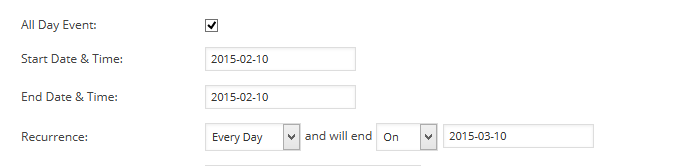
So that it creates an event for each day of the period.
I could see the value in adding a overlap check, but I can also think of cases where I would not want that check too. The system is not designed to check you logic so you can try to do what you want with it and I have no coding to give to prevent how you are using it.
Let me know if you have any follow up questions.
Thanks
MemberGreat, glad it helps, I am going to go ahead and close this ticket, but if you need help on this or something else please post a new ticket.
Thanks!
February 11, 2015 at 8:32 am in reply to: Remove scroll bar from expanded vertical category filter #941628MemberHi,
Thanks for using our plugins. I can help you out here.
The css that controls the size is as follows:
.tribe-events-filter-group ul {

    max-height: 250px;

    overflow-y: auto;

}
You can modify that to something like this:
#tribe_events_filters_form .tribe-events-filter-group ul {

	max-height: 100%;

	overflow:hidden;

}
I got that to work for me.
Let me know if it works for you.
Thanks
MemberHello,
Thanks for using our plugins.
Unfortunately, we do not have a feature to hide weekends in the Month view.
However, I came up with this css to do it:
https://gist.github.com/jesseeproductions/0b7be26ae186a39f0abd
Let me know if that works for you.
Thanks
MemberThanks for the feature ideas, I can see value in them. We also have a Uservoice Page where you can make recommendations and upvote other peoples ideas as well:
As for the showing events by the end time, I think it would be possible, but a challenge to do as the plugin is designed around getting the start date and time.
We are fixing an issue that keeps events still showing even if that time has passed that day. So if an event ends at 11am and it is 12pm on that day the event will no longer show, well it will do that once we fix the bug.
Let me know if you have any follow up questions.
Thanks
February 11, 2015 at 8:12 am in reply to: Twenty Twelve Menu being disabled on single event page #941618MemberHi,
Sorry for the issues you are having.
I took a look at your site and see what you mean.
I found out it is this css causing the issue:
#header {

    float: left;

    width: 100%;

}
See if you can remove float: left; from your theme’s stylesheet.
When I removed that from it is my browser it fixed the issue and did not create new ones 🙂
Recurring Events
I created a recurring event and when I break it out it no longer appears to me to be apart of the series, beside the title being the same and it does not say it is recurring in the column either. Do you not see that in your site?Let me know if removing the css works.
Thanks
MemberThere are server logs that hosting companies can check that might not show, that is why I ask. One time this issue was fixed because there was an issue with Zend Optimizer that did not show in the site error logs.
I looked at the 404 Error Console and did not see anything that could help.
I did look at a venue and see the address as coordinates:
39.759304, -105.011323
As you mentioned, but I did not realize you put that in instead of the address.
In the next version we are adding a method to edit coordinates in addition to having an address.
For now please use the Event Rocket Plugin an unofficial plugin maintained by some of our developers that adds a coordinate editor to the venues:
Using that editor you can have both the address and coordinates for a venue.
Please change one venue so it has both and see if that resolves the Map View issue.
Thanks
MemberThank you for the testing.
I went back to your site today and was unable to reproduce the error now. I did see it yesterday, but now clicking on the Tuesday Events takes me to the right page.
Are you seeing it resolved now? Can you try on a browser that you have not visited the site on or clearing your browser cache?
Month Tool Tips
For the theme conflict are you using any custom templates for the events calendar? what about if you change the Events Template in the settings?Events > Settings > Display Tab
Let me know and we can go from there.
Thanks
February 11, 2015 at 7:40 am in reply to: Ticket stock increasing as people purchase tickets #941604MemberSo every time a ticket is purchased the stock increases by the amount purchased? or by just 1?
And the system information would be helpful.
Are you able to clone your site to a staging area to see if we can do testing there to find the conflict?
Let me know.
Thanks
MemberThe script loads all the Facebook Page’s and then has to check each event with Facebook and then in your site to see if it has been imported or not to prevent duplicates.
So it is necessary to have all the events there and to check or it would just reimport them every time, creating another issue. We have tried to improve that check in the next release to make it more efficient, but that release is not ready yet and I do not have a timeline for its release.
The import function is all run through this file:
the-events-calendar-facebook-importer\the-events-calendar-facebook-importer.php
MemberThe whole system is design to show current and future events so adding past events into the mix for everything is going to be a challenge. We do that because if we always queried all the events it would greatly impact performance and as an Event Calendar it is used to display events people can attend so finding current and future events is the goal. That is why the search function only finds future events that is intended.
We do not have coding to give you to change this around it could be possible, but not something I or our developers have done as it is not how the plugin is built. So unfortunately, we do not have any help to change both plugins to achieve this.
You maybe to use the Event Rocket as it has Event list that could help you list events from whatever date you like.
Otherwise there is not much else we can do on this customization.
February 11, 2015 at 5:41 am in reply to: Does WooCommerce’s built-in VAT functionality apply to Tickets? #941591MemberGreat, hope it works out.
If not you can email us within 30 days with the order number to [email protected] and request a refund.
I am going to close this ticket, but if you need anything else related to this topic or another please post a new topic on the forum and we can help you out.
Thanks
-
AuthorPosts