
Home › Forums › Calendar Products › Events Calendar PRO › Users are getting confused and entering unintentional Overlapping Events
- This topic has 7 replies, 2 voices, and was last updated 11 years, 8 months ago by
Brian.
-
AuthorPosts
-
February 10, 2015 at 1:21 pm #941442
Alicia
ParticipantOn a website I maintain users are getting confused by the recurring events layout and entering events that overlap. I’m going to need to write patch code in either js or php to stop this but this is what is occuring
They’ll go in and check All Day event.
Then enter the first day of the event
Then enter the last day
Then enter recurrence for the same number of days – this results in entries reading something linkFeb 10 – March 10
Feb 11 – March 11🙁
Or they’ll do something like this — They’ll enter a start date & time, the opening time of the event. Then they’ll enter the last day of the range and the end time. And again, they’ll enter the daily recurrence leading to something like
Feb 10 8:00 AM – March 10 5:00 PM
Feb 11 8:00 AM – March 10 5:00 PMWhile there might be a corner case where this is useful, this as default behavior should be considered a bug. The users should not be allowed to enter recurring events which self overlap like this.
February 11, 2015 at 1:07 pm #941735MemberHi,
I am not sure I follow you logic on how you are creating recurring events. If I can create one event and set the Start and End Dates as you state and that is one big event I would not be using recurrence.
If I was using recurrence I would set it up like this:
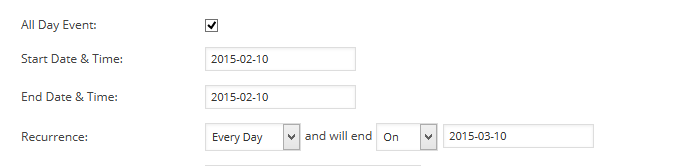
So that it creates an event for each day of the period.
I could see the value in adding a overlap check, but I can also think of cases where I would not want that check too. The system is not designed to check you logic so you can try to do what you want with it and I have no coding to give to prevent how you are using it.
Let me know if you have any follow up questions.
Thanks
February 12, 2015 at 5:43 am #941915ParticipantIf I can create one event and set the Start and End Dates as you state and that is one big event I would not be using recurrence.
The problem is the users at this site can’t grok that an event that recurs on a daily basis, say, over the summer, is not the same thing as a continuous event over the same time frame. I’ve added a radio toggle to the start of the form that asks the user if the event is one day or multiple days. It has this tool tip
Please do not confuse recurring one day events
with multiple day events. They are displayed differently (see the
recurrence tip below).A “multiple day event” is one where attendees are expected to
remain at it or a nearby hotel for most or all of its duration –
(a music festival or Renaissance fair).A “one day” event lasts only one day or less. If the same event
can be attended on one of multiple days mark it as recurring (see
below).Multiple day events can also recur, but only on a weekly, monthly,
or annual basis. If a different interval is needed contact an admin.So that I don’t have to hack the validation code or change the form or PHP side behavior that radio button hides unnecessary fields from the user. If it’s a one day event the user isn’t given the option of selecting an end date – only an end time. If it’s multiple day they aren’t given the option to use daily recurrence or custom recurrence. Beside the recurrence field this tooltip was added.
Please Do not confuse daily recurrence with
multiple day events (see the one-day event tooltip above)Recurring events are stored and displayed as a chain of related
events. This means that if you enter an event that recurs for seven
days you will see seven events listed in the system. Editing any
one of these events will edit all of them.When displayed on the home page event list a recurring event will
show as occurring at the current day or next day of recurrence (Viewed
on a Tuesday an event repeating each Friday will show its next Friday
entry). A multiple day event will be displayed with its first day of
occurrence shown even if that is in the past.I’m hoping this will clarify things enough for my users, but it took me – a programmer with around 10 years of experience – about 15 minutes to wrap my head around how you guys have this set up. That is going to give barely computer literate users fits, so there’s room for improvement here. I will admit it took me a lot longer to come up with an explanation my users might be able to understand which I’ve drafted above.
The primary problem with the current interface is it is trying to collect too much information too fast in my opinion. Some of the settings render follow up questions irrelevant in most use cases. Now admittedly, I can see use scenarios where the current behavior is not only useful but desirable – say a 3 day hiking trip that heads out once a day under one of three guides – those would overlap. But these scenarios are rare and accommodating for them complicates the interface for the 90% of users who are never going to need them.
This is why Apple kicks Microsoft’s tail in UIX btw – the rarely used or complicated config options for OSX are tucked out of sight where they won’t be stumbled upon by casual users who don’t need and often can’t properly use them. The same thing needs to apply here – the default entry method should not allow overlap because for most users it is non-sensical. Put a toggle in the admin panel to enable it.
Admittedly this is mostly an issue for the Community Events submodule – an admin should know what they’re doing or take the time to learn. It’s visiting users creating events through that module that are causing the problem on my client’s site – not the clients themselves.
February 12, 2015 at 7:53 am #941983MemberOh ok I see this is on the Community Events event add form.
Thank you for the feedback on this and I see what you are getting at.
I am going to have our team look at this and include it with our usability studies to see if we can improve this.
Thanks again.
February 12, 2015 at 7:57 am #941984ParticipantThanks. Sorry about the confusion, recurrence is a feature of the Pro version so both it and community events have to be installed for this to come up and I didn’t know which board was better for this.
February 13, 2015 at 7:26 am #942305MemberNo worries.
Thanks for bringing this up. Your feedback has been added into our file for the next round of usability tests.
Let me know if you would like anything else related to this topic otherwise I will close this thread.
Thanks
February 13, 2015 at 12:01 pm #942405ParticipantNope. Good here. Thank you.
February 13, 2015 at 12:01 pm #942406MemberSounds good.
I am going to close this ticket, but if you need anything else related to this topic or another please post a new topic on the forum and we can help you out.
Thanks
-
AuthorPosts
- The topic ‘Users are getting confused and entering unintentional Overlapping Events’ is closed to new replies.