

Forum Replies Created
-
AuthorPosts
-
March 30, 2015 at 8:05 am in reply to: Ready to buy but: can TEC allow me to charge for listings #951869
Brian
MemberHi,
Thanks for the interest in our plugins. We do not have a feature with Community Events to charge for listings.
Adding it to that plugin could be possible depending on your skill level. You have to understand PHP and PHP Classes to make the modifications so it could turn into quite the challenge.
We are able to help answer some questions to get you started on customizations, but for the most part they are beyond the support we can provide.
If you would like to request that feature please head to our UserVoice Page and add your own or upvote that feature as they will increase the chances of it being added to a future version.
http://tribe.uservoice.com/forums/195723-feature-ideas
Let me know if you have any follow up questions.
Thanks
March 30, 2015 at 8:01 am in reply to: Display Event Title in Month View Mini Calendar Shortcode #951862MemberHi,
Thanks for using our plugins.
The Mini Calendar Shortcode just displays the Mini Calendar Widget and they do not have a feature to display Event Titles in the Days of the Month.
It could be possible with some customization, but that is beyond the support we can provide.
We do have the themer’s guide to help get you started on modifying templates such as the Mini Calendar Widget:
https://theeventscalendar.com/knowledgebase/themers-guide/
Let me know if you have any follow up questions.
Thanks
MemberGreat, thanks for sharing. I am sure someone will find this useful.
I am going to go ahead and close this ticket. If you have a similar issue or another in the future, please do not hesitate to create a new ticket.
Thanks!
MemberOk thanks for the database.
I was able to load the site and see the issue.
I also fixed the issue on my test site.
In your theme in this file you are running flush_rewrite_rules() on every load of a page:
wp-content\themes\Eastgate\functions.php
So on line 228 please remove:
flush_rewrite_rules();
Then resave permalinks and try to visit a single event.
I was able to visit them after making this change.
flush_rewrite_rules() should never be run on every load of a page as it can cause this exact issue.
Here is more information on using the flush function in WordPress.
https://codex.wordpress.org/Function_Reference/flush_rewrite_rules
Let me know if removing that solves the issue for you.
Thanks
MemberNo worries, glad it helps.
The example.com does not show on the site if you do not replace it, it is only a placeholder.
The website url you put in there will show in the details section of the single event.
Let me know if that helps.
Thanks
March 30, 2015 at 4:54 am in reply to: Hooking 'save' or 'update' event for tribe_events custom post type? #951805MemberI am glad to see you were able to figure it out.
I am going to go ahead and close this ticket. If you have a similar issue or another in the future, please do not hesitate to create a new ticket.
Thanks!
MemberHow strange, but I am glad to see you were able to fix this issue.
Since the issue is resolved I am going to go ahead and close this ticket. If you have a similar issue or another in the future, please do not hesitate to create a new ticket.
Thanks!
MemberGreat, glad it is working, I am going to go ahead and close this ticket, but if you need help on this or something else please post a new ticket.
Thanks!
March 30, 2015 at 4:53 am in reply to: Ready to buy, questions about customizing, styling and manual excerpt area #951802MemberSince this is marked with a correct answer, I am going to close this ticket. If you need anything else related to this topic or another please post a new topic on the forum and we can help you out.
Thanks
March 29, 2015 at 2:02 pm in reply to: Migrate Events Created By The Moderator to Specific User Accounts #951727MemberHi,
Thanks for using Community Events.
The events use authors just like posts.
You should be able to do a bulk edit in the event list in the admin and change the author just like a post.
Since Community Events enables any WordPress role to create events, you may need to change the role of the user to an Author so you can assign them the events. Once assigned you can change them back to a lower role.
Let me know if that works for you.
Thanks
MemberHello,
Thanks for using our plugins.
I can help you out here.
You are talking about the URL field under Event Website that is also under the Event Organizer Details section, correct?
That is part of the Events Calendar and used if for example the event is a festival and has its own website. You can add it there for people to use to visit the festival site to get more information.
It is up to you to use it and not apart of EventBrite.
Does that make sense?
Thanks
MemberHi,
Thanks for the interest in our plugins.
The Community Events and the Ticketing plugins do not work together to enable front end users to create events with tickets.
If you would like to request that feature please head to our UserVoice Page and add your own or upvote that feature as they will increase the chances of it being added to a future version.
http://tribe.uservoice.com/forums/195723-feature-ideas
Thanks
MemberI am glad to see you were able to figure it out.
I am going to go ahead and close this ticket. If you have a similar issue or another in the future, please do not hesitate to create a new ticket.
Thanks!
MemberHi,
This thread is being closed as it is a duplicate of this thread and that thread is not closed:
Please note we may take up to 24 hours to respond to a post and we do not work on Weekends.
Thanks
MemberOk, I visited your site and I am seeing this for the Organizer:
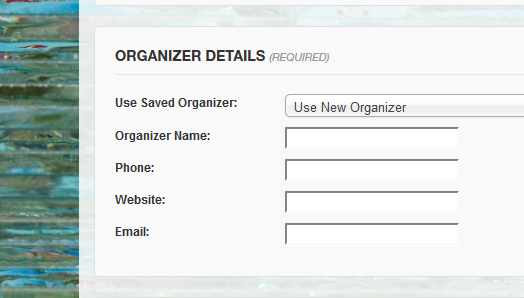
Are you not seeing the email field there?
If so, if you change browsers does it work?
If not then what does your required fields code look like? That is not standard coding we include so the email field could be wrong in that function and it is looking for a field that does not exist.
Let me know what you find out and we can go from here.
Thanks
-
AuthorPosts