

Forum Replies Created
-
AuthorPosts
-
Brian
MemberHi,
I took a look at your site and see you are using W3 Total Cache. I just checked on August 3rd and the site is still using a cache copy from August 1st.
<!-- Performance optimized by W3 Total Cache. Learn more: http://www.w3-edge.com/wordpress-plugins/Page Caching using disk: enhanced
Served from: contracostabee.com @ 2015-08-01 16:08:29 by W3 Total Cache -->
I believe this could be the issue, please setup the cache to renew itself at least once a day and see if that helps.
Thanks
July 31, 2015 at 1:27 pm in reply to: Since Update most of event listing content no longer displays #992345MemberHi,
If that is the case the best thing is to go back to square one either way and use the latest templates as there is to much guessing otherwise. I can help get the customizations back to what they were.
The first thing would be to follow the points in my last thread to remove the organizer email from that template.
Then we can go from here.
MemberHi,
Thanks for providing that.
I think I found the issue and it does appear to be a bug.
It appears the date format day/month/year in the end on recurrence field is causing the problem. Your date is 20/12/2015
When I had it set to the same format I would only get the first event created.
I am not sure if it is all of the datepicker settings with day first, but changing this setting:
Events > Settings > Display Tab > “Datepicker Date Format” to 01/15/2015
Resolved the issue for me.
Although that is not ideal it does enable the recurrence to work.
If you would rather not change the format setting you could try setting On to After in the dropdown and then count how many weeks you need the event and put that number there.
Let me know if either of those work for you.
Thanks
MemberI am glad to see you were able to figure it out.
I am going to go ahead and close this ticket. If you have a similar issue or another in the future, please do not hesitate to create a new ticket.
Thanks!
MemberGreat glad it helps.
I am going to close this ticket, but if you need anything else related to this topic or another please post a new topic on the forum and we can help you out.
Thanks
MemberHi,
Thanks for using our plugins. I can try to help out here.
Out of the box there is no feature to make all the Events the same size in photo view so it does take some customization.
You can follow our themer’s guide:
https://theeventscalendar.com/knowledgebase/themers-guide/
To move and edit this template in your theme:
events-calendar-pro\src\views\pro\photo\single-event.php
There you want to modify this function:
<?php echo tribe_event_featured_image( null, 'medium' ); ?>Instead of medium you would want to use a custom size, my example is photo-view instead of medium.
To create a custom size use this function in your theme’s functions.php:
add_image_size( ‘photo-view’, 220, 180, true );
Change the width and height number and then replace medium with the name you give it
That will get the images all the same size. If you are long title or on some dates the time might be on two different lines so you may have to add some css to force a consistent size. That is going to be unique to your site, but I can try to help out a big more.
Cheers
MemberHi,
Thanks for using our plugins. I can try to help out, but I am limited in supporting them.
The coding looks like that should work.
Did you try resaving permalinks after adding the coding?
If that does not help you maybe to use a plugin such as the Rewrite Rules Inspector
To see what is happening when you visit your new archives.
Cheers
MemberHi,
Sorry for the issues you are having I can help out.
We currently, do not support ticket creation in recurring events. It is possible to create the events and then edit each event to add tickets to it.
Otherwise if you create a recurring event series and tickets with it at the start all the tickets will be assigned to the first event. That is what it means by this message on the ticket edit form in the event “Currently, WooTickets will only show up on the frontend once per full event. For PRO users this means the same ticket will appear across all events in the series. Please configure your events accordingly.”
However, regardless of that the tickets should still go to the cart.
Can you please follow our testing for conflicts guide and see if that can find a conflict and we can go from here:
Thanks
July 31, 2015 at 11:58 am in reply to: JSON feed – no existing plugin grabs Tribe event's custom fields #992279MemberHI,
Thanks for using our plugins. I can try to help out.
We currently do not support the WordPress JSON API as it is not included in WordPress Core yet.
All our custom fields start with an underscore such as _EventStartDate
So that is suppose to indicate they are private fields and not accessible by public. I do not remember the details, but you would have to force the API to recognize those I believe.
Here is a list of most of our custom fields for reference:
https://gist.github.com/jesseeproductions/c2df90a56827dae990a0
Cheers
MemberHi,
Sorry for the confusion on this. The Mini Calendar Widget displays events by month and only the current month it is on.
If you would like to display upcoming events regardless of month then the Event List widget does that.
Let me know if you have any follow up questions.
Thanks
MemberOk thanks.
That helps. I see the one event you have not edited that is working and the other that is not working.
Could you include all the recurrence settings you have for that event that is not working?
The settings I am looking for are all in the area displayed by this image:
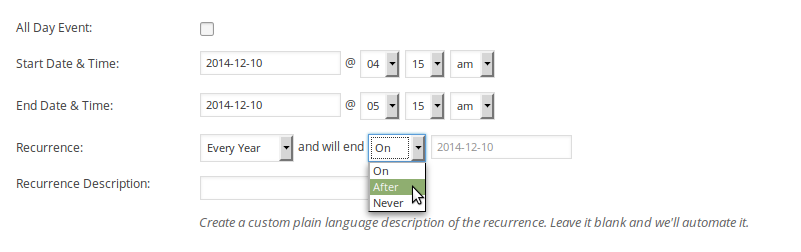
Let me know and I will test that out and go from here.
Thanks
July 31, 2015 at 11:51 am in reply to: Since Update most of event listing content no longer displays #992271MemberHi,
It sounds like you have custom templates in your theme. Unfortunately, I cannot troubleshoot customizations you have made.
The only thing I can suggest it backing out your customizations to get the latest coding and then follow our themer’s guide to get them back in.
https://theeventscalendar.com/knowledgebase/themers-guide/
I would then move this file to your theme:
the-events-calendar\src\views\modules\meta\organizer.php
And in there just delete the email field or any other organizer field you do not want to display.
Thanks
MemberHi,
Thanks for using our plugins!
I can help out here.
You can apply to the non profit if you qualify at any time. We do not restrict it to new customers.
Here is all the information on applying:
https://theeventscalendar.com/knowledgebase/do-you-offer-discounts-for-non-profit-organizations/
Let me know if you have any follow up questions.
Thanks
MemberHi,
Thanks for using our plugins.
I can help out a bit here, but if you have purchased our premium plugins please login and post in the premium forums as this is for pre sales questions only.
To quickly answer your questions though we have this guide to move the ticket form:
https://theeventscalendar.com/knowledgebase/moving-the-ticket-form/
And we have this setting to that places the currency symbol after the cost:
Events > Settings > General Tab > Currency symbol follows value
There is also a WooCommerce Setting you can change here:
WooCommerce > Settings > Currency Position
Cheers
July 31, 2015 at 11:43 am in reply to: Remove Community Events Options from Admin Toolbar (Revisited) #992265MemberGreat glad it helps.
I am going to close this ticket, but if you need anything else related to this topic or another please post a new topic on the forum and we can help you out.
Thanks
-
AuthorPosts