

Forum Replies Created
-
AuthorPosts
-
Barry
MemberHi Michael,
Setting up an event representing each day of that timeframe – then individual tickets representing each available time slot – is probably going to be the best way to handle this.
For example, you could have a Feb 27 event with tickets for 10.00am – 10.30am, 10.30am – 11.00am, … etc. Then repeat with a new event covering the next day. Capping each slot is easy – simply make use of the stock control facilities 🙂
I do realize that’s a lot to setup manually, but without building a tool to automate the process or a customization that handles the process differently I’m afraid there aren’t too many other options here.
That said, if while looking at this you can think of some intuitive ways we could better accommodate this type of scenario, please don’t hesitate to share them on our UserVoice page.
Thanks again!
January 20, 2016 at 4:06 pm in reply to: How can I force the Organizer to be the logged in user's name only? #1059501MemberHi Jadu,
At this time you’d need to implement that as a customization.
Though the amount of assistance we can provide for this sort of thing is fairly limited, I’d be happy to outline a possible way to approach this – but first please do take the time to review our Themer’s Guide which covers many fundamentals in terms of customizing our plugins.
- Setup an empty file within your theme at tribe-events/community/modules/organizer.php – this will remove the ability for people to change the organizer
- When a user submits a new event you can modify the submitted data using the tribe_events_community_sanitize_submission hook – use this to inject whatever organizer you prefer
- To avoid duplication where the same user submits multiple events, remember to check and see if an organizer post has already been generated for them!
I do realize this is a very basic sketch showing just one way you might approach the problem, but hopefully it’s enough to get you headed in the right direction. Remember also there are plenty of folks you can approach for help if you need hands-on assistance beyond what we can offer in the support forum 🙂
Good luck!
MemberHi Erikka,
I’m sorry to hear you’ve hit up against some difficulties here.
Deleting the saved recurring import won’t impact those events which have already been imported, which is why they remain on the calendar. However, no further imports (from that source) should be generated.
Currently we do not have a tool to remove only those events which were imported via iCal, so to do this (if manual cleanup would take too long) we’d probably need to supply you with some SQL statements. Do you feel comfortable using these? If not, manual cleanup may be preferable even if it does take some amount of time (and, that way, you could leave one copy of each in place).
In terms of stopping the duplication, I’d really need to figure out why that was happening in the first instance. Can you share the Google Calendar URL you were importing from?
Thanks!
January 20, 2016 at 3:44 pm in reply to: Update Blues. After update, permalinks and tribe_get_event_link() are busted #1059493MemberHi Simon,
The code inside The Events Calendar used to register rewrite rules was recently rewritten, so it may be that the second half of that knowledgebase post needs to be updated – and I’ve flagged it for further review accordingly.
Until such time as we can update it, perhaps you could use a suitable redirect plugin to avoid problems for those users who are following the currently-invalid URLs?
In TEC’s settings I have the single event slug set as ‘event’.
Wherever I was useing tribe_get_event_link() in my layouts, the resulting link is now $siteURL/tribe-event/$eventName after the update.
That sounds rather strange. Can you give me an example usage from your custom templates so I can try to replicate (and can you determine if this relates to the rewrite customizations you had implemented)?
Last but not least, could you share your system information by private reply? Sometimes that can provide useful insights.
Member…Just to add, one thing you could try as an alternative is using this shortcode on a custom page:
[tribe_community_events]That might work as a replacement for the regular set of Community Events pages – though depending on your setup it’s possible it may not.
MemberHi Claire,
I’m sorry to hear you have experienced difficulties.
Most of our users use regular ‘pretty’ permalinks rather than default or pathinfo (index.php) based permalinks as you are doing and – unfortunately – that can mean problems do sometimes slip in under the radar.
I’ll certainly get this logged as a bug, but would it be possible for you to move away from pathinfo/index.php type permalinks to another pattern – or do you have to do things this way due to hosting constaints?
MemberGreat to hear and fingers crossed we don’t have any sudden reversions!
MemberHi Andy,
I wanted to check in here as I’ll be out for the second half of the week (and as forum load has been higher than normal lately, it’s possible other team members will be unable to take this up in my absence).
Is everything going ok following the cleanup and has this helped with the overall objectives of improving site performance?
January 20, 2016 at 6:52 am in reply to: Calendar is invisible when WooCommerce plugin activated #1059245MemberI renamed that page events-old and I can now see the events calendar listings on my page.
Excellent!
How did you find the page? I am curious.
By default, lots of information is exposed in the markup behind every page (of course, not the point of being a security risk – but enough to let themes and plugins interact with different types of pages, posts and archives in different ways).
By looking at the body class in this case I could see that A) it was a page and B) what the page ID was. An actual event archive would have had something quite different in place here.
I now do not have an Events page link in my top navigation bar … Since I deleted that page that you gave me above, the navigation link and the page that I had in my page structure have disappeared.
So your previous nav link was to page #1001 and my guess is that WordPress intelligently removed it when you deleted the page. Try this:
- Visit Appearance → Menus
- Using the Screen Options pulldown at the top of the screen, ensure Events is selected
- You should now see a list of event pages/views you can select from
- Check and add the main events page
- Save the menu!
Here’s what you’re looking for:
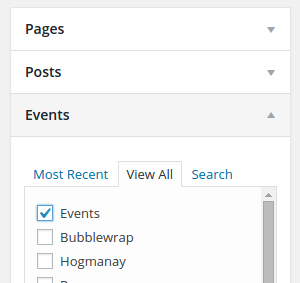
Does that help?
January 20, 2016 at 6:38 am in reply to: Attendees list gone after upgrading and extending recurring event #1059240MemberAwesome, I’m glad the fixed the initial problem 🙂
Now you guys have to fix one last problem: the recurring events attendees list. Do you know when you’ve planned to release it?
I’m afraid I don’t know. We’re aware this is a very popular request but, for the time being, ticketing remains unsupported in the context of recurring events.
As the main problem is resolved I’ll go ahead and close this topic – but of course please don’t hesitate to open new topics if you need help with anything else.
Thanks again!
MemberActually, I take that back – the snippet does seem to work with Genesis (just the latest base theme, I didn’t try with any child themes).
With that in mind, it could be worth performing a similar test of your own: if you strip things down to just our plugins, that snippet and the basic Genesis framework does it work for you then?
Assuming it does, if you start reactivating the other components one-at-a-time do you find it suddenly stops working?
MemberOK – I just tested with Genesis and ….. same result as you experienced!
Curiosity has the better of me now. Give me a little longer and I’ll see if there’s any obvious reason it doesn’t work under Genesis.
January 19, 2016 at 3:47 pm in reply to: Best way to display RSVP'd users on the front end event detail page? #1058906MemberGreat – and yep there’s no particular need to do anything but activate it 🙂
If you want to change the position then altering the hook used in rsvp-lister.php (by default it is tribe_events_single_event_before_the_content which of course places the list just before the content) is the way to go.
Good luck!
January 19, 2016 at 3:08 pm in reply to: Best way to display RSVP'd users on the front end event detail page? #1058892MemberHi Eric,
Though hopefully this will change in the near future, right at this moment there aren’t any hugely useful template tags to help you out here. Despite this, it’s still achievable – it just requires a little custom code.
Here’s an example plugin that facilitates this for both RSVP and WooCommerce-based ticket purchases. I hope that’s useful, but please understand it’s just an example/starting point to help get you started, it’s not something we can support on an ongoing basis 🙂
Thanks!
MemberThanks for sharing, though I’m afraid nothing obvious is jumping out at me there.
On a clean installation with only a default theme, though, it does appear to me to work as expected. Quite why it’s failing in your case I’m not sure and, as customizations/custom dev tasks are something we can only offer very limited support for, I’m afraid I’ll need to leave the rest in your hands.
Sorry I couldn’t get you what you needed on this occasion, but hopefully you’re able to come up with a working solution of your own 🙂
-
AuthorPosts