

Forum Replies Created
-
AuthorPosts
-
Barry
MemberHi Diane,
Thanks for contacting us.
The link you are referring to allows logged in users to view any RSVPs they have created (and they can then change their status from Going to Not Going, etc).
It’s important to note that it only works for the user who RSVP’d—it won’t work for any other users (unless they also happen to have RSVP’d, in which case they will see their tickets) and it won’t work for users who are not logged in.
For example, if I try to follow the link you shared it does indeed redirect to the event page and that is expected, because I am neither logged in nor have any tickets.
Does that clarify things at all and are you still seeing problems?
Please cc my web developer
I’m sorry, but we don’t have that capability. You are welcome to share your login with your developer if you wish, though, for the purposes of helping you to troubleshoot your site (or if they have their own license, they can monitor and subscribe to updates).
Thanks!
Member…Coming back to this topic: filterbar (as a shortcode attribute) isn’t actually supported, rather the attribute you would seek to use here is tribe-bar. Example:
[tribe_events tribe-bar="on"]
Can I ask, did you see a reference to the filterbar attribute in our official documentation someplace, or was it a previous forum reply?
Thanks!
MemberHi Alli,
Great question!
If you want to feature specific events or ranges of events on your homepage – perhaps using custom layouts – then you’d really have to do this as a further customization.
You don’t necessarily have to reinvent the wheel completely, though. You could for instance categorize the events you are interested in featuring (though we have a concept of ‘featured events’, at this time our widgets don’t allow you to filter down to just those events, however categories are supported) and use the advanced events list widget or calendar widget to display them.
With the aid of a template override you could change how they are displayed and create something very close to what you see with the site you referenced.
Some further resources that you might find useful:
I hope that helps 🙂
MemberHi Roberto,
Thanks for contacting us.
It looks like Nico has replied in your other topic and, as he indicates, Filter Bar support is unfortunately not provided by the shortcode you are using.
I do take your point that the use of ‘filterbar’ as a shortcode attribute could lead to confusion: we’ll monitor this and see if others too find this confusing and adjust if necessary.
Last but not least, I apologize for the delay in responding to you. However, I’d highlight that in general we only provide support services through the working week and not over the weekend.
Thanks again 🙂
MemberThis reply is private.
MemberGlad that works—and I’m sorry it too us a while to get to the solution 🙂
MemberHi Mario,
Much as I’d love to, there’s no way for me to easily view the theme code just by looking at your website (and I’d hate to offer up a CSS fix that strips out this box and does so not just in the places where you don’t want it but additionally in places where it is working properly).
The theme author – or author of whichever plugin generates this – will be best placed to guide you on a future-proof means of disabling the grey box in places where it isn’t required.
MemberThanks Paul.
I’m still unsure of the root cause of this issue, but I do have a lead for us to look at.
On a regular installation with WooCommerce, if you were to create a new product—forget about tickets for the moment—you should find that for a simple virtual product (like a ticket) you can edit the inventory and check the Manage Stock box, something like this:
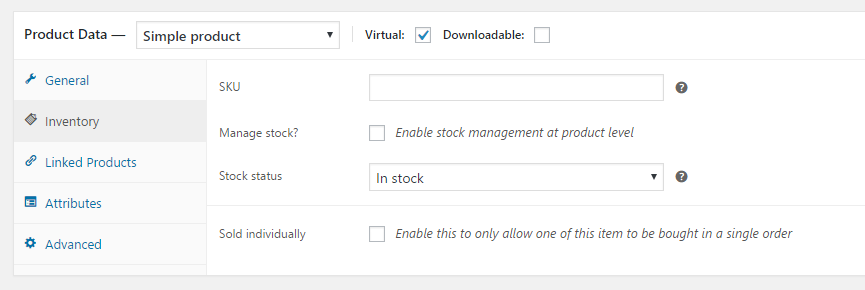
As soon as you check the “Manage Stock” box, it is possible to supply an inventory value. On your site, for some reason, that checkbox appears to be missing (unless perhaps the user account you generated for us to test with has been modified to remove certain capabilities). I’m unsure why the checkbox is missing, but I suspect whatever is causing it to be absent is at the root of the problem you are facing.
In a ticketing context, on a site where this works properly, the stock value you enter in the tickets UI is reflected in the WooCommerce product editor. Here, of course, those fields are completely missing from the product editor. I don’t see anything that would trigger this in your plugin list, yet something is certainly amiss.
Are you the only person to have worked on this site? If other developers are involved, can you perhaps ask them for a list of any changes they made? I’m wondering if an adjustment to the theme’s functions.php file, or direct editing of plugin code, is responsible for this issue.
Something else that may be worth a shot: deactivate all plugins, including ours, except for WooCommerce. Are you able to manage inventory and set stock levels for simple virtual products under those conditions?
Another thought: when you ran through the troubleshooting steps, did you include your Under Construction plugin or was that allowed to remain active?
MemberThanks for your patience, Terry.
This does seem to be a legitimate bug which I’ll log for further resolution. In the meantime, as a workaround, please try the following steps:
- Create a new file within your theme, located at themes/YOUR_THEME/tribe-events/tickets/rsvp.php
- The contents of this new file should be as per this example
Does that help, at least until we can deploy a fix in a future release of the plugin?
(Edited to simplify the steps involved in the temporary fix)
MemberYes let’s do that (you could post them by private reply).
Please note, however, that it is not always possible to fully troubleshoot in this way—as our ability to interact with a remote test site for debugging purposes is limited as compared to working with a local replica. That said, it could provide a few insights that are useful here and lead us to the answer.
Thanks!
MemberHi Terry,
You shouldn’t need any extra license keys.
You can download our plugins and install them on your test site without activating them – the activation keys themselves aren’t needed for general operation, only for update purposes (and access to support).
Thanks!
MemberHi Paul,
I’m sorry you’re feeling disheartened: believe me, we also want to solve this issue. Sometimes – especially if there is a disconnect between, say, screenshots and what is described in the posts – we do need to spend some time figuring out the true scenario.
I realize that can be a cause of frustration at times and from your perspective it may appear that the issue isn’t being understood correctly, but from ours the time is often well spent in terms of solving a problem as quickly as possible.
Another issue is that–as at the start of this exchange–the dev site you linked to is not always available for us to inspect and troubleshoot against. Right now for instance, it comes up with a dark screen reading maintenance.
Some maintenance plugins let you set a special URL query that you can provide to let third parties circumvent the maintenance screen, ie example.com/?special_key=123 – does that happen to be a possibility here?
Alternatively, we can make an exception and use your login details if you’re still up for providing them.
MemberI’m not familiar with the term “global stock.”
OK – then let’s ignore that. I couldn’t see from your screenshots if that was a factor or not, but it sounds like it’s not visible for you and so isn’t relevant.
Is there a workaround to this?
I wish we were more easily able to replicate this so that we could get a firm handle on the issue. Unfortunately, much like Shelby, I’ve been unable to do so so far.
Are you able to perform our standard troubleshooting steps (essentially, running our plugins and nothing else except for a default theme and replicate the same issue under those conditions)?
Alternatively, if you have or can create a test site—which can be as simple as installing WordPress into a subdirectory in your existing hosting environment—and replicate there (or determine if you cannot replicate there), that could be a useful exercise and would avoid any disruption on your live site.
The ideal would be distil this down into a concrete set of steps that can be used to replicate, or else isolate a conflict (perhaps a problem caused by the presence of another plugin or your theme).
If that is not possible or does not get us any further, then sharing a dump of your database would be the next logical step. You could share this privately by uploading a zipped copy of the database file, or else via Dropbox.
Let me know if you are able to run through those steps and what the outcomes are.
Thanks again for your patience while we work through these issues 🙂
MemberHi Terry,
Thanks for your patience and apologies for the delay in responding—Shelby isn’t available right now and so as not to delay things further I’ll take over from here 🙂
Question: are you using, or attempting to use, global stock for the events and tickets in question? If so, that could be the root cause of this as, for the time being, global stock is not supported by the RSVP ticket provider.
If that is the case, it may be some bugs have surfaced since that particular user interface shouldn’t really be exposed if you cannot take advantage of it–but let’s start by confirming if this might indeed be behind the problem in your case.
Thanks!
February 10, 2017 at 4:34 pm in reply to: Similar Events shown in a series + how to display all datees of an series #1233152MemberHi again Tom!
Would this snippet help/get you closer to your objectives?
function related_events__ignore_same_series( array $args ) {
	// Safety check: do not interfere if PRO is not active
	if ( ! class_exists( 'Tribe__Events__Pro__Main' ) ) {
		return $args;
	}

	$event_id = Tribe__Events__Main::postIdHelper();

	// Do not interfere if this is not a recurring event
	if ( ! tribe_is_recurring_event( $event_id ) ) {
		return $args;
	}

	$parent_id = wp_get_post_parent_id( $event_id );

	// Ignore events from the same series
	$args['post_parent__not_in'] = ( 0 === $parent_id )
		? array( $event_id )
		: array( $parent_id );

	return $args;
}

add_filter( 'tribe_related_posts_args', 'related_events__ignore_same_series' );
You would need to add this snippet either to a custom plugin of your own, or else to your theme’s functions.php file (preferably a child theme, to help avoid the risk of losing customizations like this upon update).
Does that help here?
-
AuthorPosts