
Home › Forums › Ticket Products › Event Tickets Plus › Stock Levels
- This topic has 15 replies, 4 voices, and was last updated 9 years, 7 months ago by
Paul.
-
AuthorPosts
-
February 5, 2017 at 3:51 pm #1229756
Paul
ParticipantHi, i’ve got everything set up and working apart from stock levels.
I’ve got 1 tier of ticket showing as sold out after I entered 0 as quantity, so that’s good.
Another tier, I only have 4 left so have added 4 to the stock level. On the front end it’s allowing customers to order more than 4.In the back end, all tickets show 0 sold, 0 remaining.
Please help. I’ve gone over all the docs but nothing seems to cover this.
thanks very much.
February 7, 2017 at 6:20 am #1230499Barry
MemberHi Paul,
I’m sorry to hear you’ve hit up against some difficulties.
I seem unable to view your website (even the single event URL you provided seems to take me to an incomplete/blank page) so I can’t view the issue with the frontend ticket form allowing customers to order more stock than actually exists – but I’d be keen to take a look if you can facilitate my doing so.
In the back end, all tickets show 0 sold, 0 remaining.
Can you confirm how many actual sales have gone through and would you be able to share a screenshot of the ticket settings for this event?
Last but not least, as it looks like you have a dev/testing site available, it could be worth deactivating except our plugins and WooCommerce (and switching to a default WordPress theme such as Twenty Seventeen) then seeing if you can replicate the same issue with a new event and fresh set of tickets.
This basically echoes our basic troubleshooting strategy and might help us to discover if this is a plugin or theme conflict of some kind.
Let me know what you find!
February 7, 2017 at 7:07 am #1230535ParticipantThis reply is private.
February 7, 2017 at 7:09 am #1230539ParticipantThis reply is private.
February 7, 2017 at 7:24 am #1230556MemberHi again Paul:
So no sales have gone through and you have not supplied a stock value, is that correct? If so is the basic problem the way we present the information, ie:
0 Sold (0 Remaining)
If I’m understanding you correctly, you’d prefer this to be something along the lines of:
0 Sold (unlimited quantity remaining)
Is that correct? Apologies if I’m misunderstanding, I just want to ensure I have a clear picture of things.
February 7, 2017 at 7:55 am #1230588ParticipantWell not unlimited stock because we have a limited number of tickets to sell.
For 1 particular ticket we only have 4 left.
I’ve entered 4 in the stock box but it’s still showing 0 in stock and 0 remaining.
More importantly, in the front end anyone can order as many as they like.thanks,
PaulFebruary 7, 2017 at 9:16 am #1230735MemberAhh, I see – I was thrown off by your screenshot showing the stock field as empty … Regardless, I seem unable to replicate 🙁
Can you confirm this persists for you even when you are running no other plugins but ours/WooCommerce itself alongside a default theme such as Twenty Seventeen (you might need to test with a clean event and fresh tickets)?
February 9, 2017 at 10:02 am #1232217ParticipantSorry I missed you r reply, I didn’t get an email for some reason.
I’ve already confirmed that the issue persists with no plugins and a different theme, earlier in this discussion. This is incredibly urgent now. We really need to get it fixed asap.
If you need login details let me know.
thanks
February 9, 2017 at 5:00 pm #1232496MemberHi Paul,
I realize you indicated having performed basic troubleshooting and that’s much appreciated. To explain my further request, we sometimes find customers try this but use existing data (which isn’t always a clean or suitable way to test), which is why I noted it should be done using a fresh event and tickets.
If that didn’t provide any other insights, though, let’s think through further options.
I’ll post my next reply privately so I can reference some elements on your site.
February 9, 2017 at 5:04 pm #1232501MemberThis reply is private.
February 11, 2017 at 2:45 am #1233284ParticipantOne last time…
I’m entering a stock level so, yes, they do have a limit in place.
The stock level isn’t taking effect, hence it showing ZERO on the screen shot. THIS IS THE ISSUE!
Customers are able to buy more than we have available and this simply cannot happen.Not sure how else I can say this to you but it’s been almost a week now and you still don’t seem to have even grasped what the issue is. It’s pretty disheartening TBH.
February 13, 2017 at 12:28 pm #1234013MemberHi Paul,
I’m sorry you’re feeling disheartened: believe me, we also want to solve this issue. Sometimes – especially if there is a disconnect between, say, screenshots and what is described in the posts – we do need to spend some time figuring out the true scenario.
I realize that can be a cause of frustration at times and from your perspective it may appear that the issue isn’t being understood correctly, but from ours the time is often well spent in terms of solving a problem as quickly as possible.
Another issue is that–as at the start of this exchange–the dev site you linked to is not always available for us to inspect and troubleshoot against. Right now for instance, it comes up with a dark screen reading maintenance.
Some maintenance plugins let you set a special URL query that you can provide to let third parties circumvent the maintenance screen, ie example.com/?special_key=123 – does that happen to be a possibility here?
Alternatively, we can make an exception and use your login details if you’re still up for providing them.
February 13, 2017 at 1:23 pm #1234059ParticipantThis reply is private.
February 13, 2017 at 3:12 pm #1234134MemberThanks Paul.
I’m still unsure of the root cause of this issue, but I do have a lead for us to look at.
On a regular installation with WooCommerce, if you were to create a new product—forget about tickets for the moment—you should find that for a simple virtual product (like a ticket) you can edit the inventory and check the Manage Stock box, something like this:
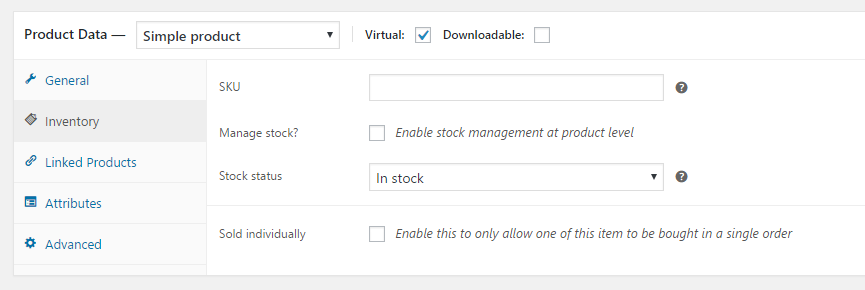
As soon as you check the “Manage Stock” box, it is possible to supply an inventory value. On your site, for some reason, that checkbox appears to be missing (unless perhaps the user account you generated for us to test with has been modified to remove certain capabilities). I’m unsure why the checkbox is missing, but I suspect whatever is causing it to be absent is at the root of the problem you are facing.
In a ticketing context, on a site where this works properly, the stock value you enter in the tickets UI is reflected in the WooCommerce product editor. Here, of course, those fields are completely missing from the product editor. I don’t see anything that would trigger this in your plugin list, yet something is certainly amiss.
Are you the only person to have worked on this site? If other developers are involved, can you perhaps ask them for a list of any changes they made? I’m wondering if an adjustment to the theme’s functions.php file, or direct editing of plugin code, is responsible for this issue.
Something else that may be worth a shot: deactivate all plugins, including ours, except for WooCommerce. Are you able to manage inventory and set stock levels for simple virtual products under those conditions?
Another thought: when you ran through the troubleshooting steps, did you include your Under Construction plugin or was that allowed to remain active?
March 7, 2017 at 8:35 am #1250539Support Droid
KeymasterHey there! This thread has been pretty quiet for the last three weeks, so we’re going to go ahead and close it to avoid confusion with other topics. If you’re still looking for help with this, please do open a new thread, reference this one and we’d be more than happy to continue the conversation over there.
Thanks so much!
The Events Calendar Support Team -
AuthorPosts
- The topic ‘Stock Levels’ is closed to new replies.