

Forum Replies Created
-
AuthorPosts
-
March 14, 2018 at 2:50 am in reply to: To insert a label in the "View As" form for screen reader accessibility #1478667
Andras
KeymasterStoked to hear you found a solution! Congrats!
On the previous issue with the screen reader, a fix has been developed and is waiting to be tested. If it passed QA, then it will be released at the end of this month. Will keep you posted.
Andras
March 14, 2018 at 2:41 am in reply to: Export/SQL statement for Managing Your Orders and Attendees #1478664KeymasterHi Peter,
When an order for a ticket is placed, then a whole bunch of data is created. And I agree, it is difficult to track them down. Hopefully this explanation will help:
Here’s a screenshot, part of the wp_postmeta table for a purchase.
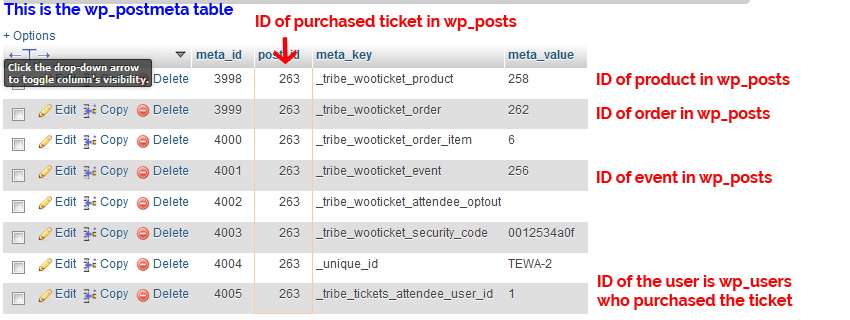
I guess you need to start with the user ID and the event ID.
If you have the user ID, you can look up the purchases (ID of the purchased tickets) in wp_postmeta.
From there you can use the ID of the purchased tickets to run a query in wp_postmeta and you will get further IDs which you can see in the screenshot.
You can use those IDs to fetch further information about the purchase, like name and address of the buyer, event details and so on.
In terms of code the csv export of the attendee list is handled – partially – here:
wp-content/plugins/event-tickets/src/Tribe/Attendees.php
There is also a filter you can use to add extra columns, line 509:
tribe_events_tickets_attendees_csv_export_columnsHope this helps you move ahead.
I’ll be here for further questions.
A.
KeymasterHi Marlon,
Happy to hear that gave you at least a temporary fix.
Perfect timing to ask that question. 🙂
A fix has been developed for the drag-and-drop ordering bug. It is currently waiting to be thoroughly tested to make sure we don’t introduce any new bugs.
If all goes according to plan, then the fix will ship in the next maintenance release sometime around the end of this month. Hang in there.
I am going to set the status of this ticket to “pending fix” and we will update it once the fix is released.
Cheers,
AndrasKeymasterThis reply is private.
March 13, 2018 at 4:13 am in reply to: I'm trying to checkout and I get a The provided card was declined" #1477336KeymasterHi Jo,
Good to hear there is progress.
I do see your order for the 3 plugin renewal with some coupons and the order amount is the $170 you mentioned. However the order at the moment is in failed status and I don’t see your licenses renewed yet.
It can be that you will need to place the order again with the coupon codes you used. (I will also check this internally.)
If you use coupons then you will pay the discounted amount now. However for future renewals, if you don’t have any discount coupons, or you are not ordering a bundle, you will need to pay full price.
Let me know if there’s any news. I’ll also get back to you if I find out anything.
Cheers,
AndrasKeymasterAwesome! Stoked to hear you managed to resolve it! Great job!
Is there anything else related to this topic that I can help you with before we close this thread?
A.
March 13, 2018 at 3:35 am in reply to: Events Tickets Plus + Enfold quantity buttons conflict with ticket meta data #1477318KeymasterGreat findings! Based on that it definitely looks like an Enfold feature.
And it’s interesting, I have Enfold 4.2.4 on hand and that doesn’t have the issue. Maybe that is also worth pointing out to them. Also downgrading to that version might be a good temp solution for you.
Let me know how this all plays out or if I can help you any further.
Cheers,
AndrasKeymasterHi Lolo,
Thanks for the detailed description of the issue.
As a first I’d like to ask you to share your system information with us.
Then please check your settings under Events > Settings > Tickets tab > WooCommerce Support section, what boxes are checked for you? (screenshot)
Please also test if the same thing happens if you switch over to a default theme like twentyseventeen and deactivate all plugins, except TEC, ET, ET+ and WooCommerce.
If you are afraid to do this kind of testing on your live site, then you can use the plugin Health Check which will allow you to do conflict testing without disrupting your live site.
Let me know what you find.
Cheers,
AndrasMarch 13, 2018 at 3:11 am in reply to: Is this really the way you need to process a refund of tickets, and restock? #1477304KeymasterHi Dan,
Just to give you a heads-up, this is a custom development task and so is outside of our stated scope of support.
Even so, we’d love to help you if we can. We do need to prioritize requests from other customers right at this time but I’ll certainly flag this with the team and – although we can’t make any promises – if we have time and space to come back and help we’ll be happy to do so.
If you urgently need help with this, however, you may instead wish to consider working with a suitably skilled developer or designer who can offer the additional level of support you require.
Thanks and cheers,
AndrasKeymasterHi Kevin,
I checked the status of the ticket. It was planned to be released now but the developer working on it didn’t manage to fully finish it on time, so it had to be postponed to the next maintenance release of Events Calendar PRO.
The only workaround I can suggest until that comes is to roll back to PRO version 4.4.19.
I’m sorry about the delay and thanks for your patience!
Cheers,
AndrasKeymasterI’m stoked to hear that Matthew! Awesome!
Since this is marked resolved I am going to close this ticket, but if you need anything else related to this topic or another please create a new ticket and we’ll be happy to help.
Cheers,
AndrasPS: If you like our plugins, and you didn’t yet do so 🙂 we would be happy to receive a review in the wordpress.org repository. Thanks!
https://wordpress.org/support/view/plugin-reviews/the-events-calendar/
https://wordpress.org/support/view/plugin-reviews/event-tickets/PS2: We’d be also grateful if you would give us feedback on your satisfaction with support. Just click on one of the classy looking emojis below. 🙂 If you can spare a few words, that’s even better. Doublethanks!
KeymasterHi Tom,
Thanks for reaching out!
It looks like this is an Avada related issue. Theme issues and customizations are beyond our reach, so I would suggest to get in touch with the Avada developers on this one.
It looks like there is no mobile stylesheet or it doesn’t kick in.
I checked that page in responsive mode in my browser on the PC and it looked OK. Here’s a screenshot.
Cheers,
AndrasKeymasterHi Mike,
Sorry about the troubles with the import limit. Let me try to help you get to the bottom of this.
Can you please check your Event Aggregator System Status under Events > Help?
Please also send me a screenshot of your Events > Import > History page.
Thanks,
Andras
March 12, 2018 at 4:49 am in reply to: I'm trying to checkout and I get a The provided card was declined" #1476309KeymasterThis reply is private.
March 12, 2018 at 4:48 am in reply to: I'm trying to checkout and I get a The provided card was declined" #1476307KeymasterHi Jo,
I’m sorry to hear that you bumped into issues when trying to upgrade.
Please give me some time until I look into this. It shouldn’t take long.
Meanwhile I do that please also check in your PayPal account if you can find any further information on why the transaction was declined, and share it with me in a private reply here.
Thanks,
Andras -
AuthorPosts