

Forum Replies Created
-
AuthorPosts
-
Andras
KeymasterHey Greggor,
Glad to hear that got solved!
As for the zoom issue you will need to do a bit of tinkering. You will find the details in this post:
How does that work out for you?
Andras
KeymasterGrüsse Kay,
Ich bin sehr froh das zu hören. 🙂
Ich werde dieses Topic schliessen. Wenn du später nochmal Hilfe brauchst dann öffne bitte ein neues Topic und wir helfen dir gerne.
Grüsse und einen schönen Tag noch!
Andras
KeymasterHello Diane,
Thanks for reaching out with your question. Let me try to help you out with them one by one.
1- what is events url slug used for? mine is weird. how can I change it?
Basically that is the slug for your main events page. By default it is set to events, so your main events page would be http://domain.com/events
You can change that to anything you like, just make sure there is no conflict with another page / post slug.
2- I want to remove ‘All Events’ from top of my events page. It does not
go anywhere.There seems to be an error with your Events URL slug that is why the ‘All Events’ doesn’t go anywhere. It points to this URL, which is faulty: http://www.lyndhurst.orgprograms/
Try to change your Events URL slug and see if the error still happens.
If you still want to remove it then paste the following snippet into your child theme’s style.css file:
.tribe-events-back.tribe-events-loop {
display: none;
}3- The ‘Events’ in the top bar of edit page goes nowhere, too.
This is also because of the above issue. Change your slug, save it and check if the issue still exists.
If you are still having an issue afterwards then please do the following before posting a reply to speed up the support:
- Make sure that all your plugins are up to date.
- Share with me your system information, here’s a guide for that: https://theeventscalendar.com/knowledgebase/sharing-sys-info/
Thanks and cheers,
AndrasKeymasterHeyya Chuck,
Thanks for reaching out!
Yeah, sorry, this glitch somehow crept in recently. We are aware and is gonna be fixed very soon.
Meahwhile the workaround is pasting this little css snippet into your theme’s style.css file:
.tribe-events-filters-vertical {

float: left;

width: 25%;

}
Hope this helps for now. Let me know.Cheers,
AndrasKeymasterThis reply is private.
KeymasterHey Greggor,
Thanks for reaching out! Sorry about this issue with the google maps API.
I checked your site and I see this error in the console:
You have included the Google Maps API multiple times on this page. This may cause unexpected errors.
If you have more possibilities to add your API key (e.g. in the theme options or other plugins), then remove all and leave only one. I cannot advise which one, you might need to play around with that a bit.
Check this and let me know if the issue is solved.
Cheers,
AndrasKeymasterHi Ulf,
Thanks for your patience. I had to talk with our translations guy and got some useful info.
In general with the ?lang=fr setup is not the best option for this, but it can be done. You need to tweak your setup so that the slugs do not get translated. This article will help you in that:
Also note that the ?lang=fr setup is not the best for SEO.
The other option is to use a different language URL format. You can set this under WPML > Languages.
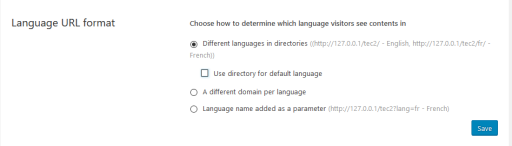
Let me know if this helps you solve the issue.
Cheers,
AndrasKeymasterThis reply is private.
KeymasterHello digitaliway,
Thanks for using our plugins and thanks for reaching out! What a fantastic question, I believe nobody asked that yet. Let me help you with this.
Follow these steps:
1. Edit your event, then scroll down to tickets. Hover over the ticket you want to change and click on ‘Edit in WooCommerce’ (https://cloudup.com/cTlpFM5_NDZ)
2. On the WooCommerce product page scroll down to the Custom Fields section and look for the one that says ‘total_sales’. (https://cloudup.com/ciIaYw0PWDu)
3. You’ll see the sales number there. Set it to zero (or whatever you like), then hit the update button just below it. (You don’t need to save / update the product itself.)
4. Go back to your event to check if the number has changed.
Easy, ain’t it? 🙂
Let me know if this helps!
Cheers,
AndrasKeymasterHallo Kay, grüss dich,
Vielen Dank dass du unser Plugin benutzt!
Ich sehe dass du höchstwahrscheinlich eine Version von Divi benutzt. Divi hat eine Einstellung unter Divi > Theme Options > General > Number of Posts displayed on Archive pages. Hier sollst du dieselbe Nummer haben wie unter Events > Settings > General > Number of events to show per page.
Probier mal das und lass mich wissen ob das hilft oder nicht.
Freundliche Grüsse
AndrasKeymasterHi dswiese,
Thanks for using our plugins and welcome to the forums! Great question!
Out of the box that is not possible, but with a snippet it most probably could be done.
I might have something, I need to look around. What are you using to import events? The iCal importer or Event Aggregator?
Cheers,
AndrasKeymasterHi Enn,
Unfortunately we don’t have anybody on the team who speaks Estonian. (Above English we can cover German, French, Spanish, Hungarian, Italian for sure.)
We (Modern Tribe) don’t take on customization projects like this, but here’s a list of developers, known name in the community who might be able to help you out with this.
https://theeventscalendar.com/knowledgebase/find-a-customizer/
I hope this helps and good luck with your project!
Cheers,
Andras
KeymasterDanke!
Gib mir ein bischen Zeit um die zu testen. Ich melde mich bald.
Andras
KeymasterHey Mark,
Glad I could be of help!
I’ll close this topic for now.
If you need anything else related to this topic or another please post a new one in the forum and we will be happy to support you.
Good luck with your project!
Cheers,
AndrasNovember 9, 2016 at 8:05 am in reply to: After Last update, filter bar will no longer appear in vertical position #1189625KeymasterThis reply is private.
-
AuthorPosts