

Forum Replies Created
-
AuthorPosts
-
December 2, 2016 at 3:28 pm in reply to: Issue with CSV importing due to complex event description #1201071
Andras
KeymasterThis reply is private.
December 2, 2016 at 7:42 am in reply to: Issue with CSV importing due to complex event description #1200843KeymasterThis reply is private.
KeymasterThis reply is private.
December 1, 2016 at 2:16 pm in reply to: Filter Bar Has No "Find Events" or "Submit" button to render filtered results #1200525KeymasterSure thing. Will be waiting for the results!
A.
December 1, 2016 at 2:13 pm in reply to: Is there a way to find and delete double entries/attendees? #1200524KeymasterThen you need to edit the file I referenced above, the rsvp.php
Copy it here (sorry, there was a typo before)
wp-content\themes\[your-theme]\tribe-events\tickets\rsvp.php
You will need to change the input type to radio (instead of number) and the name to $event->ID (instead of $ticket->ID). I haven’t tested this, just writing how I would do it.
Give it a try and let me know if you get stuck.
Cheers,
Andras
December 1, 2016 at 9:04 am in reply to: date pickerbumpdown is not a function prevents date picker and venue #1200388KeymasterAdam, thanks for sharing the details. Please let me know how that plugin works out for you.
Thanks and cheers,
AndrasDecember 1, 2016 at 8:51 am in reply to: Filter Bar Has No "Find Events" or "Submit" button to render filtered results #1200374KeymasterFound one more think in case that doesn’t solve it.
I was using a child theme of twentysixteen and with that the filter bar wasn’t submitting at all. Once I switched to the parent / main twentysixteen everything worked fine, even with the costs filter.
So you might want to check switching your theme to a default one and preferably not child theme and check like that.
Let me know what you find.
Cheers,
AndrasDecember 1, 2016 at 8:24 am in reply to: Filter Bar Has No "Find Events" or "Submit" button to render filtered results #1200295KeymasterHello again,
So, I found the same issue, but only by chance. 🙂 Let’s say we got lucky here.
You get that javascript error because of one of the filters. For me it was the Cost one. Try removing that and check. If that doesn’t solve it, then remove all, and go one by one, see where it comes back, if at all. Then let me know the results.
Thanks and cheers,
AndrasDecember 1, 2016 at 8:18 am in reply to: Filter Bar Has No "Find Events" or "Submit" button to render filtered results #1200292KeymasterHi Chelsie,
Sorry, my bad, didn’t fully realize that. :blush:
Please give me some time to investigate and I’ll get back to you soon.
Apologies,
AndrasDecember 1, 2016 at 8:07 am in reply to: Event id changes for recurring events. Need help tracking this. #1200279KeymasterHi Miah,
I don’t know the details how it exactly it is going to be handled as the dev team is working with full steam on the upcoming 4.4.
We can leave the thread open. We’re happy to help out if you have further questions. Please note though, that if there is no activity on the thread for 3 weeks, it will automatically be closed.
Let us know if you have any further questions.
Cheers,
AndrasKeymasterOkay, now I understand.
I’m afraid that is a tad bit difficult as the blog posts are decreasing in time, events are increasing. You get what I mean.
The only way of doing what you’d like would be that you inject the events there based on publication time and you manually set the publication time of the events to the needed date, so they show up at the right place.
For the above example:
Blog from yesterday Nov. 29th
NEXT EVENT DEC 2ND – publication time nov 28
NEXT EVENT DECEMBER 8TH – publication time nov 27
blog from last week (i.e. nov 22)
NEXT EVENT DECEMBER 15TH – publication time nov 21Whaddaya think of this?
A.
KeymasterHallo Detlex,
If you don’t mind I’ll stick to English for now.
I played around a bit, and it is possible to do. You basically need to set up custom recurrences, which will stop after 2 events, with weekly frequency, and not the same time, then set the start time and the duration for the day. (Stop after 2, because the first is the first date always, and second is the recurrence.)
Here’s a screenshot worth all of those words. 🙂
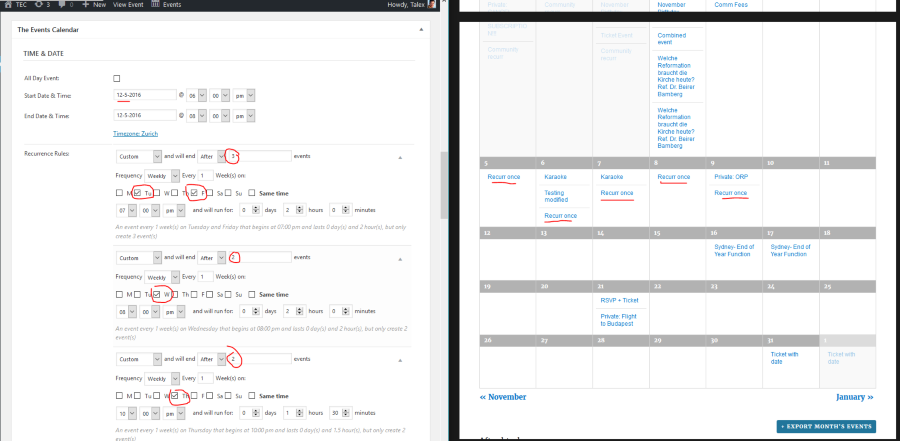
If there are 2 days when the Aufführung is at the same time, let’s say Tuesday and Friday at 7pm, then set it to stop after 3 events and tick both days. That is the first recurrence rule you see on the screenshot.
Let me know if this helps.
Cheers,
AndrasDecember 1, 2016 at 2:44 am in reply to: Is there a way to find and delete double entries/attendees? #1200188KeymasterHey Jack,
Just scanned through the other thread with Nico as well.
An idea that came to my mind was to change the quantity fields to radio buttons. That will only let you choose 1 from all. That’s fairly easy to do with RSVPs.
For the ticket fields you would need to dig into some WooCommerce code. Maybe the Woo guys or the community can help you with that if you think this would be a solution for you. I’ll also ask Nico, maybe he has an idea.
Would this be a good solution for you?
Cheers,
AndrasKeymasterThis reply is private.
KeymasterHey Brian,
Thanks for drawing my attention to that!!! Just did it.
Cheers,
Andras -
AuthorPosts