
Home › Forums › Calendar Products › Events Calendar PRO › Recurring Event with changed time
- This topic has 9 replies, 4 voices, and was last updated 9 years, 9 months ago by
hildesheimerallgemeine.
-
AuthorPosts
-
November 29, 2016 at 1:28 am #1198932
hildesheimerallgemeine
ParticipantHello,
if there is a event on for example 01.12.2016 at five O’clock. Why is it not possible to add another time to the recurring event?
For Example: A theater performance event on the 04. December 2016 and starts everyday on other timesThank you in advance.
November 29, 2016 at 4:36 pm #1199499Andras
KeymasterHey Detlex,
Thanks for using our plugins and welcome to the forums!
Do I understand correctly that you would like to create a recurring event, that repeats several times, but every day at a different time?
You can do some custom recurrence rules that will allow you to choose different times, but it might be limited compared to what you need. You can also use exclusions.
If you can write me an event with a detailed recurrence, then I might be able to help you figure out a good rule set.
Wenn du möchtest du kannst auch auf Deutsch schreiben. 😉
Grüsse
Andras
November 30, 2016 at 1:02 am #1199622ParticipantHey András,
dann werd ich mal lieber auf Deutsch schreiben. So kann ich es auch etwas leichter erklären.Wir haben ein Event – beispielsweise eine Theateraufführung.
Das Event findet von Montag bis Freitag statt. Jedoch mit unterschiedlichen Zeiten. Beispiel:
Montag: 18 – 20 Uhr
Dienstag: 19 – 21 Uhr
Mittwoch: 20-22 UhrUnd so weiter.
Mit den Ausnahmen und Regeln hab ich leider keine Lösung gefunden. Vielleicht kannst du mir ja helfen!
Vielen Dank.
December 1, 2016 at 7:54 am #1200268KeymasterHallo Detlex,
If you don’t mind I’ll stick to English for now.
I played around a bit, and it is possible to do. You basically need to set up custom recurrences, which will stop after 2 events, with weekly frequency, and not the same time, then set the start time and the duration for the day. (Stop after 2, because the first is the first date always, and second is the recurrence.)
Here’s a screenshot worth all of those words. 🙂
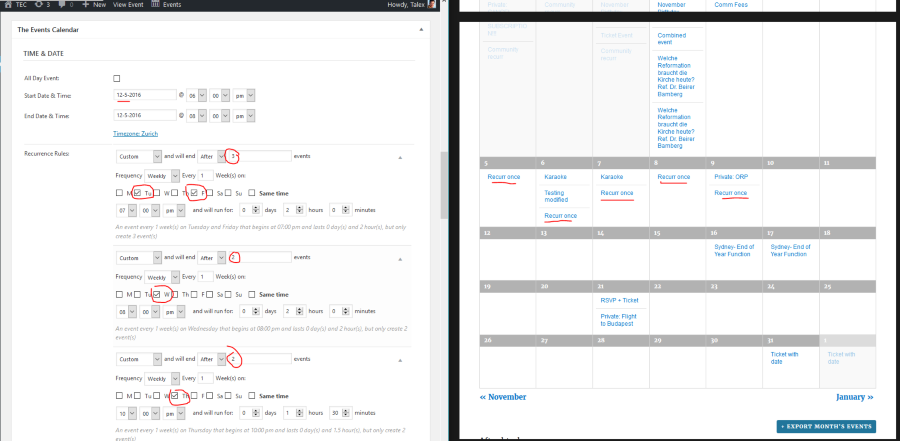
If there are 2 days when the Aufführung is at the same time, let’s say Tuesday and Friday at 7pm, then set it to stop after 3 events and tick both days. That is the first recurrence rule you see on the screenshot.
Let me know if this helps.
Cheers,
AndrasDecember 16, 2016 at 5:18 am #1207014ParticipantThis reply is private.
December 19, 2016 at 9:39 am #1207748KeymasterHi Betim,
I’m sorry to hear that didn’t work out. If you give me some more details where you got stuck or what is not working I would be happy to help you get this to a finish.
Why is it not possible to take “Date” as a Rule and just give Date another time?
Most probably either doing it this way was not considered, or because you can do it with the above method, or also with the following approach: https://cloudup.com/cBNksXmpqxb
If you think that is something you would like as a feature I encourage you to visit our User Voice Page and either upvote an existing request or make a new request there.
But as said, it should be doable with one of the above methods. If you tell me where you are stuck, I might be able to help you out.
Cheers,
AndrasDecember 20, 2016 at 1:13 am #1208059ParticipantThis reply is private.
December 20, 2016 at 12:40 pm #1208466KeymasterThis reply is private.
January 11, 2017 at 8:35 am #1216594Support Droid
KeymasterHey there! This thread has been pretty quiet for the last three weeks, so we’re going to go ahead and close it to avoid confusion with other topics. If you’re still looking for help with this, please do open a new thread, reference this one and we’d be more than happy to continue the conversation over there.
Thanks so much!
The Events Calendar Support Team -
AuthorPosts
- The topic ‘Recurring Event with changed time’ is closed to new replies.