

Forum Replies Created
-
AuthorPosts
-
Andras
KeymasterHello Johan,
Thanks for doing an awesome job with the translations and sharing them with the community.
I have added them to the respective plugins. As Geoff said, since the translations for the free plugins are not approved by us, that will take some time to get through. The translations for Event Tickets Plus are in and will most probably be available with the next update.
Cheers,
AndrasDecember 5, 2016 at 8:19 am in reply to: Issue with CSV importing due to complex event description #1201559KeymasterThis reply is private.
December 5, 2016 at 7:58 am in reply to: Issue with CSV importing due to complex event description #1201550KeymasterThis reply is private.
December 5, 2016 at 7:39 am in reply to: Is there a way to find and delete double entries/attendees? #1201537KeymasterHey Jack,
I see what you mean. Since we are limited on doing customizations I will need to pull some strings for this and can require couple days to get a solution – if at all. Let me check what I can do and I’ll get back to you asap. Hang in there.
Cheers,
Andras
December 5, 2016 at 7:33 am in reply to: remove save-as and change next previous links and sales question #1201533KeymasterHey Mel,
It seems we’re on the right track to nail this.
The small circle is actually the ‘next month’ button on the top. 🙂
Here’s the css snippet you will need to make them visible above and hide them below:
#tribe-events-footer .tribe-events-sub-nav {

display: none;

}

#tribe-events-header .tribe-events-sub-nav li, #tribe-events-header .tribe-events-sub-nav li a {

display: block !important;

}
As for the ‘view as’, if you want that label gone, you should be able to achieve it with the code above.If you want the whole thing gone and only the Month view available, then you don’t need any CSS, you can even remove the one I sent before. In this case go to Events > Settings > Display tab > Enable event views and have only the one view active that you would like to show. This will automatically hide the ‘view as’ dropdown.
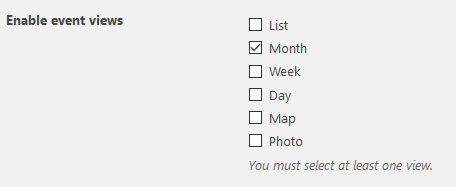
Does this fix it for you?
Cheers,
Andras
KeymasterHi Pieter,
To just to give you a quick update, the bugticket is on normal to high priority but we still cannot give you any exact release date for the fix. Please hang in there and thank you for your patience!
Cheers,
AndrasKeymasterHello Neil,
Thank you for sharing your feedback and concerns with us.
I just want to let you know that the featured-image-bug is being worked on, currently it is pending Quality Assurance. If all goes according to plan, this fix will be released before Christmas.
(As a note, the non-importing of the featured image happens only when Events Calendar Pro is active. If you deactivate Pro, then they should come through.)
I’ll let you know if I have any new updates.
Cheers,
AndrasDecember 3, 2016 at 7:37 am in reply to: Events are not updated from our google calendar feed ! #1201193KeymasterHello Samuel,
I am really sorry about the frustration this bug is causing you. I understand how irritating it is when something is not working the way we expect them to.
Let me assure you that our team is already working on a fix. I checked the status now and it is pending Quality Assurance. So now the fix will go through rigorous testing and if all goes according to plan, this fix is going to be released before Christmas.
I’m again really sorry for this and thank you for your patience!
Cheers and have a great weekend,
AndrasKeymasterHi nnyorker,
I almost thought I lost you there. 🙂
Thanks for sharing the infos. I’ll look into that shortly. Please hang in there.
I’ll get back to you soon.
Cheers,
AndrasKeymasterHello Artist,
Sorry for the somewhat belated reply. I was knocked out by a flu yesterday and am in recovery.
I understand that in some cases setting the event publish dates manually is not an option.
And I’m getting a bit confused now here. I don’t quite understand what the problem is and what is the end result that you would like to achieve.
You mentioned this before:
Blog from yesterday Nov. 29th
NEXT EVENT DEC 2ND
NEXT EVENT DECEMBER 8TH
blog from last week
NEXT EVENT DECEMBER 15TH
etc…which can be achieved with the solution I proposed; simply because blog posts are ordered one way (newest / freshest to oldest, or rather from present to past) and Events are ordered the other way (oldest to freshest or rather from present to future). This can be overruled if you order the events by their publish date. If you still want to inject the Events by event date and get the same order above, I have to disappoint you, as that is not possible. Even if we wanted to do it, we couldn’t. Thus, this is not a bug, it is an impossibility.
Who and for what reason would anyone want to put the event listings into their home page loop showing the last event sometime next year in between today’s blog posts?
I’m not the one to say who is, but I can easily imagine that from our 4 million downloads and couple hundred thousand active users, there are some who might be using it. And if it is not suiting their needs, then they wither tweak it, or turn to us for help and we show them the way. For this to happen, we need to have a clear understanding of what the user wants to achieve, and if the outcome is possible, then we are happy to help out, or at least give directions.
It just doesn’t make any sense to me at all…
You are not alone in this. There are pieces of art, which don’t make any sense to me at all either. 😉
and that no one at all said “don’t you think that they should be shown the other way around?”
As said above, if the feature didn’t fully meet the need of the user, and they turned to us for help with a <span style=”text-decoration: underline;”>clear end result</span> in mind, then we were – and still are – happy to provide help to achieve the goal. If it is doable.
It leaves me really really confused about why you even added the option in the first place
I’m sorry about the confusion here. The option was added, because there are users who want to show their events in their blog loop. Past or future, depending on need. But, as with all settings, it can be switched off. Nobody is obliged to use it. That’s the beauty of it.
So you are telling me there is no other options and that Modern Tribe has no interest or intention on fixing or changing this?
There are lots of options with customization. Some of them are easy some not. If you let me know what is the end result you would like to see when injecting events into your blog loop, then I might be able to help you out and guide you in the right direction. Since we are limited in supporting customization I might not be able to give you a ready-to-install solution, but I can definitely give you guidance. (For info, our support policy.)
As of the moment, this is not a bug; it is a feature that works the way the developers intended it to work and it can be customized in many ways. So there is nothing to be fixes. Nor do we intend to change this functionality at the moment.
If you would like to propose a change or a new feature then please visit our User Voice Page and make a new suggestion there.
I would be happy to help you achieve your goal, let me know how I can help you further.
Cheers,
AndrasDecember 3, 2016 at 6:55 am in reply to: date pickerbumpdown is not a function prevents date picker and venue #1201185KeymasterThanks for giving me more details Kevin! I just added that to our bugticket.
I am going to set this ticket to pending gix, but the issue is still open and we will update this ticket once we release a fix, so you will be notified.
If you have any new questions or issues please create a new ticket and reference this one.
Thanks for all the help and input!
Cheers,
AndrasKeymasterHappy to hear Damian!
Since this is marked resolved I am going to close this ticket, but if you need anything else related to this topic or another please post a new topic on the forum and we can help you out.
Good luck with your project!
Cheers,
AndrasPS: If you like our plugin, and you didn’t yet do so 🙂 we would be happy to receive a review in the wordpress.org repository. Thanks!
https://wordpress.org/support/view/plugin-reviews/the-events-calendarPS2: We’d be also grateful if you would give us feedback on your satisfaction with support. Just click on one of the classy looking emojis below. 🙂 If you can spare a few words, that’s even better. Doublethanks!
December 3, 2016 at 6:48 am in reply to: Problems using embeded calendar (photo view) and footer widget #1201182KeymasterCiao Maximiliano,
I have tested this with Enfold Version: 3.6.1 and couldn’t reproduce the issue.
This is what I did after activating the Enfold child theme:
- set up event with a featured image
- set up a page with the shortcode you shared above
- check page how it looks
- add Archives widget to footer column 1
- add Events Calendar widget to footer column 2
- check page how it looks
Before and after all the changes the pages looked the same.
This could be a theme issue, and in this case I would recommend you to contact the Enfold developers.
If you give me some more info, then I can try to help you find out the source of the issue:
- Write me the steps you took to create the issue
- what widgets did you add to the footer?
- make sure that when you enter the shortcode that you use straight quotes (“) and not curly quotes (”)
Also if you have a more fresh version of Enfold, could you please share with me so I can test it with that?
Thanks and cheers,
AndrasKeymasterThis reply is private.
December 3, 2016 at 6:03 am in reply to: How to replace CSS files not listed in Themer's Guide #1201168KeymasterHey man,
News is, you don’t need to separately remove the mobile stylesheets. The code that replaces the base stylesheets also replaces the media ones. So in your new custom-events-stylesheet.css you will need to set up @media queries to deal with mobile view.
E.g:
.tribe-events-single-event-title {

  background-color: red;

}

@media screen and (max-width: 1024px) {

  .tribe-events-single-event-title {

    background-color: blue;

  }

}
Does this answer your question?
Cheers,
Andras -
AuthorPosts