

Forum Replies Created
-
AuthorPosts
-
January 16, 2017 at 8:53 am in reply to: View all events defaults to last event of the month. #1219047
Andras
KeymasterHello Stephen
Thanks for going Pro and reaching out to us. I’m sorry about the issue you are having, let me try to help you with that.
Before that, just to set the right expectations, we provide support to all our premium plugin users. We are taking the submitted questions / issues in the order they arrive and we do reply to each and every one of them within 24-48 hours during working days. We strive to give an answer within 24 hours, however we are a bit swamped right now – plus there was the weekend – that is why the answer is closer to the 48 hour timeframe. You can find more detail here about what kind of support we provide for premium license holders.
I checked your site, specifically this link:
http://www.stdavidsschool.co.uk/events/
There is already a page title there, “Chamber Choir Rehearsal”, which is definitely not supposed to be there.
When I go to any event, then back to “All Events”, I still get that rehearsal title, not the visited event.
This is likely an issue stemming from the theme. In order to find the source of this, please switch to a default theme like twentysixteen and check if you still have the issue there as well. If you don’t see this with twentysixteen, then there is something in the theme you are using that makes this happen.
To solve the datepicker issue and to make it appear properly add this snippet to your theme’s style.css file:
div.datepicker.datepicker-dropdown {
z-index: 99 !important;
}Let me know where you get with the theme testing and the snippet.
Cheers,
AndrasKeymasterHello Soula,
Thanks for using our plugins and welcome to the forums!
Not a waste of time at all, we are happy to help out with all questions.
At the moment there is no easy way to create that many tickets. What you would like to achieve would require that you set up an event with a ticket (limited to 75) for every day in the coming 2 months. That is approx 60 events.
This exhibition itself could be set up as a recurring event, however we don’t yet have the functionality of creating tickets separately for every recurrence. I’m sorry to disappoint. This is a requested feature and it is on our roadmap, but currently I cannot commit to any release date for this.
Once you have the events and the tickets set up for every day , then you could use this shortcode in a sidebar widget to show the current day’s event, and a link to it. This way people can go to today’s event page and buy the ticket.
[tribe_events view="day" tribe-bar="false"]
I hope this somewhat answers your question. Let me know if you have anything else.Thanks and cheers,
AndrasJanuary 13, 2017 at 2:21 pm in reply to: keep getting error message; tickets not saving as woocommerce enabled #1218388KeymasterHello Mary,
Thanks for using our plugins and welcome to the forums! I’m really sorry about this issue you are experiencing and thanks for reaching out to us. Let me try to help you solve these problems.
Based on your system information I see that you are using an outdated versions of Events Calendar Pro and the Filter Bar. As a first step I would like to ask you to update these and re-check if the issue with the WooCommerce ticket exists. Mismatching versions of your plugins can cause glitches like that.
As for the plugin-multisite issue, please give me some time to gather some information. Normally if all the plugins are activated the same way, they should give you the same error message. Or none at all. Not entering a license key will only mean that you don’t get automatic updates for that plugin. But you can always download the latest version from your account and manually upload it to your ftp to get the latest version.
Meanwhile let me know if the update fixes your WooCommerce issue.
Thanks!
Andras
KeymasterHello FMD,
I checked the status of the bugticket. A fix has been developed, but it still needs to be reviewed and tested. If all goes according to plan it should be released with the upcoming maintenance release later this month.
Thanks for hanging in there.
Cheers,
AndrasJanuary 13, 2017 at 1:33 pm in reply to: how to import from another site which is using also the events calendar? #1218353KeymasterHi Ellen,
At the moment those are not included in our generated iCal feed and I’m not sure if even all of them can be included due to the limitations of the ical format.
If you think that is something you would like as a feature I encourage you to visit our User Voice Page and either upvote an existing request or make a new request there.
If you would like to import events from one site to the other, you can try to use the built in export-import functionality of WordPress. Though this cannot run automatically.
Regarding the auto-publish error you are experiencing, could you please give me more details?
Where is it appearing? What are you doing when it appears? What is the link you are importing?
The more details you can give me, the better.
Thanks,
Andras
KeymasterHi again Wim,
Yes, unfortunately that is a bug and fortunately we already know about it and there is a workaround until it gets fixed.
You need to edit your translation file tribe-events-calendar-pro-xx_XX.po (xx being the code for the language you are using, nl_NL I presume.) translation file and change the translation of the English ‘all’ string to ‘all’ (or remove it). Save it and upload both the .po and the .mo file to the wp-content\plugins\events-calendar-pro\lang\ directory.
I’ll add your thread to our bugticket to give it more push.
Also I will set this thread to pending fix status, so you’ll be notified when the fix is out.
Until then please let me know if the workaround does the trick for you.
Thanks and cheers,
AndrasKeymasterHello Rich,
I looked into that, if you put the file into /wp-content/themes/jobify-child/tribe-events/login-to-purchase.php then it should work. Tested it successfully on my test install.
Does this solve it for you?
Andras
KeymasterHey Drew,
Thanks for chiming in and giving us an example.
Since you also have a similar experience, it would be great if you could help a bit further.
Based on what you wrote as a solution I understand the following: you set up the main event to last from 3/5/2017 to 3/26/2017, so it was an event lasting 21 days; and you set up 2-3 recurrences as well?
And when you set up the main event to last one day (from and to 3/5/2017) then some recurrence(s) didn’t show up?
Thanks for the clarification!
Andras
KeymasterI know what you mean. I have a client site without Events Calendar but with a similar issue.
If you would have 40.000+ blogposts and running similar queries like the Events Calendar does, you would get the same speed. This is where different caching methods (caching plugins, browser caching), usage of a Content Delivery Network, a dedicated server with lots of resources (multiple CPUs, SSD, high memory) can help.
Unfortunately this is not strictly related to our plugin. It is more related to the content, and to be specific, the amount of content. I’m sorry, I’m not able to help you with this performance issue one beyond the above.
Andras
KeymasterGrüezi Monika,
Thanks for using our plugins and for reaching out! I’m sorry you are having this issue.
This seems to be a small glitch, which I will forward to the developers for a fix.
Meanwhile what you can try to do is change the translation from ‘alle’ to ‘all’.
For this you will need to edit the wp-content\plugins\events-calendar-pro\lang\tribe-events-calendar-pro-de_DE.po file. You can do that with the free PoEditor software for example.
Once you open the file look for the string ‘all’ in the source text. The translation should be ‘alle’ as expected.
Change ‘alle’ to ‘all’ and save the file.
Upload the tribe-events-calendar-pro-de_DE.po and tribe-events-calendar-pro-de_DE.mo files to your server to the respective folder, overwriting the old files.
Check your site if this solves the issue.
Let me know how that works out.
Cheers,
AndrasKeymasterHello Iain,
Thanks for reaching out to use with your question.
By default the venue name is not included in the page title.
However that could be possible with modifying / overriding the single event template.
To get you started I suggest you go through these posts which give you the details on how you can create a template override.
https://theeventscalendar.com/knowledgebase/themers-guide/
https://theeventscalendar.com/knowledgebase/template-overview/
Let me know how far you get.
Cheers,
AndrasJanuary 11, 2017 at 1:20 pm in reply to: how to import from another site which is using also the events calendar? #1216894KeymasterHello Ellen,
Thanks for using our plugins and welcome to the forums!
Excellent question you have there.
On the site from where you want to import, go to a month view and scroll to the bottom. There you should see a button below the calendar that says “Export Events”. Right click on that and copy the URL.
Should look something like this:
http://wpshindig.com/events/?ical=1&tribe_display=month
Paste that URL into Events > Import > iCalendar
Let me know if this solves it for you.
Cheers,
AndrasKeymasterHello Sebastian,
Thanks for going Pro and welcome to the forums! And thank you for your question!
I guess you are waiting for the functionality of easily creating separate tickets for the separate instances of recurring events.
Unfortunately this development didn’t yet make it to our current release, but we are taking steps toward it. In the current 4.4 release there was major work done on the recurring events themselves and how they are handled in the background. This all needed to be done for the recurring events tickets functionality.
A lot of people are looking for this and it is on our roadmap. If all goes according to plan it will come in the next or second major release. (More on our release schedule here.)
Hope this answers your question.
Cheers,
AndrasKeymasterHello Wim,
Thanks for reaching out to us and I’m sorry you are experiencing this issue.
I have checked that link you shared and I got to the event page. Here’s a screenshot:
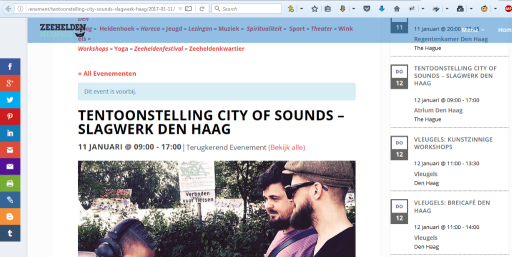
Here are some things that you can try if you are having the issue:
- Resave your permalinks under Settings > Permalinks
- If you have a caching plugin, deactivate it and check
- Do a conflict test following this guide: https://theeventscalendar.com/knowledgebase/testing-for-conflicts/
Let me know if I can help help you further.
Cheers,
AndrasKeymasterHello again Fifty,
As a first I owe you an apology, I didn’t manage to reproduce yet. That was for a different issue.
While I try to dig in to that there are couple more things that can be checked.
I see that you are using a caching plugin. Could you deactivate that and check if the issue persists? Maybe an earlier version is stuck in the cache.
And let me know the result of the conflict test please. It might be that some other plugin is interfering.
Also we have recently released an update to our plugins. Might want to update them too.
Thanks and cheers,
Andras -
AuthorPosts