

Forum Replies Created
-
AuthorPosts
-
January 27, 2017 at 8:05 am in reply to: Broken Events Calendar plugin with the Listify Theme #1225162
Andras
KeymasterThis reply is private.
January 27, 2017 at 7:42 am in reply to: Counts off for Total Tickets Sold, Remaining, etc. #1225152KeymasterJared,
Thank you for the repeated detailed explanation. That was mighty helpful!
Although I cannot click the “Place order” button twice (after one click the button, actually the screen gets disabled so there is no way to click on it – I guess that might be a theme feature), this is what I did.
- Create event and create a WooCommerce ticket with a stock of 10.
- Go to front end and make 2 separate purchases with payment on delivery.
- The 2 purchases get registered and are marked completed
- On the orders page I delete one purchase and then remove it from the trash.
- I can confirm that the tickets sold remains 2.
- I went to the event edit page, scrolled down to the ticket and clicked “Edit in WooCommerce” (https://cloudup.com/cukrZ6eC8DS – the screenshot already shows the corrected sold amount)
- On the WooCommerce edit product page I scrolled to the Custom Fields, where total_sales show 2 rightfully, as 2 purchases went through. (https://cloudup.com/cz3_LGGUixt)
- Change this value to 1 (or whatever you need) and update the product
- Check on the Event Attendees page if the change is correctly reflected (https://cloudup.com/cfP9QZVpqpV)
Please check this and let me know if this helps / solves it.
Cheers,
AndrasKeymasterDavid, could you zip up your theme folder and share it with me? I would like to run some tests with it.
Thanks!
Andras
KeymasterMeanwhile I get someone…
If I see correctly, you have some customizations on the site (e.g. the prev/next links show at the top of the list). Could you disable all customizations and check if that changes anything?
Thanks,
AndrasKeymasterHello David,
Thanks for updating and checking.
I tested it locally with the latest versions or our plugins and Divi + Divi builder as well and for me all is working fine. I will try to get an extra set of eyes to look at this, I ask for a bit of patience.
Thanks,
Andras
KeymasterOk, so we got as far as the the framework itself working well.
As for your child theme, you will find the customizations on your server under wp-content/themes/genesis-starfire-2/ folder. I would start with the functions.php as usually that is the one handling the customizations.
Easiest test is renaming functions.php to something else. Or comment out all lines, check if it works then, and start uncommenting function by function, and check which one breaks it.
If that doesn’t lead anywhere, and you can share with me your theme and the theme framework I can maybe also try something.
Cheers,
AndrasJanuary 27, 2017 at 2:18 am in reply to: Strong Behaviour of the quantity field in RSVP tickets #1224989KeymasterGrüss Dich Uwe,
Thanks for using our plugins and welcome to the forums!
Sorry about this issue, that usually comes from some minor theme incompatibility.
I would be super happy to help you solve that. For this I would need to see the page online where this glitch is, and then I should be able to provide you with the needed CSS tweak to solve this.
Would it be possible to make a page like that accessible?
Thank and looking forward to solving this for you!
Grüsse
AndrasKeymasterHello Khanh,
Thanks for getting in touch! I’m sorry you are having that issue with timezone conversion.
I would like to investigate this a bit further to be able to provide you with proper support. For this reasion, please:
- share with me your system information
- share with me the feed / file you are trying to import
I will give those a check and we’ll see how we can fix this for you.
Thanks and cheers,
AndrasKeymasterJohn, that’s fantastic news! Thanks for reporting that.
Since this topic is resolved I am going to close this ticket, but if you need anything else related to this topic or another please post a new one in the forum and we will be happy to help you out.
Cheers,
AndrasPS: If you like our plugins, and you didn’t yet do so 🙂 we would be happy to receive a review in the wordpress.org repository. Thanks!
https://wordpress.org/support/plugin/the-events-calendar/reviews/PS2: We’d be also grateful if you would give us feedback on your satisfaction with support. Just click on one of the classy looking emojis below. 🙂 If you can spare a few words, that’s even better. Doublethanks!
January 26, 2017 at 2:08 pm in reply to: Broken Events Calendar plugin with the Listify Theme #1224710KeymasterThis reply is private.
January 26, 2017 at 1:43 pm in reply to: Why does plugin not work for private events yet iFrame widget does? #1224682KeymasterHello mhanz,
Thanks for reaching out and sorry about the issue you are having. Let me try to help you with this.
As a first I need some more information on this issue.
Is the event marked private in Eventbrite, in your Events Calendar or both?
Where were the tickets created originally? In Eventbrite or in The Events Calendar?
Thanks for the clarification in advance. I’m looking forward to solving this with you.
And if in the end you decide that this doesn’t work for you, we do have a 30-day refund policy. You can read more about that here: refund policy
But I’m sure we’ll be able to solve this.
Cheers,
AndrasJanuary 26, 2017 at 1:28 pm in reply to: Counts off for Total Tickets Sold, Remaining, etc. #1224675KeymasterHello again,
Sorry, I had to remove the images from the original post for data privacy reasons. Nonetheless, thanks again for reaching out with your issue. Let’s see what we can do about them.
I checked your descriptions and the screenshots and I need to ask a clarification.
E.g. Encaustic Mask Assemblages: […] The max for the event is 24. […] 15 Seats max.
What is the difference beween “max for the event” and “seats max”?
As for the stats on this event: 24 max stock, 6 sold => 18 remains. That’s what is there.
Deleted attendees: 3. So the 3 deleted plus the 6 in the list (actually sold) adds up to the Total tickets sold: 9
Art Journaling with PanPastels
Some of the numbers here do see jumbled a bit. But again the 24 max stock, 6 sold => 18 remains seems OK.
Ancestor Art: Encaustic Story Collage
Yes, this seems totally off.
Here’s something you can check while I run some tests and dig a bit further into this:
Go to the WooCommerce product page of the tickets and check there the inventory -> stock quantity of the product, and check the “total_sales” in the custom fields. Do these seem right? You can modify them here manually if needed. Also check if they match with the stats on the event admin page.
Let me know if anything comes up.
Cheers,
AndrasJanuary 26, 2017 at 12:58 pm in reply to: Counts off for Total Tickets Sold, Remaining, etc. #1224643KeymasterThis reply is private.
January 26, 2017 at 12:49 pm in reply to: How to manage stock for different pricing tiers of a single event. #1224637KeymasterHello Dan,
Excellent question you have there, thanks for reaching out!
If that is for one event, then you can easily use the Global Stock feature.
When creating an event, in the ticket section tick the checkbox “Enable global stock”, then save the event. If you start adding tickets before saving this setting, then you will not be able to use it for tickets.
After the new settings is saved add a new ticket or edit an existing one.
You now should see a dropdown titled “Global stock mode”. There select “Use global stock”. Create all 3 tickets the same way.
You are done. 🙂
Here’s a screenshot of the settings.
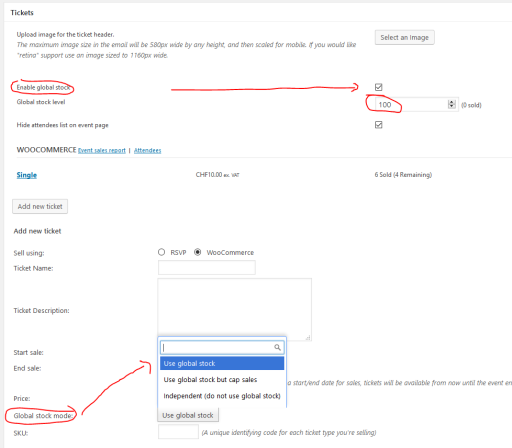
Now people can buy max. 100 tickets for that event (or whatever you set). That can be 100 pcs from one ticket, or a total mix.
Let me know if this is what you are looking for.
Cheers,
AndrasKeymasterSo, I checked with WPML active and set up the same recurring event. All went fine.
Based on the screenshot you sent me I discovered that you are most probably using an older version of our plugins. Please update them to the latest version and check afterwards if you are still having the issue.
If the issue is still there, then please share with me your system information and we’ll see what else can be done.
Thanks and cheers,
Andras -
AuthorPosts