Forum Replies Created
-
AuthorPosts
-
Andras
KeymasterHi comsud,
After you make changes to the ticket itself, then you need to click on the ‘Save ticket’ button (screenshot: https://dl.dropbox.com/s/vssgnddwmmslp5f/shot_180921_213557.jpg), and not on the ‘Update’ button of the post.
If you are clicking the save ticket button, then please share your system information with me in a private reply.
Also open the web developer tools of your browser (F12 or Ctrl + Shift + I on Chrome / Firefox, Option + Cmd + J on Safari), switch to the console tab and check if any error messages appear when you click on the ‘Save ticket’ button. If yes, please create a screenshot and share.
Thanks and cheers,
AndrasKeymasterHello Sebastian,
Thanks for getting in touch!
Sorry to hear about the issues. I believe I can give you some information on them.
I can’t get/display the cost of the newly imported eventbrite tickets
This is likely a missing feature of the new version. If you check the event after it has been imported, the ‘Event cost’ field is not populated, that would show the event cost. We already have this ticketed, I will add your voice to it and we’ll give you an update here once that is fixed.
Until then if you fill out that field manually, then the cost should show up. I’m sorry I don’t have a better workaround for this at the moment.
newly imported events don’t show the eventbrite iframe
We have received similar reports. Could you please share your system information with me in a private reply, as well as a url to an imported eventbrite event that has this issue? (Even more if you have.) Thanks!
Cheers,
AndrasSeptember 21, 2018 at 12:24 pm in reply to: event times and dates not updating on front end #1627874KeymasterHi Lisa,
Thanks for reaching out!
I have tried to recreate this scenario based on the information I have. This is what I did:
Create a new event.
Enter a title.
Click on Preview => the preview shows the unchanged date, today 8am to 5pm (the default values)
Click on save as draft.
Change the date to something in the future and change the times to something else than 8 to 5.
Click on Publish.
Check the event on the front-end, making sure I’m not checking the preview page of it => everything is updated and shows properly.
Are you doing something differently? Could you maybe create a screen recording so I can see what you are doing? That would help us track down if we are having a bug here.
Thanks and cheers,
AndrasSeptember 21, 2018 at 9:23 am in reply to: The small calendar on phones does not link to the day. #1627566KeymasterHi wescole,
Thanks for reaching out!
there’s a bug, when that view is unselected in the Display settings, the option to show that as the mobile view should not show up.
You are absolutely right. I will ticket this and let the devs know.
the small calendar that shows on mobile is not the same as the widget calendar but it’s really confusing to us.
Yes, the main calendar is not exactly the same as the widget. Even though they look quite similar in mobile view.
When I see a dot indicating that there are events on that day, I either expect it to scroll to the content below or I expect to go to the day
I just tested this on my mobile and both the main calendar and the widget worked the same way for me. When I tap on a day with a dot, then the events of that day will be listed below the calendar.
I created a screen recording about that. The top one is the month view of the default calendar, the bottom one is the widget, and they have the same functionality.
https://www.dropbox.com/s/g317vnphn9q88ov/month-view-vs-mini-calendar.mp4?dl=0
If this is not what you meant, or your mini calendar works differently, then please share a screen recording with me or a url where the functionality is visible so I understand better.
Thanks and cheers,
AndrasSeptember 21, 2018 at 9:01 am in reply to: Month View: All events have same permalink in tooltip using [[=raw permalink]] #1627541KeymasterHi Marcial,
Thanks for reaching out!
Sorry to hear about this. If I understand correctly you have some customization / template override in place.
We are aware of a bug, where the same post object is used for all events in the month. Our developers will be taking a look at this.
Meanwhile I might be able to provide a workaround.
Not quite sure how your override exactly looks like so I will give you an example.
If you would want to print out the ID of every event in the calendar view you would normally do:
echo $post->IDBecause of the bug that would give you the post ID of the first event.
If you do a declaration like
$post_id = $post->ID;at the top of the-events-calendar/src/views/month/single-event.php
(or rather the template override file)
then you can already do
echo $post_idand that will give you the proper post id for all events.I hope I didn’t explain this too complicated. 🙂
I hope it helps. Let me know.
Cheers,
AndrasKeymasterHi Kristin,
Thanks for reaching out!
I guess that would only be possible at the moment by modifying the core file itself, which then would be overwritten with the next plugin update. So that’s not the best solution.
If you think this is an accessibility issue, then could you provide me with some screenshots and some details on this that I could show to the accessibility team to assess if we can fix this in the future?
Thanks,
AndrasKeymasterHi,
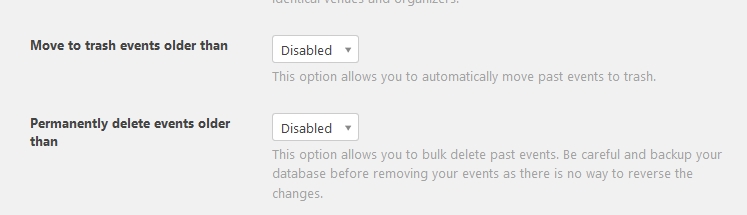
No, past events do not get automatically moved to the trash by default.
There is a setting for this under Events > Settings > General tab and looks like this: https://dl.dropbox.com/s/ht2k1dp1ubw6azd/shot_180921_174300.jpg
I’m not sure if it has an effect on imported events. Just checking with the developers and will get back to you on that when I get an answer.
Cheers,
AndrasKeymasterHi there,
Thanks for reaching out!
That is a superb question!
In order to do that you will need to create a template override.
You need to override this file:
wp-content/plugins/event-tickets/src/views/tickets/rsvp.php
make a copy here:
wp-content/[your-theme]/tribe-events/tickets/rsvp.php
You will need to modify line 210. It looks like this:
[code language=”php”]
<a href="<?php echo esc_url( Tribe__Tickets__Tickets::get_login_url() ); ?>">
[/code]And change it to:
[code language=”php”]
<a href="my-account/">
[/code]I believe that should do it. If for some case that wouldn’t work, put there the whole url ‘https://www.leeucentennial.com/my-account/’ but I think it’s not needed.
Let me know if this does the trick.
Cheers,
AndrasSeptember 21, 2018 at 8:22 am in reply to: Different Content in Ticket-E-Mail and attached PDF-Tickets #1627433KeymasterI’m not aware of any other way and at the moment there is no other extension.
I guess it would be possible with some custom development, however we do not have the bandwidth for that.
An idea that came to me now, you could modify the email template and add different css rules for screen and for print. When it shows on the screen then you don’t see the “Thank you for the order…” sentence. When it goes to print (pdf), then it doesn’t show what you don’t need.
Here’s some guidance on how you can do css media queries:
https://www.w3schools.com/cssref/css3_pr_mediaquery.asp
You will need ‘@media screen’ and ‘@media print’ I believe.
Hope this helps.
Cheers,
AndrasKeymasterThis reply is private.
KeymasterExcellent, happy to hear that!
Since this is resolved I am going to close this ticket, but if you need anything else related to this topic or another please create a new ticket and we’ll be happy to help.
Cheers,
AndrasPS: We’d be grateful if you would give us feedback on your satisfaction with support. Just click on one of the classy looking emojis below. 🙂 If you can spare a few words, that’s even better. Thanks!
PS2: If you like our plugins, and you didn’t yet do so 🙂 we would also be happy to receive a review in the wordpress.org repository. Much appreciated!
https://wordpress.org/support/view/plugin-reviews/the-events-calendar/
https://wordpress.org/support/view/plugin-reviews/event-tickets/KeymasterHey Sara, I will need some time to look into that. I kindly ask for your patience.
Thanks and have a great weekend!
AndrasKeymasterThe continue reading is actually part of the excerpt that shows up.
If you want to remove that add this to your functions.php file:
[code language=”php”]
function custom_excerpt_more($more) {
return;
}
add_filter(‘excerpt_more’, ‘custom_excerpt_more’);
[/code]To change link in day view:
wp-content/plugins/the-events-calendar/src/views/day/single-event.php
to
wp-content/[your-theme]/tribe-events/day/single-event.php
and add the ‘target=”_blank”‘ in line 30.
Do you have any more places where you want to change this, so we can settle all in one? 😉
A.
September 21, 2018 at 2:37 am in reply to: Incorrect time for recurring events (add more events) #1627145KeymasterThanks for sharing that! That made it much easier.
I managed to recreate this and can confirm this is a bug. I already ticketed it so our devs will take a look.
I am going to set the status of this ticket to “pending fix” and we will update it once the fix is released.
If you have any new questions or issues please create a new ticket and we’ll help you out.
Thanks and cheers,
AndrasSeptember 21, 2018 at 2:11 am in reply to: CSV import – problem with Excerpt field and Event Website field #1627122KeymasterSure thing Sally. We’ll be in touch.
A.
-
AuthorPosts