

Forum Replies Created
-
AuthorPosts
-
Trisha
MemberHi there,
I apologize for missing that about the plugins! The good news is I found the source of the problem and was able to come up with a solution for you.
The problem is the theme but it also occurs in the twenty sixteen theme. It has to do with the change to responsive images in WordPress 4.4 and how the default image sizes are calculated in the theme itself.
If you’ll add the following snippet to your theme’s functions.php file it should fix the problem.
https://gist.github.com/trishasalas/c7568e1d9ee1b772faedcfd43d0ac772
Let me know how it goes!
Cheers,
TrishaMay 9, 2017 at 11:07 pm in reply to: Adding a field in the backend to allow a user post a url to create a button? #1281455MemberHello, James!
I understand! The easiest way to get the more precise look you want is to use a plugin called Advanced Custom Fields (ACF). You can find that here: https://wordpress.org/plugins/advanced-custom-fields/
After you install the plugin on your site you need to add the fields for your button. You can find links to documentation for Advanced Custom Fields on the link above.
Your fields should look something like this in the ACF admin area:

Important to note:
- Remember the field names that you use, you will need them later.
- Select ‘Post Type is equal to tribe_events’ so that the meta box will display on the Events post type.
- I chose ‘side’ for the placement of the box but you have other choices, it doesn’t matter which one you choose for the meta box to work properly.
It looks like this on the Add Event screen:
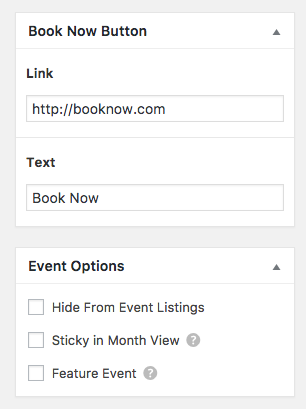
You will need to move the ‘Single Event Meta (Organizer) Template into your theme in order to do finish this customization. The template is located at
the-events-calendar/src/views/modules/meta/organizer.phpthere are instructions at the top of the file you’re moving. If you would like more detailed instructions you can also reference the Themer’s Guide.Add the following code to the bottom of the file right before the closing ‘</div>’
https://gist.github.com/trishasalas/26a90dbbc05f93100664a5e356ad74d0
Note that I added the class ‘button’ to the link on Line 7, this causes it to inherit the default Events Calendar button style.
This is the result:

While this type of customization is normally outside the scope of what we support, it’s not terribly extensive and I think it can be super-useful to many. I hope it helps 🙂
Let me know how it goes!
Cheers,
TrishaMemberHey, there!
Ok, you totally have a point. I didn’t realize you were seeing the issue in twenty sixteen as well. Did you also disable all plugins besides The Events Calendar when you tested?
Based on this new information I will do further testing and report back to you asap!
Hang in there!
TrishaMemberThis reply is private.
MemberHello, Matt!
Thank you for using The Events Calendar! I can help with this ?
I understand what you are asking but without the context of the current Zap you have and how it’s grabbing the information, it’s hard to follow up with anything super specific.
See if this article helps: https://theeventscalendar.com/automating-event-promotion-zapier/
If this isn’t what you’re looking for can be a little more specific about how you have the WooComerce data set up?
If it helps tickets, orders and events are all different post types that are linked together with post meta.
Cheers,
TrishaMemberHello, loannis!
Thank you for using The Events Calendar! I can help with this ?
As a first troubleshooting step, could you please provide us with your complete system information in a private reply using the instructions found in the following link?
https://theeventscalendar.com/knowledgebase/sharing-sys-info/
Secondly, can you make sure that you are logged-in to your WordPress website inside the App while using the QR scanner app? For example, if you are taken to the website within the app, go to the login screen and try to log in then re-scan the QR code. You should only have to log in one time but it is critical that you are logged in.
I tested several QR code readers and some were easier than others, I suggest you try a few different ones to see if you can find one that works well for you.
Cheers,
TrishaMemberHi, Donald!
You’re correct and this was an oversight on our part. I’ve looked for a way to reopen the feature idea but I’m not finding that as an option.
I’ll chat with one of my colleagues in the morning to see if I’m missing something and reopen if I’m able. I’ll report back with my findings!
Cheers,
TrishaMemberThis reply is private.
MemberHi there!
Ok, I see what you mean. That appears to be a conflict with the way the theme is rendering the images. It’s using
srcsetwhich is usually a good thing…but in this case it’s choosing the wrong image size.I would suggest talking to the theme author to see if they have a workaround as it’s not something we can fix with CSS or a snippet in this case.
If you have any additional questions or need clarification on this issue let me know, I’m happy to help!
Cheers,
TrishaMay 8, 2017 at 7:49 pm in reply to: Purchase Ticket Field Won’t Appear For Specific Event But OK For Others #1280592MemberHi, Darren!
I’m glad to hear you got that worked out!
For your second question go to ‘Events > Settings’ in the admin are and click on the ‘Tickets’ tab. There is a select box to choose the ticket location in that tab. See the screenshot below for reference.
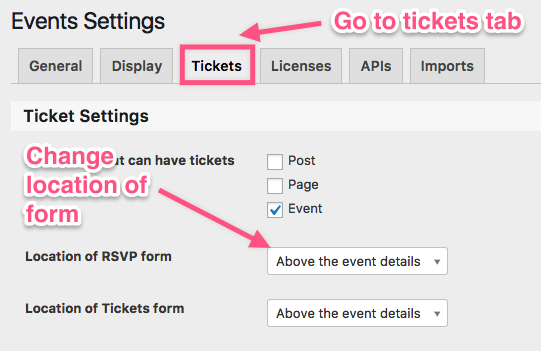
Does this help answer your question? Let me know how it goes!
Cheers,
TrishaMemberHi, Karen!
My apologies, you’re right!
I worked out some CSS for you to hide that bit. Try this:
.sidebar .tribe-events-meta-group .tribe-events-event-cost,

.sidebar .tribe-events-meta-group dt:nth-of-type(3n) {

display:none;

}
Let me know if it works!
Cheers,
TrishaMemberHello, Dennis!
Thank you for using The Events Calendar! I can help with this ?
To get started, would you be so kind as to share your system information? That will allow me to check for possible conflicts and see your current calendar settings. You can snag that by heading to Events > Help, copying the information that is at the bottom of the screen, then pasting it here for me as a private reply.
Cheers,
TrishaMay 5, 2017 at 11:22 am in reply to: Purchase Ticket Field Won’t Appear For Specific Event But OK For Others #1279424MemberHello, Darren!
Thank you for using The Events Calendar! I can help with this ?
I’m sorry to hear about this! Let’s see if we can get it fixed for you.
To start with would you mind sending a screenshot of the Tickets settings for each event? On the event admin screen about 2/3 of the way down, there is a meta box for tickets. It would be super helpful to see all of that information. Here’s a blank screen as an example:

I’ll wait to hear from you!
Cheers,
TrishaMemberHello, Caitriona!
Thank you for using The Events Calendar!
Since I don’t have your site URL or system information there’s not really any way I can help you here.
Also, I do want to note that our pre-sales forum is used to answer questions about purchasing our premium plugins.
If you’re looking for technical support, it would be awesome if you could post your question to our WordPress.org support forum.
Or, if you already have an active license for one of premium plugins, will you please log into your account and post your topic to our premium support forum instead?
I’ll go ahead and close out this thread, but please do post in the appropriate forum and we will be happy to assist you.
Cheers,
TrishaMemberHi, Ryan!
Thanks for the additional information. The error could be related to 7.1 but I’d need to replicate it to be sure. It doesn’t match the other thread you linked to nor does it match the bug report on file so it’s hard to say at this point.
I think the easiest way to troubleshoot this might be to have you send over a database dump of your site if you’re comfortable with that. It would give me what I need to test and try the different PHP versions so we get something more solid.
You can attach the file in a private reply here or send it to [email protected] with the subject ‘For Trisha’.
Cheers,
Trisha -
AuthorPosts