

Forum Replies Created
-
AuthorPosts
-
Trisha
MemberHi, Joe!
Thanks for letting me know! Glad it worked 🙂
I’m going to close this conversation out, but as always, if you need anything else feel free to reach out! I’m happy to help 🙂
Cheers,
TrishaMemberHello, Rudy!
As a next step will you please visit ‘Events > Help’ in the WordPress admin? Scroll down to the logging section, enable Debug/All Events level debugging then run through the steps that you outlined in the first post here to repeat the error. Return to the log and see what’s caught there.
Afterward, return to the log and see what’s caught there.
Let me know what you find out!
Trisha
MemberThis reply is private.
MemberGreat news! So glad I was able to find a fix for you!
I’m going to close this conversation out, but as always, if you need anything else feel free to reach out! I’m happy to help 🙂
Cheers,
TrishaMemberHi, Ryan!
I just got a follow-up from Scott. This should only de-register for the TEC post type so he’s revised the fix.
https://gist.github.com/sc0ttkclark/240574189719e1e91fb79d68301d6624
Cheers!
TrishaMemberThis reply is private.
May 11, 2017 at 10:05 am in reply to: Bad Json request by Events Calendar Pro slows my website down terribly #1282428MemberHi, Martin!
You’ve done great work troubleshooting and narrowing down the location of the conflict!
What I would look for in your child theme is make sure that script is enqueued properly, specifically confirm the file path is correct as it seems to not be able to find the file at all.
See https://developer.wordpress.org/themes/basics/including-css-javascript/ for reference if needed.
Hopefully, this will be an easy fix for you!
Cheers,
TrishaMemberThis reply is private.
MemberHello, Jessica!
Thank you for using The Events Calendar! I can help with this ?
At first glance, it looks like the problem is being caused by the Google Maps API being used twice. See the screenshot for reference:

My hunch is that the API key is entered in the theme settings as well as in The Events Calendar. If you’ll remove the API key from the theme the Search should start working properly.
If for some reason this doesn’t work let me know and we’ll continue to troubleshoot.
Cheers,
TrishaMemberHello, Brendyn!
Thank you for using The Events Calendar! I can help with this ?
WordPress doesn’t have anything built-in for a meta box in that position.
However, this post on StackExchange might help you out! https://wordpress.stackexchange.com/a/88103
Does this help answer your question? Let me know how it goes!
Cheers,
TrishaMay 10, 2017 at 9:40 pm in reply to: Bad Json request by Events Calendar Pro slows my website down terribly #1282159MemberHello, Martin!
Thank you for using The Events Calendar! I can help with this ?
Yes, I’m seeing this also when I use the Chrome Dev Tools inspector. The script in question is in your theme.

It looks like there may be a plugin conflict causing the problem. As a first step would you mind going through the Testing for Conflicts guide? You can find that here: https://theeventscalendar.com/knowledgebase/testing-for-conflicts/
Let me know what you find out and we can take it from there!
Cheers,
TrishaMemberThis reply is private.
MemberHello, Genesis!
Thank you for using The Events Calendar! I can help with this ?
That is super weird! I can’t find any obvious errors but I did find an error in the console that is worth troubleshooting. The CSS file from the business directory plugin isn’t loading for some reason. See the screenshot below for details:

It would be helpful if you could go through the steps in the Testing for Conflicts Guide, You can find that here: https://theeventscalendar.com/knowledgebase/testing-for-conflicts/
Let me know what you find out and we can go from there!
Cheers,
TrishaMay 10, 2017 at 3:06 pm in reply to: Last update no longer working with our AIT Directory Theme #1282022MemberHello, Thierry!
Thank you for using The Events Calendar! I can help with this ?
That’s very odd! I’m able to see the list view of the events, is this the view you’re talking about? I’m on a Mac using Chrome browser but I checked Safari and Firefox as well.

If I’m on the wrong page/view or if it’s happening on a different browser/OS combination let me know. I’m happy to help troubleshoot this!
Cheers,
TrishaMemberHello, Joe!
Thank you for using The Events Calendar! I can help with this ?
I see what you mean! Fortunately, this is a pretty easy fix, add the following CSS snippet to your custom css file:
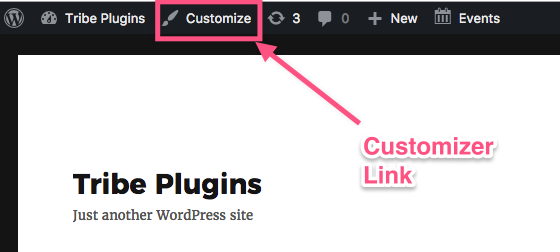
.container form { overflow: visible; }If you don’t already have a custom CSS file you can use the Additional CSS field in the WordPress Customizer. You can find the link to the WordPress Customizer in the admin bar when you are logged into your site. The Additional CSS field at the bottom of the panel.
See the following screenshot for reference:
Does this help answer your question? Let me know how it goes!
Cheers,
Trisha -
AuthorPosts