

Forum Replies Created
-
AuthorPosts
-
October 23, 2015 at 10:03 am in reply to: Validate Presence & Aspect Ratio of Featured Image? #1017371
George
ParticipantHey @josh,
Unfortunately these are mostly customization questions, which we cannot help with, or are related to Featured Images within WordPress which is not anything that The Events Calendar affects or manipulates. So there is little insight or help we can provide here 🙁 I will try to address some of your questions though regardless!
Is it possible to validate the presence of a featured image – maybe a before-save hook/filter? (i.e. Can I show an error message to the admin if they try to save or update an event without a featured image?)
This is possible with custom code, but there are also plugins out there that make Featured Images required and such. Here’s just one example of such a plugin → https://wordpress.org/plugins/require-featured-image/ Explore wordpress.org/plugins for similar ones; using a plugin for this will be a huge time-saver!
Is it possible to validate the aspect ratio of a featured image before save?
This is something that The Events Calendar has no bearing on, so I don’t know much what to say here – however, just like above I would recommend searching for media-library or featured-image related plugins out there that enable the sorts of controls you are looking for. You might be surprised what you find out there!
One thing that might help here is to use add_image_size() on your site to make a new thumbnail size on your site – upon image upload, then, the image will be cropped to this size and thus if you use this size in your templates it will be more uniform than not using it. Learn more about this function here → https://developer.wordpress.org/reference/functions/add_image_size/
Do you have any other suggestions for ensuring that the tiles in photo view are all the same height?
I would recommend the add_image_size() function I recommended above; then, use this image size in The Events Calendar’s Photo View. To do that, head into your Events Calendar Pro plugin files and navigate to this file:
src/views/pro/photo/single-event.php
Look for this line of code:
<?php echo tribe_event_featured_image( null, 'medium' ); ?>Notice that string that says ‘medium’ ? Well, if you use the add_image_size() function I mentioned above to make an image size named ‘josh-example’, then replace this string ‘medium’ with ‘josh-example’ – then, the photo view’s photos will all be this ‘josh-example’ size.
I hope there’s enough here to get you started with your customizations!
— George
October 23, 2015 at 9:53 am in reply to: Venue/Organizer fields don't display on event approval form #1017368ParticipantHey @Mark!
Can you first make a back-up of your customizations, and then try temporarily removing them from your site? When you do this, do the issues you describe persist?
This will confirm or rule out the possibility of your customizations being the culprit here – let us know what you find!
Thanks,
GeorgeParticipantAwesome! Thanks for the update 🙂
Best of luck with your site,
GeorgeOctober 23, 2015 at 9:50 am in reply to: Woocommerce ticket plugin doesnt show up on frontend #1017363ParticipantThank you for testing, @Jordan!
Your findings do, indeed, indicate a theme issue. 🙁
For the first order of business, I’d recommend contacting your theme developer for support with this; we’re not able to help with theme issues much, which is a matter of policy in some sense but also just an inherent limitation resulting from our lack of knowledge regarding the theme and its code, etc.
In the meantime, you can also check your theme’s folders out specifically and look for one called /tribe-events – if you find such a folder, I’d recommend first making a backup of it somewhere safe that you’ll be able to restore from. Then once you have it backed up elsewhere, try temporarily deleting this entire folder from your theme. Activate the theme again and see if the issues with ticket display persist.
Let us know what you find – thanks!
George
October 23, 2015 at 9:46 am in reply to: Stop The Ticket Emails being sent on order completion #1017361ParticipantHey @ruddygood,
Thanks for reaching out! I think that those methods mentioned in that thread actually WILL work, but only when your software is up-to-date.
Your version of The Events Calendar is very out of date, and your version of WooCommerce Tickets is super out of date! Your first order of business should be updating immediately. Here are the most recent versions of these plugins and where to download them so that you can update:
• The Events Calendar – 3.12.3 → https://wordpress.org/plugins/the-events-calendar/
• WooCommerce Tickets – 3.12 → https://theeventscalendar.com/my-account/downloads/Your version of WooCommerce is out of date too. You should update to its most recent version, 2.4.7, which you can do here → https://wordpress.org/plugins/woocommerce/
Once everything is updated, try the script Brian recommended in that support thread, which is available here → https://gist.github.com/jesseeproductions/7ec5827ffa34a3995dc9
Just copy and paste that script into your theme’s functions.php file.
I hope this all helps!
— George
ParticipantHey @William,
Unfortunately, getting around that “In-this-month” search filter would take some extensive modification of core plugin code 🙁 We don’t officially offer any support which such customizations, but even if we did, this would be highly recommended against because it’s a pretty tightly wound system that keeps the searches in the proper place.
If you’re curious about what would be involved, the simplest method I could think of would be to head into your plugin files for The Events Calendar and locate this file: src/Tribe/Template/Month.php
This is the specific code responsible for handling and limiting those searches: https://gist.github.com/ggwicz/9192ceffc8810e823072
So, if you’d like, you can use that code as a jumping-off point and work backwards from there to loosen the monthly limitation on search. That’s something we’d unfortunately not be able to help with, but I wanted to at least share something here 🙂
Sorry to disappoint @William! Let me know if you have any thoughts on this or if I can help with anything else.
Cheers,
GeorgeParticipantHey @Melissa,
The license key might be transferred to the live site, but more likely you will have to manually re-enter the license in your Events settings on the live site.
If you’re concerned about using up your license’s available number of domains by doing this, then I would recommend remove the license key from your staging site (and “Disconnecting” it from your account page here → http://theeventscalendar.com/my-account/license-keys).
This is because the license key is not required for any plugin functionality at all. The license only signs up your domain name for automatic updates – so you can just remove the license key from your staging site, and if you get an update notice on your live site, just do the update there and then do it manually on your staging site.
Does this all help? Did I address some of your concerns here? Let me know!
— George
ParticipantSorry for a third post, that second one posted prematurely!
This is an important post, because despite everything I said about customizations, I have gone ahead and written you a new function:
add_filter('tribe_events_event_schedule_details', 'custom_tribe_events_event_schedule_details');function custom_tribe_events_event_schedule_details() {
$post_id = get_the_ID();
$event = get_post( $post_id );$datetimes = array(
'start' => tribe_get_start_date( $event, false, 'Y-m-dTh:i' ),
'end' => tribe_get_end_date( $event, false, 'Y-m-dTh:i' )
);$datetimes['start_day'] = date( 'Y-m-d', strtotime( $datetimes['start'] ) );
$datetimes['end_day'] = date( 'Y-m-d', strtotime( $datetimes['end'] ) );if ( $datetimes['start_day'] == $datetimes['end_day'] ) {
return date( 'F j, Y', strtotime( $datetimes['start'] ) );
}return sprintf( '%s - %s, %s', date( 'F j', strtotime( $datetimes['start'] ) ), date( 'j', strtotime( $datetimes['end'] ) ), date( 'Y', strtotime( $datetimes['start'] ) ) );
}Try replacing the code Geoff originally shared with you with that code above. It works well for me, here’s a screenshot of the effects of it which seem to be exactly what you’re looking for:
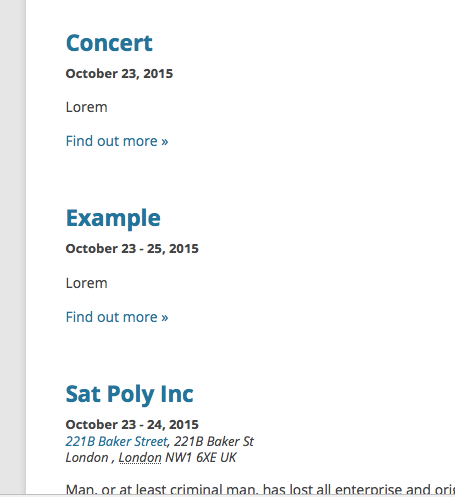
I hope that by looking through all of the code Geoff shared with you in your thread with him, and the code I wrote for you here, that you see that we are trying to help and want to. We are not trying to make things harder for you or be rude on the forums by denying customization support.
However, it’s a policy we must adhere to. We will not be able to help with any further customization questions on this matter, but hopefully all of the code we have shared helps. For further assistance, coordinate with your developers – and keep good backups of everything along the way 🙂
Cheers!
GeorgeParticipant@Lara – I wrote the above reply to hopefully reset expectations with your issues and clarify the situation. We cannot help here and cannot guarantee a solution.
With all of that being said, however, I can and would like to at least try to offer insight as to why this error might be happening, and how to go about fixing it.
From the sound of things, most of the customization is working as hoped for; but issues arise with the various event formats that can occur. And so one thing that might help here is to just remove all the conditional logic associated with displaying different types of formats; in other words, instead of letting the code do what it currently does, which is try to display different formats for different circumstances, you might find more success here by just forcing the date to display the same way no matter what.
Now, as mentioned in my above reply, figuring out the details of this are something you and your developers would have to take the reins on. But an example would be to pare down all of this sort of conditional logic in the snippet that Geoff originally shared with you:
if ( tribe_event_is_multiday( $event ) ) { // multi-date event$format2ndday = $format;
//If it's all day and the end date is in the same month and year, just show the day.
if ( tribe_event_is_all_day( $event ) && tribe_get_end_date( $event, false, 'm' ) === tribe_get_start_date( $event, false, 'm' ) && tribe_get_end_date( $event, false, 'Y' ) === date( 'Y' ) ) {
$format2ndday = 'j';
}if ( tribe_event_is_all_day( $event ) ) {
$schedule .= tribe_get_start_date( $event, true, $format );
$schedule .= '<span class="value-title" title="'. $microformatStartFormat .'"></span>';
$schedule .= '</span>'.$time_range_separator;
$schedule .= '<span class="date-end dtend">';
$schedule .= tribe_get_end_date( $event, true, $format2ndday );
$schedule .= '<span class="value-title" title="'. $microformatEndFormat .'"></span>';
} else {
$schedule .= tribe_get_start_date( $event, false, $date_without_year_format );
$schedule .= '<span class="value-title" title="'. $microformatStartFormat .'"></span>';
$schedule .= '</span>'.$time_range_separator;
$schedule .= '<span class="date-end dtend">';
$schedule .= tribe_get_end_date( $event, true, 'j, Y' );
$schedule .= '<span class="value-title" title="'. $microformatEndFormat .'"></span>';
}} elseif ( tribe_event_is_all_day( $event ) ) { // all day event
$schedule .= tribe_get_start_date( $event, true, $format );
$schedule .= '<span class="value-title" title="'. $microformatStartFormat .'"></span>';
} else { // single day event
if ( tribe_get_start_date( $event, false, 'g:i A' ) === tribe_get_end_date( $event, false, 'g:i A' ) ) { // Same start/end time
$schedule .= tribe_get_start_date( $event, false, $format ) . ( $time ? $datetime_separator . tribe_get_start_date( $event, false, $time_format ) : '' );
$schedule .= '<span class="value-title" title="'. $microformatStartFormat .'"></span>';
} else { // defined start/end time
$schedule .= tribe_get_start_date( $event, false, $format ) . ( $time ? $datetime_separator . tribe_get_start_date( $event, false, $time_format ) : '' );
$schedule .= '<span class="value-title" title="'. $microformatStartFormat .'"></span>';
$schedule .= '</span>' . ( $show_end_time ? $time_range_separator : '' );
$schedule .= '<span class="end-time dtend">';
$schedule .= ( $show_end_time ? tribe_get_end_date( $event, false, $time_format ) : '' ) . '<span class="value-title" title="'. $microformatEndFormat .'"></span>';
}
}
Instead of trying to show different formats for the different events (i.e. “Multi-day”, single-day, etc.), try just showing one format universally.
ParticipantHey @Lara,
George here – as you can see in the threads with me and Geoff, your issues are not an issue with the plugin itself. You are seeking to customize the plugin, which we explicitly offer no support with whatsoever.
These are the two issues:
• https://theeventscalendar.com/support/forums/topic/issue-with-date/
• https://theeventscalendar.com/support/forums/topic/events-list-duration-format/Your goals have been stated in those threads as this:
I am using the Pro Events List shortcode and would like the Duration to only show the dates in the following format: October 12 – 16, 2015. How do I modify this? I’ve already done some customization to the way the shortcode shows my events, but I don’t know where to change this. Can it be done? Thanks!
Despite our no-customization policy, Geoff wrote a long script for you in that thread.
In your next thread, with me, you wrote that your issue was this:
We did implement Geoff’s solution he recommends above which is how we have the date showing as it does like so October 20 – 23, 2015, but then the single day events don’t show the year at all – they just say October 20. So we added the Y to the backend settings for Day without Year under Display tab so that a single day event would show the year there regardless but when we do that it lists the multi-day event in a way we don’t want either, like this October 20, 2015 – 23, 2015.
So, in other words: there are no technical issues with our plugins on your site. The issues are that you want to customize things, but have not been able to get the customizations to work 100% correctly.
The reason I highlight all of these facts is to address your comment here:
this is starting to cost me for something that I would think could be fixed on your end.
This cannot be fixed on our end. This is a customization.
ParticipantHey @Keith,
I assume that you are talking about the features you would like to implement as mentioned in your other post, as follows:
The goal is to be able to import events from Facebook using the Facebook import, and then assign them to a Community Events user. This would allow Community Events users to modify events imported from their Facebook page.
If all of your Community Events users are authors on the site already, i.e. they have user accounts, then you can just go into the events that were imported from Facebook and change the author to whatever user is appropriate.
If you need more features than this or something, as noted it will take custom code; I know you’re aware of this, but just wanted to reiterate, because we really cannot help with customizations!
You ask if these customizations are feasible: they are. With all of my warnings about customization support, before closing this thread I will try to at least share some general ideas:
1. You ask about writing right to the database…this is feasible but generally not recommended. If you’re more familiar with SQL database code and such, and so it’d be easier to do this than using a bunch of WordPress-specific functions, then you can do so using the WPDB class as written about here: https://codex.wordpress.org/Class_Reference/wpdb
2. To associate users with events, you can use the custom fields on the event or the custom fields on the User, or some combination of these things.
You can learn about post meta here → https://developer.wordpress.org/reference/functions/get_post_meta/
You can learn about user meta here → https://codex.wordpress.org/Function_Reference/get_user_meta
3. Finally, you ask about where certain things happen in the admin – i.e. the “input box” and such. There are many different files in our plugins that all lead to these features working, but if you’re curious about modifying the admin-facing views in the plugin, head into Facebook Events and/or Community Events and look for the “src/admin-views” directory – these are all, appropriately, the Admin Views of the plugin. So hopefully this helps narrow down your searching for various admin elements.
We do not offer any support for code customizing. I’m sorry about the frustrations that might result from this, but answering specific questions about code customizations is not something we can really do either.
Hopefully my answers here help you get started with your customizations. Your best bet is to keep good backups of your code along the way and just tinker around – if you need a customization, please do not post another thread about it on the forums here and seek professional services from a developer to help you build what you need. If you do not know of a developer for hire personally, we have some listed here that might help you get started on your search → http://m.tri.be/18k1
I don’t mean to make things harder for your Keith – we have to adhere to our policies uniformly for all customers, and unfortunately just do not have the time or resources to help with code customization.
Best of luck with your customizing!
Thank you,
GeorgeOctober 23, 2015 at 8:40 am in reply to: Events Calendar List widget shows only one date in display "list-date" #1017332ParticipantI’m sorry to hear this @Robin!
I cannot recreate these issues, so I’m curious – if you activate a default WordPress theme on your site like Twenty Thirteen, Fourteen, etc., and then add the widget back in place and take a look at it on your site, does the issue persist?
If so, how about if you leave your site in this state and then proceed with deactivating every plugin on your site that is not The Events Calendar or Events Calendar Pro; check on the issue after each deactivation. Does the issue change anywhere along the way?
I’m sorry if these steps sound tedious; they’re generally much faster to work through than it sounds, and since I cannot recreate this issue and we do not have other reports of it at this time, the leading suspicion as to the cause of this is that there’s a theme or plugin conflict at play.
The above steps will help determine if this is the case.
Let us know what you find!
Cheers,
GeorgeParticipantHey meera,
Since you do not have a Premium License, you should not be posting support questions here on our site – this forum itself is called “Pre-Sales Questions”, and so you shouldn’t technically post technical support questions like this here either.
I’m not trying to be rude or make things harder for you! Those are just our policies, which apply to everyone, and so respecting them appreciated; we may not be able to reach a conclusion with your issues in this thread.
With all that being said, however, I will try to help here – the first thing I would recommend is to go through all of the steps outlined in this Knowledgebase article on our site: https://theeventscalendar.com/knowledgebase/fixing-http-404-errors/
If issues persist even after doing all of those steps, I would recommend replying with your “System Information” – if you’re not sure how to do that, this other KB article shows how → https://theeventscalendar.com/knowledgebase/sharing-sys-info/
Cheers!
GeorgeParticipantHey Linda,
Our cost field now only accepts numeric values, so your long strings here won’t work with the plugin by default now. Unfortunately, the only way around this is custom code; I wrote up some custom code here for you that should help though, try pasting this in your theme’s functions.php file and then see if things improve!
add_filter( 'tribe_get_cost', 'cost_show_full_meta_field', 10, 2 );function cost_show_full_meta_field( $cost, $post_id ) {
$full_cost = tribe_get_event_meta( $post_id, '_EventCost', false );if ( isset( $full_cost[0] ) ) {
return sanitize_text_field( $full_cost[0] );
}return $cost;
}
Cheers!
GeorgeParticipantHey John!
The good news here is that this is not an “error” notice – nothing is broken on your site, in other words (at least, this message does not indicate such).
This message is posted by The Events Calendar if you have the “Debug mode” option checked in your Events Settings page.
To disable this message, go to Events > Settings and un-check the “debug mode” option like in this screenshot:
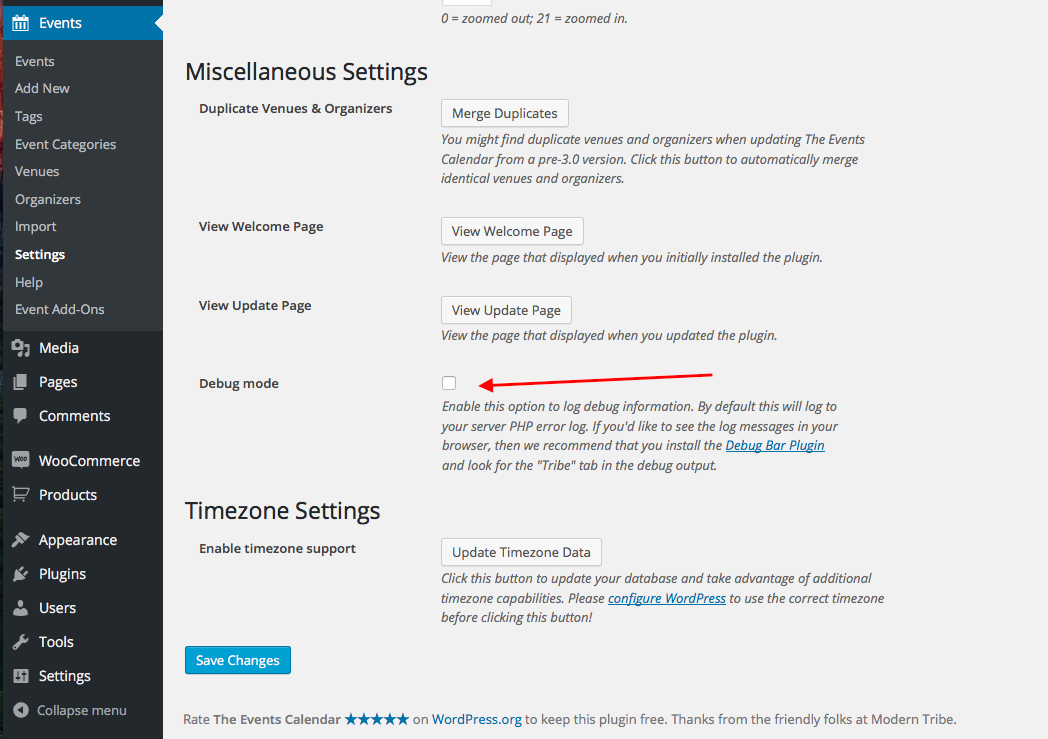
Save your changes; if the error keeps showing up, then there might be a server-specific configuration that is causing this to display, so your best step from there would be to contact WP Engine support and tell them how the logging persists even when you disable it in the plugin.
I hope this helps!
George
-
AuthorPosts