
Home › Forums › Calendar Products › Events Calendar PRO › issue with dates, again
- This topic has 5 replies, 2 voices, and was last updated 11 years ago by
George.
-
AuthorPosts
-
October 23, 2015 at 7:54 am #1017298
Lara
ParticipantHi. This is Lara, again. My developers have been working with Geoff and George on a date issue. George actually closed the thread on them. So I am hoping to speak to a manager or someone who can help this situation as it is now costing me money to have my developers work on trying to figure out an issue with your plugin, which is something that the developers of the plug in should take care of, or at least be able to tell my developers that the issue can or can not be done. I would greatly appreciate assistance in this. The problem is we have events that are single dates and multi dates. When we put in a multi day event such as DEC 20-23 2015 which is what we want it changes to DEC 20 2015- DEC 23 2015 and if we try to change it the single day events lose the year, just saying DEC 20.
We tried adding a Y back in the settings and that didn’t work, and everything else Geoff and George has sent us to do. Please let me know if there is any other way we can fix this issue as like I said this is starting to cost me for something that I would think could be fixed on your end.
Kind Regards,
LaraOctober 23, 2015 at 9:00 am #1017340ParticipantHey @Lara,
George here – as you can see in the threads with me and Geoff, your issues are not an issue with the plugin itself. You are seeking to customize the plugin, which we explicitly offer no support with whatsoever.
These are the two issues:
• https://theeventscalendar.com/support/forums/topic/issue-with-date/
• https://theeventscalendar.com/support/forums/topic/events-list-duration-format/Your goals have been stated in those threads as this:
I am using the Pro Events List shortcode and would like the Duration to only show the dates in the following format: October 12 – 16, 2015. How do I modify this? I’ve already done some customization to the way the shortcode shows my events, but I don’t know where to change this. Can it be done? Thanks!
Despite our no-customization policy, Geoff wrote a long script for you in that thread.
In your next thread, with me, you wrote that your issue was this:
We did implement Geoff’s solution he recommends above which is how we have the date showing as it does like so October 20 – 23, 2015, but then the single day events don’t show the year at all – they just say October 20. So we added the Y to the backend settings for Day without Year under Display tab so that a single day event would show the year there regardless but when we do that it lists the multi-day event in a way we don’t want either, like this October 20, 2015 – 23, 2015.
So, in other words: there are no technical issues with our plugins on your site. The issues are that you want to customize things, but have not been able to get the customizations to work 100% correctly.
The reason I highlight all of these facts is to address your comment here:
this is starting to cost me for something that I would think could be fixed on your end.
This cannot be fixed on our end. This is a customization.
October 23, 2015 at 9:07 am #1017344Participant@Lara – I wrote the above reply to hopefully reset expectations with your issues and clarify the situation. We cannot help here and cannot guarantee a solution.
With all of that being said, however, I can and would like to at least try to offer insight as to why this error might be happening, and how to go about fixing it.
From the sound of things, most of the customization is working as hoped for; but issues arise with the various event formats that can occur. And so one thing that might help here is to just remove all the conditional logic associated with displaying different types of formats; in other words, instead of letting the code do what it currently does, which is try to display different formats for different circumstances, you might find more success here by just forcing the date to display the same way no matter what.
Now, as mentioned in my above reply, figuring out the details of this are something you and your developers would have to take the reins on. But an example would be to pare down all of this sort of conditional logic in the snippet that Geoff originally shared with you:
if ( tribe_event_is_multiday( $event ) ) { // multi-date event$format2ndday = $format;
//If it's all day and the end date is in the same month and year, just show the day.
if ( tribe_event_is_all_day( $event ) && tribe_get_end_date( $event, false, 'm' ) === tribe_get_start_date( $event, false, 'm' ) && tribe_get_end_date( $event, false, 'Y' ) === date( 'Y' ) ) {
$format2ndday = 'j';
}if ( tribe_event_is_all_day( $event ) ) {
$schedule .= tribe_get_start_date( $event, true, $format );
$schedule .= '<span class="value-title" title="'. $microformatStartFormat .'"></span>';
$schedule .= '</span>'.$time_range_separator;
$schedule .= '<span class="date-end dtend">';
$schedule .= tribe_get_end_date( $event, true, $format2ndday );
$schedule .= '<span class="value-title" title="'. $microformatEndFormat .'"></span>';
} else {
$schedule .= tribe_get_start_date( $event, false, $date_without_year_format );
$schedule .= '<span class="value-title" title="'. $microformatStartFormat .'"></span>';
$schedule .= '</span>'.$time_range_separator;
$schedule .= '<span class="date-end dtend">';
$schedule .= tribe_get_end_date( $event, true, 'j, Y' );
$schedule .= '<span class="value-title" title="'. $microformatEndFormat .'"></span>';
}} elseif ( tribe_event_is_all_day( $event ) ) { // all day event
$schedule .= tribe_get_start_date( $event, true, $format );
$schedule .= '<span class="value-title" title="'. $microformatStartFormat .'"></span>';
} else { // single day event
if ( tribe_get_start_date( $event, false, 'g:i A' ) === tribe_get_end_date( $event, false, 'g:i A' ) ) { // Same start/end time
$schedule .= tribe_get_start_date( $event, false, $format ) . ( $time ? $datetime_separator . tribe_get_start_date( $event, false, $time_format ) : '' );
$schedule .= '<span class="value-title" title="'. $microformatStartFormat .'"></span>';
} else { // defined start/end time
$schedule .= tribe_get_start_date( $event, false, $format ) . ( $time ? $datetime_separator . tribe_get_start_date( $event, false, $time_format ) : '' );
$schedule .= '<span class="value-title" title="'. $microformatStartFormat .'"></span>';
$schedule .= '</span>' . ( $show_end_time ? $time_range_separator : '' );
$schedule .= '<span class="end-time dtend">';
$schedule .= ( $show_end_time ? tribe_get_end_date( $event, false, $time_format ) : '' ) . '<span class="value-title" title="'. $microformatEndFormat .'"></span>';
}
}
Instead of trying to show different formats for the different events (i.e. “Multi-day”, single-day, etc.), try just showing one format universally.
October 23, 2015 at 9:23 am #1017350ParticipantSorry for a third post, that second one posted prematurely!
This is an important post, because despite everything I said about customizations, I have gone ahead and written you a new function:
add_filter('tribe_events_event_schedule_details', 'custom_tribe_events_event_schedule_details');function custom_tribe_events_event_schedule_details() {
$post_id = get_the_ID();
$event = get_post( $post_id );$datetimes = array(
'start' => tribe_get_start_date( $event, false, 'Y-m-dTh:i' ),
'end' => tribe_get_end_date( $event, false, 'Y-m-dTh:i' )
);$datetimes['start_day'] = date( 'Y-m-d', strtotime( $datetimes['start'] ) );
$datetimes['end_day'] = date( 'Y-m-d', strtotime( $datetimes['end'] ) );if ( $datetimes['start_day'] == $datetimes['end_day'] ) {
return date( 'F j, Y', strtotime( $datetimes['start'] ) );
}return sprintf( '%s - %s, %s', date( 'F j', strtotime( $datetimes['start'] ) ), date( 'j', strtotime( $datetimes['end'] ) ), date( 'Y', strtotime( $datetimes['start'] ) ) );
}Try replacing the code Geoff originally shared with you with that code above. It works well for me, here’s a screenshot of the effects of it which seem to be exactly what you’re looking for:
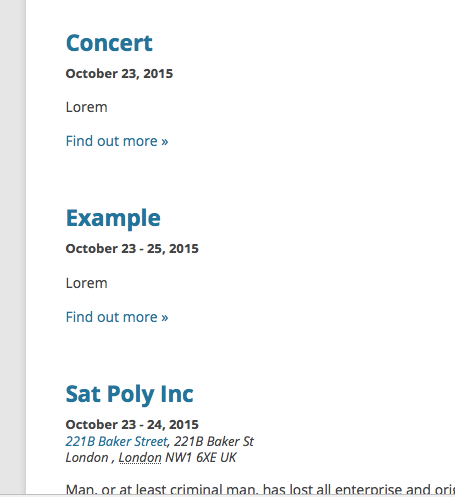
I hope that by looking through all of the code Geoff shared with you in your thread with him, and the code I wrote for you here, that you see that we are trying to help and want to. We are not trying to make things harder for you or be rude on the forums by denying customization support.
However, it’s a policy we must adhere to. We will not be able to help with any further customization questions on this matter, but hopefully all of the code we have shared helps. For further assistance, coordinate with your developers – and keep good backups of everything along the way 🙂
Cheers!
GeorgeOctober 23, 2015 at 11:34 am #1017404ParticipantThis worked! Thank you sooo very much! You should implement this option in your next update of the plugin so that no more people have this issue that seems to be fine in other sites. Thanks again!
October 26, 2015 at 11:16 am #1018042ParticipantI’m glad it helped @Lara! Apologies for all of the throat-clearing about our policies and so-on, I was just urgent to keep things under control and reset expectations in case my code didn’t help – I’m glad it did though.
Keep good backups of all custom code like this, and of your site in general in fact 🙂
Best of luck with your site!
George -
AuthorPosts
- The topic ‘issue with dates, again’ is closed to new replies.