

Forum Replies Created
-
AuthorPosts
-
George
ParticipantHey @Barbara,
There’s unfortunately no update on this – to be fully honest, my last update was on New Year’s Eve, when we were all mostly “out of office” for the holidays. We’re all just coming back to work today so there has not been any development. Sorry to disappoint, just wanted to be up-front about where things stand!
There won’t be development happening fast enough for updates here in this thread – in terms of a proper bug fix within the code itself, the best thing I can recommend is just to check out the “Changelog” of new updates as they arrive in your dashboard, and/or to keep an eye on http://theeventscalendar.com/blog for update announcements.
—
Now, as for missing denomination signs, can you clarify exactly what you mean here? If you mean that, when you enter “$0” into the price field and the “$” gets removed, for example, then this unfortunately is resultant of the same bug affecting things when you try to enter “FREE” or something similar.
I really, really appreciate your patience with all of this!
Sincerely,
GeorgeParticipantHey Dan,
With WooCommerce it’s unfortunately a bit trickier. For the record, because of this thread we now have a bug ticket in our system and can hopefully fix this in our plugins some time in the next few release – so, thank you!
And these fixes will be robust, well-tested, etc.
The following suggestion is not well-tested, by contrast, so try this out and let me know if it helps at all – paste this into functions.php just like the above code:
if ( function_exists( 'tribe_get_events' ) ) {function tribe_1049545_wootickets( $subject ) {
return wp_kses_decode_entities( $subject );
}add_filter( 'wootickets_ticket_email_subject', 'tribe_1049545_wootickets' );
}
That might do the trick – let me know!
Thanks,
GeorgeParticipantHey @Dillon,
Thanks for your patience with our delayed responses over the holidays.
As for your issues, can you share thinks to the following two things:
1. The specific URL where the “mobile layout” calendar is visible on your site? I looked but could not find The Events Calendar on your site.
2. The specific URL that you saw of ours, the one you are referring to when you say, “How would I get my mobile layout to match yours […]”.
—
I’ll take a look at the specific page and see what I can learn.
Unfortunately, a lot of times if there are weird overlapping issues it is caused by theme code. Themes dictate almost all “responsive” styles and such, and so if that ends up being the case here, your best course of action to improve responsive styles would be to contact your theme developer or web developer for specific assistance.
But like I said – I’ll take a closer look at things to see what the problem is and we can go from there! 🙂
Cheers,
GeorgeParticipantHey Guy,
This is unfortunately not possible at this time with anything built-in to our plugins 🙁 You would have to write some extensive custom code to make this happen, or hire someone to write such code for you. We have a list of folks available for hire here, which might be helpful → http://m.tri.be/18k1
I’m sorry to disappoint! We cannot help write custom code so the above two options are unfortunately the only two options at this time.
Sincerely,
GeorgeParticipantHey @laughmasters,
I just tested adding some shortcodes to the “Add HTML before event content” option and confirmed that shortcodes are not stripped from that option for me. Can you confirm the exact nature of what happens when you try entering a shortcode there by addressing each of the following five questions specifically:
1. Upon saving the changes, does the shortcode text in that option get removed? Or does the actual text in the option field remain, but just nothing shows up on the front-end?
2. How are you adding the shortcodes? I see an “Insert Shortcodes” button above the field in your video, but this is NOT default plugin functionality and is NOT anything built into WordPress. Where does this button come from?
3. Does the behavior of this issue change based on whether you add the shortcodes with that “Insert Shortcodes” button versus just entering the shortcode manually by hand?
4. If you just manually add a simple test shortcode like [tribe_events_list] to that option, and save changes, do the same problems happen? I.e. does the text get stripped and nothing shows up on front-end, or does the shortcode remain and the Events List appears?
5. Can you share your complete “System Information”? Here’s how: https://theeventscalendar.com/knowledgebase/sharing-sys-info/
—
If you address each of these 5 questions in the order they appear, that will provide a ton of helpful data for us to get started on investigating this more closely.
Thank you in advance for providing all of this information!
Cheers,
GeorgeParticipantHey @Danfeely,
I played around with this a bit and found that you should be able to keep the apostrophes by adding the following code to your theme’s functions.php file:
if ( function_exists( 'tribe_get_events' ) ) {

	/**

	 * Prevent apostrophes from being encoded in email subjects.

	 *

	 * @link http://theeventscalendar.com/?p=1049545

	 */

	function tribe_1049545_subject( $title ) {

		return wp_kses_decode_entities( $title );

	}
function tribe_1049545_headers( $headers ) {
return array( 'Content-Type: text/html; charset=UTF-8' );
}add_action( 'tribe_rsvp_email_subject', 'tribe_1049545_subject' );
add_filter( 'tribe_rsvp_email_headers', 'tribe_1049545_headers' );
}
It works for me – I hope it helps!
Cheers,
GeorgeParticipantHey @Chris,
Thanks for reaching out. There are several pieces of information that we should start this issue with.
First, you mention this:
It does not however populate on the side panel on our home page anymore.
1. How, specifically, did you power this side panel of events previously? Did you use a widget? Did you use custom code? Be specific.
2. Can you share a link to your home page so we can see it live?
3. Can you share your “System Information”? Here’s how to do that → https://theeventscalendar.com/knowledgebase/sharing-sys-info/. Be sure to share your complete system information, do not remove anything from it.
If you address each of these three points, that will help us get started with the investigation here to figure out what’s wrong.
Thank you!
GeorgeParticipantHey Tim!
Thanks for reaching out.
They are separate purchases – but to be clear, you do NOT need one to use the other. You do not need Events Calendar Pro for Event Tickets Plus to work, for example.
I hope this information helps – let me know if you have any other questions 🙂
— George
January 4, 2016 at 6:27 am in reply to: How do I include Calendar templates in my header.php? #1049770ParticipantHey @Cynthia,
Just to mention this to get it out of the way, we can only provide extremely limited support for custom coding projects or any sort of question like “How do I make this code thing happen” – see the “Product Support” section of http://theeventscalendar.com/terms for more information.
I only mention that to set expectations, however – for your specific questions here, it sounds like what you’re looking for is a set of conditional statements for things related to The Events Calendar.
There is fortunately a whole list of such functions, with descriptions about what they do, in this “Gist” here → http://m.tri.be/18z9
Check out that Gist and use the various examples there – if you play around with things I’m sure you’ll be able to build what you need.
In closing, just to hopefully save some time, code like this will not work for templates within The Events Calendar (or any plugin):
is_page_template('photo.php')The is_page_template() function will only work for theme templates.
I hope this information helps!
Cheers,
GeorgeJanuary 4, 2016 at 6:21 am in reply to: Organizer unable to email attendee list in EC Pro 4.03 #1049766ParticipantHey @Ameet,
Thanks for reaching out here. Before getting too far afield with this issue, I have to admit that I’m a bit uncertain about what the exact issue is. You describe the issue as the following:
an organizer who would not have access to admin is unable to Email the attendees list anymore.
This is correct functionality – organizers do not have admin access, and are not admin users at all for that matter. So they cannot do basic admin things like access the Attendees List.
—
With this in mind, then, can you clarify exactly what you are referring to? If you are referring to front-end features of, for example, our Community Tickets add-on, can you please share screenshots of which specific attendees links are causing you trouble? (You can do so by uploading the screenshot to Imgur.com, Flickr.com, CloudUp.com, or any similar image-hosting site; then just share the links to those images here and I’ll take a look.)
I’m sorry to respond to your questions with questions of my own! But I just want to be 100% certain that I am addressing the right concerns of yours so that I can best help out here.
Thanks in advance for any more information you can provide regarding all of this.
– George
January 2, 2016 at 5:21 pm in reply to: Portuguese (Pt_pt) translation: expressions missing #1049190ParticipantHey @Isabel,
Thank you for posting your suggestions here. We unfortunately cannot field specific translation edits like this here on the forums, and so I would recommend posting your edits where appropriate on translations.theeventscalendar.com
If you’re not familiar with that process, these knowledgebase articles should be helpful:
• Translating The Events Calendar: http://theeventscalendar.com/knowledgebase/translating-the-events-calendar/
• Translating our premium add-ons: https://theeventscalendar.com/knowledgebase/adding-or-updating-a-translation/
• Changing the language on your site: https://theeventscalendar.com/knowledgebase/changing-the-language-on-your-calendar/Cheers!
GeorgeParticipantHey @Bart,
First of all, thanks for your patience with our delayed responses over the holidays.
Second of all, happy New Year! 🙂
And finally, in regards to your actual issue – I checked out your month view and found the problem you describe here. So I opened my developer console and tried again, and noticed that the problem manifests at the level of the server itself (so it seems) – check out this screenshot here and see how the AJAX request itself is failing before it even finishes:
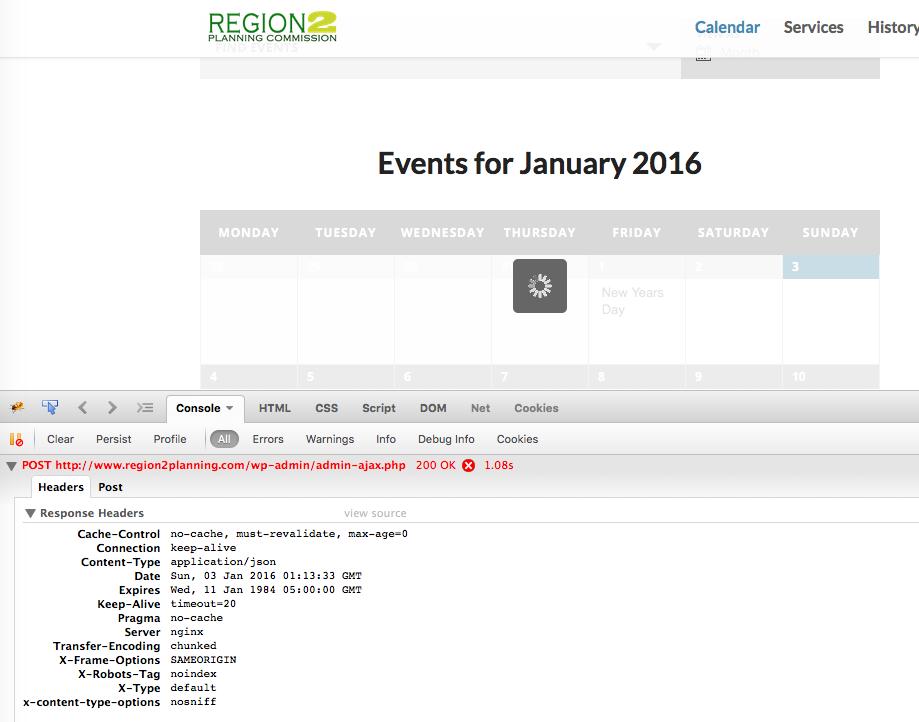
—
I would recommend the following three steps:
1. Share your “system information” with us. Here’s how → https://theeventscalendar.com/knowledgebase/sharing-sys-info/
2. Do the complete set of troubleshooting steps outlined here, and try recreating this issue after each step in the process → https://theeventscalendar.com/knowledgebase/testing-for-conflicts/
3. If you do every part of Step #2 here and the issues still persist, I would recommend contacting WP Engine support about this and seeing if they have insight on why the AJAX requests are failing.
Thank you!
GeorgeParticipantHey Mikhail,
This is unfortunately a limitation of the CSV format itself 🙁 It’s very hard to work around! CSV means “Comma-separated values” and so issues like the ones here can arise whether you use The Events Calendar, or Microsoft Excel, or Google Sheets, or basically any software that generates CSV values…
At this time time there is not something within our plugin itself that will fix this. I’m sorry to bear that news.
In closing, I notice that you don’t seem to have any premium licenses, and are posting a technical support question in our “Pre-Sales Questions” forums. So, if you do have a premium account, log into that account to post in our premium support forums. Otherwise, for now, I will close up this thread because it is not a Pre-Sales Question. To seek technical support for our free plugins, head over to wordpress.org/plugins/the-events-calendar and use the support forums there to raise any further concerns.
Thank you!
GeorgeJanuary 2, 2016 at 5:08 pm in reply to: Restrict Mini Calendar to show 1 specific venue only #1049185ParticipantHey Jacob, I will indeed close this thread but forgot to mention that this might be achievable by using the pre_get_posts() hook within WordPress. As mentioned, we cannot help with the line-by-line coding of this solution, but you can learn about pre_get_posts() here → https://codex.wordpress.org/Plugin_API/Action_Reference/pre_get_posts
Cheers!
GeorgeJanuary 2, 2016 at 5:07 pm in reply to: Restrict Mini Calendar to show 1 specific venue only #1049184ParticipantHey Jacob,
This is unfortunately not possible without an amount of code customization that falls quite far outside the scope of our support forums 🙁
I’m sorry to bear that news!
I will close up this thread because we cannot help with custom code – check out the “Product Support” section of our terms and conditions here: http://theeventscalendar.com/terms
Sincerely,
George -
AuthorPosts