

Forum Replies Created
-
AuthorPosts
-
George
ParticipantHey Scott,
Thanks for your patience with our delayed responses over the holidays!
As for “the email addresses” can you clarify exactly which email addresses you are referring to when you say this? I just want to be 100% sure I address the right concerns 🙂
Cheers,
GeorgeParticipantHey Vince,
At this time there are no features for printing the calendar other than the good old “Ctrl+P” print command in a browser; in other words, there is nothing specially built for printing the calendar at this time. You can only print the calendar the same way you would print any other web page.
I hope this helps – let me know!
Thanks,
GeorgeParticipantHey @Ryan,
If things seem to work fine for now, then you don’t need to do anything.
However, the point of this error message is to highlight that if you set your “Events slug” option to something, you cannot have a page that uses that same slug. It can cause issues.
So, for example, the default “Events slug” is /events. Well, if you have a page called EVENTS like on your site, and this page itself also has the slug /events, then now there are two things on your site trying to use the slug /events. This can cause problems.
Hence that error message.
To fix that you can either delete the EVENTS page, or just change its slug to something else.
OR you can head to Events > Settings in your wp-admin and change the “Events slug” option to something other than /events, like /calendar or /agenda or /classes or whatever fits your site’s needs.
As long as the same slug is being used for both things, there might be issues. Things might also work fine for a while, which seems to be the case on your site right now – so, again, you do not have to change anything. But if you want that error to go away and/or want to ensure proper functionality, then doing one of the solutions I mentioned above is the best step.
I hope this information helps!
Cheers,
GeorgeJanuary 2, 2016 at 4:55 pm in reply to: Recurring Events on the Same Day & Recurring Events Featured Events #1049176ParticipantHey @Josh,
Thanks for your patience with us over the holiday break!
—
First, you are asking about configuring recurring events. For this I would recommend reading the following article closely, and applying the information within it → https://theeventscalendar.com/knowledgebase/pro-recurring-events/
That article gives a good walkthrough of all the configuration options.
—
Next, you ask this:
And is it possible to have one event show when viewing upcoming featured events instead of all the recurring events showing in the upcoming featured events?
One thing that might help here is to ensure that the “Recurring event instances” option is checked. Here is a screenshot of this option in your Event Settings panel:
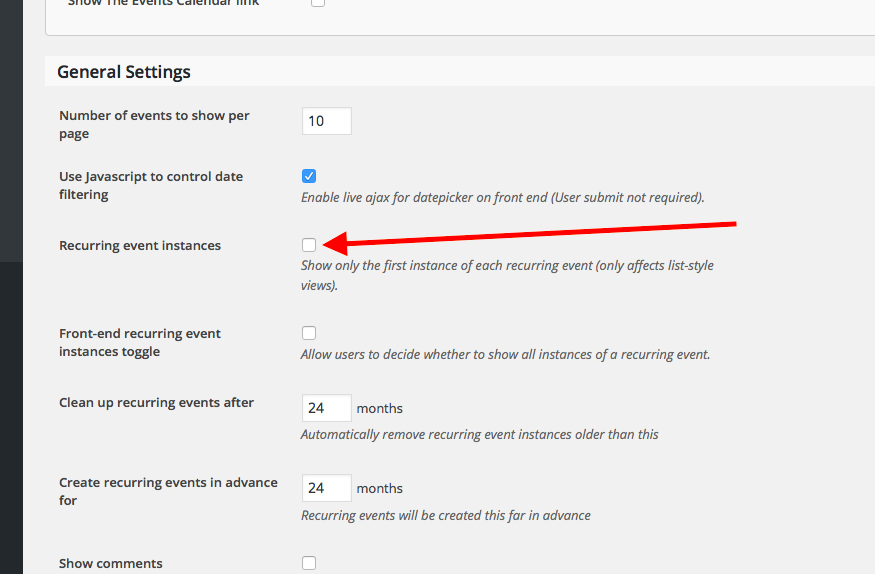
If checking that does not help, then the view you are referring to is not a list view that this option can apply to 🙁 Which unfortunately means that, no, without code customization there is not a way to limit the number of recurring events showing in the list view.
I hope this information helps!
— George
January 2, 2016 at 4:49 pm in reply to: Ticket Date shows 1970! Problem is not solved with the new update version! #1049173ParticipantHey Heinrich,
Thanks for your patience with us over the holiday break!
It seems that you are using WooCommerce Tickets on your site. This plugin can no longer be used, and you need to change over to the new Event Tickets plugin.
Change to the proper plugins and see if your issues persist.
So, first, install the free core plugin Event Tickets → http://wordpress.org/plugins/event-tickets
Then, go to http://theeventscalendar.com/my-account/downloads and download and install Event Tickets Plus.
Activate both plugins.
Then DELETE “WooCommerce Tickets” from your site.
Then see if issues persist.
Let us know what you find!
And please be sure to read this article, which covers the plugin change in more depth → https://theeventscalendar.com/knowledgebase/moving-to-event-tickets-plus/
Cheers!
GeorgeParticipantHey @david,
Thanks for reaching out. Just to be clear, if you remove this code from your theme’s functions.php file, are all of the events fully “clickable” in both the wide-screen view and the smaller mobile view (which uses dots instead of the actual event titles)?
Try removing this code from you theme’s functions.php file, and then leave your site in this state, with that code removed. I will take a closer look at things and see what I can find.
Thank you!
GeorgeParticipantSorry @tpsonline, we cannot help with custom coding here 🙁 Please see the “Product Support” section of our terms and conditions for more information → http://theeventscalendar.com/terms
I will close up this thread for now with these facts in mind.
Best of luck with your project,
GeorgePS
Before closing this thread, I looked at your code and it seems like the problem is that you’re referencing “TribeEvents::TAXONOMY”.
TribeEvents is no longer a valid class name. Using Tribe__Events__Main::TAXONOMY instead may help here.
Cheers!
ParticipantHey @Casey,
Thanks for reaching out. This is unfortunately a bit tricky to do 🙁 For a quick example, you can look at the code that we used to share in the past for changing our “Hard” 404s to a 200 status:
add_filter( 'status_header', 'tribe_no_event_404s_allowed' );function tribe_no_event_404s_allowed( $status ) {
global $wp_query;// If The Events Calendar hasn't loaded/is not activated we should not interfere
if ( ! function_exists( 'tribe_is_event_query' ) ) return $status;// If the current query is not event related we should not interfere
if ( ! tribe_is_event_query() ) return $status;// Convert 404s into 200s
if ( false !== strpos( $status, '404 Not Found' ) )
$status = 'HTTP/1.1 200 OK';return $status;
}
Here, you’ll see that for Event Queries that return a 404 Not Found error, they are changed to the 200 status regardless of context.
But basically everything not-broken would return a 200 status, so you can’t use this approach for switching 200 status responses to 404 responses as easily.
I unfortunately cannot think of a way to pull of exactly what you mean – even with the fact that this behavior should only be limited to Day View items, there is unfortunately not enough context provided to determine whether a 200 response is because of a “true” success, or a “soft 404″…
Let me know what you think about all of this!
Cheers,
GeorgeParticipantHey @Christoph – one more thing! I noticed in your “System Information” that your site is running WordPress version 4.2.4 – you should use the latest version of WordPress at all times, which at the time of my writing this is 4.4. That may make a difference with your issues, but even if not (or even if it makes things worse!) it’s still worth updating for security reasons.
— George
ParticipantHey @Christoph,
Thanks for reaching out. There are two main things I would like to highlight here – first, these two shortcodes are not from The Events Calendar or any of our other plugins:
- [segment]
- [heading2]
I do not know where those shortcodes come from, but they seem to be a major part of these issues, so I would recommend trying to use the [tribe_events_list] shortcode without any of these other shortcodes and see if things improve at all.
Next, I’m not 100% certain what you’re referring to when you write the following:
But when I arranged the composite page with other composite pages, every composite page which was arranged after this Page is not displayed.
“Composite pages” are not a default feature of WordPress, so you might be referring to something provided by another plugin or by your theme. In this case, then, your best bet is to contact the author of the theme or plugin that provides “Composite page” features on your site and then see if they can help with this.
Thank you,
GeorgeJanuary 2, 2016 at 4:11 pm in reply to: integration of events calendar pro with gravity forms #1049157ParticipantHey Wolfgang,
I’m sorry to bear this news, but we unfortunately do not have specific advice on this integration, nor do we have anything within Events Calendar Pro itself that will better accommodate the features you describe 🙁
One thing that is worth clarifying, however, is something you mentioned which I’ve quoted here:
With recurring events, one event post will ‘contain’ several events on different dates. I therefor need another way to know which specific event a user wanted to register to.
To be clear, this is not true. Every recurring event is still its own, individual post. For a quick example, let’s say you have an event recurring every Monday for 6 months – well, the first “event” post is created, and then the 5 other events in the series are created too but are simply made as “child posts” of the first event, which is the “parent post”.
If you’re not familiar with parent/child-post relationships within WordPress, you can read more about this online on pages like http://codex.wordpress.org.
But the main point is that, despite issues with Gravity Forms, individual events in a recurring series are still unique event posts, with their own IDs and such. I just wanted to clarify that point!
Let me know if any of this information helps 🙂
Cheers,
GeorgeParticipantHey Andrew,
I’m sorry to hear about this – do you have The Events Calendar installed on your site? If so, can you share your system information as described here: https://theeventscalendar.com/knowledgebase/sharing-sys-info/
Thank you,
GeorgeParticipantHey Brian,
Custom coding is unfortunately not something we can help with 🙁
However, I would recommend simply diving into the plugin code for Event Ticket Plus itself and look for where the plugin itself shows the ticket count for a given event. If you then basically just “steal” this code, and copy and paste it into your own theme or a custom plugin, it should work well.
To be a tad more specific, what you could do with that code is apply it to the “the_title” filter within WordPress, which you can read about here: https://codex.wordpress.org/Function_Reference/the_title
That filter will apply the code to the titles of all events. So, something like this for example:
if ( function_exists( 'tribe_get_events' ) ) {
add_filter( 'the_title', 'tribe_support_1049144' );
function tribe_support_1049144( $title ) {
// Just return the normal title if this is not an event.
if ( ! tribe_is_event() ) {
return $title;
}// Here would be the code for retrieving ticket count etc.
return $title;
}
}
Are you confident enough in your coding abilities to take things from here? Let me know. We cannot help with customizations but I will try to make the time to assist more specifically if possible and/or if needed.
Sincerely,
GeorgeParticipantHey @Clémence,
I’m sorry to hear about these issues!
Can you do the following things to help us get started on a proper investigation here?
1. Share your system information. Here’s how → https://theeventscalendar.com/knowledgebase/sharing-sys-info/
2. Share links to the older forum threads that you mentioned in your post – I’m just curious about this issue and these other threads so as many links as possible would be helpful.
3. Can you link to a place on your site where I can see this issue in person? I went to the link you provided but was met with the following notice 🙁
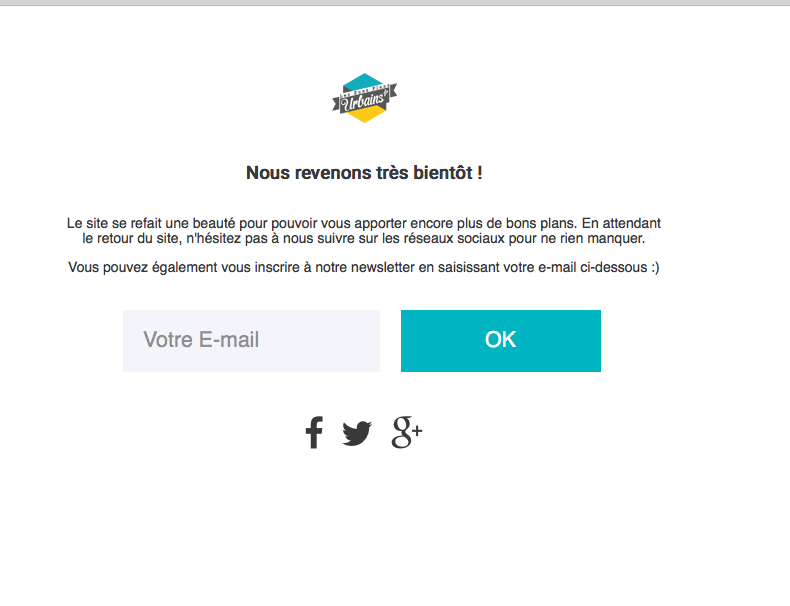
We cannot log into customer sites for any reason, so the link you share should be publicly visible.
Thanks!
GeorgeParticipantHi Christopher,
Thanks for reaching out. I’m not quite certain which spot you are referring to in our code – can you label the specific file name and line number where a call is made to a missing function? Are you getting errors of any kind?
Or are you saying something else here, like for example that you think there should be another function call somewhere in our code?
Apologies for any misunderstanding on my part here! I just want to make sure I understand your post and understand exactly where in our code you are referring to.
Thank you!
George -
AuthorPosts